Employee messaging is broken — but it’s not because people “don’t engage.”
It’s because most workplace messages are slow, noisy, and buried in channels employees never asked for. Email is where urgent notifications go to disappear. Unofficial tools like WhatsApp create risk and chaos. And legacy intranets were never built for real-time conversation — especially for frontline teams.
Meanwhile, employees are used to fast, visual, social communication everywhere else in their lives. If your internal messaging doesn’t meet that bar, it’s not being ignored — it’s being outcompeted.
The good news? Employee messaging isn’t doomed. But it does need new rules.
Let’s break them down.
{{mobile-chat="/image"}}
The new rules of employee messaging
Rule #1: Messaging should mirror how people already communicate
Away from work, employees are chatting over WhatsApp and TikTok. They’re sending short, visual, highly engaging messages in real-time. This is their norm.
Voice notes, GIFs, emojis, attachments, and the option to hop on a video call straight from the chat thread keep conversations flowing naturally — just like they do on personal apps.
Rule #2: Keep it safe, centralized, and compliant
Struggling to follow rule #1 because you don’t have modern comms tools?
Unofficial employee communication channels, like WhatsApp, are a tempting alternative. This is especially true if you have frontline employees who cannot access desktop-based communication channels.
But shadow IT like this poses a risk to your business. Beyond the sheen of convenience, there are issues with data privacy and device security. Your comms team has zero oversight and no analytics, so it’s hard to use employee messaging to build company culture.
In contrast, a dedicated messaging tool like Blink is secure. It offers end-to-end encryption, admin controls, and content moderation tools.
Centralized identity management comes as standard. So you can automatically end platform access when someone leaves your company — and get new hires onboarded with ease.
{{childrens-of-alabama="/callouts"}}
Rule #3: Everyone sees only what they need
It’s hard to surface relevant details in a flood of information. So if you want employee messaging to cut through, people should be able to find the messages that matter to them, in an instant.
For this, you need targeted channels that reduce noise and prevent notification fatigue. That means role, location, and interest-based groups. It also means giving employees control with searchable chat, pinned messages, and notification settings.
With Blink, you get all the above, plus the added benefit of employee journeys. This feature lets you deliver personalized content pathways, ensuring the right content reaches the right person at the right time. It’s perfect for onboarding, training, and other key touchpoints within the employee life cycle.
Rule #4: Make your feed worth scrolling
Messaging tools + company news feed = the magic combo. Employees can chat with their team over communication tools, then head over to the news feed for company-wide connection and insight.
So, how do you make your news feed successful? Remember: To stand out in a crowded digital landscape, your feed has to compete with employees’ personal mobile apps.
Think photos, short-form video stories, and infographics. Messages that ditch the corporate tone. Employee recognition, celebrations, behind-the-scenes peeks, and quick-fire polls.
A scroll-worthy feed does more than entertain. It amplifies big company messages, strengthens culture, and keeps employees engaged, productive, and feeling part of something bigger.
{{mobile-main="/image"}}
Rule #5: Measure everything
You know you’re sticking to the new rules of employee messaging when the stats back you up.
So track what lands, what gets ignored, and which teams are engaged. Use these data to tweak content formats, timing, and style (and educate other content creators within the company), so messages land better every time.
With BlinkIQ, you can track read rates, workforce engagement trends, and even employee sentiment to get a full picture of your internal comms performance. You get the insight you need to make meaningful changes to comms and the wider employee experience.
How do you build an employee messaging playbook?
If you’re keen to give your workplace communication strategy a glow-up, you’ll get the best results by following this playbook.
Establish your purpose and principles
First, get the fundamentals straight.
Why is employee messaging important to your organization? Perhaps it supports speedy communication, connection, alignment, or frontline access to comms.
What are your guiding principles? Is it clear, informal, transparent, and useful?
And how does messaging fit within the broader comms ecosystem? What types of employee communication belong on your team chat app, and which are better suited to your news feed or content hub?
Decide on your tools
These days, traditional intranet platforms, email, and shadow IT aren’t up to the task of effective employee messaging. You need a tool that mimics the experience of text and social apps, while offering next-level security features.
If you don’t currently have this kind of tech on your team, it’s time to gather cross-functional consensus on what your messaging tool should look like. Draw up a shortlist of tools that meet your requirements. Demo these tools and decide on the best fit.
Organize your channels
To keep things shipshape in your messaging tool, you need to decide the following:
Naming conventions for channels or groups (so they’re easy to search)
When to create a new channel
Who is permitted to create a new channel
You may then want to create (at a minimum) channels for specific departments, locations, and teams.
Create chat guidelines and governance
Create guidelines on the kind of content that people can share over company messaging channels. Establish emoji, GIF, and reaction etiquette.
Also, decide who’s responsible for governance — your IC team, HR, managers, or designated channel moderators? In the unlikely case that someone posts something inappropriate, moderators can then flag and remove the content.
{{mobile-hub="/image"}}
Create training materials
Teach employees how to get the most out of chat functions by offering step-by-step instructions for new employees and top tips for existing ones.
Let them know how to manage their notifications, how to share their location, how to set their status, and how to favorite a message.
Go further by training managers in good messaging practices. Offer advice on how to keep the digital conversation flowing, how to use AI assistance, and how to ensure their comms are accessible, engaging, and inclusive of all employees.
Decide on your success metrics
What does good look like when it comes to your employee messaging channels? Decide what metrics you want to track, and benchmark performance to see what impact any improvements make.
You might like to track:
Read rates
Message reactions
Employee sentiment
Operational efficiency
Compliance rate
Then, segment data by team or chat channel to find out where additional IC support may be needed.
{{less-is-more="/callouts"}}
Upgrade employee messaging with Blink
Playing by the new rules of employee messaging doesn’t just improve workplace communication. It powers knowledge sharing, team building, and productivity across your organization.
To achieve this, you need a modern messaging tool that meets the expectations of employees and the needs of your organization.
Blink is a secure, mobile-first messaging platform. It delivers consumer-grade chat and a personalized news feed, perfect for information sharing and co-worker connection.
But Blink doesn’t stop there. It offers a content hub, analytics, and deep integrations with other software you use. It is a complete solution for internal communications, employee experience, and employee engagement.
Frequently asked questions
#1. What is employee messaging?
Employee messaging is the exchange of information between employees, co-workers, and managers over a dedicated chat channel. Messaging can take place over 1-to-1 or group threads — and tools can be used to send urgent company updates, engage the workforce, and facilitate easy two-way conversations in real time.
#2. Why is effective employee messaging important?
Effective employee messaging is important for sharing information and emergency alerts. It also supports teamwork and a sense of belonging. Mobile-first employee messaging channels are especially important for frontline teams. Accessed via smartphone, they bring group chats into every employee workflow.
#3. What do the best employee messaging tools have in common?
The best employee messaging tools offer a consumer-grade experience. They’re easy and intuitive to use with features like emojis, GIFs, voice notes, video calling, and the option to add attachments. A dedicated employee messaging tool — designed around the needs of your organization — provides a fast, secure, and engaging way for team members to stay in touch.
#4. How do you move from email to mobile-first messaging?
To move from email to mobile-first messaging, you first need to find the right employee messaging tool. Consumer apps aren’t secure enough for business use. So you should look to apps like Blink that are designed to bring consumer-grade employee messaging to a company setting.
Employee messaging is broken — but it’s not because people “don’t engage.”
It’s because most workplace messages are slow, noisy, and buried in channels employees never asked for. Email is where urgent notifications go to disappear. Unofficial tools like WhatsApp create risk and chaos. And legacy intranets were never built for real-time conversation — especially for frontline teams.
Meanwhile, employees are used to fast, visual, social communication everywhere else in their lives. If your internal messaging doesn’t meet that bar, it’s not being ignored — it’s being outcompeted.
The good news? Employee messaging isn’t doomed. But it does need new rules.
Let’s break them down.
{{mobile-chat="/image"}}
The new rules of employee messaging
Rule #1: Messaging should mirror how people already communicate
Away from work, employees are chatting over WhatsApp and TikTok. They’re sending short, visual, highly engaging messages in real-time. This is their norm.
Voice notes, GIFs, emojis, attachments, and the option to hop on a video call straight from the chat thread keep conversations flowing naturally — just like they do on personal apps.
Rule #2: Keep it safe, centralized, and compliant
Struggling to follow rule #1 because you don’t have modern comms tools?
Unofficial employee communication channels, like WhatsApp, are a tempting alternative. This is especially true if you have frontline employees who cannot access desktop-based communication channels.
But shadow IT like this poses a risk to your business. Beyond the sheen of convenience, there are issues with data privacy and device security. Your comms team has zero oversight and no analytics, so it’s hard to use employee messaging to build company culture.
In contrast, a dedicated messaging tool like Blink is secure. It offers end-to-end encryption, admin controls, and content moderation tools.
Centralized identity management comes as standard. So you can automatically end platform access when someone leaves your company — and get new hires onboarded with ease.
{{childrens-of-alabama="/callouts"}}
Rule #3: Everyone sees only what they need
It’s hard to surface relevant details in a flood of information. So if you want employee messaging to cut through, people should be able to find the messages that matter to them, in an instant.
For this, you need targeted channels that reduce noise and prevent notification fatigue. That means role, location, and interest-based groups. It also means giving employees control with searchable chat, pinned messages, and notification settings.
With Blink, you get all the above, plus the added benefit of employee journeys. This feature lets you deliver personalized content pathways, ensuring the right content reaches the right person at the right time. It’s perfect for onboarding, training, and other key touchpoints within the employee life cycle.
Rule #4: Make your feed worth scrolling
Messaging tools + company news feed = the magic combo. Employees can chat with their team over communication tools, then head over to the news feed for company-wide connection and insight.
So, how do you make your news feed successful? Remember: To stand out in a crowded digital landscape, your feed has to compete with employees’ personal mobile apps.
Think photos, short-form video stories, and infographics. Messages that ditch the corporate tone. Employee recognition, celebrations, behind-the-scenes peeks, and quick-fire polls.
A scroll-worthy feed does more than entertain. It amplifies big company messages, strengthens culture, and keeps employees engaged, productive, and feeling part of something bigger.
{{mobile-main="/image"}}
Rule #5: Measure everything
You know you’re sticking to the new rules of employee messaging when the stats back you up.
So track what lands, what gets ignored, and which teams are engaged. Use these data to tweak content formats, timing, and style (and educate other content creators within the company), so messages land better every time.
With BlinkIQ, you can track read rates, workforce engagement trends, and even employee sentiment to get a full picture of your internal comms performance. You get the insight you need to make meaningful changes to comms and the wider employee experience.
How do you build an employee messaging playbook?
If you’re keen to give your workplace communication strategy a glow-up, you’ll get the best results by following this playbook.
Establish your purpose and principles
First, get the fundamentals straight.
Why is employee messaging important to your organization? Perhaps it supports speedy communication, connection, alignment, or frontline access to comms.
What are your guiding principles? Is it clear, informal, transparent, and useful?
And how does messaging fit within the broader comms ecosystem? What types of employee communication belong on your team chat app, and which are better suited to your news feed or content hub?
Decide on your tools
These days, traditional intranet platforms, email, and shadow IT aren’t up to the task of effective employee messaging. You need a tool that mimics the experience of text and social apps, while offering next-level security features.
If you don’t currently have this kind of tech on your team, it’s time to gather cross-functional consensus on what your messaging tool should look like. Draw up a shortlist of tools that meet your requirements. Demo these tools and decide on the best fit.
Organize your channels
To keep things shipshape in your messaging tool, you need to decide the following:
Naming conventions for channels or groups (so they’re easy to search)
When to create a new channel
Who is permitted to create a new channel
You may then want to create (at a minimum) channels for specific departments, locations, and teams.
Create chat guidelines and governance
Create guidelines on the kind of content that people can share over company messaging channels. Establish emoji, GIF, and reaction etiquette.
Also, decide who’s responsible for governance — your IC team, HR, managers, or designated channel moderators? In the unlikely case that someone posts something inappropriate, moderators can then flag and remove the content.
{{mobile-hub="/image"}}
Create training materials
Teach employees how to get the most out of chat functions by offering step-by-step instructions for new employees and top tips for existing ones.
Let them know how to manage their notifications, how to share their location, how to set their status, and how to favorite a message.
Go further by training managers in good messaging practices. Offer advice on how to keep the digital conversation flowing, how to use AI assistance, and how to ensure their comms are accessible, engaging, and inclusive of all employees.
Decide on your success metrics
What does good look like when it comes to your employee messaging channels? Decide what metrics you want to track, and benchmark performance to see what impact any improvements make.
You might like to track:
Read rates
Message reactions
Employee sentiment
Operational efficiency
Compliance rate
Then, segment data by team or chat channel to find out where additional IC support may be needed.
{{less-is-more="/callouts"}}
Upgrade employee messaging with Blink
Playing by the new rules of employee messaging doesn’t just improve workplace communication. It powers knowledge sharing, team building, and productivity across your organization.
To achieve this, you need a modern messaging tool that meets the expectations of employees and the needs of your organization.
Blink is a secure, mobile-first messaging platform. It delivers consumer-grade chat and a personalized news feed, perfect for information sharing and co-worker connection.
But Blink doesn’t stop there. It offers a content hub, analytics, and deep integrations with other software you use. It is a complete solution for internal communications, employee experience, and employee engagement.
Frequently asked questions
#1. What is employee messaging?
Employee messaging is the exchange of information between employees, co-workers, and managers over a dedicated chat channel. Messaging can take place over 1-to-1 or group threads — and tools can be used to send urgent company updates, engage the workforce, and facilitate easy two-way conversations in real time.
#2. Why is effective employee messaging important?
Effective employee messaging is important for sharing information and emergency alerts. It also supports teamwork and a sense of belonging. Mobile-first employee messaging channels are especially important for frontline teams. Accessed via smartphone, they bring group chats into every employee workflow.
#3. What do the best employee messaging tools have in common?
The best employee messaging tools offer a consumer-grade experience. They’re easy and intuitive to use with features like emojis, GIFs, voice notes, video calling, and the option to add attachments. A dedicated employee messaging tool — designed around the needs of your organization — provides a fast, secure, and engaging way for team members to stay in touch.
#4. How do you move from email to mobile-first messaging?
To move from email to mobile-first messaging, you first need to find the right employee messaging tool. Consumer apps aren’t secure enough for business use. So you should look to apps like Blink that are designed to bring consumer-grade employee messaging to a company setting.
Diversity and inclusion aren’t just HR trends. They’re strategic issues.
Studies show that lack of inclusion in the workplace costs U.S. businesses up to $1.05 trillion. Insights highlighting the costs of poor diversity measures are forcing companies to reevaluate existing policies and practices.
Specifically, the COVID-19 global pandemic has shined a light on diversity and inclusion issues affecting frontline workers.
On the flip side, companies that implement diversity and inclusion strategies are reaping benefits such as increased employee engagement, better retention, and more creative problem-solving.
Here’s what you’ll learn
Current state of diversity in the workplace for frontline workers
How a lack of diversity in the workplace affects frontline workers
Business benefits of providing diversity in the workplace
What diversity in the workplace looks like
Obstacles to diversity in the workplace
How to promote diversity and inclusion in the workplace
Final thoughts: championing diversity in the workplace for frontline workers
In this post, we’ll discuss the current inclusion challenges facing frontline workers. We’ll also outline how businesses can better promote diversity in the workplace – and how to include it in your internal communications.
Current state of diversity in the workplace for frontline workers
Frontline workers in the United States are employed in the following six industries:
Grocery, convenience, and drugstore
Public transit
Trucking, warehouses, and postal service
Building cleaning services
Health care
Child care and social services
When the U.S. government issued mandated business shutdowns, these essential industries remained open. The frontline workers who keep these businesses running experienced pandemic-related stress and risk of exposure to the COVID-19 virus.
Here’s a quick look at the demographics of the more than 31 million frontline workers in the United States:
64.4% female / 36.6% male
58.8% white
17.0% Black
16.3% Hispanic
6.7% AAPI (Asian American / Pacific Islander)
Although women make up most frontline workers, they’re underrepresented in the public transit (29.1%) and trucking, warehouse, and postal service (22.7%) industries.
How a lack of diversity in the workplace affects frontline workers
Frontline workers are the face of your company, and they provide valuable insights into your customers’ needs and pain points. However, if you don’t prioritize diversity and inclusion in your frontline workforce, you could risk losing many of these high-impact team members.
Here are a few ways lack of inclusion and diversity in the work environment creates a negative experience for frontline workers:
Poor communication
Communication between team members with different native languages or cultures can be challenging. Add to that the fact your frontline employees aren’t necessarily in the office every day; they’re out in the world facing customers.
Without communications systems in place that cater to all of your employees, your frontline workers can feel confused or disconnected from the greater team. In more extreme cases, poor communication channels can lead to conflict between team members.
When companies have a clear majority profile, it’s more likely for an employee who doesn’t “fit the mold” to experience harassment and discrimination. If you don’t have diversity in management positions, it’s harder for employees to speak up about harassment or other negative experiences.
Less incentive to feel engaged at work
Even if frontline employees don’t experience harassment at work, lack of diversity leads to lower employee engagement. A frontline employee who’s different from the workplace majority can experience isolation and feel they’re not seen or heard.
And if your company tends to promote only those who fit the majority, then employees who feel different won’t see room for long-term growth that keeps them engaged.
Ultimately, employees who don’t feel safe or valued in your organization are more likely to leave. Over time, the cost of continually replacing alienated and dissatisfied employees will cost your business.
Business benefits of providing diversity in the workplace
Creating a more diverse place and inclusive culture doesn’t just benefit your frontline employees; it’s a competitive business advantage too.
Here are the top benefits that businesses report after investing in diversity and inclusion programs:
Increased perspectives and creativity
A diverse workforce brings unique perspectives to the table, which increases creativity and problem-solving. According to a Boston Consulting Group study of more than 1,600 companies, teams with diverse leadership drive almost 20% more innovation revenue than their counterparts.
How to champion diversity in the workplace for frontline workers 1
According to the Wall Street Journal, the 20 businesses ranked the highest in diversity and inclusion scores recorded 12% operating profit margins. Companies who ranked low on diversity initiatives, on the other hand, only generated operating profit margins of 8%.
Bringing together people from different backgrounds gives you a broader customer perspective, results in better decision making, and helps you avoid tone-deaf features or marketing campaigns.
Different perspectives in your business help you identify and capitalize on more market opportunities.
Reduced employee turnover
Higher employee engagement remains one of the top benefits of hiring diverse teams — businesses with better employee engagement experience less turnover in their workforce.
What diversity in the workplace looks like
It’s clear that successful workplace diversity and inclusion efforts can give businesses a strategic advantage.
But what exactly does diversity in the workplace look like?
It turns out that diversity is, well, diverse. Business owners and leaders must consider several types of diversity, including:
Cultural background diversity
Religious diversity
Gender identity diversity
Race and ethnicity diversity
Age diversity
Neurodiversity
Disability diversity
Sexual orientation diversity
Modern diversity equity and inclusion (DEI) programs need to go further than race and gender diversity.
Companies also need to think about embracing diversity in all departments and at all levels of their organization. Diversity initiatives are most successful when they include leadership and management.
Obstacles to diversity in the workplace
While the benefits of workplace diversity may seem clear, many companies struggle to implement effective diversity programs.
The primary obstacles businesses face when creating a diverse and inclusive environment are:
Leadership buy-in
Manager training
Lack of awareness
Encouraging honest feedback from employees
How to promote diversity and inclusion in the workplace
Expand where you post job notifications
Train leaders and managers
Allow employees to take off cultural and religious holidays
Offer on-site daycare
Extend options for flexible hours
Use an app with on-demand translation
Solicit feedback from your employees
1. Expand where you post job notifications
Fostering a diverse workplace starts with the hiring process. Hiring managers can reach a more diverse talent pool by expanding where they share job openings. Your hiring department can build relationships with outreach groups, community hiring offices and chambers of commerce, and job fairs that cater to minority groups.
2. Train leaders and managers
You can’t assume that your managers know the value of diversity. To successfully implement diversity and inclusion efforts into company culture, both leadership and frontline managers need to buy into the idea of creating diverse teams.
How to champion diversity in the workplace for frontline workers 2
As you make changes in your hiring process, conduct manager training sessions that underscore the benefits of an inclusive workplace. Give them tools to implement your initiatives on their teams.
3. Allow employees to take off cultural and religious holidays
When you hire diverse talent, demonstrate that your company honors and celebrates the various cultural backgrounds and points of view your team brings to the workplace.
One simple way to do that is by letting employees take off work for religious or cultural holidays that aren’t observed by the entire office. By creating a culture that empowers all workers to observe important holidays, you can increase employee engagement and retention.
4. Offer on-site daycare
Many diversity initiatives focus on race and ethnicity, but gender diversity is an equally important facet. Although gender roles are expanding, access to quality childcare presents a significant challenge to working mothers. During the COVID-19 pandemic, 2.9 million women left the workforce between March and September 2021, when schools closed.
According to Care.com, over 60% of parents would be more loyal to their company and have better job performance if they had access to employer-subsidized child care.
Let’s face it: your employees’ lives don’t revolve around their jobs. Many of them want to start families and raise children. If you consider child care a business issue, you can improve retention and job performance.
5. Extend options for flexible hours
If you can’t offer employer-subsidized child care, then consider expanding your flexible work hour options. Telecommuting, remote work, part-time positions, and job sharing help you provide equal opportunity to a more diverse talent pool.
How to champion diversity in the workplace for frontline workers 3
Flexible work hours will grow increasingly important as more baby boomers move into retirement and old age. Minorities rely less on professional care for the elderly. So, many millennials are entering an era where parent care and child care compete with work for their attention.
Offering remote work or even hybrid work models means your diverse employees won’t have to choose between work and parent care. You’ll have a more engaged team that feels seen, heard, and supported.
6. Use an app with on-demand translation
It’s not enough to focus on hiring people from diverse backgrounds; you have to ensure that your workplace culture feels inclusive to everyone. If you create a recruitment process that succeeds in cultivating a diverse workplace, consider using an app with on-demand translation.
How to champion diversity in the workplace for frontline workers 4
Make it possible for everyone at the company to access your internal communications in their native language.
7. Solicit feedback from your employees
Bottom line, fostering diversity and inclusion in the workplace is an ongoing process. You can’t do it all in one fell swoop. To ensure your entire team feels heard, consistently ask for feedback from employees.
That’s helpful when starting, and it lets you measure your success as you roll out changes to company culture. Keep in mind that change doesn’t happen overnight. Diverse employees may not feel comfortable voicing concerns to managers or other leaders in person. So, consider using an internal communications app to let employees submit feedback.
Final thoughts: championing diversity in the workplace for frontline workers
Implementing diversity and inclusion initiatives helps you create a workplace where your employees feel included and empowered. When you have an engaged team of diverse employees, your business performs better. Explore Blink today to learn more about technology solutions that improve engagement and retention for everybody on your team.
Once upon a time, a company intranet that worked off a server in your office was enough to keep internal communication on track. But today, company needs have changed. And so have employee expectations.
We’ve entered the era of the digital workplace. Employees use a variety of different devices. Teams work remotely, across multiple locations. And beyond the world of work, everyone is now accustomed to intuitive, convenient, and personalized digital experiences.
Digital change has come quickly. And workplace software — like the intranet — hasn’t always kept pace. Traditional intranets feel old and clunky today. They’re affecting employee experience (EX) - and they could be doing more harm than good.
Thankfully, a new breed of intranet is now emerging. It’s fresher and more relevant to today’s workforce. It’s also built with digital workplace challenges front of mind.
A modern intranet holds the key to two-way communication and collaboration, better employee engagement, and an enhanced digital employee experience (DEX). And it could be a game changer for your organization.
Here, we’re going to take a look at the changing face of the company intranet and examine the features and benefits of a new and improved modern intranet.
Contents
Intranets: then and now
Why you need a modern intranet
Features of a modern intranet
How modern intranets impact the digital employee experience
Choosing the right modern intranet
Conclusion
Intranets: then and now
The company intranet has come a long way since it was first introduced back in the 1990s. Adapting to advances in technology and changing workplace trends, it’s taken on a variety of different forms over the years.
When talking about the modern intranet, it’s useful to compare the most cutting-edge intranet software to what has come before. So let’s step back in time and revisit each stage of intranet evolution.
Early intranets
Closed private networks were the first intranets to hit the office. They used local servers to host static web pages, meaning only computers based within the same geographical location could access them.
These early intranets provided limited interactivity and functionality. They were a place to share company directories, policies, and other documents. But because the setup and maintenance of early intranets required a lot of technical expertise, information was often outdated and badly organized.
Web-based intranets
As the internet went mainstream, web-based intranets made their way onto the market. These intranets were accessible via standard web browsers and had basic search functions, which helped users find what they were looking for. But these new intranets still had their drawbacks.
Internal communication remained one-way, with information traveling from the top of an organization down. Content was often poorly maintained because updates were complex. And there was very little opportunity for companies to provide personalized employee experiences.
{{callout}}
Social intranets
Social intranets were the first intranets to go mobile. Remote servers meant geography mattered less — and everyone within an organization, regardless of their location, could access the same information.
Inspired by social media platforms, social intranets prioritized communication, with features like user profiles and user-generated content. They were also designed to support team collaboration and productivity, with personnel services and project management tools built in.
Modern intranets
Modern intranets take the social intranet concept to the next level. They are a mobile-first solution with a focus on user experience (UX), designed to meet the expectations of today’s digital workforce.
Content creation is democratized in modern intranets. All members of an organization can access information and tools easily. And team leaders get the analytics and data-driven insights they need to improve employee engagement.
Interested in seeing a modern intranet in action? Preview Blink today with a short 2-minute video.
Why your frontline organization needs a modern intranet
So why should your frontline organization ditch its traditional intranet and adopt a modern software solution instead? There are several very good reasons.
Older intranet software can cause friction and frustration. Perhaps your intranet has become a dumping ground for outdated information. Or it simply fails to provide the intuitive, user-friendly, productivity-boosting features we’ve all come to expect.
We know that traditional intranets fail to live up to employee expectations. 67% of workers say that digital experiences in their personal lives are better than the digital experiences they get at work.
Many traditional intranets are built around the needs of desk-based teams, so they do your frontline workers a disservice. Frontline workers miss out on the communication and resources available to their desk-based peers.
A modern intranet, in contrast, helps you meet all of the following challenges head-on.
1. Employee engagement
According to Gallup’s State of the Workplace Report for 2023, just 23% of employees are engaged at work. But organizations should try to do better. That’s because high levels of employee engagement lead to happier employees, improved productivity, and lower rates of attrition.
Employee engagement is always a challenge. But engaging employees in a frontline organization can be particularly tricky. When your workers are deskless, how do you give them the connection, coaching, and support they need to thrive within your organization?
A modern intranet gives you all of the tools you need to engage your employees, regardless of where they work. You can count on a social feed, a content hub, employee recognition tools, surveys, and more.
With analytics too, you can see what is engaging your employees — and what isn’t — so you can improve your efforts going forward.
2. Communication
Open communication within a workplace is vital. It helps you inform, motivate, and engage your employees, while fostering an inclusive and supportive work environment. It involves top-down, bottom-up, and peer-to-peer communication, so everyone has a voice.
For frontline teams, maintaining open channels of communication within teams who don’t work face-to-face requires tailored solutions.
A modern intranet helps you build internal communication links between every member of your workforce — whether they’re based in the office, on the shop floor, or out in the field.
You don’t need to rely on emails or a company noticeboard. Instead, all types of internal communication are supported via your intranet app.
With better communication, you bring your teams together and you may find it easier to grow your company too. A Forbes study found that companies who involve 75% of their frontline in internal comms, achieved more than 20% growth over a year.
3. Digital access
Older intranet software is built around an outdated version of the workplace. It doesn’t prioritize the mobile experience and instead works best for employees who sit at a desk on a computer for the majority of each working day.
Newer intranets understand that the world of work has changed. Digital tools are a workplace essential. And frontline, hybrid, and remote teams should have equal access to the information and interaction that these tools provide.
That’s why the best modern intranets have a mobile-first design. Employees can access them as easily on a small smartphone screen as on a desktop computer. All workers across an organization are engaged and empowered, so no one misses out.
4. Collaboration
Traditional intranets are known for being slow and difficult to use, with low rates of user adoption. In fact, 57% of employees say they see no purpose in their company intranet.
This impacts collaboration. When employees avoid your intranet — because it isn’t intuitive to use or data is hard to find — knowledge sharing suffers and you risk creating organizational silos.
For frontline teams, this exacerbates an existing risk. Frontline workers spend time away from HQ, working different shift patterns, and managing a high workload. These factors already get in the way of team collaboration.
Luckily, this is another frontline challenge that a modern intranet can solve. The intranet allows people across your organization to share ideas and objectives via an easy-to-use interface.
Everyone can contribute, even those who work remotely, making your organization more productive, more innovative, and better able to solve problems.
Features of a modern intranet
We’ve touched on what makes a modern intranet different from the other intranet software available. But now we’re going to delve into the details. Here are features you can expect from the newest intranets and how they stand to benefit your business.
A central hub
A modern intranet acts as the gateway to your business. It’s the go-to location for company communication and knowledge sharing.
With a single, searchable hub, it’s easy for employees to find what they’re looking for, whether that’s essential documents, a directory of co-workers, or a list of the latest company events.
Importantly, information is stored logically and consistently. And the advanced search functionality of a modern intranet — thanks to keyword suggestions and content tagging — means it’s always clear what information is and isn’t available.
User friendly interfaces
Modern intranets are familiar to their users. That’s partly because they can be customized with employer branding. But it’s also because they have an intuitive, user friendly interface that mirrors many of the digital tools employees already feel comfortable using.
Employees don’t need a company email address to sign in. They can get notifications whenever important information is posted. And it’s easy to download intranet apps from the App Store. This means very little training is required.
Personalized experiences
Personalization makes the modern intranet even more engaging for users. Employees can personalize their dashboard and see content tailored to their role and department.
You can also program your intranet so it presents different information depending on where an employee is at in their career and how much time they’ve spent with the company. Someone who started working for you last week will get different intranet content to someone who has been working for you for years.
Communication tools
Managers can share important news and announcements. Teams can share ideas. An employee can wish a coworker a happy birthday. With a variety of communication tools based within the same intranet software, meaningful communication becomes second nature.
Employees don’t have to switch between different platforms for informal co-worker chat, essential C-suite comms, and knowledge sharing resources. They can easily find communications, and contribute to them too, all within the same interface.
It’s also easy for managers to highlight need-to-know information.Push notifications and mandatory reads ensure essential information never goes unread.
Real-time communication
Asynchronous communication is important for teams who work across different time zones or shift patterns. But real-time communication is also crucial for your organization. It allows employees to communicate as if they were in the same physical location — even when they’re not.
This allows for faster decision-making, improved problem-solving, and better collaboration. It also helps employees to feel more connected to one another — because real-time communication mirrors face-to-face communication in a way that an email thread just can’t.
Employee recognition
Employee recognition isn’t always easy when employees work disparately. Managers have to be intentional about praise and recognition because they get few informal opportunities to show their appreciation.
With built-in employee recognition features, a modern intranet makes it easy for you to motivate and incentivize your team.
Managers are prompted to recognize employee anniversaries and milestones. Peers can celebrate coworker wins. And some intranet software even provides recognition leaderboards and real-life rewards as further incentive for hard work.
Collaboration tools
The modern intranet makes collaboration a priority. It provides features that support collaboration for teams who don’t necessarily work in the same office.
From shared calendars to real-time chat, document sharing to task allocation, a modern intranet helps teams work together, even when they’re physically apart.
Mobile compatibility
Workers no longer have to be chained to their desktop computers in order to get the most from the intranet experience. Modern intranets are mobile responsive. They offer the same user experience and the same great features whichever device employees have access to during their workday.
This means frontline, remote, and hybrid workers enjoy the same intranet experience as their desk-based peers. And you create a joined-up organization in which all workers are treated equally.
Integration capabilities
Modern intranet software integrates with the digital tools and data sources you already use within your organization. It creates a seamless experience for employees.
They don’t need to log in to multiple platforms and deal with repetitive or conflicting information. Everything is available via the same intranet hub.
For your management team, integration makes everything more efficient. You don’t need to duplicate work over different tools, which means you improve data accuracy too.
Feedback functions
Good internal communication goes both ways. And with modern intranet feedback functions, it’s easy to find out what your employees are thinking and feeling at any given moment.
Surveys and forms are delivered in a user friendly format so a higher proportion of your employees is likely to respond. And with accurate insight into employee sentiment, you can create better employee experiences, making informed decisions based on what your workforce really wants and needs.
Security
When you opt for a modern intranet, security comes as standard. The best providers work by recognized cybersecurity guidelines.
They provide data encryption and data backup. Regular penetration testing ensures the system always provides a strong defense against cyber-attack. And access controls mean admin teams can choose with members of your organization can see sensitive information.
Analytics to optimize and measure
The best modern intranets offer analytics too, meaning you get real-time data on employee engagement and the employee experience.
You can track a variety of metrics — things like user activity, co-worker interactions, likes, searches, and downloads. And then you can view these results in a visual, easy-to-digest format.
Along with surveys and feedback forms, intranet analytics gives insight into how employees use the software and how it impacts their overall experience of the workplace. This empowers you to make data-driven improvements.
How modern intranets impact the digital employee experience
The digital employee experience (DEX) is how employees feel about the digital tools they use within the workplace. For optimal DEX, you need digital tools that support and streamline every employee workflow, without creating points of friction.
DEX comes under the umbrella of employee experience (EX). But we’d argue that, in a digital workplace, DEX isn’t just part of the EX picture. It’s integral to it. In fact, we can relate DEX to nearly all of the nine EX elements identified by McKinsey.
an employee’s sense of growth, purpose, and motivation
how employees feel about their productivity and efficiency
The company intranet is inevitably a big part of employees’ digital experience. And when you replace a traditional intranet with modern software, designed to meet the expectations and needs of today’s employees, you impact DEX in all of the following ways.
Enhanced communication
These days, we rely on digital communication tools to connect frontline, hybrid, and remote working teams. It’s important to EX that teams get the same level of connection and knowledge sharing, and the same sense of belonging, that they’d get working face-to-face.
Modern intranet software is built with team communication at its core. It understands that, in a digital workplace, informal water cooler chats aren’t always possible.
So it provides teams with communication tools that create a sense of physical togetherness, even when teams work disparately.
With Blink Chat, for example, employees can message each other in real-time. They can chat one-on-one or set up Group Chats for multiple team members. Within chats, employees can send messages, send documents, and even start online voice or video meetings, straight from the app.
But the modern intranet doesn’t just facilitate peer-to-peer communication. It also gives managers the communication tools they need to enhance the employee experience.
This is where the Blink Feed comes in. Via a familiar, social media-style feed, leadership can post company-wide communications. They can guide company culture and broadcast important news, motivating and informing employees in the process.
Employee techquity
Employee techquity is achieved when frontline workers have equal access to the digital tools, resources, and people they need to succeed. Older intranet systems tend to leave frontline and remote workers behind. They fail to address many of the key challenges faced by frontline teams.
This means frontline and remote employees miss out on the opportunities afforded to desk-based staff. They find it harder to advance in their careers, they don’t always have access to the same tools, tech, and training, and they can end up feeling disconnected from company HQ.
A modern, mobile-first intranet helps to create a fairer working environment. All employees get to use exactly the same functions and features, whether they access the platform via a desktop computer or a smartphone device.
A modern intranet is easy to use, so frontline workers can dip into internal comms during a busy work day. It also acknowledges the fact that many frontline workers don’t have a company email address, so provides alternative login methods.
By providing an equal digital experience for all workers within your organization, everyone gets the tools they need to do their job — and everyone enjoys a sense of connection and belonging.
Employees enjoy a better workplace experience when they feel they’re working to the best of their ability.
In a digital workplace, this means having the right information, along with the right collaboration and productivity tools. And this is another area of DEX that a modern intranet can help with.
A modern intranet acts as a content hub for your organization. But unlike old intranet software, this new style of content management system is well-organized and user friendly. It’s easy to find and read policy documents and to collaborate on files with co-workers.
Just take a look at the Blink Hub. It’s a content management system that puts policies, training materials, and manuals in one convenient, easy-to-access location.
A drag-and-drop interface makes it easy to add content. And because the Blink Hub is available via desktop and mobile apps, every member of your organization can access it.
A modern intranet can also provide self-service functions, another big plus for the digital employee experience.
When employees can book shifts, request annual leave, register for a training course, and access pay stubs all from the same platform, work admin becomes much less of a headache.
Employee engagement
Engaged workers feel emotionally connected to their work and co-workers. They feel aligned with company values and empowered to work productively.
A poor digital employee experience gets in the way of engagement. But there are lots of ways that a positive DEX — supported by a modern intranet — can enhance it.
The social features of a cutting-edge intranet — like social feeds, discussion forums, and employee profiles — help employees build meaningful connections with people at all levels of your organization.
Employee recognition and reward functions within the intranet also boost engagement. Employees understand their goals and how these goals relate to the overarching company mission. A culture of recognition and rewards — made easy with intranet tools — then incentivizes them to meet their objectives.
Another way that your intranet can improve employee engagement is with employee personalization.
Workers get to personalize the platform dashboard to make it more relevant and engaging. Admins can adapt content too, tailoring it to the needs of workers at each stage in the employee lifecycle.
Analytics and feedback
Modern intranets make it easy for you to gather information on the digital employee experience. You can launch surveys, send out forms, and dive into the analytics provided by your platform.
This is a huge bonus to your DEX strategy. Because you don’t need to stab in the dark. You have all the data you need to make targeted EX improvements.
View data on employee engagement, satisfaction, and retention. See what content performs best to improve your content management strategy. Understand how your teams interact, identifying co-worker relationships that need a little TLC.
A tool like Blink Analytics allows you to really drill down into the data. You can segment it based on team or location. So you understand exactly how your digital workplace is working for each member of your organization.
Simplicity
Some organizations have approached the challenge of digital transformation by acquiring tech tools for every business function. But this isn’t an effective way of doing things.
Gartner research shows that application sprawl (when workers are expected to use multiple digital tools) turns up the volume without improving communication.
Simplifying and streamlining the technology you use can therefore have a huge impact on the digital employee experience.
When workers have a single, go-to platform, there’s less friction. Employees aren’t constantly pinged with notifications from multiple apps. They don’t have to familiarize themselves with different interfaces. And it’s easy to find the information and tools they need.
Choosing the right modern intranet
We’ve covered all of the reasons that a modern intranet might benefit your organization. But with numerous intranet options out there, how do you choose the right one for your business?
Let’s take a look at a couple of questions you can ask when looking for intranet software that meets the needs of your organization and employees.
Is the software built to scale?
An intranet is a big investment of time and money. It also quickly becomes a central part of your company operations. So you don’t want to be changing it in a hurry.
When choosing an intranet, look for a solution that can grow with your business. Consider whether an intranet contender will continue to meet your needs if you experience a period of rapid growth and need to take on lots more staff.
Scalable intranets offer bespoke pricing for enterprise clients (per-user pricing can become unaffordable as your team grows). They’re also cloud-based, so you don’t have to rely on on-premise infrastructure when you need to expand capability.
Some other considerations to bear in mind? You need access controls suited to large teams, the option to create communication channels for each team or department, and the right level of security and support for a bigger organization.
Is mobile access a priority?
If you have any workers who don’t spend their workday sitting behind a desk, then a mobile-first intranet is the only logical choice.
On-premise solutions aren’t always accessible via mobile devices. You may even find that remote desk workers, using a laptop or desktop computer, have to jump through VPN hoops to access intranet content.
A mobile-first intranet is designed to work well — and provide the same features — over any device and from any location. So it’s particularly useful for frontline teams who need to access internal info on the go, using their smartphone.
Does the solution provide analytics?
The best intranet solutions give you the analytics and reporting features you need to measure the success of your new platform.
They provide data on employee engagement, content performance, user behavior, employee retention, and employee satisfaction. With real insight, you can identify areas for improvement and make targeted changes.
Only shortlist solutions that offer robust analytics functions. They should be able to provide data on a wide range of metrics, allow you to segment data by a variety of user groups, and provide real-time data. They should also present all data in a visual, easy to understand way.
Does the intranet integrate with your existing technology?
One of the key benefits of a modern intranet is its simplicity. It brings all of the communication and collaboration tools your digital workplace needs into the same platform.
The ideal intranet will meet your business needs in terms of two-way communication, content management, and collaboration. But it should also integrate with any of the tech tools you already use.
You need to know that any payroll, project management, or customer service software can integrate seamlessly with your intranet. And that these tools will continue to work just as well as before.
A new intranet shouldn’t negatively impact the adoption of your current tools. Instead, streamlining your digital tools should actually improve uptake.
Is the intranet user friendly?
An intranet only benefits your company (in all of the ways listed above) if your employees actually use it. So you need a solution that is intuitive and easy to learn, even if your team isn’t super tech-savvy.
Look for an intranet with a user friendly interface. It should feel familiar even if you’ve never used it before. Also, ensure it includes all of the self-service and search functions that make life easy for your teams.
User friendliness is particularly important for frontline teams. Working away from a desk, often with limited time for company comms, your intranet needs to be so easy and engaging that these remote, time-poor workers choose to open the app and check in.
When conducting your software search, it can be helpful to look at adoption and intranet usage stats. If other organizations, with a similar structure to yours, have managed to persuade their workers to use a particular intranet solution, then the platform will probably work well for you too.
Ever since its introduction in the 1990s, the intranet has been an integral part of company operations. But today, organizations are moving away from older intranet versions to embrace a newer, slicker, more effective modern intranet.
A modern intranet supports the creation of a truly digital workplace. It gives frontline, remote, and office-based teams everything they need to work happily and productively. Because it provides a beautiful interface, designed to meet the needs of digital workers, employees actually enjoy using it too.
Choose the right modern intranet and you’ll improve the way your teams communicate and collaborate. You’ll improve DEX and employee engagement, so employee retention gets easier.
You’ll also avoid some of the pitfalls of digital transformation, preventing application sprawl by making all tech tools available via the same user friendly dashboard.
For frontline organizations, the modern intranet really comes into its own. Mobile-first, intuitive design with a real-time communication focus, ensures everyone – whether they work on the frontline or in an office – has access to the tools and information they need.
If you’re ready to benefit your employees and your organization by adopting a cutting-edge intranet solution, take a look at Blink —– a platform designed specifically for frontline teams. Blink does everything a modern intranet does, and more.
Employees get a social feed and a content hub. They can access self-service functions, make their voice heard via company-wide surveys, and receive recognition for a job well done.
As an organization, you can count on analytics and top-notch security. Blink also integrates with many of the most popular workplace apps out there, so it fits seamlessly into your workflow.
Blink has all the tools you need to make your frontline organization more connected, collaborative, and successful. So why not book a demo to see Blink in action?
Is your internal comms tech stack bursting at the seams?
Technology should make work easier. The right internal communications tech has the power to transform the employee experience and get everyone pulling in the same direction.
But when your internal comms tech stack is bursting with tools — all pinging, updating, and overlapping — things get messy.
With different tools for communication, collaboration, engagement, and more, employees get a fragmented digital experience.
And for the IT team behind the scenes? It’s a constant juggling act of integrations, logins, security, support tickets, and updates — plus eye-watering costs for all those subscriptions.
Of course, each one of those digital tools serves a purpose. But used together, they can create friction, silos, and a digital employee experience that doesn’t live up to expectations.
Overwhelmed by your tech stack? There’s a better way.
Let’s explore how to consolidate your tools without compromise — and why a single, mobile employee app can simplify your stack, save your budget, and elevate the experience for everyone.
The current state of internal comms tech: A tool for every need
Internal communication teams wear a lot of hats. They’re responsible for amplifying company culture, keeping track of employee sentiment, sharing essential company updates, and boosting employee engagement.
To tick all those boxes, many organizations end up with a patchwork of internal communications platforms. A survey tool here. A chat app there. A weakness in one tool is fixed by bringing another software solution into the mix.
In any given organization, there are often separate tools for:
Real-time chat and collaboration
Social media-style engagement
Critical communications
Employee surveys and feedback
Employee training
Virtual meetings and town halls
AI content support
Employee journeys
Peer recognition
Task management
Before you know it, these tools are fighting for employee attention. They’re adding to the noise and making it harder for comms teams to cut through with vital messages. Maintaining multiple, overlapping solutions is also costly — and it creates a real headache for CIOs and IT teams.
{{mobile-hub="/image"}}
The CIO’s challenge: Complexity, cost, and employee fatigue
If you’re managing a complicated internal comms tech stack, you’re probably experiencing one, if not all, of the following challenges.
IT burden
Managing integrations, security, compliance, and maintenance for multiple tools puts a strain on your IT team. Help desk tickets mount up because users struggle to learn each new platform and remember all those login details. For companies with high employee turnover rates, onboarding and offboarding staff across different platforms takes up a huge amount of time.
Cost overload
A bloated internal comms tech stack eats into your budget. When different tools cover similar ground, you pay multiple times for the same features, many of which aren’t even used by your comms team or employees. Costs mount up, draining resources that could be better used elsewhere.
Employee disengagement
App overload kills engagement. Employees bounce between platforms. They miss messages. Some tune out completely. You get poor usage and adoption rates — and a tech ROI that simply doesn’t add up. Despite (on paper) covering all the bases, your internal communication tools don’t provide the seamless digital experience employees have come to expect.
{{mobile-desktop-main="/image"}}
The solution: An all-in-one employee app
With new and improved internal comms tech tools on the market, it doesn’t have to be this way. You don’t need to make do with a hotchpotch of platforms, each fulfilling a slightly different internal comms function.
Instead, you can consolidate all internal communications andworkplace tech into one software solution. And you can do this without compromising on security, functionality, or the employee experience.
With a unified employee app, you have one platform, one login, and one powerful digital workplace for all your internal communication needs. Here’s what consolidation can do for your organization.
One hub for all communications
The best employee communications apps bring all comms under one digital roof. So everyone can stop toggling between tabs!
Employees can access a news feed, instant messaging, alerts, surveys, and videos from the same dashboard. Comms teams can unify their messaging across integrated communication channels. IT teams have just one comms platform to manage and maintain.
Streamlined integrations with existing enterprise tools
The right employee app acts as a hub for all workplace tech. It offers seamless integrations with tools like Workday, ServiceNow, and Microsoft 365.
Your team doesn’t need to spend time creating and customizing integrations from scratch. And with one command center, it’s easy to maintain, secure, and scale your tech ecosystem.
Improved user adoption and engagement
Fewer internal communication tools means less friction and high levels of user adoption. What’s more, with single sign-on (SSO) and deep integrations, users can access all workplace tools via one central, user-friendly dashboard.
Everything from HRIS tools to L&D programs to pay stubs is right at employee fingertips. So adoption of other workplace tech improves too. And — if you pick a mobile-first solution — you improve uptake among frontline employees, which means better comms engagement across your entire workforce.
Reduced costs and complexity
By eliminating redundant software and establishing a single employee app you reduce costs and complexity. Your budget goes further — and your IT team is less stretched, so they can focus on value-add activities instead of tackling endless support tickets.
{{mobile-main="/image"}}
Why Blink? The all-in-one employee app
Blink was built as an all-in-one workplace solution — everything your workforce needs in one intuitive platform designed for easy use on mobile devices.
Wondering whether our employee app is the answer to a sprawling internal comms tech stack? Take a look at what Blink can bring to your organization.
Real-time chat and collaboration
Blink makes a great alternative to Slack and Microsoft Teams, particularly if your organization has a lot of frontline workers. As a mobile-first solution, Blink gives all employees easy mobile access to secure chat and collaboration tools via both desktop and smartphone apps.
Social-style news feed and engagement
Workplace from Meta will soon be defunct. But your workforce can still enjoy an engaging social-media-style experience with Blink. You get a news feed and other modern social features, like Stories, Communities, live streaming, and user profiles.
Mobile alerts and push notifications
Say goodbye to a tangled web of email and SMS communication (which most employees ignore anyway). With Blink, you can use mobile-first alerts and push notifications to share critical updates with your workforce.
Surveys and pulse checks
Surveys and polls are another built-in Blink feature, so you don’t need a third-party tool to find out what your workforce is thinking and feeling. Your comms team can seek regular feedback from employees and view survey data alongside platform usage stats.
Video and live updates
Blink offers integration with Zoom. But you can also use native tools for video and live updates. Users can video call from within chat. Leaders can use the live stream feature to host company-wide meetings from the news feed, giving employees the option to comment and interact during the event.
AI-powered content
Another big benefit of Blink is its built-in AI functionality. Users don’t have to switch between ChatGPT and your employee communications platform. Instead, they can keep their data safe and sound by getting Blink to create, improve, or summarize content, right within the feed.
A wide range of integrations
Blink’s App Marketplace contains integrations with many of the most popular workplace tools. You can set up integrations with your learning and development, project management, CRM, payroll, HR software, employee scheduling, time tracking, and more. One app, one seamless experience: Get one-click access to what you need, when you need it.
Easy identity management
Another way Blink eases the load of your IT team is with user management tools. Rather than using another external identity management provider like Okta, you can use Blink to automate user administration, assigning permissions based on groups, job roles, location, and more. You can use single sign-on right in the app, reducing the number of accounts and login details you’re responsible for.
Rock-solid security
Blink can handle authentication, including secondary biometric authentication, for you. You can also fence particular functions, controlling the areas that workers can access in integrated tools. Blink gives you everything you need to keep company data safe on employee devices.
{{less-is-more="/callouts"}}
Simplify, save, and strengthen employee experience with an employee app
Lately, the internal comms text stack has become a little… unwieldy. In many organizations, a complex network of tools is harming the employee experience, complicating internal communications, and stretching IT teams to the limit.
But with the help of an employee app, you can fix all that.
Employees get a dynamic digital workplace, where they can access multi-media company news and time-sensitive critical updates. It’s easier than ever for them to connect with co-workers, launch video calls, and respond to surveys.
Your internal comms team has tools to share information and gather feedback on employee experience. They can unify their messaging and keep a close watch on employee engagement figures across all workplace software.
And last but by no means least, an employee app brings benefits for your IT team too. Streamlining your tech stack reduces tickets and software maintenance tasks. It frees up your budget while bringing comms clarity to your entire organization.
Blink. And create a streamlined digital experience for every worker and every team.
“I kind of feel that 60 is the new 40,” says Ciarán McKinney, 61-year old manager at Age & Opportunity. Workplace communication skills are shifting as the workforce is slowly shifting as baby boomers continue working past the traditional retirement age.
The trend is mirrored on the other end, too. The teen employment rate in 2021 is the highest it has been in the last 10 years. These new workers are the first generation Z members to enter the workforce, and many are starting as frontline workers.
What does this mean for you?
Generational differences in the workplace affect many industries, but frontline workers are usually the most diverse. Over 33% of frontline workers are over 50, and the low barrier to entry means many frontline workers are among the youngest workers.
Your workforce demographic is more diverse than ever. You have employees belonging to multiple generations with different internal communication styles working together. To get the most out of them, you need to manage them effectively.
Managing a multigenerational workforce takes practice and understanding. You need to understand generational differences in the workplace and approach each generation in a way that suits them.
Generation breakdown – understanding the differences
If you’ve read the classic To Kill a Mockingbird, you might remember Atticus Finch's advice:
“You never really understand a person until you consider things from his point of view... Until you climb inside of his skin and walk around in it.”
Taking Atticus’s advice to heart, you should remember that while you can define a generation by a few key events and common traits, you must view the person as an individual first.
To find common ground with different generations, let’s understand the environment they grew up in.
Baby boomers
Commonly called baby boomers, the generation born between 1946-1964 represents close to 40 million members of the American workforce.
For most of their work-life, they either communicated face-to-face or used emails and phone calls. They might be known as the tech-averse generation, but 52% of baby boomers own a tablet.
Generation X
Generation X includes those born between 1965-1980. It is the second-largest generation in the American workforce (53 million active workers).
They were also the first generation that saw both parents in the workforce as normal. This might have made many Gen Xers independent and self-reliant.
Millennials
Millennials, sometimes referred to as Generation Y, were born between 1981-1996. With 56 million millennials in the American workforce, they are the largest generation at work today. This is true in the UK as well, where roughly 50% of the workforce consists of millennials.
Millennials grew up surrounded by technology. The internet and mobile phones became common during their childhood.
The best way to communicate with them is usually by texting. On average, millennials spend 48 minutes a day texting, higher than any other group surveyed.
But try to avoid phone calls as 75% of millennials find them time-consuming.
Generation Z
The newest addition to the workforce, Gen Z, was born between 1997-2012. They represent a small but growing group.
Gen Z is best known for its passionate beliefs around diversity, climate change, and a desire to change the world.
Here’s what Casey Winch, CEO of Tallo, has to say about that:
“If you’re in the business of recruiting Gen Z, you need a diversity and inclusion strategy, and you need it now.”
Gen Zers came into a world with widespread access to technology. You can call them digital natives. They are likely to possess excellent tech skills and communicate using text messages, instant messaging, and social media.
Effective communication in a multi-generational workforce
Working with a multigenerational workforce doesn’t have to mean struggling to balance everyone’s needs. You can use the range of experiences from different age groups as an advantage.
Some companies have done this effectively.
Pair different generations together intentionally
You can get higher productivity by mixing older and younger generations as teams. It increases the productivity of both older and younger employees.
Riva Precision Jewelry went for this when it faced a skilled labor shortage. It hired young workers who lacked skills and paired them with experienced employees.
This addressed their labor shortage and made both groups happy. Older workers were compensated for their time teaching, and the newer employees gained experience in the industry.
Offer flexibility to older employees
One way companies have stayed engaged with older workers is by offering them a flexible schedule. This can even include working at multiple locations.
Companies like Home Depot and CVS have started implementing snowbird programs that allow older workers to transfer to a warmer store during the winter months. These workers tend to defer retirement since they can fit work into their schedules easily.
“A good number of our pharmacy customers are going to be mature customers, and as part of our focus on diversity, we want a workforce that reflects our customer base,” according to David Casey, CVS’s vice president for workforce strategies.
Find a way to provide coaching to younger workers
The nursing field has struggled with an ageing workforce and retaining new workers. Baptist Health Lexington was no exception.
Managers at the hospital struggled to find time to meet with staff about career concerns, but millennials longed for career mentorship. They hired an on-call career counsellor and saw an 11% decrease in turnover.
The return on investment (ROI) and worker satisfaction encouraged Baptist Health Lexington to keep the change.
Workplace communication skills for every generation
We’ve seen how some frontline companies are crafting policies for a multigenerational workforce, but finding solutions for your workers might take time. There are some general ideas you should keep in mind when managing generational differences in the workplace for your frontline staff.
Keep things conversational, not corporate
Keep the team communication distributed over communication channels by complexity and importance.
If you’re praising someone, do it over the phone. Guiding someone, opt for face to face.
This is especially important as companies adapt to more text-based communication for frontline workers. You can easily approach a coworker in the break room, but a casual conversation on the company's texting app takes practice.
In general, you want a reason to message someone. If you see a coworker you need to speak with commented on a company post, try to initiate a conversation.
Understand that people might take more time to respond to your feedback than you are used to. Some generations are more sensitive about respecting their free time and may wait to reply until they are at work again.
Prioritize flexibility
Jacquelynn Wolff, a Boston resident, received an offer for her dream job. But it was in New York. She didn’t want to leave, so she discussed it with her employer who agreed on remote work.
“It lowered my stress levels instantly. I’m able to work better for my team, too, because I don’t have to worry about adjusting to a new city or a long commute.”
She isn’t alone. Workers worldwide are asking for a flexible work environment.
About half of the global workforce would consider quitting a job if workplace flexibility ends after the pandemic.
But work flexibility might mean different things for different generations. There is no one-size-fits-all solution. Work-life balance varies from person to person.
Ask your employees. Survey them and find what they prefer.
Include everyone and adapt your feedback style
Frontline employees tend to work away from the office. You can’t give feedback to them using a thumbs up or facepalm (not that you should do that with office employees either).
So what’s the best way to congratulate them on a job well done or correct their errors?
That varies with each generation.
"Older generations tend to be more linear and traditional, while younger generations are looser and more spontaneous around time and place," says consulting CEO Tammy Erickson.
Younger generations grew up with likes and shares of social media. They like frequent attention. Sixty-six percent of Gen Z preferred feedback every few weeks.
You can send a shout-out tweet to a millennial and Gen Zer. They may love it. Baby boomers and Gen Xers might not share this response.
Older generations tend to prefer face-to-face meetings. Suggest improvements in one-to-one meetings and congratulate them in front of their colleagues for maximum effect.
Ask your employees how they prefer to learn about their performance. Not every millennial has a Twitter account, and not all baby boomers enjoy phone calls.
6 tips to improve your workplace communication skills to engage every generation
With that in mind, let’s end with a few tips that will enhance multi-generational communication for everyone.
Ask! Survey for group feedback and keep track of what each individual prefers. You may find your workers follow a similar pattern to their generation, or they may surprise you.
Use a multidimensional approach to communications and try to reuse content to suit as many people as possible.
For example, if most of your workforce prefers in-person meetings but others learn better on their own time, record videos of in-person announcements to reshare later.
Pass the tools of internal communications to your employees. Employee-generated content is compelling. You can add personality, create meaningful connections, and put a face to the dry policy updates.
Have a central repository like Blink that can mix rich content like videos and images with conversations and calls. Keeping everything in one, mobile-friendly place makes it easier to reach others and communicate the way that works best for everyone.
Keep channels open for constant feedback about what could be improved. Don’t assume a few changes at the end of the year will be ok going forward. Remind employees to approach you about possible improvements when they can, and make sure you’re available.
Make it human. Let your employees see you at home, record videos on your way in, accept things that are a little messy for the sake of authenticity. Likewise, don’t expect perfection from your employees.
Final thoughts: workplace communication skills for every generation in the workplace
With so many generations at work, you will see generational differences in the workplace. It’s essential to understand and acknowledge them.
Let your frontline employees define themselves. A millennial can excel at soft skills, and a baby boomer can adapt to newer technologies. Effective communication grows from an environment that is open and adaptable.
Offer flexibility and show your workers that you are invested in their continuing careers. Adopt communication tools that cater to all generations and make it easier for everyone to be heard.
Focus on what’s similar instead of different to keep moving forward as a successful frontline team.
This article is part of Blink's "frontline first" series: content created specifically for leaders of deskless or distributed teams. We know that the job of frontline leadership is entirely different from managing ‘desk-based’ teams, so this is for you and your unique set of challenges.
When you think of board-level management metrics, most people think along the lines of growth, market share, profit and efficiency. For frontline organizations, there’s another that’s just as critical: safety.
Frontline safety is front-page news
Where an organization’s success is built on distributed workers, there’s an inherent - and very human - vulnerability. The business’s success or failure hinges on these people and their ability (and will) to get to work - and so protecting their capacity to do so isn’t just a pastoral concern, but a fundamental one.
The COVID-19 pandemic brought this into sharp relief and public consciousness in an unprecedented way. When the desk-based world was able to retreat to working from home, frontline workers in healthcare, transit and retail were suddenly facing considerable risk simply by showing up. The scramble to give these workers - who had quickly (and deservedly) acquired ‘hero’ status - adequate protection shone a spotlight on what a lack of preparedness can do.
Although the pandemic is largely over, the key principle of frontline safety as a critical concern rightfully remains. Many frontline roles are intrinsically hazardous, involving operating dangerous equipment or working in environments such as construction sites where the potential for harm and injury is commonplace.
For anyone responsible for the performance of a frontline team, this article gives you some key principles to ensure that your people - and by extension, your organization - are protected.
Poor safety risks more than injury
The list of potential failures to deliver on frontline safety is long, including everything from trips and falls to crashes, cuts and even inhaling toxic fumes. These consequences should be reason enough to put frontline safety first, but it's worth talking about what else an organization risks by failing to do so.
1. The legal risk
As noted by the Occupational Safety & Health Administration, workers have many rights, including the right to:
Refuse dangerous work
Training and protection from dangerous equipment
Report and record injuries and receive treatment for those injuries
Request an inspection
A failure to adhere to local, state, or federal laws can result in legal liability, major fines or a license suspension. In extreme cases, upper management can be personally held civilly or criminally liable.
2. The union risk
Many organizations with large frontline workforces will have strong union representation, one of whose major responsibilities is to act if they perceive threats to the safety of their members. A failure to act quickly and visibly on any risks to safety could result in union action, causing disruption that invariably impacts the bottom line.
3. The reputational risk
Risks to frontline workers during COVID-19 were a public relations disaster for hundreds of organizations who fell behind on providing Personal Protective Equipment (PPE) or failed to provide adequate protection. From workers in factories for brands like Boohoo to the reporting of 20,000 cases of COVID-19 among Amazon workers, media and consumers alike were quick to rally behind frontline workers. While these levels of scrutiny may be now less acute post-pandemic, they remain a key concern for any business.
4. The performance risk
COVID-19 showed the frightening impact that safety has on the ability for a frontline business to operate effectively. Some reports suggest that up to one-third of US job vacancies are caused by long COVID, and every industry from transit to retail struggled to deliver services at times of high rates of sickness-related absence. For organizations to perform - particularly during the Great Resignation - they need a healthy (and therefore stable) workforce.
Four steps to create a culture of frontline safety
Frontline safety is more than just a worker's orientation at the start of a job. It involves the creation of a culture that values safety as a core pillar. Here’s how you deliver on it.
1. Start with strategy
COVID-19 showed us that a lack of planning can be devastating when it comes to safety. So review your frontline safety strategy - if it’s more reactive than proactive, it’s time to make a change.
You’re aiming for a comprehensive safety strategy that addresses and minimizes risks and dangers to workers, including preparedness and response plans for emergencies and adherence to all local, state, and federal worker safety regulations.
This is a major undertaking that demands buy-in from the highest leadership level and should involve third-party experts to assist in conducting audits and validating proposed policies for their effectiveness.
This strategy should cover the key areas of training, equipment and environment, and reporting as a matter of course. But another important consideration for this strategy should be policies on sickness and injury pay. This was another area that was found under the spotlight during the COVID-19 pandemic, when lack of adequate provision saw some frontline workers left with a choice between financial difficulty and putting themselves (and others) at risk.
Finally, a key - but often overlooked - aspect of building a safety strategy is to be highly demonstrative and communicative about it. Doing so allows team members to see that the organization is taking safety seriously and gives you the opportunity to start to build a safety-first culture.
2. Appropriate and ongoing training (for everyone)
Less than half of global frontline workers (44%) say they have received workplace health and safety training in the past year. This is a vital component of delivering on frontline safety, that should start with onboarding but be consistently reinforced and refreshed at regular intervals.
A critical concern here is to ensure that it’s not just the frontline worker who’s given high-quality, regular training - it’s also the manager.
Frontline managers are the critical point of failure for a safety-first culture: if they succeed, a team can be well-trained, issues can be effectively escalated and policies implemented properly. If they fail, this can allow policies and processes to fall into disrepair and for a culture of silence to be created, resulting in a ticking time-bomb for a safety issue. It’s therefore essential that manager training regularly reinforces the organization’s safety strategy, and that manager performance metrics ensure their accountability for its delivery.
3. Solicit safety-oriented feedback
Recent research by the Centre for People, Work and Organizational Practice at Nottingham Business School (NBS), in partnership with the Chartered Institute of Personnel Development (CIPD), revealed that people who work on the frontline were less likely to have access to channels which allow them to speak up about issues and worries. This worrying state of affairs should be cause for immediate attention by any frontline leader.
The report determined that in many cases, the ‘command and control’ structure of many operational roles often led to a culture that made employees afraid to raise concerns without fear of repercussions. Critically, office-based staff were more likely to feel confident to speak out and had communications channels, such as computer systems, which enabled them to access information and communicate to others.
The first part of this solution is cultural - working with management and the frontline to remove inhibitions about speaking up and ensuring that whistleblowers are protected - but the second is more technical. Which leads to our last point…
4. Make communications a priority
We saw that office-workers feel more comfortable to whistleblow on safety because they have the technology to do so subtly and directly. This is where the frontline situation is also in urgent need of change.
One of the perennial challenges for frontline teams is communication - many teams rely on paper memos, noticeboards and in-person briefings, all of which have obvious drawbacks in terms of effectiveness and scale.
Some organizations have attempted to move over to more digital communications, often using email and WhatsApp for team communications or an intranet for company-wide messaging. While these are an improvement, they're still not a watertight solution for safety, because the frontline often struggles with adoption - email engagement rates are low and intranets often go unchecked as neither are seen as a critical part of the job.
There’s also another problem - as a leader, you can never be sure that your message has been read and received. In the fast-moving and mission-critical world of safety communications, this should be a major concern.
This is where employee communication apps, like Blink, can help. Installed on a frontline worker’s phone, Blink allows for constant communication, enabling every worker to read important information, reply to questions, and digitally sign appropriate files and forms. It also has a mandatory reads feature that requires employees to acknowledge that they have read something, solving the problem of knowing whether communications have been effective.
While making leveling up how you deliver information to the frontline is mission-critical, there's another important communications consideration: how the frontline gets information back to you. As we've seen, this is where frontline workers are often disempowered. An app like Blink helps by enabling workers to report incidents with just a couple of clicks through digital forms, ensuring that important concerns and near-misses can be escalated quickly and efficiently.
Conclusions
Delivering on frontline safety is a make-or-break business issue, and should have equal priority with any other board-level discussion. As we’ve learned over the past two years, failure in safety can mean failure as a business - but for those teams that put in the work, it can be a critical support to a happy and therefore productive workforce.
Frontline safety might be at its most visible in equipment and guidelines, but making it truly effective starts with making it part of a company’s culture.
Boston – June 11, 2024 – Blink, the leading employee engagement super-app, today announced the next generation of its platform. The latest release introduces AI-driven advanced employee intelligence to reshape how organizations understand and enhance employee engagement, retention, productivity, and overall workplace satisfaction for both deskless and desk-based employees. This new level of insight and analysis triggers real-time nudges and mobile alerts across all levels of the business to aid in decision-making and prompt action.
Key Features and Benefits
Gather the team - Activation analytics which track employee engagement from day one, help achieve a 95% employee activation rate. Leaderboards pushed to managers to encourage healthy competition and discussion.
Optimize operations - Usage analytics provide insights into the use and performance of internal apps, shift booking rates, form completion and critical updates. This improves operational efficiency and user experience across the organization.
Captivate with comms - Communications analytics monitor how employees interact with internal comms, helping to identify preferences and needs and create more effective internal comms campaigns.
Building bonds to shape culture - Engagement analytics track the use of chat and channels, helping to curate effective channel sizes, increase awareness and suggest suitable channels to employees. This fosters engagement and communication across the business.
Listen to and understand employees - Survey analytics developed with HR experts offer detailed insights from employee surveys. AI-powered sentiment analysis provides a clear picture of employee sentiment and areas of improvement. This feature also helps to improve participation through real-time participation alerts.
Understand turnover risks - By integrating with HR systems like Workday, Blink tracks highly segmented employee turnover data to identify problem areas. Correlating turnover with other engagement metrics provides a full picture of where, how, and when to act on turnover risks.
Blink’s advanced analytics leverages extensive data from the platform to provide a detailed view of engagement and adoption across an organization. The analytics dashboard allows HR leaders to examine specific metrics and trends, and to clearly understand employee behavior and communication patterns. These insights enable organizations to make informed decisions to improve employee experience and performance.
For a comprehensive overview of Blink's superapp, click here to explore the full product capabilities.
Elara Caring, a leading home healthcare provider, has successfully implemented Blink's advanced employee intelligence to enhance its onboarding and retention strategies. By utilizing Blink's new hire surveys and analytics dashboards, Elara Caring gained critical insights into their employees' experiences during the first few months of employment.
"With Blink’s insights powering our ElaraCare Application, we’ve created actionable strategies to improve team member experience," said Thomas Firmani, president, Personal Care Services at Elara Caring. "New caregiver feedback data – obtained through multiple touch points – has enabled us to refine our team member engagement process. Leveraging Blink’s in-app features, we have more personalized posts, enhanced support channels, and improved recognition platforms.”
"People feeling engaged in their work and happy are critical for the success of any organization," said Sean Nolan, CEO and founder of Blink. "Our enhanced platform provides the necessary advanced tools for organizations to gain deep insights into their workforce. By understanding employee sentiments and behaviors, leaders can make informed decisions that enhance the employee experience, productivity and ultimately reduce turnover."
About Blink
Blink is a provider of a leading super-app designed for frontline organizations. The company aims to revolutionize employee work life by bridging the digital divide between deskless and desk-based employees, enabling effective communication and engagement in distributed organizations. Blink is used by industry-leading companies, including RATPDev, Elara Caring, and Domino’s. Each user opens the app an average of seven times a day, helping lower frontline attrition by up to 25%. Founded in 2015 and with offices in London, Boston, and Sydney, Blink is a Leader in the G2 Grid® for Best Employee Engagement Software. Visit Joinblink.com for more information and follow on LinkedIn and X.



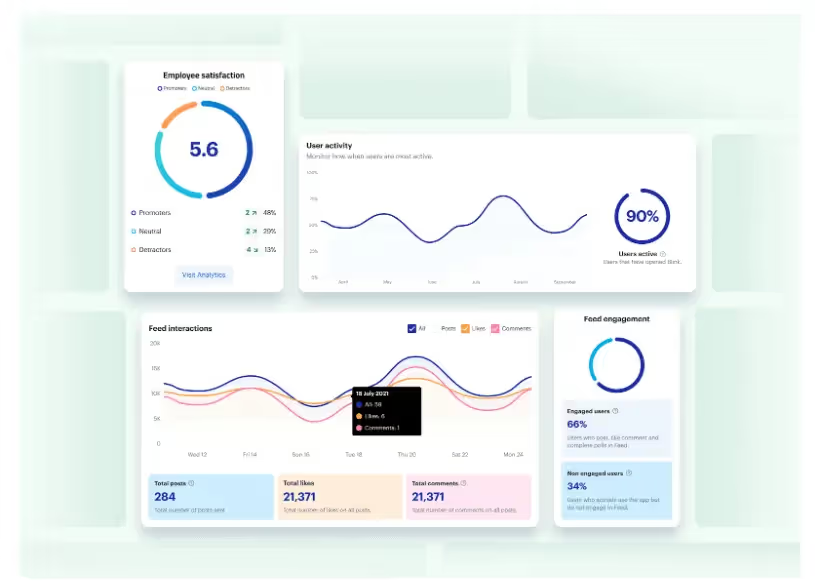


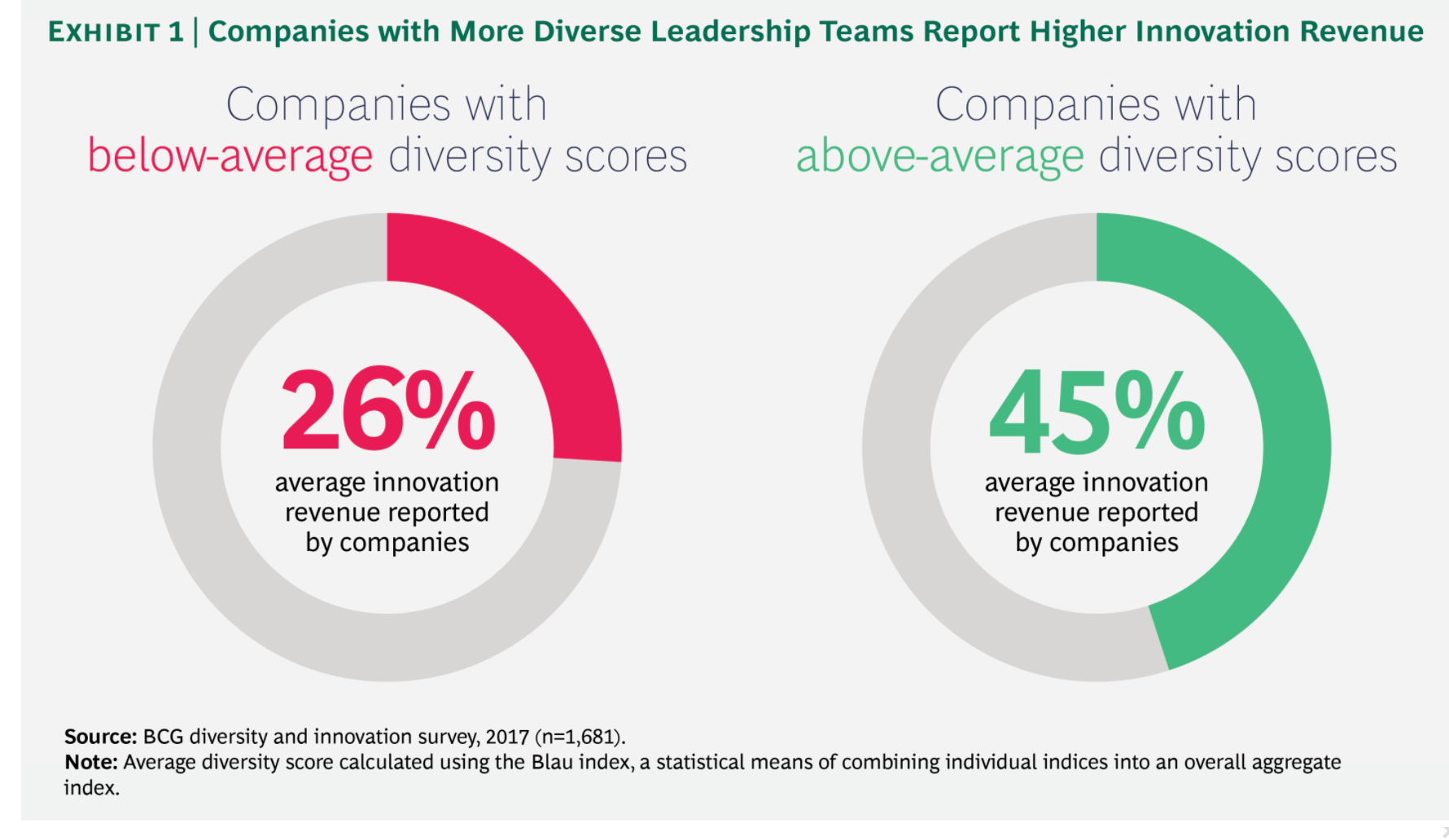

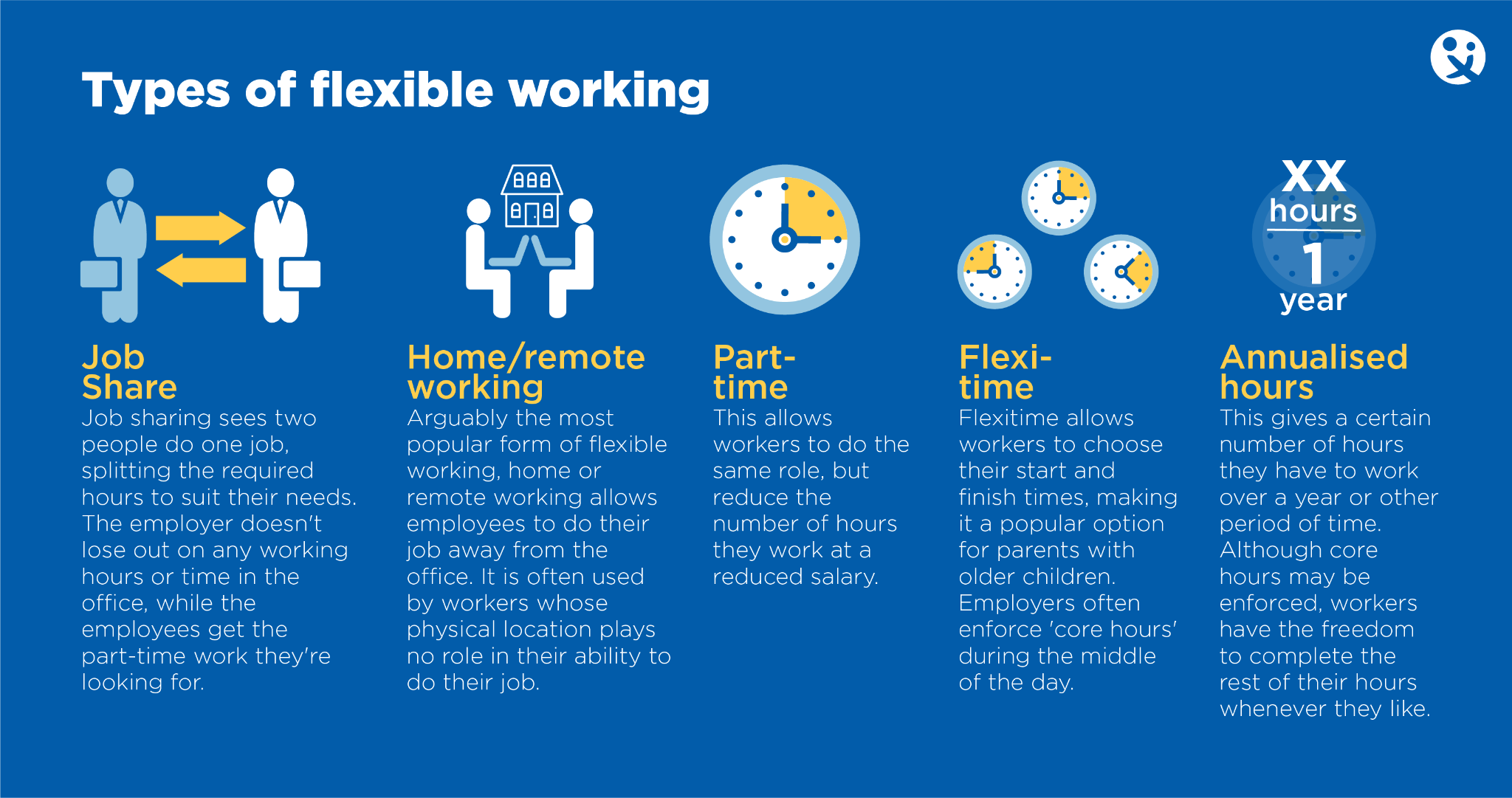
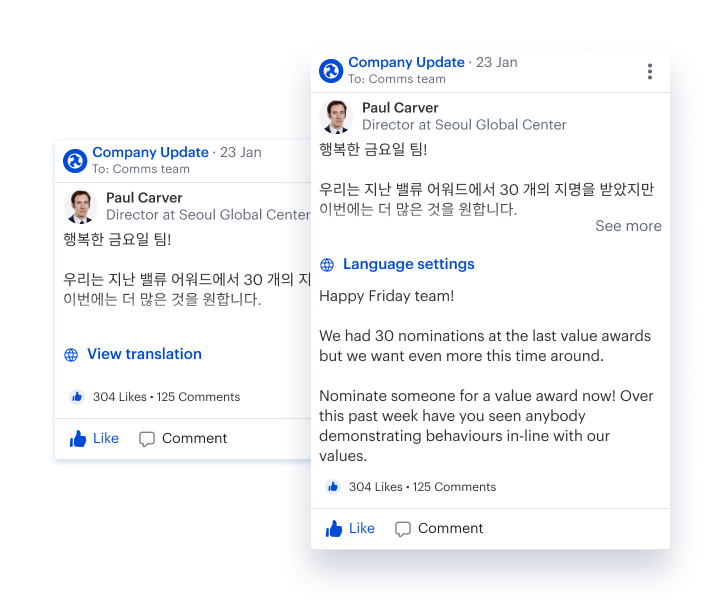

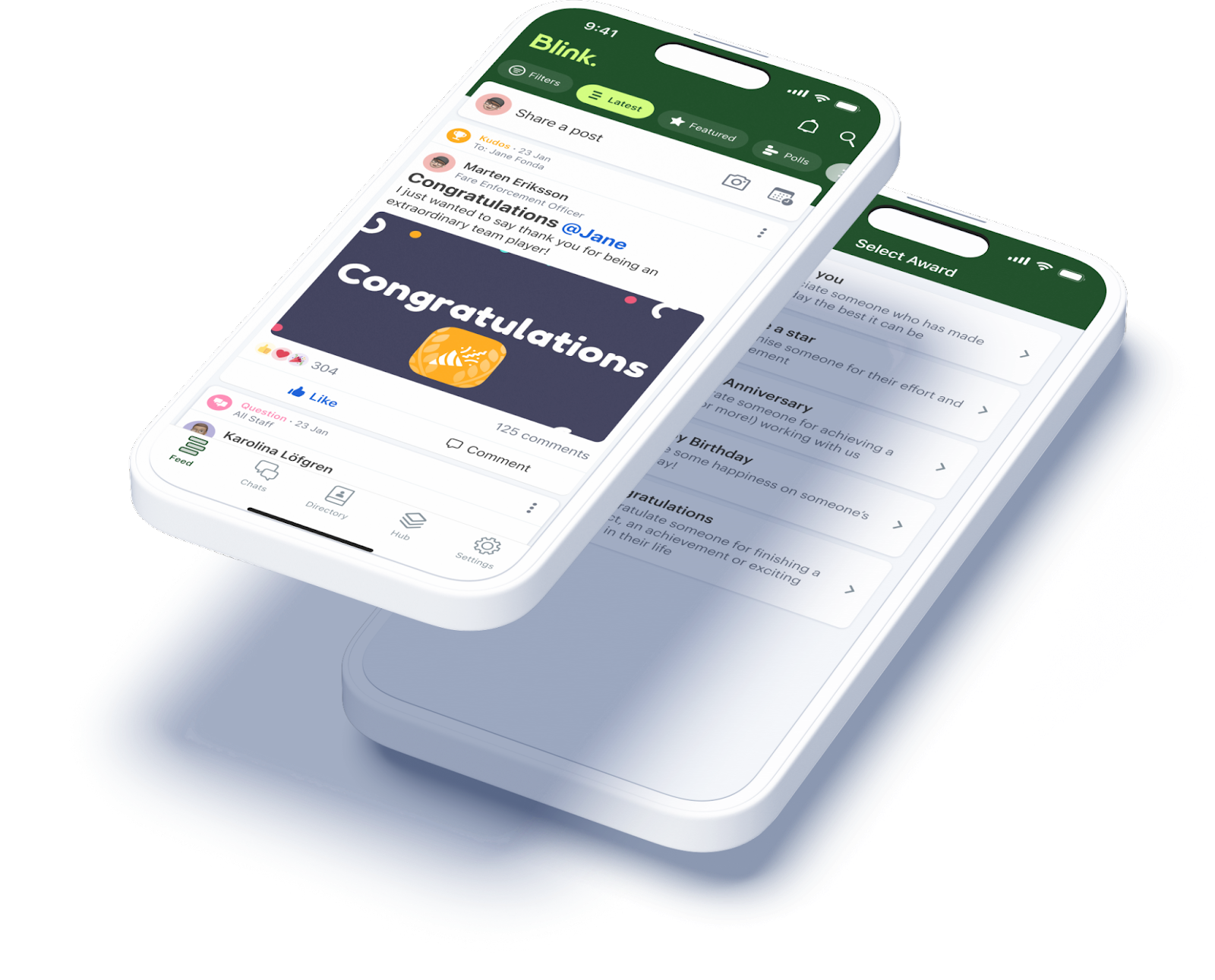
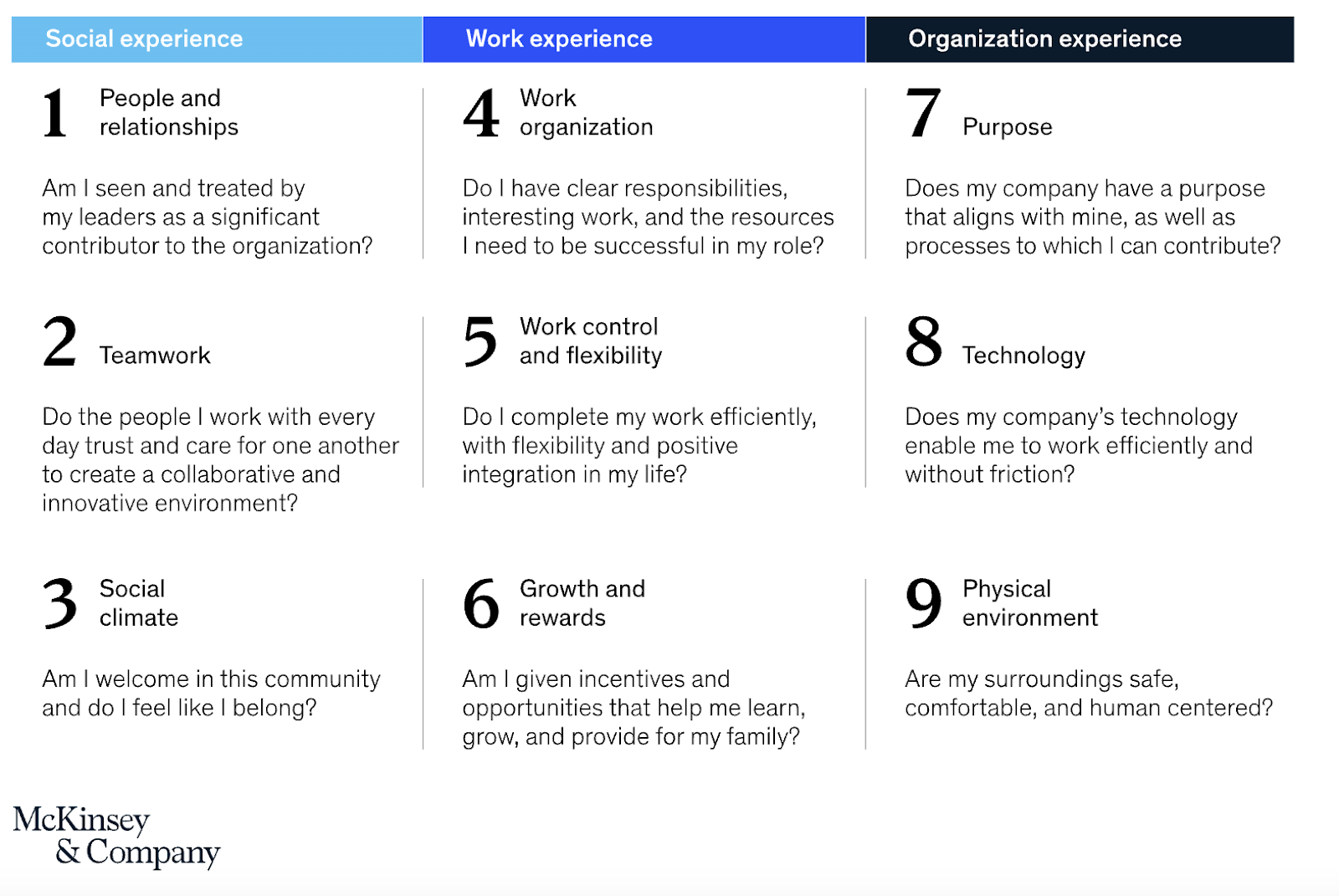
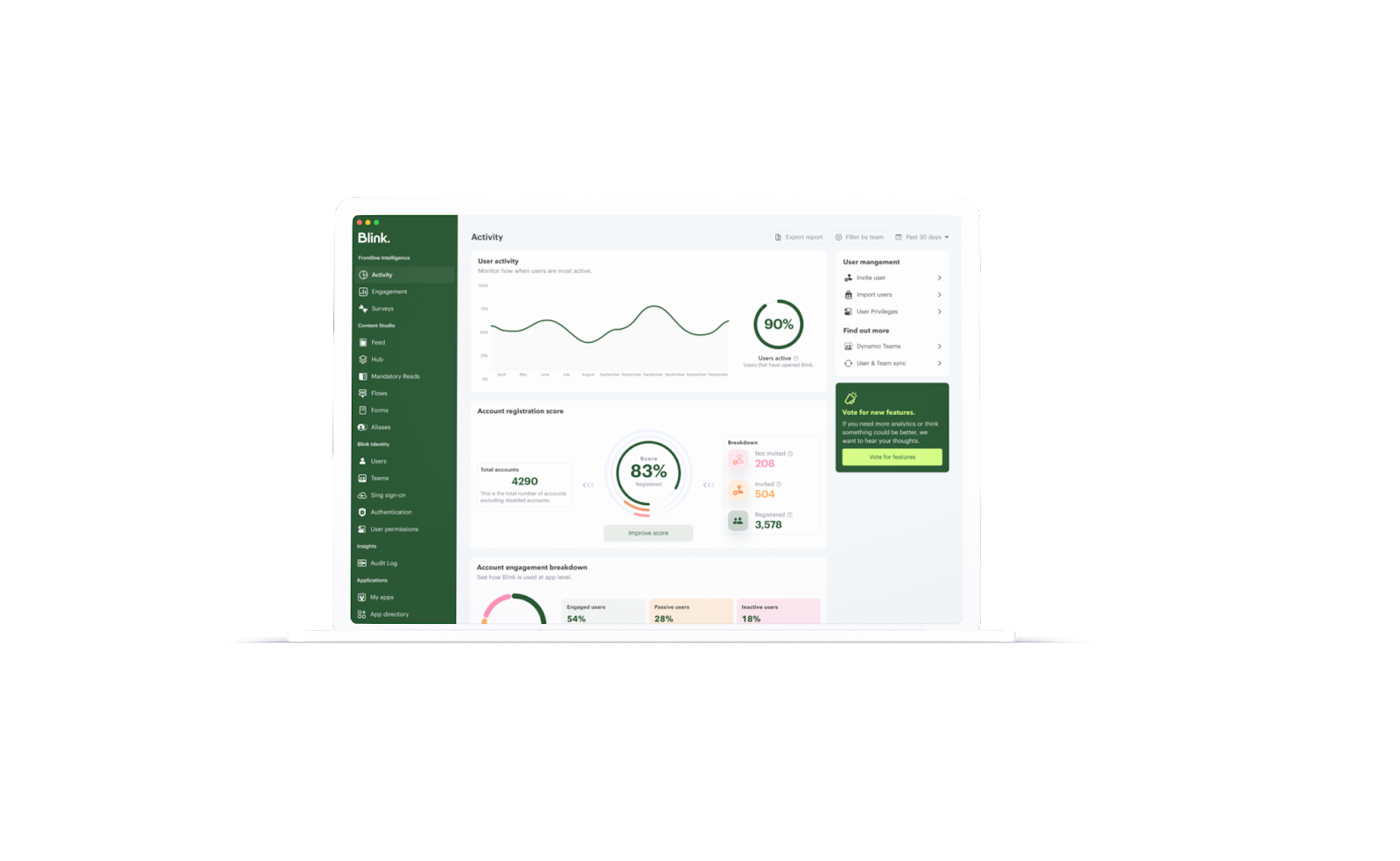
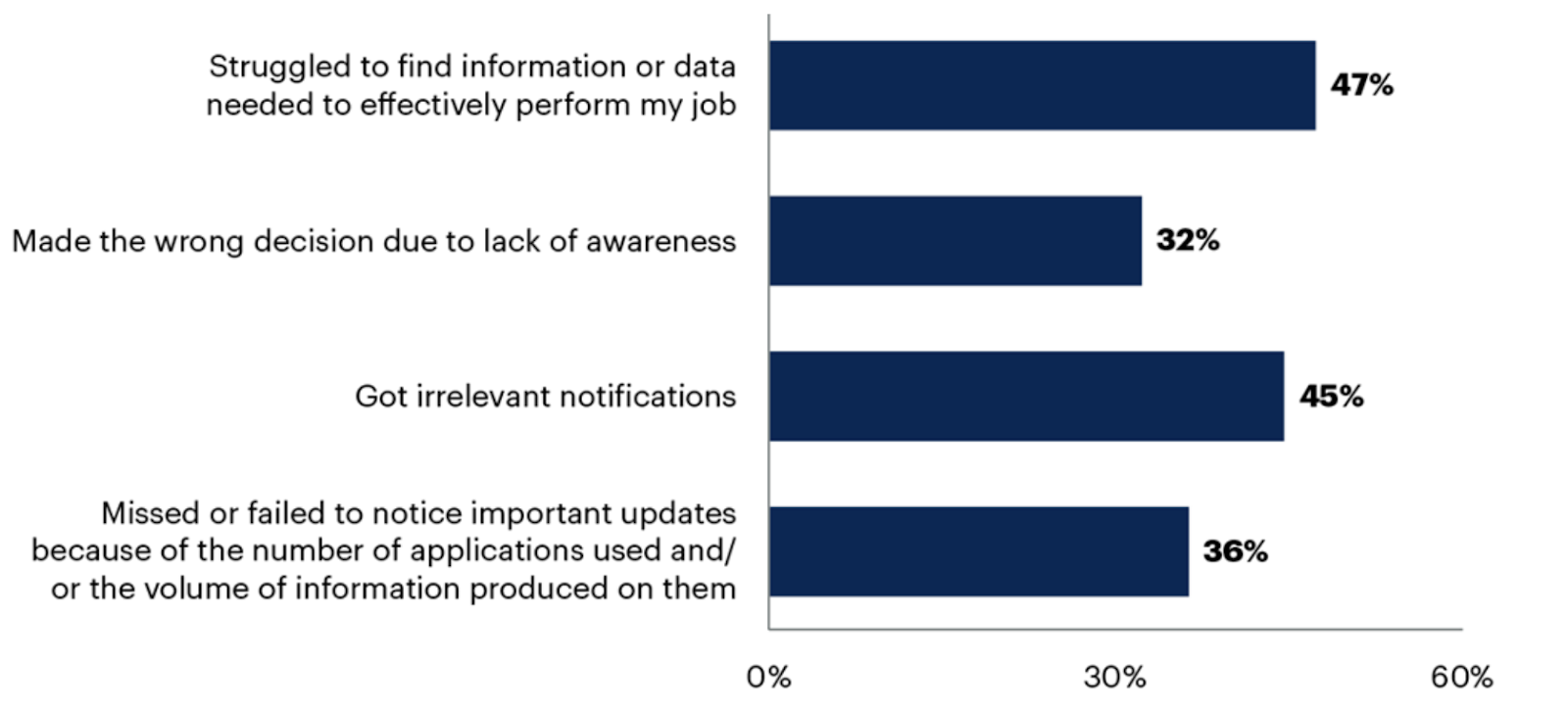





.avif)

