Your internal communications tools can use an update to engage employees in the new year. We compare Staffbase vs. Blink to see which is right for you.
Staffbase vs Blink compared on features, pricing, integrations, and frontline employee engagement. See which communication platform fits your needs.
Jess DeVore
Published:
September 17, 2023
Last updated:
September 17, 2023
What we'll cover
You’re in the market for a new internal communications platform, but which is better: Staffbase vs. Blink?
The answer depends on what exactly you’re looking for. Both offer several similar features, but their execution is different. Let’s dive into the specifics to see which communication tool is right for you.
Staffbase vs. Blink: which is best for you in 2022? 1
The Staffbase employee app works best for big corporations, while Blink’s simpler format lends itself to on-the-go workers.
If a good portion of your team comprises frontline employees, Blink is the internal communications platform for you. Their mobile-first design and seamless app integrations are ideal for keeping deskless workers engaged.
Staffbase offers more robust customization features as standard with each product launch, including a custom logo and font.
A user said, “I love the look & feel of the app and the option to personalise the app for (conditional) user groups.”
But for those looking to customize their employee intranet software’s overall function and employee experience, Blink brings more flexibility, with deep integrations with existing apps inside the platform.
Within this, Blink brings existing apps to the platform via Single Sign-On integrations, while Staffbase offers more functionalities out of the box.
For example, Staffbase comes with a basic payroll function, while Blink has an end-to-end integration with Workday.
Comparing Blink vs. Staffbase on history, Staffbase has been around longer, making it a more established product with tried-and-tested service offerings. It is well-respected as a quality option.
As a newer company, Blink offers more innovation and cutting-edge features. 100% of the product roadmap is written based on customer requests, and it’s to provide feedback on the functionalities they want with each update.
The right solution for you depends on if you’re looking for a one-stop solution or something to complement your existing software.
Staffbase vs. Blink: How they’re similar
Staffbase vs. Blink: which is best for you in 2022? 2
Mobile content
Comparing Staffbase vs. Blink on mobile compatibility, you’ll find both offering well-optimized mobile platforms. That means your deskless employees will have the same access to information, documents, and community as those in the office with either platform.
But some G2 reviews suggest that Staffbase’s “Admin access on smartphones is very limited with basic functionality.”
Support for XL enterprises
Both internal communication platforms are robust enough to support enormous organizations. The intranet, news, and key features are designed to aggregate and organize a large content volume across many different functionalities.
But Staffbase is best used by large corporations, while Blink also works for companies with a large frontline workforce but smaller desk-based teams. Blink’s platform requires less time to implement and works with a hands-off IT experience.
Centralized intranet solution
Staffbase and Blink are good options for those searching for an employee intranet replacement. While peripheral features differ, both offer a solution to disseminate updates, provide access to company policies, spark conversation, and track insights about employee engagement.
Although the search in Staffbase works fine for a mobile app, those using Staffbase intranet will find the lack of filters, document management, and content management tools limiting them from creating a proper knowledge base.
Staffbase vs. Blink: How they’re different
When comparing Staffbase vs. Blink at a high level, it may seem like they share many features. But the execution of those features varies greatly.
Customer input
Blink serves fewer customers, which means they can have a much closer relationship with their customers — we’re talking on a first name basis.
Blink relies heavily on customer feedback to craft its product roadmap and even maintains a Product Portal to allow customers to request features and vote on what they want to see next.
In contrast, users say that Staffbase “aren’t quick to take on board and prioritise client feedback/requests for development.” Overall, Staffbase’s updates and features implementations are less agile.
Email
One notable feature that Staffbase offers that Blink lacks is email building. Through their merger with Bananatag, Staffbase lets you create engaging newsletters, send targeted emails to subsets of employees, and measure the impact of your internal email strategy.
Since frontline workers don’t have company email addresses, email is less of a focus at Blink, although it is accessible via integrations with Gmail and Outlook.
Employee generated content
Blink focuses on decentralizing employee communication so that every employee has a voice.
Blink champions employee-generated content through a live user feed and omni-directional chat features. For organizations that want to revitalize their outdated top-down team communication structure, Blink is a great choice.
Staffbase does not make it as easy for users to share content with other users. To upload a photo, users must send a submission form to the admin — who then creates the post themselves.
This setup is ideal for companies looking for greater control over who can share news. A user appreciated this feature, saying, “It’s very easy to make someone editor of a news channel so for example a Team Leader can communicate to his own team without giving him administrator rights of the whole app.”
Integrations
Blink offers a wider range of integrations with thousands of apps via Single Sign-On. Employees can access niche industry tools, Microsoft teams, and Sharepoint without ever leaving the app. The Blink team also takes care of the dev work, making it an all-in-one solution.
Staffbase integrations are more limited. They offer integrations with Microsoft 365 and SAP. This could only work well for a company that uses other enterprise applications or has a dedicated team to customize Staffbase through their APIs. Users said, “Currently, no local programs can be integrated into the launchpad.”
Notifications
Blink offers an array of real-time and schedulable push notifications to keep employees in the loop and engage with the app frequently.
Besides regular notifications, admins can create priority posts to catch everyone’s attention or create mandatory posts that users must acknowledge. Users can switch notifications on and off and follow certain posts.
Staffbase employee app’s push notifications are less customizable, focusing only on basic functions. Users say notifications “need improving,” and “There is no way to control push notifications separately for each channel.”
Chats
Blink’s chat is designed for both socializing and collaboration — wherever you are. Advanced features like saving messages and file sharing elevate the chat as a tool for getting workflows done rather than just a social media feature.
Staffbase offers an instant messaging feature as an add-on to advanced subscriptions. The chat supports one-on-one and group chats with a 128 user cap.
Users can only send images or videos on the Apple and Android apps, rather than documents. This leads to users calling Staffbase’s chat function “very basic.”
Here’s what Staffbase supports:
Staffbase vs. Blink: which is best for you in 2022? 3
Frontline focus
Blink’s core principle is that they improve frontline workers’ lives. As a result, engagement with the app is remarkably high, with an average of 10 opens per user per day.
While Staffbase is also targeted at frontline workers, many features aren’t carried through to the mobile interface. Reviewers say, “The biggest obstacle for us is to get non-desk users excited about the app and to integrate them.”
Content moderation
In Blink, administrators can assign content moderators who have complete power in managing content.
But Blink offers omnidirectional communication: User-generated content does not have to undergo a review before getting published, but any user can report and flag inappropriate content.
At Staffbase, admins have more direct control over moderating content. But there are some functional limitations around offline viewing and flagging inappropriate content which is surprising in an otherwise full-featured app.
Staffbase vs. Blink: pricing
Blink offers four levels of paid service based on company size, while Staffbase structures its pricing based on the number of features you use.
Blink levels:
Essential: $3.40 per person, per month
Business: Price on application
Enterprise: Price on application
Enterprise Plus: Price on application
Staffbase levels:
Employee app
Employee app + Intranet
Staffbase NOW
Final thoughts: Staffbase or Blink — which should you use in 2022?
Staffbase is a highly customizable internal communication software ideal for large corporations with a clear idea of what tools they need to round out their digital workplace.
Blink is ideal for businesses large and small wanting a complete out-of-the-box solution to engage frontline workers and facilitate more communication across their organization.
If you’re not sure, try a free demo of Blink and see for yourself the technology that drives a 330% increase in engagement for its users.
You’re in the market for a new internal communications platform, but which is better: Staffbase vs. Blink?
The answer depends on what exactly you’re looking for. Both offer several similar features, but their execution is different. Let’s dive into the specifics to see which communication tool is right for you.
Staffbase vs. Blink: which is best for you in 2022? 1
The Staffbase employee app works best for big corporations, while Blink’s simpler format lends itself to on-the-go workers.
If a good portion of your team comprises frontline employees, Blink is the internal communications platform for you. Their mobile-first design and seamless app integrations are ideal for keeping deskless workers engaged.
Staffbase offers more robust customization features as standard with each product launch, including a custom logo and font.
A user said, “I love the look & feel of the app and the option to personalise the app for (conditional) user groups.”
But for those looking to customize their employee intranet software’s overall function and employee experience, Blink brings more flexibility, with deep integrations with existing apps inside the platform.
Within this, Blink brings existing apps to the platform via Single Sign-On integrations, while Staffbase offers more functionalities out of the box.
For example, Staffbase comes with a basic payroll function, while Blink has an end-to-end integration with Workday.
Comparing Blink vs. Staffbase on history, Staffbase has been around longer, making it a more established product with tried-and-tested service offerings. It is well-respected as a quality option.
As a newer company, Blink offers more innovation and cutting-edge features. 100% of the product roadmap is written based on customer requests, and it’s to provide feedback on the functionalities they want with each update.
The right solution for you depends on if you’re looking for a one-stop solution or something to complement your existing software.
Staffbase vs. Blink: How they’re similar
Staffbase vs. Blink: which is best for you in 2022? 2
Mobile content
Comparing Staffbase vs. Blink on mobile compatibility, you’ll find both offering well-optimized mobile platforms. That means your deskless employees will have the same access to information, documents, and community as those in the office with either platform.
But some G2 reviews suggest that Staffbase’s “Admin access on smartphones is very limited with basic functionality.”
Support for XL enterprises
Both internal communication platforms are robust enough to support enormous organizations. The intranet, news, and key features are designed to aggregate and organize a large content volume across many different functionalities.
But Staffbase is best used by large corporations, while Blink also works for companies with a large frontline workforce but smaller desk-based teams. Blink’s platform requires less time to implement and works with a hands-off IT experience.
Centralized intranet solution
Staffbase and Blink are good options for those searching for an employee intranet replacement. While peripheral features differ, both offer a solution to disseminate updates, provide access to company policies, spark conversation, and track insights about employee engagement.
Although the search in Staffbase works fine for a mobile app, those using Staffbase intranet will find the lack of filters, document management, and content management tools limiting them from creating a proper knowledge base.
Staffbase vs. Blink: How they’re different
When comparing Staffbase vs. Blink at a high level, it may seem like they share many features. But the execution of those features varies greatly.
Customer input
Blink serves fewer customers, which means they can have a much closer relationship with their customers — we’re talking on a first name basis.
Blink relies heavily on customer feedback to craft its product roadmap and even maintains a Product Portal to allow customers to request features and vote on what they want to see next.
In contrast, users say that Staffbase “aren’t quick to take on board and prioritise client feedback/requests for development.” Overall, Staffbase’s updates and features implementations are less agile.
Email
One notable feature that Staffbase offers that Blink lacks is email building. Through their merger with Bananatag, Staffbase lets you create engaging newsletters, send targeted emails to subsets of employees, and measure the impact of your internal email strategy.
Since frontline workers don’t have company email addresses, email is less of a focus at Blink, although it is accessible via integrations with Gmail and Outlook.
Employee generated content
Blink focuses on decentralizing employee communication so that every employee has a voice.
Blink champions employee-generated content through a live user feed and omni-directional chat features. For organizations that want to revitalize their outdated top-down team communication structure, Blink is a great choice.
Staffbase does not make it as easy for users to share content with other users. To upload a photo, users must send a submission form to the admin — who then creates the post themselves.
This setup is ideal for companies looking for greater control over who can share news. A user appreciated this feature, saying, “It’s very easy to make someone editor of a news channel so for example a Team Leader can communicate to his own team without giving him administrator rights of the whole app.”
Integrations
Blink offers a wider range of integrations with thousands of apps via Single Sign-On. Employees can access niche industry tools, Microsoft teams, and Sharepoint without ever leaving the app. The Blink team also takes care of the dev work, making it an all-in-one solution.
Staffbase integrations are more limited. They offer integrations with Microsoft 365 and SAP. This could only work well for a company that uses other enterprise applications or has a dedicated team to customize Staffbase through their APIs. Users said, “Currently, no local programs can be integrated into the launchpad.”
Notifications
Blink offers an array of real-time and schedulable push notifications to keep employees in the loop and engage with the app frequently.
Besides regular notifications, admins can create priority posts to catch everyone’s attention or create mandatory posts that users must acknowledge. Users can switch notifications on and off and follow certain posts.
Staffbase employee app’s push notifications are less customizable, focusing only on basic functions. Users say notifications “need improving,” and “There is no way to control push notifications separately for each channel.”
Chats
Blink’s chat is designed for both socializing and collaboration — wherever you are. Advanced features like saving messages and file sharing elevate the chat as a tool for getting workflows done rather than just a social media feature.
Staffbase offers an instant messaging feature as an add-on to advanced subscriptions. The chat supports one-on-one and group chats with a 128 user cap.
Users can only send images or videos on the Apple and Android apps, rather than documents. This leads to users calling Staffbase’s chat function “very basic.”
Here’s what Staffbase supports:
Staffbase vs. Blink: which is best for you in 2022? 3
Frontline focus
Blink’s core principle is that they improve frontline workers’ lives. As a result, engagement with the app is remarkably high, with an average of 10 opens per user per day.
While Staffbase is also targeted at frontline workers, many features aren’t carried through to the mobile interface. Reviewers say, “The biggest obstacle for us is to get non-desk users excited about the app and to integrate them.”
Content moderation
In Blink, administrators can assign content moderators who have complete power in managing content.
But Blink offers omnidirectional communication: User-generated content does not have to undergo a review before getting published, but any user can report and flag inappropriate content.
At Staffbase, admins have more direct control over moderating content. But there are some functional limitations around offline viewing and flagging inappropriate content which is surprising in an otherwise full-featured app.
Staffbase vs. Blink: pricing
Blink offers four levels of paid service based on company size, while Staffbase structures its pricing based on the number of features you use.
Blink levels:
Essential: $3.40 per person, per month
Business: Price on application
Enterprise: Price on application
Enterprise Plus: Price on application
Staffbase levels:
Employee app
Employee app + Intranet
Staffbase NOW
Final thoughts: Staffbase or Blink — which should you use in 2022?
Staffbase is a highly customizable internal communication software ideal for large corporations with a clear idea of what tools they need to round out their digital workplace.
Blink is ideal for businesses large and small wanting a complete out-of-the-box solution to engage frontline workers and facilitate more communication across their organization.
If you’re not sure, try a free demo of Blink and see for yourself the technology that drives a 330% increase in engagement for its users.
What we'll cover
Start your free trial today
See how Blink helps frontline teams stay connected, informed, and engaged.
Unmotivated workers do the bare minimum. They can drag other team members down with them. They’re also more likely to be looking for a job elsewhere.
Given that only 23% of global employees feel engaged at work, improving employee motivation is a critical business priority. You need to employ strategies known to boost motivation and inspire better employee productivity.
In this article, we list a range of employee motivation ideas that will help you get the most from your workforce. We’ll be looking at the following:
Why is employee motivation important?
Key factors in employee motivation
12 ways to motivate employees
Using an employee super-app to create a motivated workforce
Why is employee motivation important?
Motivated employees tend to enjoy work. They have a sense of purpose and accomplishment. They also approach work with energy and drive.
But employee motivation isn’t just good for employees. It benefits your business, too. Here’s how:
Increased employee productivity. Motivated employees work harder. They’re more efficient and focused. They’re also more likely to take the initiative, going beyond their basic responsibilities.
Better quality of work. A motivated workforce doesn’t just produce more work. It produces better work. Workers are committed to quality. This results in fewer errors, fewer missed deadlines, and fewer workplace safety incidents.
Higher retention rate. Engaged employees are loyal to your organization. So they’re less likely to look for another job. With a motivated workforce, your organization experiences higher levels of employee retention and less absenteeism.
More profit. Gallup research on employee engagement shows that employee morale impacts a range of business outcomes. It leads to a 23% increase in profitability and a 10% increase in customer loyalty.
Key factors in employee motivation
There are two types of motivation — extrinsic and intrinsic.
Extrinsic motivation is all about the carrot and the stick. You create extrinsic motivation with external rewards and penalties. Rewards might include an employee’s salary, bonuses, rewards, and praise. Penalties might include a poor performance review or a manager reprimand.
Intrinsic motivation comes from within. Employees are motivated to do their best work because they find it personally rewarding. This type of motivation relies on drivers like interest, purpose, pride, and curiosity.
When you have high levels of employee engagement within a workplace, you tend to get high levels of intrinsic motivation. Employees feel invested in their work and the company. So they’re driven to bring their A-game without needing constant carrot-and-stick encouragement.
As an employer, it may seem that you have more control over extrinsic motivation. You can raise someone’s salary, provide bonuses, and praise a job well done. All of these things help to motivate an employee.
But the fact is, you can influence levels of intrinsic motivation, too. Here are some of the things that prompt intrinsic motivation in your employees.
Feeling valued
When employees feel you care about them, their wellbeing, and their lives beyond work, they’re more likely to bring their all. That means giving employee recognition where it’s due, treating people fairly, and valuing their input, too.
Making progress
Employees like to know where they’re heading — and where they’re at right now. That requires regular, positive feedback and constructive criticism. Training, development, and clear career pathing are also important.
A sense of purpose
Every job has its boring bits — the tasks that an employee is never going to be excited about doing. But when employees understand how their work contributes to organizational success and wider society, finding that motivation gets easier.
A positive company culture
Motivation is contagious. And it spreads more easily in organizations where there’s good communication and a sense of belonging. When they’re part of an open and supportive company culture, employees are more invested in company success.
The ideas we’ve included below incorporate all of the above. They also provide ways to inspire both intrinsic and extrinsic motivation in your workforce.
12 ways to motivate employees
To motivate your employees, you need to:
Highlight values and purpose
Communicate transparently
Give employees the resources they need
Use the right technology
Provide opportunities for professional development
Develop employee career paths
Support employee wellbeing
Encourage teamwork and collaboration
Support employees to build workplace friendships
Recognize employee contributions
Ask employees for their thoughts and feedback
Treat everyone equitably
Highlight values and purpose
According to Gartner research, shared purpose is one of five primary things motivating employees to stay in their jobs right now. It helps them feel invested in their work and your organization.
Shared purpose helps employees feel part of something bigger than themselves. So work becomes about more than just a paycheck.
You can support purpose in the workplace, by crafting clear company values and communicating these values regularly.
Start during onboarding. Introduce new hires to your company’s vision, mission, and values from day one. Explain how their role contributes to your goals and social impact.
Be consistent. Regularly reinforce your company's vision and mission in all employee communications. Make purpose a recurring theme in meetings, updates, and internal messaging.
Build a values-based culture: Create an environment where company values are lived and breathed daily. Take concrete action based on your values. That way, employees are more likely to believe in them.
Communicate transparently
Employee communication is another important element of employee motivation. Open and transparent communication builds trust. And employees who get enough information to do their jobs well are 2.8 times more likely to be engaged.
But while 87% of business leaders think their internal communications are “highly effective”, only 63% of employees agree. So what does effective communication look like?
Effective communication is a two-way conversation, where both leaders and employees get to share ideas, concerns, and feedback. It’s keeping employees up-to-date with key company developments, and it’s ensuring that you have clear channels of communication to reach all employees.
For remote and frontline teams, this means choosing streamlined, digital communication channels. You need internal communication tools you can use to relay messages quickly and reliably, bypassing paper memos and an employee’s already overflowing email inbox.
Give employees the resources they need
Imagine you’re setting out on a long hike. You’re excited and determined to reach the endpoint.
But you’re given a pair of ill-fitting hiking boots to wear. And a mile or so into the walk, you realize that the map you’re following isn’t 100% accurate. You decide to call the hike organizer for directions. But the number’s engaged and you fail to get through.
It’s likely that at this point in the hike, your motivation has started to dip. You feel thwarted and discouraged. You’re tempted to turn back. What felt like a promising journey now feels like an uphill struggle.
That’s why it’s important to give employees the resources they need. They need the right tech, training, support, and information to do their jobs well. Without it, morale takes a hit.
Use the right technology
Technology is increasingly important to the employee experience. Done right, it makes life easier for employees. Done wrong, it causes friction and frustration, which harms employee motivation.
A concerning 83% of HR leaders say they don’t have the right technology at work. This is contributing to stress, burnout, and low morale. Similarly, only 10% of frontline workers say they have access to the tools, tech, and opportunities they need to connect and advance in the workplace.
All workers — those in the office, those working remotely, and those on your company’s front lines — need access to high-quality, user-friendly tech that makes their jobs easier, not harder.
That might mean using a mobile-first employee app to give frontline employees the resources and co-worker connection they crave. Or it might mean implementing a social intranet that supports workplace communication and collaboration.
You can also use tech tools that have a direct impact on employee motivation. Employee engagement tools help organizations to improve and track staff morale.
Provide opportunities for professional development
According to O.C. Tanner research, organizations have five times greater odds of achieving employee fulfillment when they support professional development. A comprehensive training program improves your workplace retention rate, too.
O.C. Tanner also found that organizations are more likely to make a success of skills-building initiatives when they:
Empower employees to make their own training decisions. Supporting employees to choose training paths that align with their career goals and interests improves engagement with the learning process.
Give employees time during work to complete training. Allocate dedicated time for training so employees don’t experience stress, trying to juggle learning with daily tasks and out-of-work responsibilities.
Provide or reimburse hobby classes as well as work-related learning. Reimbursement for hobby classes improves the odds that a skill-building program will improve retention by 119%.
Develop employee career paths
Training is important. But unless employees can put those newfound skills to use within your organization, they’re going to become frustrated. That’s why every employee should have a clear progression path within your organization.
Sit down with employees to find out where their ambitions lie. And — as we mentioned above — personalize a training program to support their career goals.
Also, try to be realistic and open with workers about when a promotion is likely. This will depend on their current skill set and your organizational needs. If an upward move isn’t available for the foreseeable, there are other things you can do to keep staff motivated.
A lateral move helps employees to develop skills in another area of the business. You give them a new challenge and support them to become well-rounded members of your organization.
Similarly, stretch assignments are a great way to grow employee skills. They encourage workers to move beyond their comfort zone, take on new responsibilities, and prepare for higher-level roles.
Support employee wellbeing
In its State of the Global Workplace Report for 2024, Gallup talks a lot about employee wellbeing. It reveals that to improve employee lives and organizational performance, employers need to do the following:
Make support for employee wellbeing visible and consistent
Assign employee wellbeing counselors or coaches
Emphasize wellbeing at work and in life
Go beyond physical health to provide mental health and holistic support
Employee wellbeing goes beyond the odd mindfulness session. It requires a company-wide approach and a real understanding of what your employees might be struggling with.
Starbucks is a great example. They’ve been helping employees with the astronomical cost of housing. They offer a Tenancy Deposit Loan Scheme that they’ve named Home Sweet Loan. Employees can access an interest-free loan to pay the rental deposit when moving into a new home.
Starbucks is making it easier for employees to find and secure housing. This is good for their baristas. But it’s good for business, too. Because when employees aren’t worried about the roof over their heads, they’re more motivated and focused at work.
Encourage teamwork and collaboration
A 2022 Corel report reveals that 41% of employees have left their jobs or would consider leaving their jobs due to poor collaboration at work.
Collaboration is a great way to engage employees. It helps to create a sense of belonging. It makes work more efficient because teams share knowledge and resources freely. Plus, employees motivate one another when they work together.
You can support collaboration by supporting employees to build positive workplace relationships (more on this in a moment). Praising teams, rather than individuals, for their successes is also a good idea.
For teams who work disparately, the right intranet or app is an important part of the puzzle. You need tools that support employees to collaborate in real-time and access shared resources.
Water cooler chat may feel like an unnecessary part of the work day. But giving employees the time, space, and, in some cases, the tech they need to develop workplace friendships is incredibly important to engagement.
Employees who feel that they belong within an organization are 5.3 times more likely to feel empowered to perform their best work. And those with a best friend at work are more productive, happier to innovate, and happier to share ideas.
So schedule social events. Allow time at the beginning or end of meetings for informal conversation. If your team works remotely or you have frontline workers, be intentional about creating these opportunities for connection.
That might mean letting employees create shared interest groups on the company intranet. How about a book club? Or a running club? Maintaining a news feed where employees can post, comment, and like, helps remote and frontline workers to build connections, too.
Recognize employee contributions
Employee recognition and rewards are another important pillar of employee morale. When employees feel their hard work is appreciated, they’re more likely to maintain their motivation.
They’re also more likely to stay working for your company. According to recent Gallup and Workhuman research, a 10,000-person organization can save up to $16.1 million a year in reduced employee turnover costs by making recognition an important part of company culture.
Timely and relevant recognition from managers is essential. But peer-to-peer recognition can be just as valuable and it has a surprising benefit. 75% of employees say that giving recognition makes them want to stay at their current organization longer.
Blink’s employee recognition feature makes it easy to give every employee the appreciation they deserve. You can create personalized recognition posts in seconds. Then, share praise with the individual or publish it on the company news feed for everyone to see and celebrate.
If you want to offer employee rewards as part of your recognition program, be sure to find out what employees are excited by. You may think that cash bonuses and company merchandise are great incentives. But it may be that employees would prefer something else, like extra paid time off.
Employees are more motivated when they feel listened to. When an employer seeks their input and insight, it makes them feel valued, which contributes to employee morale.
Ask for employee input on key decisions. Taking everyone’s opinions into account when implementing change helps to ensure buy-in.
Also, get employee feedback on a range of issues, on a regular basis. Use surveys to ask workers about the employee experience, workplace satisfaction, or workplace rewards. Their answers will help you to develop a more motivating environment for employees going forward.
Just remember that feedback is a multi-stage process that requires effective communication. You need to:
Ask for employee feedback
Thank employees for their feedback
Tell employees what their feedback has revealed and what you plan to do about it
Keep employees in the loop, informing them how your plans are going
Closing the feedback loop like this keeps employees invested in the feedback process. It shows them that you’re really listening to what they have to say.
Treat everyone fairly and equitably
Fairness is crucial to employee motivation. When employees feel that they aren’t being treated fairly or equitably, motivation takes a dive.
So all employees must be given equal access to training and career progression opportunities. Everyone should have the option to give feedback and build workplace friendships. They should get the resources and recognition they need to feel valued.
Pay also comes into the equation. You can prevent resentment and employee churn by offering employees a fair salary. Conduct a pay equity audit. Also, regularly check to see how your wages match up with market trends and the cost of living.
But bear in mind that engaged employees look for a 31% pay increase to consider taking a job with another organization. So you don’t necessarily have to match competitors like-for-like if you provide non-monetary benefits and a company culture employees enjoy being part of.
Using an employee super-app to create a motivated workforce
Having the right tech on your team makes it easier to boost employee motivation.
An employee super-app is particularly useful for remote and frontline employees who may feel disconnected from motivators like co-worker support, feedback opportunities, and company resources.
An employee app helps you to create an equitable experience for all members of staff, no matter where they work. It also allows you to put motivation-boosting features into the palm of every employee’s hand.
Take a look at these employee app features, sure to improve employee motivation.
Social features
Social features like a company news feed help to include everyone in your company culture and support workplace connections.
A resource library
A resource library gives all employees, no matter where they work, access to essential workplace resources. You can populate your library with how-to guides, company policies, and FAQs.
Recognition features
Built-in recognition features make it easy to show appreciation for employees and encourage peer-to-peer recognition, too.
Survey tools
The best employee super apps make it easy for managers to request feedback — and for employees to provide it.
A digital hub
By integrating with all of the digitals you use, you can give employees access to professional development, wellbeing, and collaboration tools, all in the same place.
Effective communication
With a news feed, group messaging, and 1:1 chats, it’s easy for every member of your organization to take part in the company conversation and for leaders to amplify company culture.
Analytics
Analytics help you to track motivation and engagement. This allows you to make data-backed improvements to your engagement initiatives.
In summary
Find ways to motivate your employees and you create a happier, more engaged, more productive workforce. You improve employee loyalty and talent retention. You also achieve better business results.
There are lots of different things you can do to motivate your workforce. But all actions center around four key pillars:
Help employees find meaning in their work
Show employees that you value them as people as well as workers
Support employees to make progress in their careers
Build a positive company culture
It’s easier to do all these things when you have the right tech tools. An employee super-app brings your organization together and helps you establish a positive company culture.
It also gives employees all the communication, resources, and digital tools they need to excel in their roles. They experience more flow and less friction, which makes for improved employee motivation.
At first glance, it seems that internal communications and external communications couldn’t be more different.
External communication is all about sharing your brand and its messaging with people outside of your organization. This includes customers, stakeholders, and investors.
Internal communication is focused on sharing key company developments with people inside your organization. It gives employees the information they need to do their jobs effectively.
Because of this primary difference between internal and external communication, many companies treat these two forms of corporate comms as separate entities. They fail to see how their approach to external comms can inspire a better kind of internal communication.
Here, we challenge that thinking. We look at the similarities and differences between internal and external comms — and share some ideas for improving internal communication at your organization.
Similarities between internal and external communications
Let’s start by looking at all the things internal and external business communication have in common.
External communication is how you share your brand with customers and stakeholders. It’s how you convince people to trust in your brand and buy your products or services — and it has a clear impact on your bottom line.
Internal communication is aimed at your employees. It supports day-to-day operations and helps you build a strong company culture. The link may not be as obvious but internal communication also has a big impact on your company’s profitability.
That’s because, when you communicate effectively with employees, you stand to improve productivity, the customer experience, employee engagement, and employee retention, all of which affect company profits.
Therefore, both types of communication are essential to an organization — and both require a detailed schedule and strategy.
Selling the brand and what it stands for
You can use external and internal communication to sell your brand to respective audiences.
To your external audience, you sell your external brand image. You show customers and collaborators what makes your brand unique — and why they should pick you over your competitors.
To your internal communications audience, you sell your employer brand and company culture. You remind employees why your company is such a great place to work.
Comms content differs depending on your audience. But there’s a guiding principle to bear in mind. Selling your brand is easier when you create an emotional connection between your organization and your audience.
To do this, creative visuals and persuasive copy can do a lot of the heavy lifting. But you should also communicate a brand purpose that goes beyond increasing profits. You should highlight your company’s social purpose to both internal and external audiences.
You can take things further with your internal comms. Clearly communicate your purpose, values, and strategy to employees. This helps your staff find meaning in their work — and understand how their efforts contribute to business goals — which means better motivation.
To align employees with your purpose, values, and strategy, focus some of your internal communications plan on the following:
Making your senior execs accessible and accountable. Holding monthly Q&As is a great way to align your on-the-ground team with long-term strategy goals. It’s also much easier for employees to relate to the humans behind your company than to a faceless corporation.
Highlighting how your company has made a difference in the world. Showcase positive customer case studies to show how your company is making a difference in people’s lives. Also, share any company activities that support people or the planet.
Featuring employee perspectives. Interview people from different departments and ask them what they do and what they like about their job. This helps people to build a bigger picture of their workplace and understand how everything fits together.
Two-way conversations
In both external and internal communications, communication used to travel one way. A brand and its leaders would speak. Customers and employees would listen.
But social media changed things dramatically. It’s now easy for customers to interact with brands, comment on their social posts, ask questions, and post their online reviews.
This shift from one-way conversations in external communication has changed expectations around workplace communications — and many organizations are now adopting a two-way approach as part of their internal comms strategy.
Companies are involving employees in the company conversation — whether they work in the office, at home, or on the frontlines of the organization. They’re giving them a voice with the help of employee surveys, two-way communication channels, and meetings where their contributions are encouraged.
Of course, making the decision to embrace two-way conversations can be a big deal for brands. They have to be prepared to respond to questions and criticism — from customers or employees. So why do it?
Involving customers and employees in your communications is good for engagement. It helps to boost trust and loyalty, which benefits both employee and customer attraction and retention.
For employees, two-way communication makes them feel valued and respected by your organization. This means they’re more likely to offer their valuable insights and perspectives — and they’re more likely to do their best work.
The need for engagement
Another similarity between internal and external communication is the need for engaging content.
This is a given in external communication. Marketing and PR teams are tasked with making a brand stand out from the competition. They employ eye-catching visuals and interactive content to grab and hold customer attention.
Just like customers, employees are more likely to engage with your content when it’s creative, interactive, and visually appealing. This is why many organizations are now posting social-media-style internal content to user-friendly, mobile-first communication channels.
The need for targeting
You maximize the impact of internal and external communications when you personalize content to your audience.
Send the same external or internal information to everyone and your recipients will start to switch off from your comms. They assume that your messages are irrelevant to them and stop reading or watching them.
So you need to segment your audiences. Then, create targeted content relevant to each group of customers or employees.
For internal communications, you can segment employees by role, location, department, tenure, and team to ensure each employee only receives information relevant to them.
Of course, there are some messages that all employees need to hear. But with proper segmentation, you don’t give retail staff an in-depth update on your work-from-home policy — or tell office-based staff about the next driver training session. Instead, all comms are appropriate and engaging.
Measuring success
Measurement is another important element of both external and internal communications. If you don’t set and track metrics, you can’t be sure that your communications are effective.
So, just as you measure the impact of your external communication campaigns, you can set internal communication metrics and KPIs. You can identify your best content and assess levels of engagement, finding ways to hone your comms going forward.
Also, in the same way that you’d conduct market research and seek customer reviews, seek feedback from employees. Use surveys to ask them about their employee experience. Find out what they think about your internal communications. Then, make informed improvements.
Differences between internal and external communications
Internal and external comms clearly have a lot in common — and there are lots of external communication principles that you can apply to your internal messaging.
However, there are some key differences between internal and external communication that you should bear in mind.
Your audience
Internal and external communications have different audiences:
Your external communication audience includes customers, stakeholders, business partners, investors, and the media.
Your internal communication audience includes your organization’s C-suite, managers, and employees.
There is, however, some overlap. You need to share external messages with frontline employees so they can relay a consistent message to customers.
Your communications team
Usually, different teams are responsible for external and internal communications.
External comms is often run by your PR or marketing teams. You may rely on agency or in-house staff.
To communicate effectively with your employees, you need an internal communications team. This is usually an in-house team that has regular contact with:
The leadership team
Marketing and PR
Operations
HR
Your internal comms team will work with partners throughout the organization to ensure key messages are communicated consistently and employees have access to the information they need.
Content
The content you share with internal and external audiences is very different.
External communication is all about marketing messages, customer support, and building a brand reputation. Examples of external communication content include:
A press release discussing the latest company news
Customer emails detailing a discount
An industry research report
An advertising campaign for a new product
Via your internal communication channels, you’ll tend to share business updates, strategy details, operational information, and company culture. Examples of internal communication content include:
The content you serve to your internal and external audiences may differ. But there are still some fundamentals that apply to both.
Comms that demonstrate honesty and authenticity are better at building brand trust. So try to communicate openly across both internal and external communication channels.
In internal communications, this means being transparent about company goals and challenges. And it means welcoming questions and ideas from employees.
Communication goals
The goal of external communication is to promote the company. You’re aiming to:
enhance the company’s reputation
generate sales and leads
build relationships with customers and stakeholders
Goals for internal communications are different. Across internal comms channels, you’ll share practical and operational information to ensure the smooth running of your organization.
But effective internal communication does more than convey essential, day-to-day guidance for employees. You can use your internal communications to:
share company values, goals, and purpose
strengthen co-worker relationships
recognize and motivate employees
facilitate collaboration
Done well, internal communications helps you to build a company culture employees are excited to be part of. This is particularly important for remote, hybrid, and frontline teams.
These employees miss out on the camaraderie of the office. It’s easy for them to feel disconnected from the organization and, as a result, less engaged in their work. Internal communications — and co-worker communication channels — provide a vital link to the organization.
So use internal communications to improve the employee experience, boost employee engagement, and reduce employee turnover. Build these goals into your internal communications strategy and you’ll create a happier, more motivated, and more cohesive organization.
Communication channels
You can use some communication channels to speak to external and internal audiences. You might use emails, webinars, conferences, and newsletters to reach employees, customers — and other company stakeholders.
However, in general, you use different communication channels for each group.
Your external audience gets updates via press releases, your company website, media news, and your social media accounts. You can also grab their attention with marketing campaigns and product launches.
Internal communication takes place over internal channels. Offline channels include company meetings and notice boards. But the best internal communications strategies make the most of digital communication tools.
Modern intranets and employee apps are a one-stop shop. They consolidate your internal communications and give internal comms teams all the tools they need to communicate with staff.
Pick a mobile-first solution and employees can access your company comms from their smartphones, which is ideal for frontline and remote workers.
You can also find internal communication platforms that provide social-media-style tools. They allow you to post interactive content on the company news feed and give employees the chance to like and comment.
Whether your comms team wants to post a company-wide update, send out a survey, celebrate team success, or provide self-serve HR functions, it’s all possible with the right comms platform.
Finding the right tool to support your internal communications strategy
There are lots of similarities between internal and external communications — and lots of ways external comms can inspire more effective and engaging internal messaging.
So segment your audience, measure success, embrace two-way conversations, and create interactive, visual content.
Don’t underestimate the benefits better internal communications can bring to your organization. It has the power to improve employee engagement, customer experience, company culture, and employee retention.
Also, remember that embracing the principles of external communication for your internal comms strategy is easier when you use mobile-first, social-media-style, digital communication tools.
Blink is an employee super-app, with all the tools you need to deliver relevant and engaging comms to employees. With Blink you can:
Union conversations have a habit of making people nervous. Leaders worry about saying the wrong thing. Employees worry about being monitored. Union reps worry about losing influence or control.
And technology? It often gets blamed for all of the above.
But here’s the reality we see time and time again: unionization itself isn’t the problem. Poor communication is. And when communication breaks down, mistrust fills the gap.
This is where a modern, frontline‑first employee experience platform can either inflame tensions — or quietly make everything work better.
Let’s talk about how.
Why union engagement makes or breaks change
Rolling out any new workplace technology without union engagement is risky. Rolling it out to a unionized workforce without involving union reps early? That’s how good initiatives get derailed.
Union concerns are rarely about the tool itself. They’re usually about how the tool shows up:
Is it being forced on people?
Will it blur the line between work and personal time?
Can data be used against members?
Is this really about safety and communication — or “efficiencies” and headcount reduction?
If these questions go unanswered, assumptions fill the gap — and those stories spread fast.
The fix isn’t better messaging at the end. It’s earlier, more transparent engagement from day one.
{{mobile-desktop-main="/image"}}
The most common union concerns — and what’s actually behind them
Union concerns tend to cluster around a few themes. None of them are unreasonable.
1. Personal devices and work creep
No one wants a workplace app that turns evenings, weekends, and lunch breaks into unpaid work time.
The fear isn’t the app — it’s the expectation that comes with it.
2. Surveillance and disciplinary misuse
“Are managers reading chats?”
“Is location tracking involved?”
“Can this data be used against members?”
If workers feel monitored, trust evaporates.
3. Data security and privacy
Unions are rightly skeptical of where employee data lives, who owns it, and whether it’s being shared or sold.
4. Digital exclusion
Not everyone is equally comfortable with technology. Digitizing forms and processes can unintentionally disadvantage certain groups if it’s done carelessly.
5. Loss of union voice
In some organizations, unions have historically been the primary communication channel. New platforms can feel like a threat to that role — unless they’re positioned differently.
None of these concerns disappear if you ignore them. They just get louder.
{{mobile-chat="/image"}}
Reframing technology as a worker benefit — not a management tool
When unions are brought into the conversation early, something interesting happens: the narrative shifts.
Instead of “this is being done to us,” the conversation becomes “how can this work for our members?”
When critical information reaches everyone instantly — not just the people with email access — it reduces risk for the entire workforce.
Clearer boundaries between work and personal life
Replacing informal tools like WhatsApp with a dedicated work app actually protects personal time.
Features like Do Not Disturb and notification controls make expectations explicit instead of implied.
A stronger union communication channel
A modern employee app doesn’t replace union communication. It strengthens it.
Union reps can:
Share updates directly with members
Run group chats and discussions
Post sign‑up forms and resources
Communicate clearly during industrial action or negotiations
Instead of losing visibility, unions often gain it.
Less friction, fewer workarounds
Paper forms, scattered systems, and shared logins aren’t just inefficient — they’re inequitable.
Centralizing access to tools and information creates a more level playing field between desk‑based and frontline workers.
A more equitable employee experience
When everyone gets the same access to updates, policies, and conversations — regardless of role or location — trust grows.
That sense of fairness matters more than most organizations realize.
[Product image - Reporting / digital forms (if we have it?)]
{{mobile-hub-report="/image"}}
What successful union engagement actually looks like
The organizations that navigate union alignment well don’t rely on clever slogans or last‑minute reassurance. They follow a few consistent principles.
Engage early (earlier than you think)
Unions should hear about new platforms before launch plans are finalized — not after.
Early conversations surface concerns while there’s still time to address them.
Make participation voluntary — and mean it
Choice matters. When people feel coerced, adoption drops and resistance hardens.
Ironically, voluntary rollouts often see higher uptake because the value is clear.
Involve union reps as champions
Union reps shouldn’t be observers. They should be part of the champion group helping shape how the platform is used.
Ownership beats endorsement every time.
Explain the “why,” not just the “what”
Link the rollout back to real issues unions already care about — safety, inclusion, access, and communication gaps raised by members.
When the problem is familiar, the solution makes more sense.
Keep the dialogue going after launch
Union engagement doesn’t end on go‑live day.
Post‑launch check‑ins, feedback sessions, and open forums build credibility — especially when concerns are acknowledged and acted on.
{{mobile-priority-post="/image"}}
What we see in the real world
Across transport, logistics, healthcare, and other unionized environments, the pattern is consistent:
Unions that are resistant at first often become the strongest advocates once they’re genuinely involved
Union‑led communication through the platform increases trust and reach
During negotiations or industrial action, having a clear, controlled communication channel reduces confusion and misinformation
The common thread isn’t the industry. It’s respect.
Technology doesn’t replace relationships — it exposes them
No platform can fix a broken relationship between leadership and unions. But the right technology does amplify intent.
If the intent is control, workers will feel it. If the intent is safety, clarity, and fairness, that shows up too.
Unionized workforces don’t need fewer tools. They need better ones — introduced with transparency, choice, and trust. Blink was built for environments exactly like this — complex, frontline‑heavy, and relationship‑driven.
Because when communication works, everything else gets easier.
Why workforce communication is more important than ever for bus and coach teams
Across Australia and New Zealand, bus and coach operators are under more pressure than they’ve been in years.
As operators work to deliver safe, reliable services every day, the industry is navigating workforce shortages, rising operational costs, accelerating technology change, and increasing pressure to do more with less. Traffic congestion, network disruptions, and unplanned service changes add to that load, and there’s very little margin for error.
For many bus and coach operators, the question is no longer whether new technology is required. It’s whether legacy ways of communicating (paper noticeboards, depot briefings, email, and word of mouth) are now making things harder, not easier.
Blink is the platform bus and coach operators use to reach their entire frontline workforce in real time. Trusted today by nearly 30,000 drivers and depot-based employees across ANZ, it replaces paper noticeboards and fragmented messaging with a single hub for communication, safety, and operational updates.
As a platform used by operators around the world, Blink brings ANZ operators proven approaches from some of the most complex transit environments globally, and feeds what works locally back into how the platform develops.
The operational reality facing bus and coach operators
The challenges are well understood. What gets talked about less is what they actually cost to manage day to day.
The cost of driver churn
When a driver leaves, the loss is not just a vacancy. It’s the sunk cost of route familiarisation, safety accreditation, and network geography training, and an increased risk of cancelled services, reduced reliability, and financial penalties when contractual KPIs are not met.
The zero-emission transition
As fleet technology continues to evolve, the knowledge gap grows. Engineering and operational teams need practical, real-time access to new maintenance protocols and safety procedures. How well operators bring their frontline through that transition will determine whether the rollout goes smoothly or creates new risk.
The “shadow IT” risk
Without a dedicated communication platform, many operators still rely on paper noticeboards, depot briefings, or informal messaging apps that lead to unmonitored conversations, unverifiable safety updates, and corporate data sitting outside company control.
Communication sits at the heart of each of these challenges. The question is whether operators have the right communication tools to effectively address each one.
Closing the frontline communication gap
Many operators already have systems for payroll, rostering, and compliance. What’s often missing is a reliable way to reach the frontline in real time, with confidence that critical messages have actually landed.
In an environment where services change by the minute, from route diversions and special events to breakdowns and severe weather, that gap carries real risk. Right now, most operators have no reliable way to know whether a message was seen, understood, or acted on.
Blink closes that gap. Operators are using it today to streamline communications across operations, safety, and corporate updates, replacing paper noticeboards and depot-only briefings with a platform that validates messages have been received and actions completed. Native live streaming takes this further, giving operators a way to bring multiple depots together in real time for safety briefings, operational updates and company-wide announcements.
It’s also accelerating staff onboarding, keeping the whole workforce aligned on network and fleet changes, and consolidating near-miss and safety reporting in one place.
For operators running complex depots and rosters, Blink also integrates directly with rostering and workforce platforms like Trapeze, Workday, and ServiceNow, ensuring updates reach the right people automatically.
Up and running in weeks
Blink doesn’t require a large-scale rollout to deliver value.
Large multi-state operators use Blink alongside established HR, operations and payroll platforms. But many small and mid-sized bus and coach businesses adopt it precisely because it delivers immediate value without needing centralised enterprise systems already in place.
Out of the box, operators can:
Digitise paper-based processes such as pre-departure checks, incident reports and leave requests
Issue polls and surveys to capture workforce sentiment, training compliance and safety confirmations
Deliver targeted communications through feed posts and short video updates, covering everything from onboarding journeys and road closures to service disruptions and company-wide announcements
Deploy simple self-service tools (custom micro-apps) for things like roster visibility, digital payslips, HR and payroll queries, uniform orders and shift swaps, particularly where access to existing systems is limited
Recognise and reward frontline employees in the moment, whether that’s acknowledging safe driving, years of service, or going above and beyond, keeping morale high and making people feel seen, no matter where they’re located
Nobody has time for a drawn-out rollout. Blink is designed so operators can be up and running in weeks, not months.
Ready to test this in your depot?
Every depot has its own rhythms, constraints and safety requirements. The most practical way to evaluate frontline communication is to test it locally, under real operating conditions.
To help Bus Industry Confederation members assess this in practice, Blink is offering a no-obligation trial for a single depot or region, so you can validate whether clearer updates, better reach and confirmed acknowledgements translate into smoother day-to-day running before committing to a wider rollout.
Get started:Start for free and get your first operational group live
Onboarding support:Book a short call with our ANZ team to align setup with your business priorities
Member benefit: BIC members can access an exclusive introductory discount
Vehicles and infrastructure will keep evolving. But the operators who pull ahead will be the ones who’ve worked out how to keep their people informed and ready.
Blink wins ClearBox Choice award for the second year running
Blink has been named one of the top intranet platforms by ClearBox in the latest update of the 2024 Intranet and Employee Experience Platforms report. Every year, the intranet consultancy takes an in-depth look at the intranet market, comparing available solutions and awarding the best intranet providers.
Here’s a snippet of what ClearBox had to say about Blink:
“The focus Blink places on the deskless audience is among the best we’ve seen in this report and makes a compelling choice for organizations with a frontline-heavy workforce.” — ClearBox Consulting
Let’s take a closer look at the ClearBox report and its review of Blink.
About ClearBox
ClearBox Consulting is an independent intranet consultancy that helps organizations find intranet solutions that meet their needs. It’s a vendor-neutral company that prides itself on giving honest, impartial advice. Previous clients include big names like Unilever, PlayStation, GlaxoSmithKline, and Bayer.
About the report
Every year, ClearBox compares 20 leading intranet vendors and their products, scoring them on eight criteria. It then releases a report to detail its findings. As part of the report, ClearBox highlights standout intranet vendors, giving them a ClearBox Choice Award. In 2024, Blink was among the award-winners for the second year running.
What does the report assess?
ClearBox evaluates every product against eight criteria. Criteria include user experience and visual appeal, community and engagement, publishing and communications management, and mobile and frontline support.
The organization also seeks customer opinions on the product and customer support from the vendor. It looks at information on pricing and each vendor’s development roadmap too.
Blink’s mobile-first intranet: The ClearBox review
ClearBox describes Blink as “a frontline-focused, mobile-first product that understands its target audience perfectly.”
The report praises Blink’s community and engagement features, its approach to integrations, and its ability to support two-way employee communications. ClearBox gives Blink particularly high scores in the following areas:
Mobile and frontline support
User experience and visual appeal
Community and engagement
Here, we look at each of these criteria in more detail.
{{mobile-main="/image"}}
Mobile and frontline support
Blink was the only software provider in the ClearBox report to score maximum points for this criterion. Staffbase comes close. But achieving the same mobile and frontline support as Blink comes at an additional fee for Staffbase customers.
Blink was built with the frontline workforce front of mind. We wanted to create a tool that leveled the playing field, giving deskless workers equal access to internal communications and company resources.
Employees can log onto our mobile-first platform via smartphone — they don’t need a desktop computer or a company email address. Via a user-friendly interface, they can then access everything they need to thrive in their roles. This boosts employee engagement and the frontline employee experience.
User experience and visual appeal
For user experience and visual appeal, Blink gets a near perfect score — and ties with Omnia and Staffbase for its out-of-the-box offering.
ClearBox highlights Blink’s highly effective mobile user experience and straightforward navigation. The report also references Blink’s excellent branding and design options, along with the social-media-style experience it provides for users.
We know that social media provides an excellent user experience. So, with Blink, you get a comprehensive company news feed that you can fill with interactive, multimedia content. Organizations can also share real-time updates and employee-generated content across Blink Stories.
Community and engagement
ClearBox highlights Blink’s focus on community and people. It also praises the wide range of engaging features Blink includes as standard. These include employee surveys, a range of communication channels, and employee recognition tools.
The ClearBox report also talks about Blink Journeys. Admins can create tailored content pathways for employees, triggering the right content at the right time in the employee lifecycle. This ensures relevant and engaging content that is personalized to every user.
Employees can also join Communities — spaces where workers can unite around shared interests — to find like-minded co-workers and develop a deeper sense of belonging.
Some more highlights from the ClearBox report
Here’s what else ClearBox had to say about Blink:
“Blink was designed with the frontline in mind and the focus on a mobile-first experience is clear throughout. Blink is an excellent app product and one of the best we’ve reviewed in this report.”
“[Blink is] easy to use and quick to navigate, making communications, reference materials, and tools easy to find.
“Blink offers organizations alternatives to shadow technology like WhatsApp, while also providing easy access to business tools without the need for employees to download multiple apps.”
And here’s what customers interviewed by ClearBox said about their experience with Blink:
“Blink has drastically improved the way we communicate with our team members. In a recent survey, [employees] already feel more listened to and this is all down to Blink.”
“[Blink] is amazing. They partner with us to complete projects or work through any desired improvements as they are able. Great partner to work with!”
Why choose Blink?
Blink is the leading mobile-first employee experience platform. It gives admins all the tools they need to share critical messages and build a strong company culture. It allows frontline and desk-based workers to join the conversation, build workplace relationships, and find the information they need to do their jobs well.
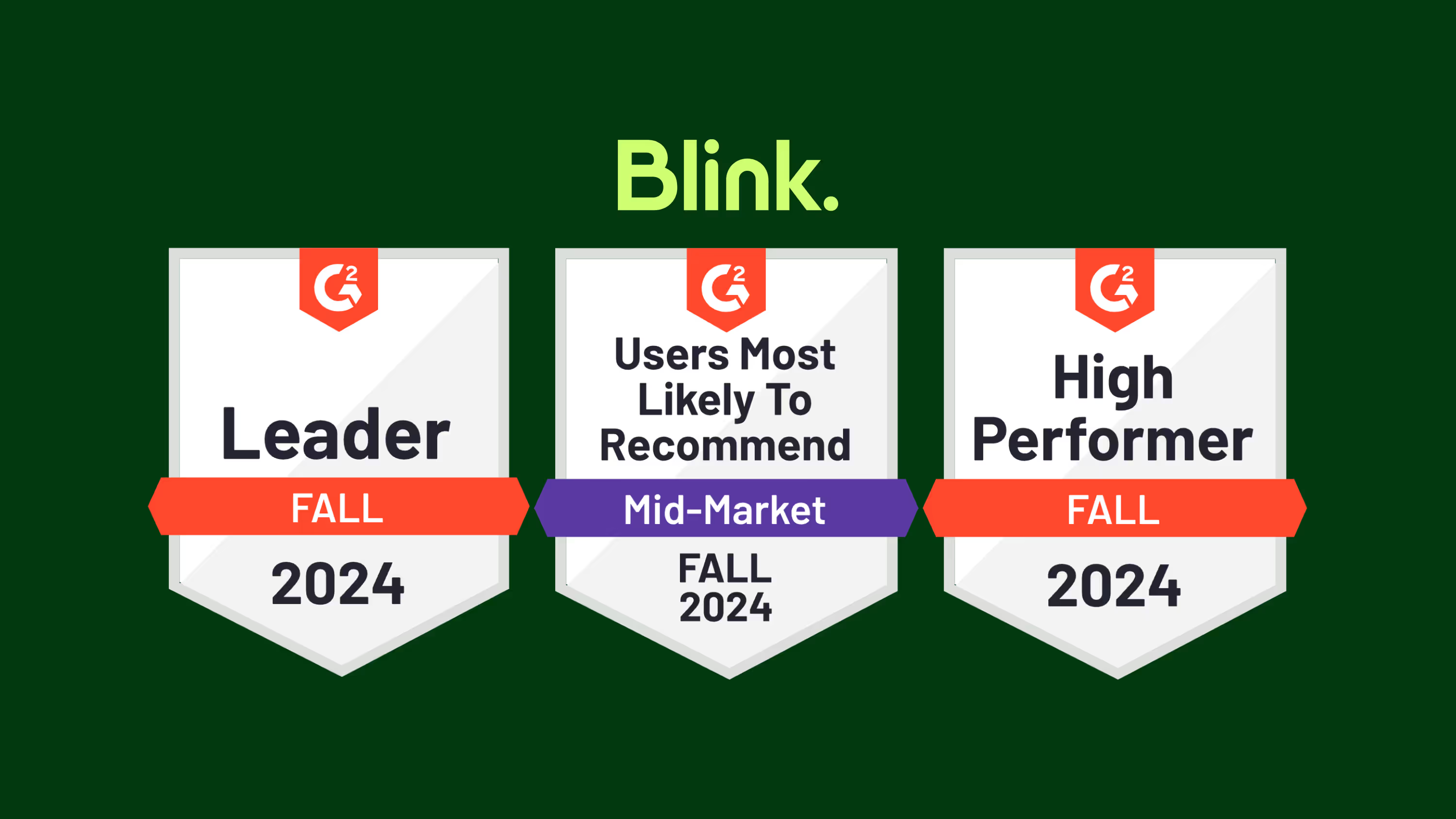
G2’s 2024 fall reports are now live — and Blink has made some major moves in employee communications categories.
We’re excited to have improved on our strong G2 ratings from spring 2024, where we were recognized in the employee communications, employee intranet, frontline worker communications, and employee engagement software categories.
Let’s take a closer look at G2’s fall results and explore what they mean for Blink — and our customers.
An introduction to G2 rankings and reports
G2 is the world’s most trusted software marketplace. It provides software reviews and comparisons and — every quarter — it releases its G2 reports.
These reports are based on the reviews of real software customers. They highlight the very best software options available and help users find products capable of solving their business problems.
To create its ranking and reports, G2 assesses software providers based on the following indices:
Results Index. To create its Results Index report, G2 looks at whether a software platform meets user requirements. It also looks at estimated ROI, product adoption rate, and how likely users are to recommend the product to a friend.
Usability Index. The Usability Index is all about how easy it is to use a particular software. G2 looks at ease of use, ease of admin, and the percentage of users who adopt the product.
Relationship Index. For its Relationship Index, G2 ranks software companies on the quality of their support. Users are asked whether a software provider is easy to work with — and whether they’d recommend this software product to a friend.
Implementation Index. To create these rankings, G2 looks at user opinions related to ease of setup and the length of time it took to go live.
Grid Report. The Grid Report is G2’s analysis of the competitive landscape for a particular software category. Each available product is plotted on the grid according to its market presence and user satisfaction.
Enterprise Grid Report. G2 segments its reviews based on the size of the company its reviewers work for. In its Enterprise Grid Report, G2 only includes reviews from enterprise companies — those with 1,001 or more employees.
Regional Grid Report. G2 also highlights the top 50 companies from each global region. A company’s region is determined by where it was founded, where its executive team resides, and where the majority of its workforce is located.
Blink’s G2 rankings for fall 2024
So how did Blink perform in the fall G2 results? We jumped up a number of spots in key employee communications categories:
Blink moved up two spots in the Relationship Index for Employee Communications and is now ranked #2 out of all employee communications software for customer service.
Blink also moved up two spots in G2’s Grid Report for Employee Communications, again ranking #2 out of all employee communications software.
Blink moved up four spots — coming in #2 — in the Enterprise Grid Report for Employee Communications.
But that’s not all! Here’s how Blink performed in employee communications, frontline worker communications, and enterprise social networking categories.
Employee communications
G2 ranked Blink as one of the top three software providers in all of the following categories:
Usability Index for Employee Communications
Relationship Index for Employee Communications
Results Index for Employee Communications
Grid Report for Employee Communications
According to G2, Blink is user-friendly, provides good customer support, and produces business results. Blink is also an industry leader in the internal communications space, with high levels of software satisfaction and performance.
In addition, showing that it performs well for large organizations, Blink was listed as one of the top three software providers for the following enterprise company categories:
Enterprise Results Index for Employee Communications
Enterprise Implementation Index for Employee Communications
Enterprise Grid Report for Employee Communications
As well as being well-reviewed by users, products included in the Employee Communications category must be able to:
Create internal content campaigns
Personalize distribution of communication
Segment company into designated groups
Allow employees to subscribe to topics or content of interest
Analyze performance of content shared within the application
With a news feed, content hub, instant messaging, survey, recognition, and digital form features, Blink gives companies everything they need to improve internal communications. Our app fosters a culture of two-way communication, so organizations can keep staff informed and engaged.
Frontline worker communications
Blink also ranked highly when it comes to frontline worker communications. It’s featured as one of the top three software providers in the following categories:
Usability Index for Frontline Worker Communication Platforms
Relationship Index for Frontline Worker Communication Platforms
Results Index for Frontline Worker Communication Platforms
Enterprise Results Index for Frontline Worker Communication Platforms
Products included in the Frontline Worker Communications category must be able to:
Provide real-time messaging capabilities, allowing frontline workers to communicate quickly and efficiently with their co-workers and supervisors
Provide the ability to broadcast announcements and updates, such as policy changes or emergency alerts, to specific individuals, groups, or the entire workforce
Enable the sharing of documents, manuals, standard operating procedures (SOPs), and other resources
Provide survey and feedback tools to gather insights from employees
Have a specific and designated use case for frontline and deskless workers
Unlike other platforms in the space, Blink was designed with the frontline workforce in mind. It’s a mobile-first employee communications app with the same great features and user experience across desktop and mobile device versions.
Employees can access Blink from their smartphones. They don’t need a company email address to log in. And with single sign-on technology, they have easy access to the internal communications, company resources, and coworker connections they need to thrive in their roles.
Enterprise social networking (ESN)
This quarter, Blink received recognition in the Enterprise Social Networking category and received a new badge:
Enterprise Europe Regional Grid Report for Enterprise Social Networking (ESN)
To qualify for inclusion in this category, a software product must:
Allow users to create and maintain profiles that include information such as contact info, skills, expertise, and interests
Have an activity feed or timeline that displays real-time updates, posts, and interactions from users or groups
Allow users to engage with content via likes and comments
Enable users to upload, share, and collaborate on a variety of files or document types
Allow users to send direct messages in one-on-one or group conversations
Organize groups or communities based on employees’ interests, projects, or departments
Blink provides informal, interactive communication channels that support bottom-up and peer-to-peer communication. Employees can share updates and photos directly with their co-workers, building connections across the organization even if they work remotely or on a company’s frontlines.
“Our frontline absolutely love being able to post out things themselves, and they feel part of the community of colleagues. We had a slight manager / frontline divide before Blink — but now it’s helped everyone feel involved and equal. We also love the Hub as it allows people to be self-sufficient! The customer support is absolutely excellent!”
Blink review
Reviewer: Matt M
Company size: Mid-market: 51-1,000 employees
Rating: 5 stars
“Blink has been a game changer for our organization. The timeliness of employee communication has increased dramatically, allowing us to exchange crucial information with our team in real time. As an Emergency Medical Services provider, all branches of our organization need to be in constant communication. Since implementing BLINK, we have benefitted from a dramatic culture change.”
Blink: Boosting employee engagement across a mobile workforce
Reviewer: Laura P
Company size: Mid-market: 51-1,000 employees
Rating: 5 stars
“We love that Blink tackles our past challenges of inconsistent messaging and low engagement, especially with our remote and frontline workforce. Its functionality across desktop and mobile apps allows staff to easily access company messages, connect with colleagues, and utilize systems on-the-go. This fosters a two-way communication flow between managers, teams, and the entire business, boosting teamwork and knowledge sharing. Employees actively use the system to post, engage with each other, and build a more collaborative work environment — that’s what makes it a game-changer for engagement.”
Blink: The all-in-one employee communications platform
G2 consistently ranks Blink as one of the best employee communications and frontline worker communications platforms on the market. So if you want to improve internal communications or employee engagement at your organization, Blink could be just the software solution you need.

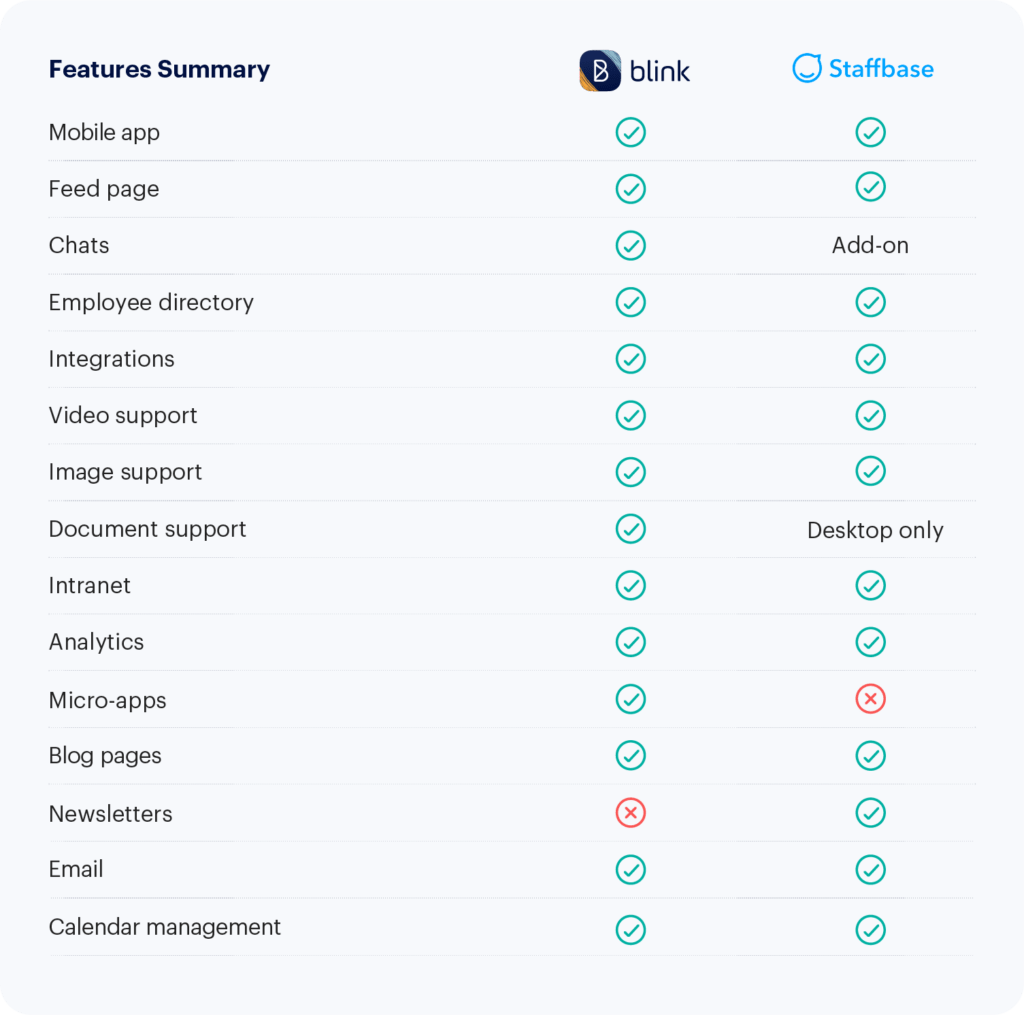
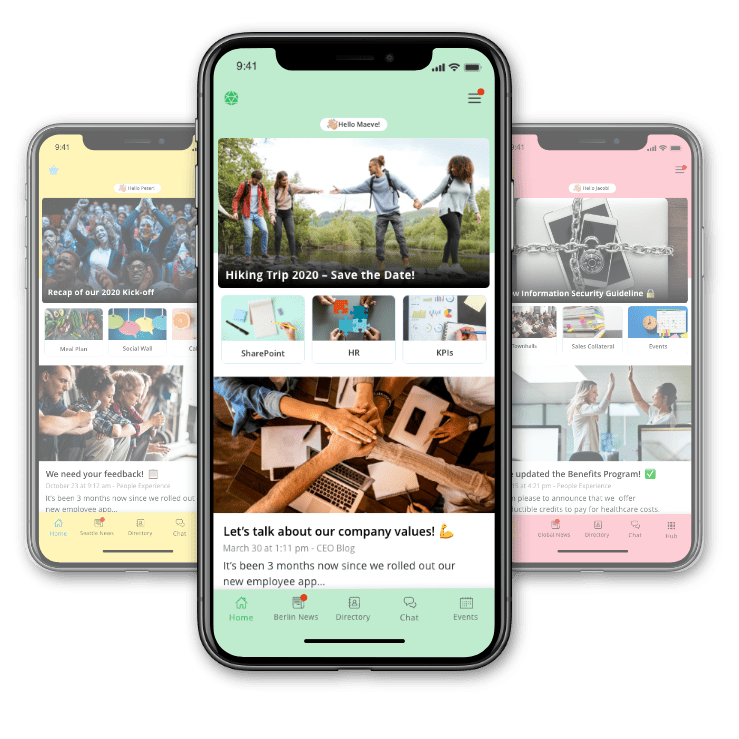
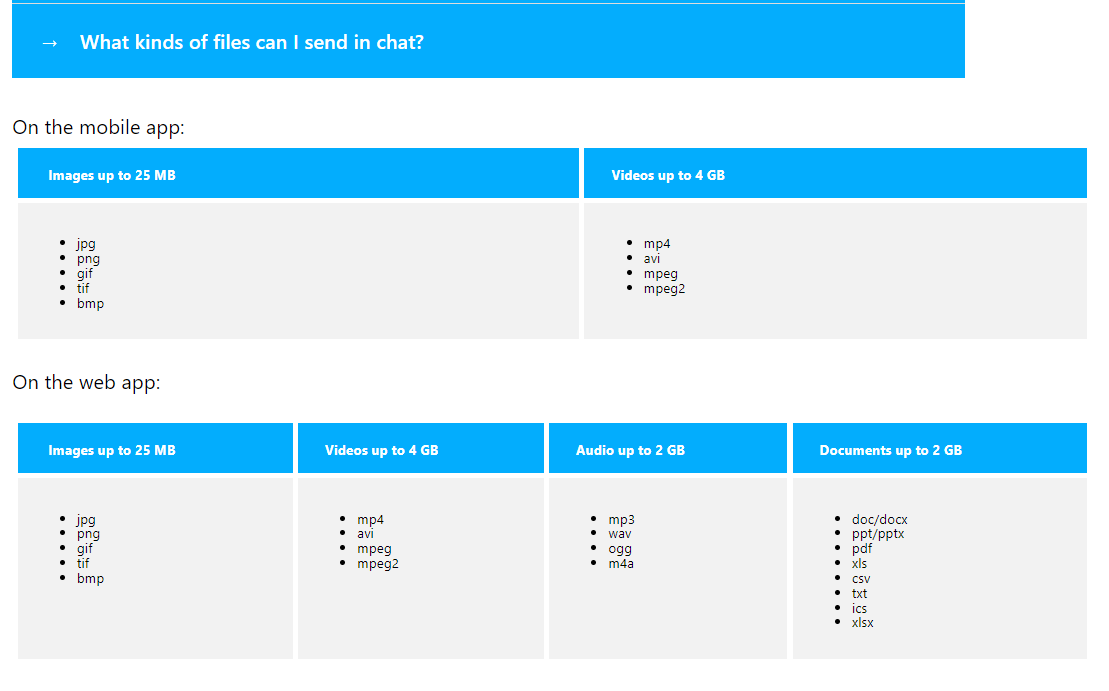


-min.avif)



.jpeg)