Study after study has shown the importance of collaboration at work. Companies that get collaboration right are more likely to beat competitors and have a highly motivated, engaged workforce.
But fostering collaboration can be a challenge when most of your employees don’t work from the office. If your employees work on the front lines or from their homes, they won’t have the same bonding opportunities as desk-based workers.
What can you do about this? Invest in creative ways to build effective virtual collaboration into your culture and promote teamwork.
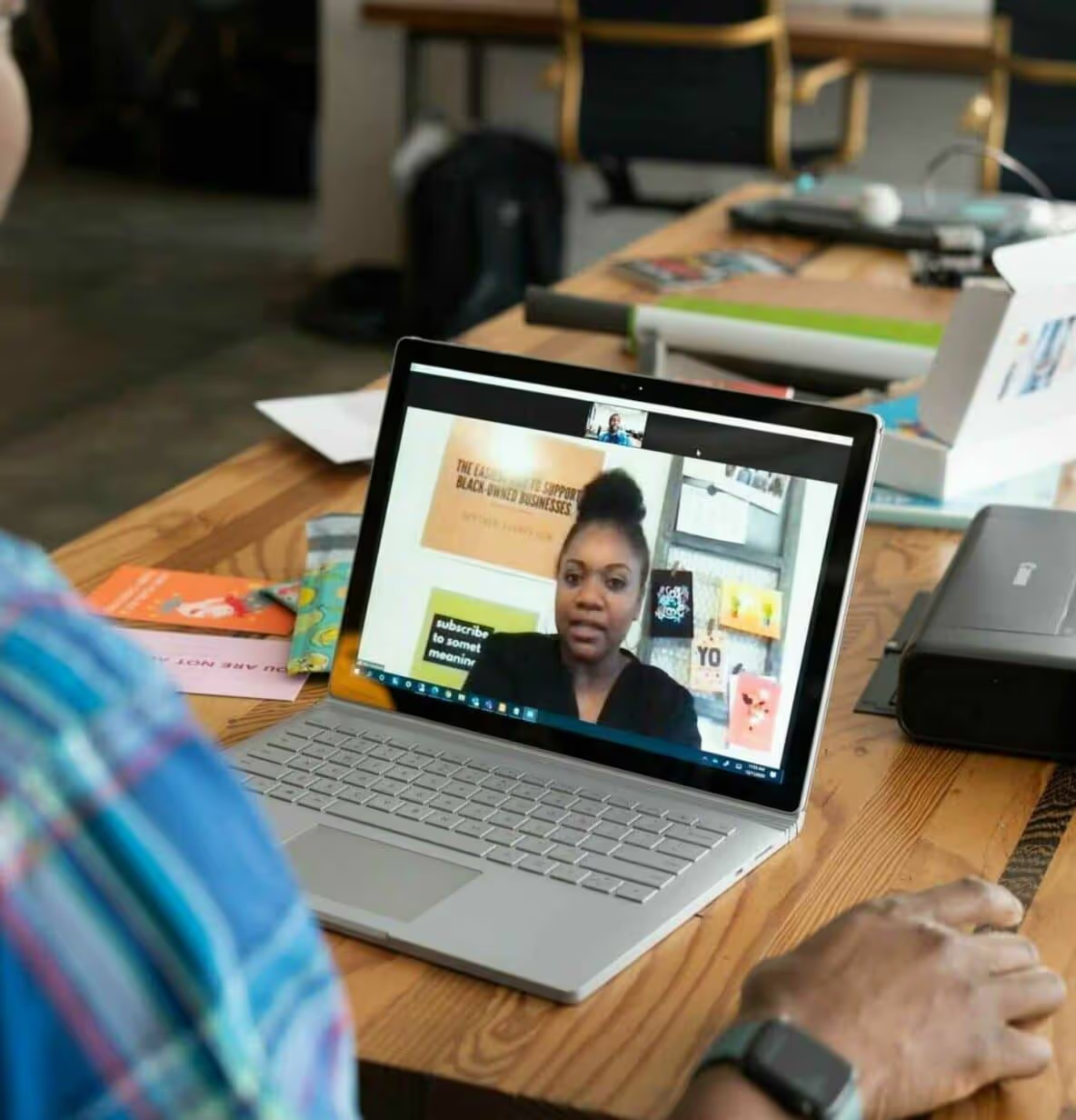
One such way is to conduct online collaboration activities. These exercises provide remote employees the chance to socialize with peers whom they rarely get to meet in person.
So in this post, we’ll walk you through some of the best online collaboration activities we have hosted or seen working recently. But before we get to that, let’s see why virtual collaboration is so important.
Why is online collaboration important?
2500% more companies globally are investing in remote collaboration initiatives in response to Covid-19.
The media has bombarded us for years with stories of isolated, self-made geniuses. But whether you’re an individual or a business, you need to work with other people and teams successfully to get positive results.
You and your workers need opportunities to develop rapport, understand each other’s abilities, and communicate effectively as needed.
It’s teamwork that lets employees put out a collective effort and get things done — things that cannot be carried out alone.

But as we said before, remote work deprives people of the chance to interact with their coworkers beyond the scope of work. If you’re part of a dispersed team, there’s little chance that you’ll ever bump into another colleague near the water cooler, or talk about a hobby.
Because of this, virtual teams often lack the human connection that is critical to job satisfaction and employee retention. And without emotional bonds, team members are less likely to be engaged at work.
That’s where online collaboration activities fill the gap. You can use them to enhance relations between employees and boost motivation. The remote collaboration exercises below will help your workers feel closer than ever, improving their overall well-being and happiness.
Online collaboration activities for remote teams
When picking the following online collaboration activities, we have ensured they are easy to implement and effective. And that they can be adapted to remote work environments using any well-known video conferencing tools.
Plus, if an activity requires a whiteboard, you can share your screen and use any online whiteboard or note-sharing software for each person to see a live, editable page. Let’s begin.
What’s on your bucket list?
Sharing our dreams with another person is a great bonding experience. In this online collaboration example, you’ll give each employee a few minutes to think and make a list of their goals.
Specifically, these would be the things they want to do in the next 12 months, or at least once in their lifetime.
Then, every worker will share the list they created in a video conference. If some employees have the same things on their lists, they can continue the conversation offline to discuss and plan together.
Online coffee meeting
Call for a short, stand-up meeting at the start of the day. Each team member finds a coffee shop nearby, or brews a fresh cup on their own if they are home.
During the meeting, they can talk about the work they have planned for the day while enjoying their morning coffee. If mornings are not possible, you can apply the same concept to evening coffee breaks.
Be careful with this activity though. It’s very easy for it to become a strictly formal, work-related conversation. Make sure to keep the chatter light and fun.
Wall of fame
This online collaboration exercise helps employees facilitate clear communication and recognize each others’ strengths.
Divide workers into teams of two. Now ask each employee to take two minutes and share a work-related accomplishment they have had recently. You can set a particular time frame, such as last year, quarter, or week.
These could include successes such as handling a client, reducing the time it takes for a task, or gaining new insights.
After a worker is done speaking, the other person on their team will summarize to make sure they have understood the value of this achievement. Then repeat the same process for everyone in the meeting.
Photo of your life
Ask your distributed employees to take or share a snap of something meaningful from their personal life.
For example, it can be:
A family portrait
A picture from their recent vacation
A shot from their daily routine
Something they recently purchased
Whatever it is, it should shine some light on their personality and interests. Then schedule a video meeting where workers can show and talk about their pictures. They can say why they chose the image and what it means to them.
Memory board
The memory board is an amazing way to bond over past events, and it helps immensely with virtual team building.
Create a list of some work-related subjects and post them as notes on a whiteboard. For example:
My favorite team member
First day at work
Client presentation
You can then have each worker pick a topic and share a memory related to it.
Two truths and a lie
This is a great collaboration example for newly formed remote teams. Typical introductions based on “say something about yourself” can feel awkward, boring, and uncomfortable.
But with this remote team-building activity, you can give workers a fun, alternative way to introduce themselves and improve future communication.
Before calling an introduction meeting, ask employees to prepare three statements — two truths and one lie — about themselves. The lie should be conveyed as realistically as possible. It shouldn’t be easy to spot.
Each worker will then disclose their three statements in the meeting when delivering their introduction. And other team members will guess what’s the lie and what the truths are. Once they are done, the worker will tell the team members if they were right or wrong.
You can also make it more fun by awarding points to people who hid the lie successfully or who guessed it correctly.
Guess the phrase
This team-building activity has gained so much momentum over the years that companies like Hasbro have turned it into an electronic game.
Create a list of words or phrases. These could include celebrities, expressions, objects in the office, or movie names.
Then assign one to each employee. No one should know the word apart from the worker whom it’s assigned to.
Next, ask each employee to describe the word given to them without actually mentioning the word. And other team members will guess what the word is.
Online lunch and learn
Breaking bread together is an obvious connector. And lunch and learns have been one of the classic online training activities to promote collaboration in physical workplaces. So there’s no reason they can’t be adapted to the virtual world.

Get your team members on a video call and invite a subject matter expert to teach something that everyone can use. The topics may include productivity, problem-solving, and of course, working remotely.
You can schedule the event during lunchtime, allowing workers to enjoy their meals while absorbing new knowledge. If budget is not an issue, you can also offer to pay for the food.
Survival on an island
In this virtual team-building activity, give your team a hard situation. For example, let’s say they were going somewhere in a plane and it crashed on a deserted island, or a zombie apocalypse has made its way into their region.
Then share with them a list of objects that might help with their survival and eventual rescue. Next, ask them to rank each item based on its importance, first individually and then as a whole group.
It’s a great way for everyone to reflect and compare their personal decisions with collective choices. And it may give them new perspectives on collaboration.
Online recipe showcase
It’s not just eating. Cooking too can lead to an effective online collaboration exercise. With the popularity of remote work, more and more people are cooking at home.

You can start an online event where workers share their culinary favorites or experiments with food. And you can also run a challenge where employees will try each others’ recipes and take pictures of what they made.
Over to you: 10 online collaboration activities
Online team building doesn’t have to be difficult. It can be just as fun for workers to get to know each other virtually as physically.
As you can see, there are many online collaboration activities that are quick and easy to arrange. And they are essential to creating a digital employee experience fueled by teamwork and positive working relationships.
Not just that.
Online team-building exercises help you leverage the unique strengths and perspectives of each and every employee, resulting in a better output at work. So incorporate them regularly in the virtual workplace, and the harmony you’ll create is bound to help your business excel. Consider it one of the best practices for employee engagement you need to follow.
Plus, having the right technology, like one of the best employee engagement tools or an all-in-one team collaboration platform can foster collaboration to an even greater level. Request a free Blink demo today.

Study after study has shown the importance of collaboration at work. Companies that get collaboration right are more likely to beat competitors and have a highly motivated, engaged workforce.
But fostering collaboration can be a challenge when most of your employees don’t work from the office. If your employees work on the front lines or from their homes, they won’t have the same bonding opportunities as desk-based workers.
What can you do about this? Invest in creative ways to build effective virtual collaboration into your culture and promote teamwork.
One such way is to conduct online collaboration activities. These exercises provide remote employees the chance to socialize with peers whom they rarely get to meet in person.
So in this post, we’ll walk you through some of the best online collaboration activities we have hosted or seen working recently. But before we get to that, let’s see why virtual collaboration is so important.
Why is online collaboration important?
2500% more companies globally are investing in remote collaboration initiatives in response to Covid-19.
The media has bombarded us for years with stories of isolated, self-made geniuses. But whether you’re an individual or a business, you need to work with other people and teams successfully to get positive results.
You and your workers need opportunities to develop rapport, understand each other’s abilities, and communicate effectively as needed.
It’s teamwork that lets employees put out a collective effort and get things done — things that cannot be carried out alone.
But as we said before, remote work deprives people of the chance to interact with their coworkers beyond the scope of work. If you’re part of a dispersed team, there’s little chance that you’ll ever bump into another colleague near the water cooler, or talk about a hobby.
Because of this, virtual teams often lack the human connection that is critical to job satisfaction and employee retention. And without emotional bonds, team members are less likely to be engaged at work.
That’s where online collaboration activities fill the gap. You can use them to enhance relations between employees and boost motivation. The remote collaboration exercises below will help your workers feel closer than ever, improving their overall well-being and happiness.
Online collaboration activities for remote teams
When picking the following online collaboration activities, we have ensured they are easy to implement and effective. And that they can be adapted to remote work environments using any well-known video conferencing tools.
Plus, if an activity requires a whiteboard, you can share your screen and use any online whiteboard or note-sharing software for each person to see a live, editable page. Let’s begin.
What’s on your bucket list?
Sharing our dreams with another person is a great bonding experience. In this online collaboration example, you’ll give each employee a few minutes to think and make a list of their goals.
Specifically, these would be the things they want to do in the next 12 months, or at least once in their lifetime.
Then, every worker will share the list they created in a video conference. If some employees have the same things on their lists, they can continue the conversation offline to discuss and plan together.
Online coffee meeting
Call for a short, stand-up meeting at the start of the day. Each team member finds a coffee shop nearby, or brews a fresh cup on their own if they are home.
During the meeting, they can talk about the work they have planned for the day while enjoying their morning coffee. If mornings are not possible, you can apply the same concept to evening coffee breaks.
Be careful with this activity though. It’s very easy for it to become a strictly formal, work-related conversation. Make sure to keep the chatter light and fun.
Wall of fame
This online collaboration exercise helps employees facilitate clear communication and recognize each others’ strengths.
Divide workers into teams of two. Now ask each employee to take two minutes and share a work-related accomplishment they have had recently. You can set a particular time frame, such as last year, quarter, or week.
These could include successes such as handling a client, reducing the time it takes for a task, or gaining new insights.
After a worker is done speaking, the other person on their team will summarize to make sure they have understood the value of this achievement. Then repeat the same process for everyone in the meeting.
Photo of your life
Ask your distributed employees to take or share a snap of something meaningful from their personal life.
For example, it can be:
A family portrait
A picture from their recent vacation
A shot from their daily routine
Something they recently purchased
Whatever it is, it should shine some light on their personality and interests. Then schedule a video meeting where workers can show and talk about their pictures. They can say why they chose the image and what it means to them.
Memory board
The memory board is an amazing way to bond over past events, and it helps immensely with virtual team building.
Create a list of some work-related subjects and post them as notes on a whiteboard. For example:
My favorite team member
First day at work
Client presentation
You can then have each worker pick a topic and share a memory related to it.
Two truths and a lie
This is a great collaboration example for newly formed remote teams. Typical introductions based on “say something about yourself” can feel awkward, boring, and uncomfortable.
But with this remote team-building activity, you can give workers a fun, alternative way to introduce themselves and improve future communication.
Before calling an introduction meeting, ask employees to prepare three statements — two truths and one lie — about themselves. The lie should be conveyed as realistically as possible. It shouldn’t be easy to spot.
Each worker will then disclose their three statements in the meeting when delivering their introduction. And other team members will guess what’s the lie and what the truths are. Once they are done, the worker will tell the team members if they were right or wrong.
You can also make it more fun by awarding points to people who hid the lie successfully or who guessed it correctly.
Guess the phrase
This team-building activity has gained so much momentum over the years that companies like Hasbro have turned it into an electronic game.
Create a list of words or phrases. These could include celebrities, expressions, objects in the office, or movie names.
Then assign one to each employee. No one should know the word apart from the worker whom it’s assigned to.
Next, ask each employee to describe the word given to them without actually mentioning the word. And other team members will guess what the word is.
Online lunch and learn
Breaking bread together is an obvious connector. And lunch and learns have been one of the classic online training activities to promote collaboration in physical workplaces. So there’s no reason they can’t be adapted to the virtual world.
Get your team members on a video call and invite a subject matter expert to teach something that everyone can use. The topics may include productivity, problem-solving, and of course, working remotely.
You can schedule the event during lunchtime, allowing workers to enjoy their meals while absorbing new knowledge. If budget is not an issue, you can also offer to pay for the food.
Survival on an island
In this virtual team-building activity, give your team a hard situation. For example, let’s say they were going somewhere in a plane and it crashed on a deserted island, or a zombie apocalypse has made its way into their region.
Then share with them a list of objects that might help with their survival and eventual rescue. Next, ask them to rank each item based on its importance, first individually and then as a whole group.
It’s a great way for everyone to reflect and compare their personal decisions with collective choices. And it may give them new perspectives on collaboration.
Online recipe showcase
It’s not just eating. Cooking too can lead to an effective online collaboration exercise. With the popularity of remote work, more and more people are cooking at home.
You can start an online event where workers share their culinary favorites or experiments with food. And you can also run a challenge where employees will try each others’ recipes and take pictures of what they made.
Over to you: 10 online collaboration activities
Online team building doesn’t have to be difficult. It can be just as fun for workers to get to know each other virtually as physically.
As you can see, there are many online collaboration activities that are quick and easy to arrange. And they are essential to creating a digital employee experience fueled by teamwork and positive working relationships.
Not just that.
Online team-building exercises help you leverage the unique strengths and perspectives of each and every employee, resulting in a better output at work. So incorporate them regularly in the virtual workplace, and the harmony you’ll create is bound to help your business excel. Consider it one of the best practices for employee engagement you need to follow.
Plus, having the right technology, like one of the best employee engagement tools or an all-in-one team collaboration platform can foster collaboration to an even greater level. Request a free Blink demo today.

So, you already know how digital transformation can improve your warehousing, docking and inventory processes, but are you paying enough attention to digitalization in your run-the-business systems? Here's why you need to.
Digital technology is making huge advancements in the logistics sector, yet the frontline are still left feeling unsatisfied. By improving not only supply chain capabilities, but also your day-to-day employee management systems, businesses can enjoy a number of unexpected benefits, which we've put together for you in this handy guide.
We'll share some of our frontline employee engagement expertise with you here, as well as the latest research on how digital transformation can help in areas such as recruitment, training and tracking performance. This should help HR leaders see just how valuable digital tech can be when it comes to making their logistics workforce operate better and more efficiently across the board.
What is digital transformation (DX) in logistics?
Digital transformation (DX) in logistics is the use of digital technologies to improve the efficiency, effectiveness and responsiveness of logistics systems in order to better meet the needs of customers and businesses.
While you may be familiar with the growing pressure to digitize your supply chain management and front-of-house systems, many logistics companies are just starting to realize the impact that digital transformation can have on their back-end operations as well.
In order to keep up with today's fast-paced and competitive business environment, HR leaders will need to look at how they leverage employee technology in order to better manage their workforce; recruit and retrain more effectively; and track employee performance and engagement over time.
By creating a more streamlined, digital and integrated approach to these HR functions, businesses can streamline their operations and better meet the needs of both customers and employees alike.
So for any HR leader looking to get ahead of the competition, it is essential to embrace digital transformation in logistics and use it as a tool to improve operational efficiency, employee engagement, and overall business performance.
Core goals of logistics digital transformation
As business leaders, it's crucial to have clear goals in mind when looking to invest in or implement new digital tools.
While common logistics and supply chain processes like docking, inventory, digital supply chains, and other front-of-house systems might not be your main focus, digital transformation in logistics can help you improve or manage your business in other important ways. Think project management, team communication, and business planning, just to name a few.
But what specific goals should you be looking to achieve with your run-the-biz logistics DX efforts? Core goals often include:
Cost Reduction: For HR professionals, this may mean looking for ways to automate processes, reduce employee errors and minimize overhead costs related to hiring, training, and onboarding new employees.
Improve Communication: One of the main goals of the digital transformation journey is improving communication both internally and externally, with an aim to drive increased employee satisfaction and, ultimately, retention.
Customer Satisfaction: Improving customer satisfaction is another important priority for many logistics leaders looking to leverage digital technologies. Whether it's through improvements in product quality and delivery times, or better tracking of customer feedback and requests, maintaining high levels of service can be a key goal of DX efforts in logistics.
Employee Engagement: One often forgotten goal of DX efforts in the transportation and logistics sector is to improve employee engagement and happiness, which can have a direct impact on your employee retention and productivity levels.
Increase Profits: While not always a top priority for HR leaders, increasing profits and driving ROI can be another overarching goal of DX efforts in the industry – and this can be a great hook to get buy-in from your IT leaders or CEO.
While there are many benefits to be had from digital transformation for logistics companies, there are also a number of potential barriers (see image above) and roadblocks that can impede success. For HR professionals, the main challenges will likely include:
Resistance to Change: One of the biggest challenges faced by any company looking to undergo digital transformation is the natural resistance to change that arises within any organization. This can be especially true in cases where employees feel they are being asked to do more work or change the way they've been doing things for years.
Company Culture: Another obstacle that can arise during DX efforts in logistics is company culture. If the company's culture is not supportive of change or new technologies, it can be very difficult for any type of transformation – digital or otherwise – to take hold and be successful.
Legacy Infrastructure: Finally, one of the biggest challenges faced by companies looking to digitize their operations is legacy infrastructure. Many companies have invested heavily in outdated systems and technologies that can be difficult – and expensive – to replace. As such, it often takes a lot of time and effort to upgrade these systems in order to enable a successful DX initiative.
By knowing what you're up against, you can better prepare yourself and your organization for the challenges of digital transformation in logistics. With a clear understanding of your goals and potential roadblocks, you can work to overcome resistance, build a supportive company culture, and upgrade or replace legacy systems as needed.
And with the right approach and mindset, you can leverage digital tools that will help you achieve improved business outcomes and drive higher levels of success for your organization.
Driving digital transformation with frontline workers
Digital business processes impact your frontline team directly, and they need to be included in the transformation journey. Frontline workers are often left feeling like an afterthought, particularly during digital transformation efforts, which can be a huge mistake.
These workers are the ones who interface directly with customers and clients on a daily basis, and they understand what improvements will make their jobs easier – and ultimately benefit the company as well. As such, it is important to invest in frontline workers when driving supply chain digital transformation initiatives.
For logistics companies, this often means leveraging frontline workers as a source of insights, ideas, and feedback on what technologies will work best for them. For logistics employees, this could include instant communication, on-the-go manuals, direct route information or a familiar social media interface: all features of theBlink Frontline Engagement App.
5 unexpected HR benefits of DX in logistics
1. Reduction in staff turnover
With a real pressure on HR leaders to bring in high-quality candidates and retain their existing staff, one of the most surprising benefits of digital transformation in logistics is reduced staff turnover.
By leveraging new technologies in your business strategy to improve the work environment – such as intuitive systems that are easy to use or improved communication channels – you can help alleviate some of the stresses and challenges faced by your employees on a daily basis.
52% of frontline workers claim that they would leave their job over tech tools, according to Unleash.ai, highlighting the impact that the right workplace technology has on employee retention.
The right digital initiatives can make your workers feel more valued, appreciated, and supported – thereby helping to reduce turnover rates in the long-term.
2. Better employee engagement
Another unexpected benefit of digital transformation in logistics is improved employee engagement. This can be driven by a number of different factors, such as the use of gamification techniques or employee engagement apps that allow workers to connect with their colleagues and share ideas.
DX for your logistics workforce can also help foster a company culture of collaboration, innovation, and teamwork. By investing in your employees and encouraging them to work together towards common goals, you can cultivate a sense of shared purpose that will help drive greater success for the entire organization.
And with improved employee engagement and loyalty, HR leaders are better equipped to attract and retain top talent, manage performance, and achieve their business goals. Highly engaged employees also achieve 23% more profitability and 43% less employee turnover, Gallup reports, so the impact of upgrading your employee engagement initiatives runs deeper than you might think.
3. More productive staff
In addition to greater employee engagement and reduced turnover, digital transformation in logistics can also help boost staff productivity. In fact, McKinsey reports that well-connected teams see a productivity increase of 20–25%, so if you can target your DX initiatives towards connecting your employees, you could see another unexpected benefit.
With the right tools and technologies at their fingertips, your workers will be able to streamline processes, optimize performance, and improve output. This means better results for you and your organization – as well as increased job satisfaction for your logistics workers as it becomes easier to succeed in their frontline roles.
Whether you are implementing new systems, optimizing existing technology, or offering your employees training and support, digital transformation can help unlock the full potential of your workers and help drive greater success for your business.
4. Improved safety
In the logistics sector, one of the biggest concerns is often worker safety. This can be due to a number of factors, including long hours on the road, heavy lifting and handling of goods, or exposure to harsh weather conditions and other environmental hazards.
With digital transformation in logistics, however, you can help improve worker safety by leveraging new technologies and systems to protect your staff. This could include investing in smart wearables that track location and movement, implementing automated risk assessment tools, or an easy-to-access, Central Hub storing safety procedures and policies.
With this focus on safety, your workers will be more confident about their working conditions and better able to manage any risks that arise. And as a result, you can help reduce workplace injuries and help keep your employees safe, satisfied and healthy.
5. Increase your bottom line
And finally, perhaps one of the most valuable benefits of digital transformation in logistics is an improved bottom line. Whether you are looking to reduce costs, increase revenue, or improve overall efficiency for profitability, DX can help support these goals and drive greater success for your organization.
By leveraging new technologies and systems, you can streamline day-to-day processes, optimize performance and drive retention amongst your logistics workforce, saving on costs related to employee churn and recruitment and boosting your bottom line in the long-term.
Tips to help drive digital transformation in the logistics industry
Create a DX roadmap: A DX roadmap should include an evaluation of existing processes and systems, as well as a plan for implementing new technologies and improving existing ones.
Align digital transformation strategy with business objectives: To maximize the impact of your digital transformation efforts in logistics, it's important to align these efforts with business objectives and goals. This will help ensure that you are investing in solutions that can have the greatest impact on your operations.
Appoint digital transformation champions: To drive successful implementation and adoption of digital tools in logistics, it is important to identify key champions within your organization who can act as advocates for change.
Communicate clearly and often: To help ensure that all stakeholders are on the same page, it is important to communicate your digital transformation goals and strategies clearly and often, as well as work closely with IT or other key departments to troubleshoot any issues or problems along the way.
Keep track of your timeline: Maintaining a clear and realistic timeline for your digital transformation journey is essential to ensuring that you stay on track and meet your goals.
Use the right tools: Whether it's a digital tool for employee engagement, a new ERP system, or order tracking do your best to ensure it's right fit that will drive performance forward.
By keeping these best practices in mind, HR leaders can help drive digital transformation in logistics, maximizing the impact of these efforts on their organization as a whole.
Accelerate your digital transformation today…
The Blink Frontline Engagement App offers a powerful and easy-to-use platform for improving communication, collaboration, and task management between logistics managers and frontline employees. Whether you are looking to reduce costs or drive employee engagement in your logistics operations, the Blink app can help you achieve your goals quickly and easily.
Don't fall behind in the DX movement – get started with Blink today, and start accelerating your digital transformation in logistics!
With features like Secure Chats for real-time communications, Blink Feedfor product updates, and a Central Hub for document management, Blink can help drive increased innovation and productivity throughout your entire organization.
The Winter 2025 product release highlights Blink's latest innovations — some already live and others rolling out over the next quarter. Missed our Autumn 2024 release? Check it out here!
At Blink, our employee experience platform is always evolving to keep pace with the ever-changing needs of organizations and their teams.
In line with our dedication to creating exceptional employee experiences — whether on the frontline or in the front office — we’re excited to introduce our latest product features, built to transform how employees connect with their organizations and each other.
From enabling easy communication with in-app calling and live streaming, to powering better outcomes through enhanced data intelligence, these powerful new features are designed to support a connected, engaged, and uplifted workplace.
#1. Voice and video calling: Power real-time, in-app collaboration
We’re excited to announce the addition of native 1:1 video and voice calling within Blink, making it even easier for employees to connect, collaborate, and deliver real-time results for your business.
This new feature will include:
Streamlined communication: Enables seamless 1:1 video and voice calls directly from individual chats or colleague profiles on mobile.
Built for international teams: Ideal for organizations with global workforces who need quick and reliable access to colleagues.
Future-proof design: Will launch on mobile, with plans to extend to desktop and explore group calling capabilities.
Flexible add-on: Available as an optional feature priced based on users, ensuring scalability for any organization.
{{mobile-voice-video="/image"}}
#2. Live streaming: Go live with all employees at once
Bring your live events to life on Blink! Our new live streaming feature lets you promote and host events directly in the Feed, fostering real-time engagement and interaction.
Here’s what you can do:
Stream seamlessly via Vimeo or YouTube, with full support for Vimeo interactions on Blink.
Share streams from other platforms using Real Time Messaging Protocol (RTMP) for an additional cost.
Engage your audience as they comment and interact during your event.
Discover what drives your organization with Advanced Employee Intelligence — an upgraded analytics suite that goes beyond the basics to tackle turnover, engagement, and productivity. These actionable insights, available as a paid add-on feature, will empower you to address challenges proactively and foster a thriving workplace.
Transform your data into a powerful driver of organizational success with four core pillars of insights:
Activation: Ensure every employee is connected and engaged with activation metrics by team and role, plus gamified nudges to boost adoption.
Communication: Maximize the impact of your messages with heat maps and deep-dive analysis into communication effectiveness by category, media, and more.
Engagement: Track and improve satisfaction with tools like engagement leaderboards and influencer metrics that spotlight key communicators.
Productivity: Streamline workflows by analyzing app usage, tool access, and shift management to reduce friction and optimize efficiency.
#4. Journeys 2.0: Engage employees before day one
Make a lasting first impression with Blink’s new Journeys for preboarding! This enhancement to our Journeys feature allows managers to kick off onboarding before an employee’s first day, creating a standout employee experience right from the offer stage.
Here’s what’s new:
Include line managers in the journey for a seamless, supportive experience.
Use enhanced start-date triggers to send tailored communications ahead of the first day.
Deliver a bespoke preboarding journey that sets the stage for success.
#5. Image-first feed: Curate the content experience
We’ve made the Feed even better with a new posting experience designed for high-quality, highly curated content that stands out and visually engages users.
Here’s what’s new:
Choose your layout: Opt for the classic look or an enhanced layout that puts your images front and center.
Audience-first review: See how your post will appear to your audience before you post.
Simple to use: The curation and review steps are seamlessly built into the posting process.
#6. Self-service SSO: Simplify access to third-party systems
Our new self-service SSO feature streamlines user access to key third-party systems directly through Blink, reducing the need for multiple logins and improving overall security. This feature makes it easier than ever to connect Blink with the tools your teams rely on.
Key takeaways include:
Enhanced user experience: Simplify workflows by allowing users to access essential systems without remembering multiple passwords, driving better uptake and ease of use.
Flexible configuration: Administrators can set up and manage SAML 2.0 Single Sign-On directly from the Blink Admin dashboard, enabling seamless integration with your Service Provider.
#7. Polls as Stories: Boost engagement with a visual integration
Take your Polls to the next level by sharing them through Stories, including our new image-first Polls feature, to maximize visibility and participation. This integration helps make employee feedback and interaction more accessible and engaging than ever.
Here’s what you can do now:
Increase engagement: Promote Polls in Stories to capture attention and encourage more responses from your teams.
Visual appeal: Leverage image-first Polls to create a dynamic and engaging experience, driving curiosity and interaction.
{{mobile-story-polls="/image"}}
#8. Chat and channel moderation: Maintain a professional communication environment
Administrators now have greater control over chats and channels with new moderation capabilities, including the ability to hide certain types of content when necessary. These tools empower admins to foster a safe, engaging, and well-managed communication space for everyone.
With this feature, you’ll gain:
Improved oversight: Maintain a positive and professional environment by managing and moderating conversations directly within chats and channels.
Content management: Use the “hide” feature to remove inappropriate or irrelevant content, ensuring discussions stay on track.
#9. Dark mode: A new way to experience Blink
Enjoy a more comfortable and visually striking interface with our new dark mode feature, now available via a simple toggle in your settings. This update adds a touch of personalization and comfort to your everyday platform experience.
With dark mode:
Improved comfort: Reduce eye strain during late-night use or in low-light environments with a sleek, dark interface.
Personalized experience: Give users the flexibility to choose between Light and Dark modes based on their preferences.
{{mobile-dark-mode-post="/image"}}
Coming soon
Get excited for updates to the Hub experience, moderation enhancements, and in-app events management!
Bring your consumer-grade employee experience to life
As we kick off a new year of workplace evolution, our mission remains unchanged: to deliver tools that strengthen connections, boost productivity, and ensure every employee enjoys a seamless and exceptional experience — no matter their role or location.
These latest product enhancements reflect our commitment to helping organizations supercharge their employee experience as we step into 2025.
By understanding the platform features that really drive HR impact — and knowing what to do to ensure platform success.
Let’s take a look.
What is employee experience?
Employee experience is the combined impact of every interaction an employee has within your company — from their first day to their last, and everything in between.
It’s shaped by company culture, the quality of workplace communication, learning and development opportunities, compensation, and well-being support.
It’s also shaped by the software and resources employees use to do their jobs — whether that’s a dedicated employee experience platform like Blink or tools that support your operations.
Ultimately, employee experience is not one thing. It’s the accumulation of small, daily moments that determine how employees feel, how hard they work, and how long they stay at your organization. And it has a direct impact on the metrics that matter most to HR.
Why employee experience matters for HR
A positive employee experience improves employee engagement, productivity, retention, and performance — core HR goals.
It helps HR teams to hit their hiring targets. When you’re known as a great place to work, you attract better candidates. It also reduces HR workload because employees can access the resources they need when they need them, and there are fewer avoidable queries.
The organizations that understand this don’t treat employee experience as a culture initiative. They treat it as a business strategy.
Let’s look at some examples.
Cisco has built an onboarding experience that 90% of employees say exceeds their expectations. Beyond this initial training, the company is committed to helping employees do their best work and progress in their careers.
Hilton, named the #1 World’s Best Workplace in 2025, has made employee well-being central to its employee value proposition (EVP). With sabbaticals, benefits for caregivers, and mental health support, Hilton has ensured that 85% of its staff feel balanced and healthy at work.
Elara Caring — a provider of personal care, home health, and hospice services with over 32,000 caregivers — has prioritized internal communication and co-worker connection. After implementing a frontline app, 95% of employees say they feel more connected to the company.
Employee experience in frontline organizations: Key considerations
With over 2.7 billion deskless workers globally, the employee experience gap between frontline and desk-based staff is one of the most significant — and most costly — challenges HR leaders face.
Frontline workers are often disconnected from leadership, colleagues, and company culture. They have limited access to desktop-based tools. And they miss out on development opportunities and workplace perks that desk-based employees take for granted.
When their experience is poor, they leave — at rates that consistently outpace desk-based worker attrition.
Closing this gap requires intentional effort — and in most cases, it requires digital tools that every employee can actually access.
10 employee experience platform features that drive HR success
The right employee experience platform gives you the tools to hit your most important HR targets — whether that’s improving retention, driving engagement, streamlining onboarding, or building a culture that people genuinely want to be part of.
But not all platforms are built equal. And for organizations with a large frontline workforce, you need tools that meet staff where they are — serving customers, transporting goods, and keeping your operations on track.
Here are the features that matter most, and how each one connects to your HR goals.
1. Frontline-friendly features
For organizations with a significant frontline workforce, these frontline-friendly features are a baseline. Every other feature on this list only delivers value if frontline employees can actually access and use your platform.
To ensure your EX platform meets the needs of frontline workers, look for:
Mobile-first design. Platforms that are built for smartphones from the ground up. Not a desktop platform with a mobile app bolted on.
Offline capabilities. So employees in low-connectivity environments aren’t cut off from the information they need.
Intuitive, consumer-grade interfaces. Frontline workers won’t adopt tools that feel clunky or slow. The bar is set by the apps they already use in their personal lives.
No corporate email required. Access is granted via a phone number or employee ID, so every worker can use your systems from day one.
How will this help me meet my goals?
Ensure your employee experience investment reaches all employees — not just those who sit at a desk.
Reduce the friction that causes low platform adoption rates and poor ROI.
Close the experience gap between frontline and desk-based employees that drives disproportionately high frontline attrition.
{{mobile-hub="/image"}}
2. Two-way communication tools
Effective internal communication requires two-way channels that give employees access to leadership updates, co-worker conversations, and company news — and give leadership real visibility into what employees are thinking.
You also need structured channels for different types of communication, so the right messages reach the right people without everything competing for attention in the same feed.
For frontline organizations specifically, those comms channels need to be available on smartphones. Push notifications and mandatory reads also come in very useful.
How will this help me meet my goals?
Easily communicate company updates, initiatives, and events to your entire team or specific departments.
Work toward employee engagement goals by gathering valuable employee feedback through direct one-on-one or group chats.
Build trust and transparency because employees feel they have a direct line to leaders.
3. Surveys, polls, and real-time feedback
Annual surveys tell you how employees felt twelve months ago. But by the time the results land, the moment to act has usually passed.
Real-time feedback tools — pulse surveys, quick polls, employee sentiment analysis, and manager check-ins — give HR a live picture of how employees are feeling, what’s working, and where action is needed.
This can make the difference between responding to a retention crisis and preventing one.
The best platforms make surveys easy to launch and feedback easy to send. Short, targeted surveys take seconds to complete and get higher response rates — particularly from time-poor frontline workers.
You should also look for analytics and reports that help you make sense of your findings. That way, you can create a plan of action and employees get to see visible change in response to their feedback.
How will this help me meet my goals?
Surface issues before they impact engagement and retention.
Get the data to make evidence-based decisions on HR initiatives, rather than relying on instinct.
Demonstrate to employees that their voice matters, driving engagement and belonging in the process.
This is a problem. Because a retail associate doesn’t need the same updates as a warehouse operative. A new starter needs different content than a ten-year employee.
When every employee sees everything, the platform becomes noisy — and people stop paying attention.
Audience targeting allows HR and comms teams to deliver the right content to the right people, based on their role, location, department, and tenure. It helps you reduce overwhelm and land messages more effectively.
What’s more, when staff are confident of finding personalized content on your employee experience platform, they keep logging in. So you reach more employees through the same streamlined channels.
When choosing employee experience software, look for tools that allow you to create and manage employee groups, and tools that let you customize dashboards on an employee-by-employee basis.
How will this help me meet my goals?
Improve message cut-through by ensuring employees only receive content that’s relevant to them.
Enable more targeted feedback collection — surveying specific teams or locations rather than the whole organization at once.
Reduce the noise that causes employees to disengage from internal comms and EX platforms entirely.
5. Automated employee journeys
Onboarding is one of the highest-stakes communication challenges in any organization.
When it's inconsistent — when new hires receive different information depending on which manager onboards them or which shift they start on — it shows up in slower ramp-up times, more HR queries, and higher early attrition.
Automated employee journeys solve this by delivering the right content to every employee at the right moment — consistently, regardless of role, location, or manager.
Pre-boarding information before day one. Essential policies and system guides on arrival. Role-specific training in a logical sequence. Check-ins at 30, 60, and 90 days to identify and address early disengagement.
The same logic applies beyond onboarding — to role transitions, promotions, returns from leave — any other moment in the employee lifecycle where timely, consistent communication makes a meaningful difference.
Pick an employee platform that supports content automation — and connects with your HRIS — and staff get a more consistent and comprehensive experience.
How does this help me meet my HR goals?
Reduce the volume of repetitive onboarding queries that consume HR capacity.
Ensure every new hire gets the same high-quality experience regardless of manager or location.
Improve early retention by giving new starters the confidence and information they need to succeed from day one.
A mobile-first platform with built-in recognition tools changes that. It enables peer-to-peer recognition, manager shoutouts, and company-wide celebrations of employee achievement — visible to everyone, not just the people who happen to be in the office.
The most effective recognition tools fit seamlessly into the work day.
If giving recognition means logging into a separate system and filling out a form, it won't happen consistently. If it takes two taps from the same app employees use for everything else, you embed recognition in company culture.
How does this help me meet my HR goals?
Drive engagement, belonging, and retention by ensuring every employee — frontline included — feels seen and valued.
Motivate employees to do their best work, improving performance and productivity.
Improve the employer brand, making your organization a more appealing place to work.
7. Digital forms and workflows
HR processes are often still paper-based or scattered across disconnected systems — particularly in frontline organizations.
Leave requests, incident reports, onboarding paperwork, equipment sign-offs — each of these small administrative tasks consumes significant HR time when multiplied across a large workforce.
Digital forms, accessible from a smartphone, remove that friction. Employees complete forms in the moment they're needed, on the device they're already using. Submissions are tracked, data is captured cleanly, and HR spends less time chasing paper and more time on work that requires their expertise.
The best platforms let you build, customize, and update forms without IT involvement — so HR can respond to changing processes quickly without adding (another) ticket to the queue.
How does this help me meet my HR goals?
Reduce HR admin burden by digitizing manual, paper-based processes.
Improve data quality and compliance by capturing information consistently and in real time.
Free HR capacity for strategic work by eliminating the time spent chasing, collating, and correcting paper-based submissions.
{{mobile-hub-report="/image"}}
8. Enterprise-wide search
When employees can’t find what they need, their first port of call is often HR. The people team spends a lot of time answering questions that are already answered elsewhere.
The issue? Information is hard to find — because it’s hidden away in an intranet folder, in an outdated handbook, or in a lengthy chat thread. In the case of frontline employees, it’s often because they can’t access company resources from their smartphones.
A searchable, centralized, mobile-first knowledge hub — with user-friendly content management tools — reduces unnecessary queries. It also empowers workers, because all the information they need to do their jobs well is right at their fingertips.
With the right EX platform, you put policies, procedures, FAQs, a people directory, and training materials within easy reach — across all devices — so your HR team spends less time fielding questions.
How will this help me meet my goals?
Reduce the volume of routine process and policy queries that consume HR team time.
Improve employee productivity by reducing time spent searching for important documents or information.
Support compliance by ensuring every employee is working from the same, up-to-date version of every document.
9. Integrations with your HRIS
An employee experience platform that doesn't connect to your core HR systems creates more work, not less. Employees end up juggling multiple logins. Data lives in silos. HR spends time manually reconciling information across systems.
The right employee experience platform supports deep HRIS integration. It syncs with your HR system — pulling in employee data, org structures, and role information automatically.
Onboarding journeys trigger on the right day. Audience targeting reflects current team structures. Employees can access payroll, shift swap tools, benefits, learning systems, and leave information without leaving the platform.
Single sign-on (SSO) is essential. But the strongest integrations go further. They provide two-way data sync and automated user provisioning, so you can turn your platform into a digital front door for your entire HR tech stack.
How does this help me meet my HR goals?
Reduce the manual admin burden of maintaining employee data across multiple systems.
Give employees a single, trusted place to access HR information and complete HR tasks — reducing queries and improving self-service.
Improve the ROI of your existing HR tech by increasing adoption through a single, accessible front door.
{{mobile-payslip-hub="/image"}}
10. Reporting & analytics tools
It’s hard to make meaningful improvements to employee experience — or to make the case for HR investment — without reliable data.
An EX tool with strong analytics capabilities gives you real-time visibility into how the platform is being used — who’s engaging, what content is landing, which locations or teams are disengaged, and where communication is falling short.
That data informs better decisions: smarter content strategies, targeted interventions, and a clearer line between HR activity and business outcomes — like retention and productivity.
Look for tools that track a wide range of KPIs and provide customizable dashboards and metrics. AI-powered data insights and data segmentation tools will also prove useful.
How will this help me meet my goals?
Gain valuable insights into employee experience.
Inform HR initiatives and decision-making by tracking progress and identifying areas for improvement.
Demonstrate the ROI of HR and communications investment to leadership and finance.
How to choose the right employee experience tool for your business
Choosing an employee experience platform is a big decision. The right tool can reduce turnover, improve operational performance, and give every employee — including those on the frontline — a reliable connection to the information and culture that keeps them engaged.
The wrong one? Well, it adds to tool sprawl, sits unused, and creates more HR problems than it solves.
We’ve explored the features you should be looking for when choosing an employee experience platform that helps you meet HR goals. But what does the process of finding and implementing a new EX tool really look like?
Here’s a rundown of all the steps involved.
Start with your workforce, not your wishlist
Before evaluating any platform, get clear on what your end users need from a new tool. That means talking to people from across your organization — leadership, different departments, office-based workers, frontline employees.
Ask what bugbears they have with the tech tools you currently use — and what features and functionality they’d be looking for if they were picking a new platform. Quiz them on existing workflows and the places where bottlenecks occur.
Get input from your workforce and you’ll find it easier to draw up a list of platform must-haves. Employee buy-in also helps to ensure adoption and usage once your new tech tool goes live.
Define your HR outcomes
Another task to complete before you sit down to a demo? Establish the two or three key outcomes that matter most to your organization right now.
Is the priority reducing frontline attrition? Fixing onboarding consistency? Getting recognition to employees who currently receive none?
These priorities should drive your evaluation. So if a vendor can’t clearly explain how their platform moves the metrics you care about most — with evidence from organizations similar to yours — proceed with caution.
Assess integrations
Before committing, audit your current tech stack and ask vendors specific integration questions:
Does it integrate with our HRIS — and how deep does that integration go?
Does it support single sign-on, so employees don't need another set of credentials?
Can employees access payroll, scheduling, and benefits tools through the platform — or does it just link out to them?
What happens when one of our existing systems updates — who manages the integration maintenance?
Deep, maintained integrations are what turn a communication tool into a genuine digital front door and help your organization to avoid tool sprawl.
Don't underestimate the adoption challenge
The most common reason employee experience platforms fail to deliver ROI isn't a bad product choice. It's poor adoption — particularly among frontline workers who’ve learned to be skeptical of tools that promise to make their working lives easier…and then don't.
When evaluating platforms, ask vendors:
What does a typical frontline rollout look like?
What adoption rates do your existing customers achieve, and over what timeframe?
How do you support manager activation — since managers are often the critical link between a platform launch and frontline engagement?
What onboarding resources and tutorials are available to keep adoption momentum high?
What other support do you provide during platform launch?
A vendor who can point to concrete adoption data is a vendor worth keeping on your shortlist.
Watch for these red flags
Not every platform that markets itself as an employee experience tool is built for the realities of your organization. Watch for:
Desktop-first design presented as mobile-ready. There's a significant difference between a platform built with a mobile-first mindset and a desktop platform with a mobile app bolted on. Ask to test the mobile experience before making any decisions.
Weak or templated analytics. If you can't measure adoption by role, location, and department — and connect communication activity to business outcomes — you can't demonstrate ROI or identify where the platform is falling short.
Shallow integrations. A platform that integrates with your HRIS in name only, without real data sync or SSO, won't reduce the friction that drives employees to workarounds.
Rigid workflows. Platforms that can’t adapt to your organization’s culture and processes will slow managers and teams down, instead of helping them. Look for platforms that can be customized and personalized to organization and employee needs.
Pilot before you scale
A full-scale rollout might feel efficient. In practice, it simply hides problems until they're really expensive to fix.
Different employee groups — frontline workers, managers, desk-based staff, new starters — have different needs, habits, and access patterns. What works well for one group may not work for another.
Run a structured pilot with a representative group before rolling out to the full workforce. Track adoption rates, ease of use, and qualitative feedback. Use what you learn to refine your onboarding approach, notification settings, content strategy, and governance before scaling.
A phased rollout reveals friction points early, when they’re still cheap to address.
Measure continuously, not just at launch
Implementation isn’t the finish line. The needs of employees change over time. Business priorities shift. Communication strategies that work well at 500 employees may need adjusting at 2,000.
Build regular platform reviews into your HR calendar. Use analytics to track adoption trends, content engagement, survey participation, and the correlation between communication activity and business metrics like attrition and productivity.
The organizations that get the most from their employee experience platforms are the ones that treat them as living infrastructure — not a one-time rollout.
{{mobile-desktop-main="/image"}}
Next-level employee experience andHR impact
Choosing the right employee experience platform means finding one that works for your people, your processes, and your HR goals.
From frontline-friendly design to analytics, integrations to recognition features, the best platforms make work easier, while improving employee engagement and HR outcomes.
But even the perfect platform won’t deliver ROI on its own. Success comes from understanding your workforce, defining the outcomes that matter most, piloting thoughtfully, and measuring continuously.
Treat your EX tool as living infrastructure, and you’ll see engagement, retention, and productivity rise — making your organization a place employees genuinely want to work.
Introducing Journeys from Blink: a powerful new way to meet employee attrition and engagement challenges head-on.
Journeys lets you personalize employee interactions at scale.
Did you know that a third of employees quit within their first 90 days? All that time and effort invested in sourcing, recruiting, and onboarding new team members can so quickly go to waste. That's why it's crucial to equip your business with the right tools to keep employees engaged from the day they join.
Foster a personal connection with your employees from day one, and you'll gain control over frontline employee engagement — setting you up in the short term to reduce new starter attrition, and in the long run a happier, more engaged workforce.
What is Journeys?
Journeys is a new way to set up personalized content paths for every employee. Each new Journey helps businesses deliver and scale an engaging employee experience.
It's quick and easy to create Journeys that deliver meaningful interactions with your team.
Businesses using Journeys can:
✅ Boost employee happiness and retention by cultivating a sense of belonging and engagement within their workforce
✅ Personalize for the frontline — effortlessly. With Journeys, delivering personalized experiences to every frontline worker is quick and easy
✅ Streamline onboarding: The entire employee onboarding process is simplified by Journeys, saving valuable time and effort while accelerating employee ramp-up time
✅ Create a winning employee experience: In just a few minutes, you'll have created a tailored sequence of posts that align with your employees' needs
"Journeys has been perfect for giving our new team a great onboarding experience, as well as keeping the whole team reminded of key information such as our handbook and safety protocols. But this only scratches the surface: there are a ton of opportunities here."
Katie Palmatier, Operations Manager at Lifeline Ambulance Service
Ways organizations are using Journeys
Onboarding 👋 Effortlessly guide new starters through your induction process, welcoming them to Blink, sharing key onboarding documents and tools, and introducing them to key people who will support them in their roles.
Collecting feedback 💬 Keep your finger on the pulse throughout your employee lifecycle by linking to forms and surveys.
Celebrating work milestones 🎉 Ensure no work anniversary goes overlooked or unrecognized.
Training and compliance 🎓 Distribute key policies and learning and development resources, then send timely reminders for employees to act.
Organizations using Blink Journeys are benefitting from:
Time and effort saved in managing people operations
Improved employee engagement at scale, leading to better productivity and happiness
Reduced new employee churn, thanks to informative and well-timed onboarding communications
Decreased current employee churn through automated touch points and milestones
What's next?
Ready to transform your employee experience with Journeys and Blink? Reach out to us to learn more about Journeys and how it can elevate your employee experience. Get in touch today.
The company intranet shouldn’t be a place where your documents go to gather digital dust. Done right, an intranet acts as the beating heart of your organization.
That’s because there are so many ways you can use an intranet. Internal communication, project management, personnel services, collaboration – a modern intranet can be the hub for a diverse range of workplace activities.
Too often, however, the company intranet is neglected. Without regular improvement, it becomes irrelevant and unappealing to your employees. Usage drops and you end up paying for something that no one really engages with.
So how do you keep your intranet up to date and in use? If you feel your company intranet has lost its shine, take a look at the list of intranet improvement ideas below. They’ll help you to maximize your intranet – boosting employee engagement, connection, and productivity in the process.
What is a company intranet?
The intranet has changed a lot over the years. So we thought it wise to start with a definition.
A company intranet is a local network, exclusively for you and your employees. Unlike the company website, it’s a place where you can share documents and data privately – without worrying about clients, competitors, or the general public seeing them.
A basic company intranet usually includes:
Internal communication tools
An employee directory
Document sharing
Access to personnel services
That’s how we’d describe a traditional company intranet. But there’s a lot of variation between different intranet software. As we’ll see in a moment, older intranets are a world away from the modern versions many companies use today.
Why is it important to improve your company intranet?
An intranet can boost employee engagement and streamline operations. But if your organization is still using an older style of intranet, you may run into the following problems:
Functionality is limited
Employees don’t like using your intranet
Some employees (for example, your frontline workers) can’t access your intranet
There’s no getting away from it. Older intranets have limitations- they were designed for a version of the workplace that no longer exists. They’re great for sharing information among a desk-based team but traditional intranets aren’t particularly user-friendly or accessible.
In contrast, modern intranet software solutions are built with the needs of today’s digital workplace in mind. They allow easy internal communication and collaboration, even when employees are away from the office. And they provide a hub for workplace essentials, like benefits and payroll.
But remember – whichever type of intranet you’re currently using within your organization, there’s always room for improvement. Technology and employee expectations are constantly changing and your intranet needs to keep pace.
Updates enhance the intranet experience for employees, which means they’re more likely to use the platform. They also bring a greater range of functions under the same intranet umbrella, helping teams to be more productive.
A fully optimized intranet (or a similar tool – like an employee app), puts essential tools at the fingertips of your workforce. Employees are more effective and engaged. And you get the most out of your software investment.
14 ideas to improve your company intranet
An older intranet is sometimes little more than a glorified shared folder. Even modern intranets can quickly fall behind ever-evolving tech trends and employee needs.
By improving your intranet, you create something altogether more useful and exciting. Adopt modern intranet features and you’ll bring your company intranet up-to-date while encouraging employee uptake too.
In this section, we’re going to look at lots of ideas for improving your company intranet.
1. Improve communication channels
2. Personalized user portals
3. Content creation
4. Social networking features
5. Integration of AI and automation
6. Mobile accessibility
7. Rewards and recognition
8. Feedback and surveys
9. Integration with other tools
10. Analytics and reporting
11. Onboarding and training resources
12. Security and data privacy
13. User training and support
14. Commitment to continuous improvement
1. Improve communication channels
Think of the communication tools you use outside the workplace – the apps you use to chat with friends and family.
These apps are appealing and engaging. They facilitate fast and easy communication via instant messaging. They allow you to chat privately or in groups. And they come with an intuitive, user-friendly interface.
Recreate the same experience within your company intranet and you boost both team connection and employee engagement.
So where should you start? The first step to improving intranet communication channels is ensuring everyone has a voice. Conversations should be two-way, not one-way. That means using communication channels that allow information to travel in all directions – peer-to-peer, top-down, and bottom-up.
Once you’ve established these types of communication channels, encourage your teams to use them. Allow employees to create spaces where co-workers can chat and collaborate. Welcome feedback and frontline intel from your workers and use channels to share important news.
When communication channels crisscross your organization in this way, everyone hears and is heard. And important information is a lot less likely to be missed.
2. Personalized user portals
Marketing emails. Grocery store rewards. Netflix recommendations. The best digital experiences are tailored to each individual consumer.
Personalization makes experiences more engaging – and, when we spend our days bombarded with information, it cuts through the noise to ensure that key messages resonate.
We can apply this approach to the company intranet. When an employee logs in and sees a dashboard personalized to their role, their team, and their past intranet interactions, everything becomes much more engaging. An employee gets relevant content front and center.
Whether your intranet provides personalization automatically – or if employees can rearrange the user portal themselves – tailored experiences are another great way to improve your intranet.
3. Content creation
At a minimum, employees should be filling out their employee profile. But you can encourage them to go further. Make your intranet more relevant and engaging by involving all team members in content creation.
Employees can share team news, tutorials, and guides. To ensure cohesion, you can create a content template to support employees with the process, outlining the structure they should follow and the tags they can add.
Of course, employees can also contribute their posts, comments, and reactions on a social-media-style news feed.
4. Social networking features
72.3% of the US population uses social networking sites. So it’s safe to say that most of your employees enjoy hanging out on at least one of the popular social media platforms.
Add a social-media-style news feed to your intranet solution and you make things feel a little less corporate and a little more social. Employees can see and share posts, images, and videos. They can also comment and react to posts published by their co-workers.
A news feed keeps employees in the know. It’s a place to share important workplace updates and events. But not any old news feed will do. If you want high adoption rates, you need a news feed with a user-friendly interface. When a platform is intuitive, employees find it easier to weave it into their work day.
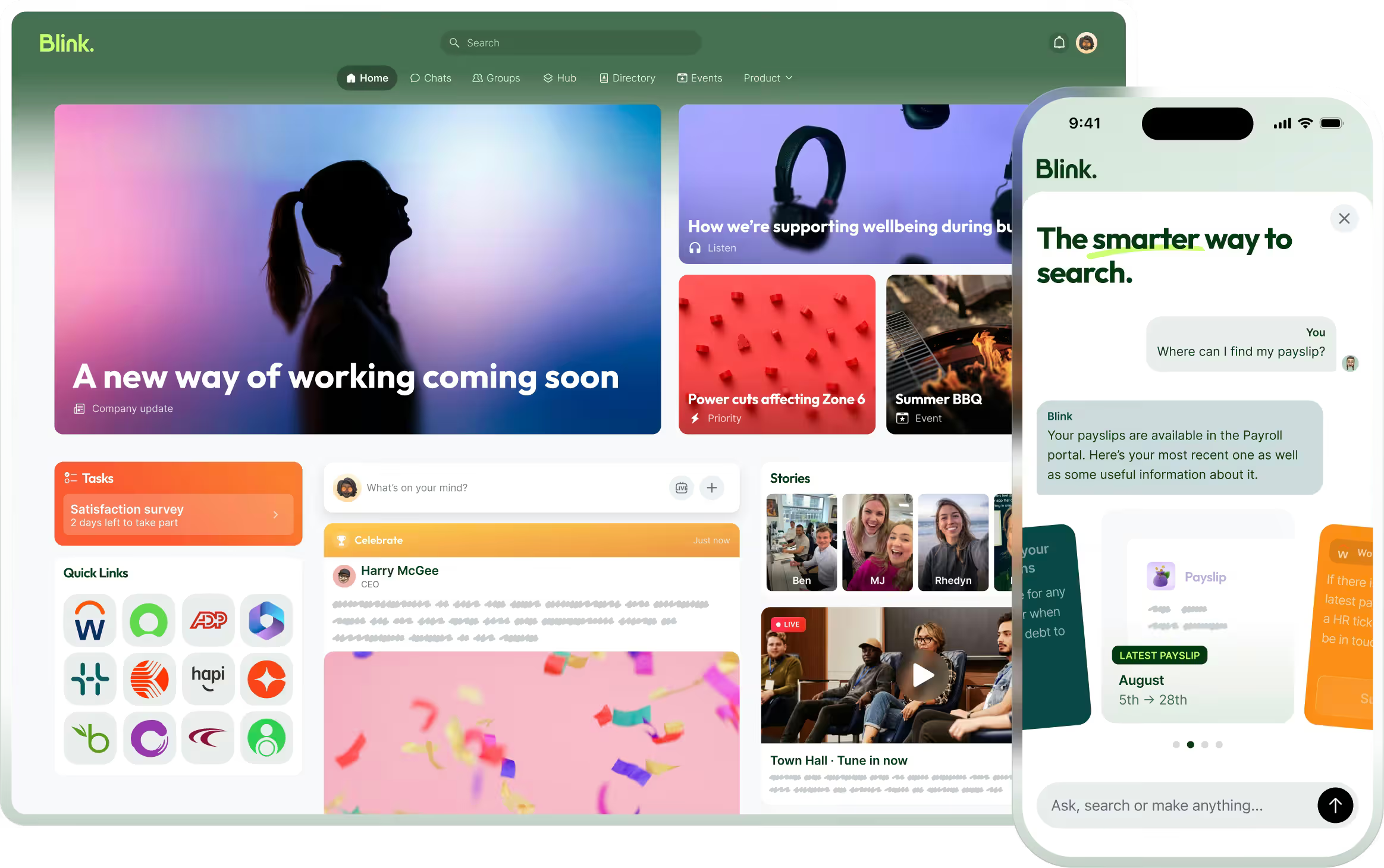
Blink Feed – a feature of the Blink super-app – replicates the experience of popular social network news feeds by prioritizing connection and usability. It offers a range of really useful add-ons, too – like critical messages that sit at the top of the news feed until employees read and acknowledge them.
5. Integration of AI and automation
Love it or loathe it, AI is making work quicker and easier. So incorporating it into your company intranet makes perfect sense.
With the help of AI, you can:
Automate repetitive intranet tasks, like expense report processing and employee onboarding
Give time-strapped content creators inspiration for their posts
Personalize employee portals based on the features they use most often
Send push notifications, drawing employee back to the intranet when new content is posted
Add an AI chatbot to your intranet and you can do even more. This virtual assistant can handle routine inquiries. It can help employees find answers to FAQs, locate relevant resources, or troubleshoot intranet issues.
When AI and automation do some of the heavy lifting, employees complete tasks quickly and easily, and you lighten the load for your personnel and IT teams, too.
6. Mobile accessibility
Back in the day, old intranets worked off a server in the office. You could only log in if you were based on a desktop computer in the same building.
We’ve come a long way. Now, in a world where employees work remotely – and where they’re used to slick digital experiences – most intranets can be accessed via an internet connection. But does this go far enough?
If employees access your intranet solely from a computer or laptop screen, then maybe. But if you’re a frontline organization, probably not. You need a solution with mobile-first design that ensures the same great intranet experience across all devices.
That’s because frontline workers don’t always have access to a desktop or laptop computer. They often don’t even have access to a work email address. And if your intranet offers a sub-standard (or non-existent) mobile experience, these workers can end up cut off from co-workers, comms, and company culture.
A mobile-first intranet ensures every member of your organization – including those working remotely or on the frontline – gets the same information and sense of connection. Your intranet reaches employees wherever they spend their workdays.
7. Rewards and recognition
According to Gallup and Workhuman research, employees who get recognition for their hard work are up to 20 times more engaged than those who don’t.
Praise an employee and you boost their motivation. Give public recognition and that impact grows. You create a positive company culture. And the wider team – seeing that effort is rewarded – are more likely to up their game, too.
If you’re not using your intranet to recognize and reward the employee behaviors you want to see, this is another key area for improvement. You need tools – like Blink’s recognition feature – that help you weave small but meaningful recognition into your every day.
Show employees just how much you value them with instant, personalized messages. And go public, celebrating employee successes with the whole team so everyone benefits.
Aggregate Industries, a manufacturer and supplier in the UK, put this rewards action with their Net Zero campaign that is at a core of their organization.
In an effort to drive awareness about the team’s sustainability efforts, “carbon atoms” were placed throughout the Blink platform for employees to find while engaging with content. Once discovered, each atom held a question related to their Net Zero strategy, and when an employee answered the question correctly, they were entered into a contest for a prize. This ultimately drove incredible engagement with the platform while learning about a key strategy of theirs, and then the employees were rewarded when they engaged.
To learn more about how Aggregate Industries utilizes Blink for their Internal Communications strategy, check out our webinar here.
8. Feedback and surveys
The best intranets have built-in feedback and survey functions that make it easy to discover employee needs, concerns, and expectations.
You promote open, two-way communication with regular requests for feedback. You then have all of the communication tools you need to share findings and a plan of action with employees.
With these tools at your disposal, you can seek feedback on any aspect of the employee experience, including the intranet itself. Perhaps a crucial feature is clunky and difficult to use. Or extra functionality would make a popular tool even more useful.
Launch surveys via Blink’s mobile super-app and it’s super easy for employees to respond – even when using a smartphone. You can discover what employees think of your intranet, and then make data-driven software improvements.
9. Onboarding and training resources
When you use your intranet for onboarding, there are lots of benefits:
You create a standardized process
New hires have a resource they can refer back to
You save manager time because the intranet does some of the training for them
It’s easy to gather feedback and data on the onboarding process
If you aren’t already using your intranet to train new hires, start by putting mandatory training resources, FAQs, and video tutorials onto your portal. Also, encourage new starters to use your employee directory, finding relevant co-workers to connect with.
Introduce new employees to your intranet from the very beginning and you showcase its role within your organization. Employees get to see its features and benefits, and are more likely to use it going forward.
10. Integration with other tools
Company intranets are most useful when they’re a one-stop-shop – a hub for all the technologies, tools, and resources you use within your organization.
Putting everything in one place speeds up and streamlines workflow. Employees don’t waste time logging in and out of different platforms. And they don’t have to familiarize themselves with multiple interfaces. Instead, they access everything they need via your intranet portal.
If you’re currently using a patchwork of different tools, you can improve things by finding out which integrations your intranet software supports.
Alternatively, you can connect tools via a feature like the Blink hub. Here, you can put HR systems, internal communications, project management, employee benefits, and more, in the same accessible place.
11. Analytics and reporting
If your current intranet doesn’t have analytics and reporting features this is another area crying out for improvement. With analytics, you get to see:
See how communication flows around your company so you can identify both positive and negative relationships. Filter employee engagement data by team or date range. Find the most popular news feed posts to learn which content grabs employee attention.
Analytics and reporting functions make intranet data easy to understand and act upon. You can then use your findings to make your intranet even more effective.
12. Security and data privacy
There’s a cyber-attack every 39 seconds. Any digital workplace needs to consider the cyber security risks they face and regularly reassess the safety measures they have in place.
The best intranets provide rock-solid security that keep systems and data safe. So if your intranet security hasn’t been updated in a while, this could be another key area for improvement.
Access control measures prevent unauthorized users from accessing specific intranet sections or features. Encryption and password protection keep sensitive documents from prying eyes. Multi-factor authentication (MFA) is an extra-secure way to verify a user’s identity as they log in to the system.
Employee training is also essential. Everyone needs to understand secure password practices – and how to recognize and respond to security threats. When your teams understand best security practices you can rest easy, knowing that your intranet isn’t putting your business at risk.
13. User training and support
Employee security training is important. So too is intranet training. Too many intranets are underutilized simply because employees aren’t familiar with the range of features they offer.
Of course, the best intranets are intuitive and easy to use. But if you find that your adoption rates aren’t as healthy as you’d like them to be, hone in on training.
Create guides that explain intranet features and how to use them. Consider setting up a dedicated support channel for intranet-related issues and inquiries. Appoint intranet champions – members of staff who get full training on intranet systems and can then share their knowledge with co-workers.
Training and support help employees to understand and see the value in your intranet, while you maximize the impact of intranet features.
14. Continuous improvement
It’s never a case of implementing an intranet solution and then letting it run its own course. To get the best out of an intranet, treat it like a constant work in progress.
The tech tools we use in our personal lives are regularly updated. And your intranet solution needs to move with the times too. To stay relevant and engaging, it has to adapt to changing trends, tech advances, and the needs of your employees.
With surveys, feedback requests, and analytics, you keep your finger on the pulse. You can figure out what’s missing from your intranet and which features need work. You also get the buzz of seeing which changes make the most impact.
Do companies still use intranets?
We’ve just spent a lot of time talking about the improvements you can make to the company intranet. But let’s circle back to an important question – do companies still even use them?
When it comes to the traditional company intranet, not so much. Business leaders have realized that a digital workplace and digitally-savvy employees need something more. They need an intranet that’s agile, user-friendly, and engaging. And traditional intranets don’t tend to tick these boxes.
That’s why many organizations have turned to modern intranet solutions courtesy of today’s top intranet software providers. They use an intranet that employees can access via an internet connection, one that combines lots of useful workplace tools, like project management and personnel services.
But for some organizations, these updated intranets are still falling short. So instead of an intranet solution, they’re choosing to use a mobile-first employee app.
Difference between intranets and employee apps
The intranet has its drawbacks. It doesn’t necessarily work across all devices. Nor does it provide the exceptional user experience that employees now expect. Employee apps – offering many of the same features as a company intranet – remedy these issues.
Everyone in your organization can use the employee app. They don’t have to be sitting at a computer. And they don’t even need their own company email address. This makes employee apps particularly well-suited to frontline organizations.
Imagine a frontline worker – a bus driver who spends the day driving. She spends very little time with co-workers or at company HQ. In the past, when the company used an intranet that she couldn’t access, she relied on the depo notice board for company updates.
But now, thanks to the company’s employee app, she receives internal communication and makes co-worker connections via her smartphone. On her commute or during a break, she can open the app and get up to speed.
Unlike an intranet, an employee app boosts engagement, collaboration, and productivity for all employees. They typically have high rates of user adoption so no one gets left behind.
Preview Blink and learn about the features we offer for frontline teams.
The intranet of the future?
When you make improvements to your intranet, you help it to reach its full potential. You pack it with the features and functionality that make life easy for your employees.
Workers enjoy a user-friendly intranet experience that streamlines their workflow and helps them to connect with co-workers. You get boosted employee engagement and productivity.
Whether you choose to improve your intranet or switch to a mobile-first employee app, it’s all about using this incredibly powerful tool in a way that best meets the needs of your business.
Instant messaging and two-way communication features facilitate conversation across your organization. Integration with AI and other workplace tools makes teams more efficient. Personalized, social-media-style portals ensure employee engagement. Mobile-first solutions bridge the gap between frontline teams and HQ.
Prioritize improvements that match your business goals and you can have an internal communication solution fit for the workforce of today – and tomorrow.
Find out if Blink’s employee app is a good fit for your organization. Book a demo to see our platform in action.
When it comes to intranets vs. employee experience platforms, what’s the real difference?
It’s getting harder and harder to tell. Here’s why.
There’s been a revolution in the type of tech tools we use in the modern workplace. For a long time now, we’ve been moving away from static communication tools — like the traditional employee intranet — toward dynamic, engagement-centric platforms.
Intranet software is still the backbone of internal communication and collaboration in many organizations. But employee experience platforms (EXPs) play an ever-expanding role in the workplace ecosystem.
These user-friendly platforms are changing our expectations of what the employee intranet should be. They’re bringing together various digital workspace tools — for communication, collaboration, learning, wellbeing, and performance management.
Ultimately, they’re providing HR teams with an easy way to perform employee experience management — and much more besides. They’re having a big impact on company culture, employee engagement, and employee retention.
So is the intranet still relevant in a world of integrated EXPs? Let’s look at how the lines between these two types of workplace tech have blurred — and what this means for your organization.
The showdown: Intranets vs. employee experience platforms
Intranets 101: The old guard of workplace tech
An intranet is a private network that facilitates the sharing of information across an organization. It’s a hub for workplace resources, news, and tools.
Traditionally, the employee intranet has supported limited interactivity. It’s a tool for top-down employee communications — where leaders speak and employees listen.
Intranet platforms are often designed for office-based employees. Workers without a desktop computer or a company email address may struggle to access the tools and resources housed on the intranet.
EXPs explained: The future of employee engagement
An employee experience platform is a dynamic ecosystem. It integrates employee communication, engagement, and collaboration tools.
EXPs place a firm focus on employees and their experience in the workplace. They provide tools for recognition and co-worker connection. They support two-way internal communication, with essential features like employee surveys — and a news feed where employees can share user-generated, relevant content.
EXPs are often available via desktop and smartphone apps. So they allow HR and comms leaders to promote company culture and share vital information across the whole organization. Everyone — including your company’s frontline workers — can access EXP resources.
Blurred lines: When intranets meet EXPs
With the advent of EXPs, modern intranet software tends to go beyond the static experience of old. Intranet providers are incorporating more and more EXP features into their offering.
So why is this change taking place? Why are the lines between the employee intranet and employee experience platforms blurring? We put this shift down to three key factors.
#1. Tech trends that are changing the game
Technology has moved on drastically since the days of the traditional employee intranet. And modern intranet solutions are taking inspiration from EXPs.
Some now come with real-time communication tools that support fast and effective teamwork. Some have user-friendly interfaces that mimic the experience employees get on their favorite social media apps.
AI integration is another popular trend. It’s helping communications teams to create compelling messages. It’s also helping comms and HR teams make sense of the employee landscape, by turning complex employee data into actionable insights.
#2. Employees are demanding better tech
Using tech tools in their personal lives, employees enjoy seamless experience. They get personalized recommendations. They can access tools from their smartphones. It’s quick and convenient for users to find the information and tools they need.
As a result, their expectations of workplace tech have become more exacting.
Old and clunky workplace tech creates a poor digital employee experience (DEX). It creates friction and frustration in the work day. This impacts employee productivity, satisfaction, and retention.
With this in mind, intranet software is evolving to meet the needs of today’s employees. Increasingly, you’ll find solutions that offer mobile-first, real-time, and personalized experiences.
#3. Building a business case for better tools
1 in 3 workers says workplace technologies are not being used effectively — and employers are wasting money on unused licenses. Employees would prefer fewer but more effective tools to help them do their jobs.
Unified platforms reduce tool fatigue. The right platform also improves ROI because you pay for a single software solution, designed to help you meet a range of business objectives.
According to Gartner research, top business priorities for 2025 include:
Change management
Strategic workplace planning
Building a strong organizational culture
Leader and manager development
A comprehensive platform can help with all the above. You can use it to drive productivity, efficiency, employee engagement, wellbeing, and retention.
{{mobile-main="/image"}}
Intranets vs. EXPs: What still sets them apart?
Intranet software providers are adopting many EXP features in a bid to improve their offering. But there remain some key differences between most intranets and employee experience platforms. These are:
Content vs. experience: Intranet software prioritizes static content. It’s focused on providing employees with the resources they need to do their jobs. EXPs focus on experience and engagement, powered by interactive social features. They have a positive impact on the employee experience and company culture.
One-way vs. two-way communication: Intranet solutions allow leaders to share information with employees. EXPs facilitate a dialogue. They give employees the tools they need to speak up and leave feedback — and for leaders to respond, showing they value the input of their workforce.
User experience: Traditional intranet platforms are often legacy systems that have been updated, bit by bit, to meet modern workforce needs. EXPs, however, have been built with today’s workforce (and their expectations) in mind. They are consumer-grade, intuitive solutions that employees enjoy using.
These differences pose a problem. In platforms where these differences are more pronounced, you’ll struggle to meet diverse organizational needs with just one tool.
You may be able to share and store company resources but struggle to promote two-way interaction. You may be able to launch beautiful employee surveys while sharing company feedback remains a challenge. Document sharing may be easy, but knowledge sharing or facilitating collaboration with project management tools may be nearly impossible.
As we’ve already seen, using more than one platform causes frustration for employees and increases your software costs. So there’s a strong case for finding workplace tech that ticks all the boxes.
Why integrated platforms are the future
We may be a bit biased — but we believe that unified platforms are the future. Powered by seamless integration, they provide employees with the corporate communication, tools, and resources they need to thrive in their roles.
For example, an integrated platform can provide key features such as:
An integrated social feed where employees can get relevant, engaging, and up-to-the-minute company news
Task management features that bring all tasks together in one easy-to-understand dashboard
Personalized employee journeys, with the platform delivering resources to workers as and when they need them
An exceptional digital experience across all devices, so you can roll the platform out to your entire workforce
Robust analytics, that help you gauge what content is getting good engagement — and where there’s room for improvement
Of course, when bringing all of your workplace tools into one super platform, there are considerations you need to bear in mind.
You need to balance rich features with simplicity to avoid overwhelming users. You also need to personalize the platform experience to each employee to prevent information overload. Platform usage will drop if employees find your solution too complicated or irrelevant.
A good intranet software provider will help you overcome these challenges and maximize the benefits of a unified platform. Key benefits include:
Streamlined workflows. Employees don’t waste time switching between different workplace software. From Google Workspace and ServiceNow, to Workday and ADP, and everything in between, any tool they need is easily and quickly at their fingertips. This means better efficiency and productivity across your workforce.
Improved engagement. An integrated platform takes the best bits of the intranet and places them all in one intuitive interface. It then builds in other engagement features — like recognition, learning, and instant messaging with coworkers — to create a thoroughly engaging platform and digital workplace.
Data-driven insights. With everything in one place, it’s easier to make sense of platform data. Your team can track employee experience and engagement metrics, viewing them alongside key business data relating to retention and productivity. With enhanced reporting tools, you can get a better sense of organizational performance and have the insight you need to make targeted improvements.
Why choose? Get the best of both worlds
The distinctions between an intranet and an EXP are getting harder to spot. The lines between the two platforms are increasingly blurred and these software solutions often provide many of the same features.
So, when deciding on the right tech for your organization, it’s best to take a holistic view. It’s about creating the right ecosystem for your workforce that offers a single source of truth for internal comms and links to the tools and features you need to ensure productivity, engagement, and employee satisfaction.
You may choose to use an EXP to fill the employee engagement gaps left by your intranet software solution. You can also find EXPs that fulfill both roles — that of an employee intranet and an employee experience platform.
Either way, the right EXP will integrate with the other workplace software you use — including HRIS, learning and development, and wellbeing tools — to give employees everything they need in a single application.