A survey conducted by the American Association of Critical Care Nurses reported that 66% of respondents considered leaving their job due to the pandemic.
At first glance, it may seem like the pandemic is what caused frontline workers to feel burned out and leave their jobs, but Amanda Bettencourt, Ph.D. of the association, says,
“This was the stress test for an already stressed system.”
The employee experience for frontline workers has been overlooked for a long time. Finally, businesses are paying attention to how to improve internal communication for their frontline workers.
The truth is that frontline workers love creating a good customer experience. Matthew, a Registered Nurse at Denver Health, says,
“I love what I do. I chose this profession because I wanted to be on the frontline doing this, and there’s nothing else I want to do.”
But how can businesses make the work experience better for frontline workers?
Keep reading to learn how to motivate frontline employees and support them so they can do what they do best – taking care of your customers.
Here’s what we’ll cover:
Benefits of empowering frontline staff
How to improve internal communication on the frontline
1. Make communications accessible to everyone
2. Personalize communication
3. Make it easy to give and view feedback
4. Create a single source of truth
5. Streamline manual processes
6. Provide ongoing training opportunities
7. Ask frontline employees for their ideas
8. Check in regularly and in person
9. Celebrate achievements
10. Put yourself in their shoes
Final thoughts: how to improve internal communication on the frontline
Benefits of empowering frontline staff
Many frontline workers love the work they do. Their job satisfaction comes from helping patients and creating a positive impact on customers.
“We get a sense of accomplishment doing our part to keep folks safe. We find the supplies that they need and get it to them as quickly as possible.”
When your frontline staff feels connected and empowered, they can focus on delivering an excellent customer experience.
But, if your frontline workforce feels unsupported and unheard, employee morale can plummet and lead to burnout and a higher employee turnover rate.
If you want to improve customer satisfaction, it starts by caring for the employees who interact with customers and patients every day.
How to improve internal communication on the frontline
Make communications accessible to everyone
Personalize communication
Make it easy to give and view feedback
Create a single source of truth
Streamline manual processes
Provide ongoing training opportunities
Ask frontline employees for their ideas
Check in regularly and in person
Celebrate achievements
Put yourself in their shoes
1. Make communications accessible to everyone
According to a Frontline Employee Workplace Survey conducted by Yoobic, one in three frontline employees feel disconnected from the company. During the COVID-19 pandemic, companies had to make fast changes to business strategies and operations.
While these changes often affected frontline employees, they didn’t feel included or well-informed. More than 75% of respondents say that receiving internal communications through a mobile app would make them feel more connected to HQ.
2. Personalize communication
Including frontline employees in internal communications is an excellent start, but it won’t solve the problem entirely. More messages don’t automatically equate to higher employee engagement. You need to make sure that your messages are meaningful to frontline employees.
When you communicate significant changes to essential workers, make it easy to understand how any new initiatives will affect their daily work. Anticipate possible questions from frontline employees and answer them in your original message. This should be a key part of your internal communication plan anyway.
For example, if you’re implementing COVID-19 precautions in-store, let employees know how you’ll be supporting them with signage or website updates so they feel supported.
3. Make it easy to give and view feedback
Some initiatives look great on paper, but they don’t work in real-time with customers.
Ben Davis, a social worker in New York, told Time Magazine of a time when top-down pandemic precautions like remote contact made it more challenging to work and connect with individuals who suffer from mental illness symptoms like paranoia.
What seemed like a good idea at first was ineffective and became the source of concern for many frontline workers.
According to Davis,
“It was all very different and very confusing. I don’t know how well he – a patient – understood that I was doing it to help keep him safe.”
In this case, Davis’s feedback was heard. His team implemented changes focused on the long-term protection of frontline workers, such as allowing them to stop administering medication if gloves run out.
Employees on the frontline can feel frustrated if they don’t have access to the resources they need to do their jobs.You must give frontline workers a place to provide feedback and ensure they see that the feedback has been taken and processed.
4. Create a single source of truth
Consider using a mobile app to deliver your intranet or knowledge Hub so your deskless employees can access the right resources.
5. Streamline manual processes
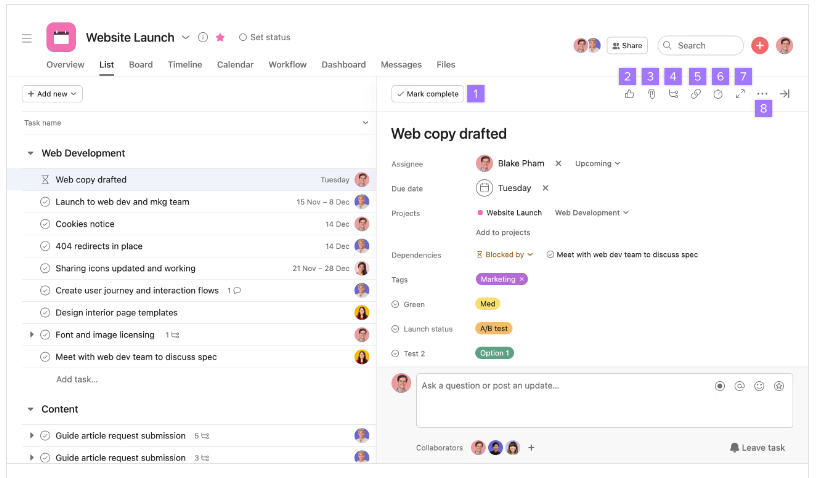
A whopping 71% of frontline workers feel bogged down by repetitive manual tasks and paperwork. One part of motivating frontline employees involves letting them focus on work that creates impact, such as working with customers.
It may sound small, but spreading your admin work across multiple platforms means your frontline workers have to log into several websites to take care of repetitive work.
Respect your frontline workers’ time by consolidating administrative work into a single portal and automating manual processes.
6. Provide ongoing training opportunities
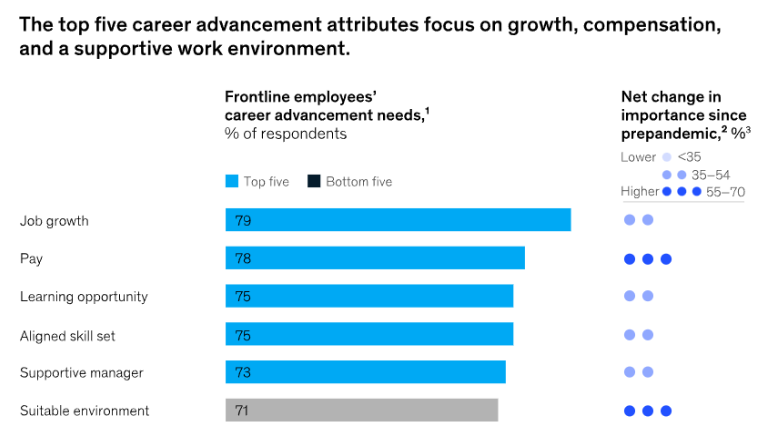
There’s a direct connection between growth opportunities and employee retention. Team members who see a future with your company are more likely to stay engaged and experience high levels of job satisfaction.
During onboarding, show your frontline workers there’s a clear path to growth in your company. Then, make sure they can easily access resources to help them build the skills they need to advance.
For example, clinic receptionists can develop skills to become Medical Assistants and then continue to advance to higher Medical Assistant levels (MA II, MA III) to earn a higher salary.
7. Ask frontline employees for their ideas
Take time during meetings to let people provide an overview of their projects, goals, and progress.
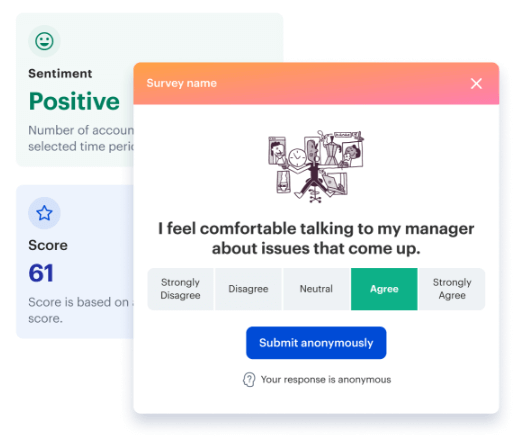
When dealing with customer feedback issues, you can also show your frontline staff you value their expertise by asking for their opinions and suggestions. Use polls and surveys to stay tuned into the customer experience through your frontline workforce.
8. Check in regularly and in person
Too many business leaders underestimate the importance of frontline workers. A grocery store bookkeeper describes his experience to New America as, “bosses come through. They don’t speak to you. They think they’re better than you…We are the ones that are helping you make this money.”
Leaders must schedule regular site visits, but you have to remember to acknowledge on-site and remote employees and genuinely listen to them.
Treat site visits as an opportunity to build relationships with frontline staff, show them that you’re there for them, and reinforce the idea of teamwork.
9. Celebrate achievements
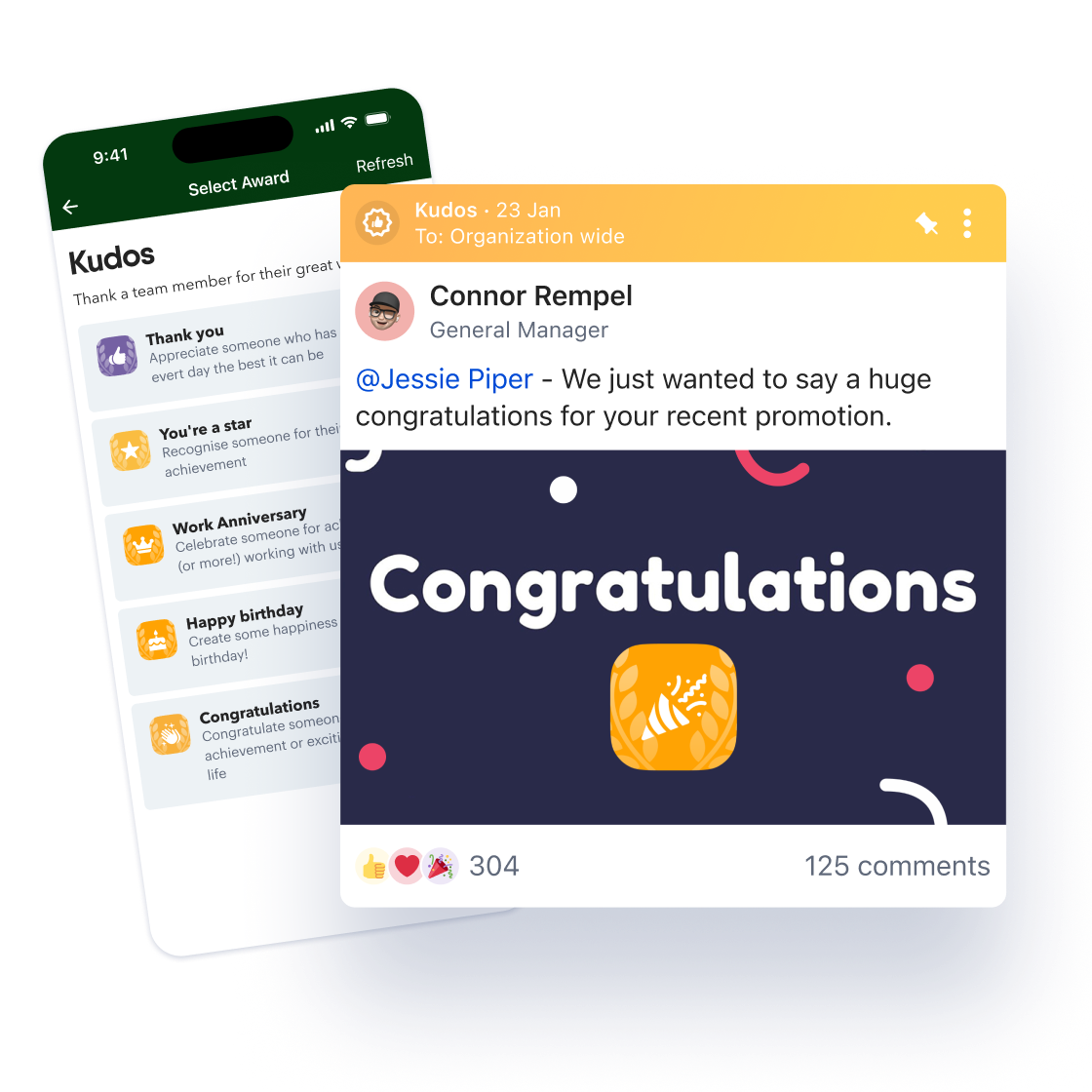
Employee recognition is an integral part of motivating frontline employees. Take time to celebrate work-related achievements like promotions and personal milestones such as birthdays and anniversaries.
10. Put yourself in their shoes
Learning to empathize with your frontline workers creates a better work environment for everyone. Don’t assume the challenges you face in the office are the same your remote employees deal with every day.
Instead of making assumptions, ask your frontline employees questions about their experience and really listen when they tell you. Use questions like “How can I make it easier for you to get your work done?” to get actionable feedback from your frontline workforce.
Lead by providing support and proactively removing the obstacles that make it difficult for frontline workers to succeed.
Final thoughts: how to improve internal communication on the frontline
How many businesses could survive without their frontline workers? And still, they’re often overlooked and misunderstood.
Learning to motivate your frontline employees through empathy, communication, and support can transform your customer experience and overall business. Discover employee engagement for modern workforces with Blink today.
A survey conducted by the American Association of Critical Care Nurses reported that 66% of respondents considered leaving their job due to the pandemic.
At first glance, it may seem like the pandemic is what caused frontline workers to feel burned out and leave their jobs, but Amanda Bettencourt, Ph.D. of the association, says,
“This was the stress test for an already stressed system.”
The employee experience for frontline workers has been overlooked for a long time. Finally, businesses are paying attention to how to improve internal communication for their frontline workers.
The truth is that frontline workers love creating a good customer experience. Matthew, a Registered Nurse at Denver Health, says,
“I love what I do. I chose this profession because I wanted to be on the frontline doing this, and there’s nothing else I want to do.”
But how can businesses make the work experience better for frontline workers?
Keep reading to learn how to motivate frontline employees and support them so they can do what they do best – taking care of your customers.
Here’s what we’ll cover:
Benefits of empowering frontline staff
How to improve internal communication on the frontline
1. Make communications accessible to everyone
2. Personalize communication
3. Make it easy to give and view feedback
4. Create a single source of truth
5. Streamline manual processes
6. Provide ongoing training opportunities
7. Ask frontline employees for their ideas
8. Check in regularly and in person
9. Celebrate achievements
10. Put yourself in their shoes
Final thoughts: how to improve internal communication on the frontline
Benefits of empowering frontline staff
Many frontline workers love the work they do. Their job satisfaction comes from helping patients and creating a positive impact on customers.
“We get a sense of accomplishment doing our part to keep folks safe. We find the supplies that they need and get it to them as quickly as possible.”
When your frontline staff feels connected and empowered, they can focus on delivering an excellent customer experience.
But, if your frontline workforce feels unsupported and unheard, employee morale can plummet and lead to burnout and a higher employee turnover rate.
If you want to improve customer satisfaction, it starts by caring for the employees who interact with customers and patients every day.
How to improve internal communication on the frontline
Make communications accessible to everyone
Personalize communication
Make it easy to give and view feedback
Create a single source of truth
Streamline manual processes
Provide ongoing training opportunities
Ask frontline employees for their ideas
Check in regularly and in person
Celebrate achievements
Put yourself in their shoes
1. Make communications accessible to everyone
According to a Frontline Employee Workplace Survey conducted by Yoobic, one in three frontline employees feel disconnected from the company. During the COVID-19 pandemic, companies had to make fast changes to business strategies and operations.
While these changes often affected frontline employees, they didn’t feel included or well-informed. More than 75% of respondents say that receiving internal communications through a mobile app would make them feel more connected to HQ.
2. Personalize communication
Including frontline employees in internal communications is an excellent start, but it won’t solve the problem entirely. More messages don’t automatically equate to higher employee engagement. You need to make sure that your messages are meaningful to frontline employees.
When you communicate significant changes to essential workers, make it easy to understand how any new initiatives will affect their daily work. Anticipate possible questions from frontline employees and answer them in your original message. This should be a key part of your internal communication plan anyway.
For example, if you’re implementing COVID-19 precautions in-store, let employees know how you’ll be supporting them with signage or website updates so they feel supported.
3. Make it easy to give and view feedback
Some initiatives look great on paper, but they don’t work in real-time with customers.
Ben Davis, a social worker in New York, told Time Magazine of a time when top-down pandemic precautions like remote contact made it more challenging to work and connect with individuals who suffer from mental illness symptoms like paranoia.
What seemed like a good idea at first was ineffective and became the source of concern for many frontline workers.
According to Davis,
“It was all very different and very confusing. I don’t know how well he – a patient – understood that I was doing it to help keep him safe.”
In this case, Davis’s feedback was heard. His team implemented changes focused on the long-term protection of frontline workers, such as allowing them to stop administering medication if gloves run out.
Employees on the frontline can feel frustrated if they don’t have access to the resources they need to do their jobs.You must give frontline workers a place to provide feedback and ensure they see that the feedback has been taken and processed.
4. Create a single source of truth
Consider using a mobile app to deliver your intranet or knowledge Hub so your deskless employees can access the right resources.
5. Streamline manual processes
A whopping 71% of frontline workers feel bogged down by repetitive manual tasks and paperwork. One part of motivating frontline employees involves letting them focus on work that creates impact, such as working with customers.
It may sound small, but spreading your admin work across multiple platforms means your frontline workers have to log into several websites to take care of repetitive work.
Respect your frontline workers’ time by consolidating administrative work into a single portal and automating manual processes.
6. Provide ongoing training opportunities
There’s a direct connection between growth opportunities and employee retention. Team members who see a future with your company are more likely to stay engaged and experience high levels of job satisfaction.
During onboarding, show your frontline workers there’s a clear path to growth in your company. Then, make sure they can easily access resources to help them build the skills they need to advance.
For example, clinic receptionists can develop skills to become Medical Assistants and then continue to advance to higher Medical Assistant levels (MA II, MA III) to earn a higher salary.
7. Ask frontline employees for their ideas
Take time during meetings to let people provide an overview of their projects, goals, and progress.
When dealing with customer feedback issues, you can also show your frontline staff you value their expertise by asking for their opinions and suggestions. Use polls and surveys to stay tuned into the customer experience through your frontline workforce.
8. Check in regularly and in person
Too many business leaders underestimate the importance of frontline workers. A grocery store bookkeeper describes his experience to New America as, “bosses come through. They don’t speak to you. They think they’re better than you…We are the ones that are helping you make this money.”
Leaders must schedule regular site visits, but you have to remember to acknowledge on-site and remote employees and genuinely listen to them.
Treat site visits as an opportunity to build relationships with frontline staff, show them that you’re there for them, and reinforce the idea of teamwork.
9. Celebrate achievements
Employee recognition is an integral part of motivating frontline employees. Take time to celebrate work-related achievements like promotions and personal milestones such as birthdays and anniversaries.
10. Put yourself in their shoes
Learning to empathize with your frontline workers creates a better work environment for everyone. Don’t assume the challenges you face in the office are the same your remote employees deal with every day.
Instead of making assumptions, ask your frontline employees questions about their experience and really listen when they tell you. Use questions like “How can I make it easier for you to get your work done?” to get actionable feedback from your frontline workforce.
Lead by providing support and proactively removing the obstacles that make it difficult for frontline workers to succeed.
Final thoughts: how to improve internal communication on the frontline
How many businesses could survive without their frontline workers? And still, they’re often overlooked and misunderstood.
Learning to motivate your frontline employees through empathy, communication, and support can transform your customer experience and overall business. Discover employee engagement for modern workforces with Blink today.
Welcome to the February 2026 edition of the Quarterly Unlock — your inside look at what’s new in Blink and how it helps teams move faster, communicate more clearly, and unlock more value across the employee experience.
As organizations scale, systems multiply and communication noise increases. Blink should get smarter, more connected, and easier to manage — without adding complexity.
Here’s what’s new.
#1. Smarter, more relevant communication
When employees see too much content, important updates get buried. When connectivity drops, access disappears. When engagement dips, comms teams feel it first.
This quarter, we’re making sure the right people see the right content at the right time — wherever they are.
Smart Feed
We’re introducing a recommended Feed experience that prioritizes relevance — not just publish time.
Surface the most important content first
Reduce manual pinning and featuring
Adapt the Feed as organizations grow
Improve visibility without extra admin effort
Instead of a strictly chronological stream, Blink becomes intelligent — helping important messages cut through the noise. Designed for large organizations and high-volume Feeds, Smart Feed is built to evolve alongside your communication goals.
{{offline-mode="/image"}}
Offline Mode
Frontline work doesn’t always come with reliable signal. Now, Blink doesn’t require it.
Save hub content and Feed posts for offline access on mobile
Access saved items centrally
Automatically sync updates when reconnected
Retain control over sensitive hub items with protected content settings
The result? Critical documents and updates remain accessible — even in low-signal environments like aviation, healthcare, logistics, manufacturing, and field operations.
Email delivery of Feed posts
Multi-channel delivery — without duplicating work. Admins can now send a published Feed post as an email to:
Everyone in a group
Or only those who haven’t read it
Each email includes a preview and a direct CTA back into Blink — helping re-engage inactive users and strengthen visibility for critical communications.
For most customers, this feature will be included at no additional cost. For large enterprises with high-volume usage, it may be considered on a case-by-case basis.
{{email="/image"}}
#2. Deeper interoperability across enterprise systems
Employees rely on multiple systems to get work done. But switching between them slows everything down.
This release brings core HR workflows into Blink — turning it from a communication tool into an action hub.
Actionable Workday Nudges
Managers can now approve or deny leave requests directly inside the Blink Feed.
Faster leave request approval turnaround
Reduced friction for frontline managers
Less logging in and navigating systems for employees
Improved visibility into HR processes
{{workday-payslip="/image"}}
Workday Digests
Daily or weekly summaries highlight open Workday tasks that require attention. Instead of relying on employees to monitor their HR inbox, Blink brings reminders into their everyday workflow — reducing missed deadlines and improving task completion.
SAP SuccessFactors daily Digest
For customers using SAP SuccessFactors, Blink now delivers a configurable daily digest when new tasks are waiting.
Task count surfaced directly in the Feed
Link-through to complete tasks in SuccessFactors
Custom branding supported
{{image-sap="/image"}}
#3. Safer, more confident Communities at scale
As Communities grow, governance becomes critical.
This quarter introduces new controls that allow organizations to scale engagement — without sacrificing oversight.
Request to join a Community
Community admins can now require approval before new members join.
Communities can be set to Open or Closed
Admins receive join requests and approve on web or mobile
Settings take effect immediately
{{community-request="/image"}}
Request to create a Community
Employees can suggest new Communities — subject to admin approval — supporting organic growth while preventing uncontrolled group sprawl.
Automated Keyword Blocking
Organizations can now define an organization-wide keyword blocklist that prevents specific words or phrases from being sent in chats and comments.
Immediate, private feedback to users
Managed via moderation tools
Works across web, iOS, and Android
This privacy-conscious safety layer helps reduce compliance risk and maintain professional standards — particularly in regulated industries.
{{automated-keyword="/image"}}
What this Unlock means for your team
For employees
A more relevant Feed
Reliable access to content
Critical updates delivered more consistently
For leaders and comms teams
Greater confidence that key messages are seen
Intelligent distribution at scale
Safer, better-governed Communities
For IT and operations
Stronger integration with enterprise systems
Reduced context switching
More control as usage scales
If you’re a customer, reach out to your customer success manager to discuss participation and enablement options.
If you’re exploring Blink, book a demo to see how the February 2026 Unlock brings communication and action into one seamless experience.
At Blink, our mission is to connect and empower workforces worldwide, and a crucial part of that mission is ensuring that our platform is accessible to everyone.
We’re excited to announce that Blink is now WCAG 2.2 level AA compliant, marking a significant milestone in our commitment to accessibility.
Why accessibility matters
Roughly 15% of the global population — around 1 in 6 people — lives with some form of disability. Given these numbers, there’s a high likelihood that many Blink users depend on our app to be accessible.
Many countries require digital products to meet accessibility standards, so we take these obligations seriously. However, our commitment to accessibility goes beyond compliance. It’s about making sure that our platform meets the needs of all users, removing barriers and creating a truly inclusive environment.
Understanding WCAG standards
The Web Content Accessibility Guidelines (WCAG) are a set of internationally recognized standards for digital accessibility. Developed by the World Wide Web Consortium (W3C), these guidelines ensure that content is accessible to people with disabilities, including those who rely on assistive technologies like screen readers or alternative input devices.
WCAG standards are organized into three levels of compliance: A, AA, and AAA. Level A does not achieve accessibility in many situations, yet AAA is not recommended by the W3C because it is not possible to satisfy all Level AAA Success Criteria for some content. Therefore we comply with AA, whilst striving to meet as many AAA criteria as possible. The latest version of the standards, WCAG 2.2, includes updated requirements that address new aspects of accessibility, such as improved keyboard navigation, visible focus indicators, and content predictability.
How we’ve updated the Blink experience
Here are some of the key accessibility enhancements we’ve introduced as part of our efforts to be WCAG 2.2 AA compliant:
#1. Media accessibility
Blink now supports features that make media content more inclusive. For example, we’ve added the ability to set alternative text for image-only context, allowing user-generated content to be accessible to a broader audience.
#2. Improved visual and text contrast
To enhance readability, we’ve adjusted contrast levels to ensure that users can easily distinguish text from background colors across all devices — an essential feature for individuals with visual impairments.
#3. Flexible orientation and resize options
Blink’s content and interface elements can now be resized up to 200% without losing clarity, and the platform supports both landscape and portrait orientations. These improvements make it easier for users to read and navigate on any device, regardless of their visual needs.
#4. Keyboard navigation and focus visibility
Keyboard focus is now visible and consistent across all interactive elements, enhancing accessibility for users relying on keyboard navigation. Additionally, we’ve ensured that elements won’t change unexpectedly when they receive focus, which prevents accidental interactions and supports smooth navigation.
#5. Consistent navigation and error prevention
We’ve made navigation more predictable and consistent across the app. Users will now receive helpful error messages and suggestions to prevent data entry mistakes, making Blink more user-friendly and inclusive.
Blink’s commitment to accessibility
We’re dedicated to empowering diverse workforces and ensuring that our technology is accessible and inclusive. Here’s how we’re continuing to prioritize accessibility:
Adhering to standards: We maintain strict alignment with the WCAG 2.2 level AA, ensuring that Blink meets industry-recognized accessibility standards.
Inclusive development: Accessibility is at our engineering core. From screen reader compatibility to clear navigation, we build with accessibility in mind at every stage.
Transparent accessibility: We provide an up-to-date, transparent accessibility statement, outlining our efforts and providing information to our users.
Accessibility isn’t just about checking the box — it’s about empowering individuals and creating an environment where everyone has an equal opportunity to thrive.
Employee experience isn’t shaped by a single moment or interaction.
It’s built, day by day, through the tools people use, the information they receive, the way they’re managed, and how easy it is to get work done.
In many organizations, those experiences are inconsistent.
Some teams are well-supported and connected. Others deal with clunky systems and unclear communication. The experience can vary wildly depending on the manager, the role, or even when someone joined the organization.
This is where employee experience management comes in.
Instead of leaving the employee experience to chance, organizations can take a deliberate approach — designing, measuring, and improving the interactions that shape working life, to create a more connected and effective workplace.
In this guide, we break down what employee experience management means in practice, why it matters, and how to build a strategy that works across your organization.
Defining employee experience management
Employee experience (EX) is the sum of every interaction an employee has with your organization — from their first contact during recruitment to their last day, and everything in between.
It’s shaped by culture, communication, workplace technology, management quality, recognition, and development opportunities.
Employee experience management is the deliberate design, measurement, and improvement of those EX interactions. It’s not a once-a-year survey. Instead, it’s an ongoing commitment to understanding what employees need and ensuring the organization delivers it.
Critically, employee experience management isn’t just an HR function. While typically led from within HR, it’s an organizational ethos that needs to be embedded across leadership, operations, comms, and IT if it’s going to have meaningful impact.
The importance of employee experience management
The business case is clear-cut. Just 31% of US employees are actively engaged at work. And this has a significant impact on business budgets.
Organizations that neglect employee experience see lower engagement, higher attrition, weaker operational performance, and worse customer experience.
Employee experience management, therefore, delivers several specific benefits:
Improved engagement and retention. Employees who feel informed, supported, and valued work harder and are significantly less likely to leave. Given that replacing a single employee costs upwards of 40% of their salary, engagement and retention improvements have a measurable impact on profitability.
More effective communication. EX management creates the infrastructure for two-way communication — not just top-down broadcasting but genuine dialogue between employees and the organization. This is good for engagement, workforce collaboration, and alignment.
A culture of continuous improvement. When feedback is gathered systematically and acted on visibly, organizations build the kind of trust that makes employees willing to contribute, raise concerns, and work hard for their teams.
Better insight. Continuous listening tools give leaders a real-time picture of how employees are feeling — surfacing issues before they show up in exit interviews or attrition figures.
Frontline employee experience management
Managing employee experience for frontline workers presents a distinct set of challenges — and most EX management frameworks weren’t built with them in mind.
Frontline workers don’t typically have corporate email addresses or regular desktop access. They can’t easily participate in surveys sent to inboxes they rarely check, or access intranets that don’t work on smartphones.
They’re often the furthest from leadership and the least connected to company culture — yet they’re the employees who represent the organization most directly to customers, and the employee segment with the highest rates of turnover.
Employees are keenly aware of this experience gap.
Only 10% of frontline workers say they have high access to the tools, tech, and opportunities they need to connect and advance in their workplace.
In organizations with both frontline and desk-based employees, almost half (49%) report that there are two separate cultures at play: “One for the frontline and one for everyone else.”
Collaborating across HR, IT, comms, operations, and leadership to implement EX initiatives
Managing and optimizing the technology platforms that underpin employee experience
Analyzing engagement and behavioral data to identify trends and inform decisions
Measuring the business impact of EX programs and presenting findings to leadership
In smaller organizations, this work is often distributed across HR and internal comms teams. The job title doesn’t really matter. Instead, it’s about assigning ownership of employee experience strategy and finding ways to incorporate these tasks into team to-do lists.
Where to start: Building an employee experience management strategy that works
New to employee experience management? Or want to hone your strategy? Here are the steps you should try to follow when designing, measuring, and making improvements to EX at your organization.
1. Understand your current employee experience
Before designing improvements, you need an honest picture of where things stand. What’s working? What’s creating friction? Where are there gaps between the experience employees are having and the one the organization intends to provide?
Look at any available data — results from your last employee engagement survey, attrition rates, employee satisfaction scores. And consider every pillar of employee experience. This includes:
Physical work environment
Pay and benefits
Company culture
Employee well-being
Technology and tools
Career growth and development
Recognition
Internal communication
Management and leadership
2. Define your employee experience goals
Once you understand the current reality, set specific, measurable employee experience goals that align with your organization’s priorities. These might include:
Reducing voluntary turnover in the first 90 days
Increasing survey response rates among frontline employees
Improving manager effectiveness scores
Reducing avoidable HR query volume
Vague goals produce vague results. The more specific the objective and the more clearly it connects to a business outcome, the easier it is to measure progress and demonstrate ROI.
3. Secure leadership support
Employee experience management without leadership buy-in is an uphill battle. When leaders prioritize EX, it signals to the entire organization that this is a serious, funded commitment — not a box-checking exercise.
Employees are perceptive. They can tell the difference between an organization that’s genuinely invested in their experience, and one that’s simply running through the motions.
When seeking leadership support, lead with data. Connect your EX goals to the business outcomes leaders care most about — retention costs, productivity, customer satisfaction, operational performance. Put your case in the language of finance, and you’re more likely to get the backing you need.
4. Build a cross-functional team
Talent experience management works best when it’s genuinely cross-functional. When HR, IT, internal comms, operations, and finance all have a stake in employee experience — and all play their role in improving it.
So seek allies beyond your immediate team. Communicate the benefits of employee experience for each function and align around shared goals, so everyone is pulling in the same direction.
For example, an employee experience manager could work with IT to remove points of friction from the employee app experience, with internal communications to develop a structured onboarding hub, or with operations to streamline shift management.
Small, targeted collaborations can help you build momentum and expand EX’s organizational footprint.
5. Design the employee journey
We can map employee experience across six key stages in the employee lifecycle: attraction, recruitment, onboarding, engagement, development, and exit.
When designing employee experience, it’s important to consider each of these touchpoints in detail.
Attraction
This is the first contact potential employees have with your organization and the very first stage of employee experience.
Your employer brand, job descriptions, and the values you convey on your careers page all shape the impression candidates form — and whether that impression matches the reality of working for you.
Organizations that can showcase a strong employee experience tend to attract better candidates with less effort.
Recruitment
The recruitment phase of the employee lifecycle covers everything from application to offer. A straightforward application process, timely candidate communications, and real candidate care — even with unsuccessful applicants — sets the tone for the employee relationship before it’s even really begun.
Onboarding
The onboarding process marks an employee’s entry into the organization. And it’s one of the highest-stakes moments in the employee lifecycle. 69% of employees are more likely to stay with a company for at least three years after a great onboarding experience.
A structured, consistent onboarding program — accessible from a smartphone for frontline employees — significantly improves early retention.
Development
Employees who see a path forward within your organization stay longer and perform better. And development can take many forms.
Formal training programs, career mapping, promotions, mentoring, stretch assignments, and accessible microlearning all signal that your organization is invested in its people.
Engagement
Keeping employees engaged is the next part of the EX puzzle. For employee experience managers, that usually means:
Continuous listening. Understanding how employees are experiencing the workplace, in real time.
Supporting managers. Managers have a huge impact on employee experience, so equipping them with the right skills, knowledge, and tools is a high-return investment.
Improving recognition. Timely, authentic, and visible recognition improves employee motivation and boosts company culture.
Hunting down friction. Every unnecessary step in an employee’s working day is an experience problem. Regularly audit workflows, tools, and processes to identify and remove friction.
Building a sense of belonging. Employees who feel connected to colleagues, leadership, and company culture are more engaged and resilient.
Exit
Departing employees still have a lot to offer. Exit interviews provide valuable insights into how to improve EX. What’s more, they help to ensure a positive employee experience right up until an employee’s last day. It protects your employer brand and increases the likelihood of future referrals or returns.
6. Consider digital employee experience
Today, the digital tools employees use are a core component of their workplace experience. We call this the digital employee experience (DEX).
When those tools are old-fashioned, clunky, or simply inaccessible to frontline workers, it harms employee experience — regardless of how strong your culture or communication is elsewhere.
Ideally, you need consolidated, mobile-first tools that reduce friction and tool fatigue. Your software should help employees access information, complete tasks, and connect with colleagues from one user-friendly dashboard.
Employee surveys: Quarterly engagement surveys give you up-to-date insight into what employees are thinking and feeling. Use a mix of qualitative and quantitative questions on all aspects of EX, and ask staff to complete surveys via your employee app to improve response rates.
Focus groups: Gather small, diverse groups of employees to participate in open discussions led by a facilitator. Encourage candid conversations and allow groups to explore specific topics in-depth. These sessions can shine a light on the why behind particular survey responses.
One-on-one interviews: An alternative to focus groups, these feedback sessions give space for quieter voices and those who don’t feel comfortable airing their opinions in a group setting. It gives you the chance to ask follow-up questions and really understand an individual’s take on EX.
Listening tours. On a listening tour, you visit employees while they work. You get to know standard operating procedures better, and experience points of friction in real-time, alongside employees.
Exit interviews: Among the most honest feedback available. Departing employees have less reason to soften their views and can tell you what aspects of employee experience contributed to them leaving.
Pulse surveys: Short, frequent surveys that capture sentiment in real time and (if you wish) anonymously. These usually consist of one to five questions, and are particularly useful during periods of organizational change.
News feed polls: Quick, in-the-moment polling through your employee platform. A low-friction, high-engagement way to gauge reaction to specific updates or decisions.
Sentiment analysis: Analyze the tone and content of employee activity — comments on news feeds, open-text survey responses, platform engagement patterns — and you can surface EX issues before employees raise them formally.
8. Develop EX initiatives
With a clear picture of where you currently stand, defined goals, and best practices, you’re ready to design targeted initiatives. Here are a few examples.
Launch a mobile-first employee app
The problem: Your employee experience feels fragmented, with office-based employees getting the best of your organization while frontline, remote, and hybrid workers get the worst.
The solution: A mobile-first employee app can bring everyone together. Put comms, resources, recognition, and admin tools in one place — and get the EX analytics you need to drive strategy forward.
Develop a new and improved onboarding process
The problem: Your 90-day retention rate is sky-high. New hires say your onboarding process is complex and confusing.
The solution: A structured onboarding process that is automated, consistent, and accessible to all employees — regardless of role, location, or manager. Employees get access to multimedia resources, instant chat tools, and lots of face-to-face connection, too.
Enhance recognition and rewards
The problem: Employee research reveals a recognition problem. A high proportion of employees haven’t received any recognition in the past quarter. Those who did receive recognition didn’t find it authentic.
The solution: Launch a recognition program on the company news feed. Use manager shoutouts, peer-to-peer recognition, and visible company-wide celebrations to shine a light on employee successes. You’ll make employees feel seen and valued, and create the kind of culture that employees enjoy being part of.
Make internal communication more interactive
The problem: The majority of internal communications are top-down. Platform analytics show limited interaction in the form of likes, comments, and shares.
The solution: Work with internal comms to develop interactive company content. They can launch polls, conduct leadership Q&As, pose questions on the news feed, and even encourage employee-generated content. It’s a way to make your channels more engaging and create a sense of belonging.
Empower managers
The problem: Your recent manager effectiveness survey shows that there’s massive variance between teams. This is having a knock-on effect on employee engagement and experience.
The solution: Identify locations or departments where managers could use additional training or support. Ensure they have the tools and resources they need to lead their teams well. Give managers a clear baseline for what “good” looks like and ensure managers have the bandwidth to deliver on EX and engagement initiatives.
Prevent burnout
The problem: Absenteeism rates are rising, as are resignations. Your last employee survey revealed increasing levels of stress and feelings of burnout.
The solution: You can prevent burnout at your organization with realistic workload expectations, accessible well-being resources, and a culture that normalizes asking for help. Train managers to spot the signs of burnout and signpost well-being support on digital communication channels.
9. Measure, evaluate, and iterate
As you make changes to employee experience at your organization, you need to gather feedback, tracking your progress against the goals you set in step two.
Look at platform analytics. Seek employee feedback. Conduct sentiment analysis. Segment data to really understand how EX plays out across the business.
Then, iterate. Use insights to improve employee experience even further, treating EX as an ongoing discipline, not a one-time project.
The role of AI in employee experience management
AI is reshaping the employee experience and employee experience management. It’s a tool for improvement — and a source of new challenges.
12% of employees say they now use AI at work daily. Employees say AI helps them do things they couldn’t do before. But 78% of those who use AI in the workplace are sourcing their own tools, often because organizations aren’t providing consumer-grade alternatives.
EX managers need to find ways of incorporating approved AI tools into employee workflows. They need to address employee concerns around AI — 1 in 4 workers are worried that the technology will lead to job losses. They also need to establish clear principles about where AI adds value —and where human judgment and empathy are irreplaceable.
More positively, AI presents a big opportunity as a tool for EX leaders. AI-powered sentiment analysis can surface patterns in employee feedback at a scale no human team could manage manually.
AI can also help EX managers to deliver better employee experiences. Personalized content recommendations, automated onboarding journeys, and intelligent nudges for managers are now all within reach.
Employee experience management best practices
Ready to take your EX leadership to the next level? Here’s what you should be doing.
Ask for feedback — and act on it visibly
When employees see their feedback leading to real change, they’re more likely to contribute to your next poll or survey. So close the loop between listening and action. Tell employees what you find, share your plan of action, and keep them informed of progress.
Promote open, interactive communication
Move beyond top-down broadcasting. Create spaces for employees to respond, react, and contribute — through comments, polls, live Q&As, and community channels. Two-way communication builds trust and makes employees feel heard.
Focus on high-impact moments
Some points in the employee lifecycle have an outsized effect on experience. Onboarding, role changes, returns from leave, and performance review cycles are all moments where thoughtful, timely communication makes a big difference. Design these moments deliberately rather than leaving them to chance.
But don’t underestimate micro-moments
The big moments matter. But so do the small ones. A quick recognition shoutout. A manager who checks in after a difficult shift. A quick behind-the-scenes live stream from your CEO. Build these cultural micro-moments into every workday, and you’ll drive trust, open communication, and connection.
Segment employees
Different employee groups have different needs. So segment your data to understand how each employee group experiences your workplace. You can then develop policies, resources, tools, and communications that support every employee to thrive within your organization.
Make it continuous
Annual surveys and quarterly reviews aren’t enough. You end up working off outdated information and fail to spot EX issues as they arise. The organizations with the strongest employee experience are the ones that listen, measure, and improve as a continuous process — not a one-off project.
Invest in the right technology
EX management software centralizes feedback, communication, and analytics in one place. It makes it much easier to manage EX strategy at scale and demonstrate its impact to leadership.
Powering better EX with the right technology
Trying to deliver an employee experience strategy manually is a huge challenge — particularly in mid-to-large-sized organizations. To make employee experience management scalable, consistent, and measurable, you need the right tech tools.
Mobile-first design. If your employee experience platform doesn’t work seamlessly on a smartphone, it doesn’t work for a significant portion of your workforce.
Survey and feedback tools. Built-in pulse surveys, polls, and feedback forms give EX managers the continuous listening capability they need without requiring a separate survey platform.
Employee journey tools. Automated employee journeys that deliver the right content at the right time — useful for onboarding experiences and beyond.
Recognition features. Peer-to-peer and manager-led recognition, visible to the whole workforce and accessible from the same app employees use for everything else.
Audience targeting. The ability to deliver relevant content to specific employee groups, segmented by role, location, department, or tenure.
HRIS and systems integrations. Deep integration with your existing HR, payroll scheduling, L&D, and well-being tools, and single sign-on so employees only need one user name and password to access your digital hub.
Analytics and reporting. Real-time insight into platform engagement, content performance, and survey results — connected to business outcomes, like retention and revenue.
The future of employee experience starts here
The organizations getting employee experience right aren’t leaving it to chance. They’re designing it. Measuring it. Improving it continuously — across every role, every location, and every moment that matters.
Good employee experience management means developing an EX strategy and delivering it consistently, no matter how large or distributed the workforce.
To have real impact, EX managers need to see what’s happening in real time, reach every employee in the flow of work, and act quickly on feedback and behavioral signals. They need one place where communication, insight, and action come together.
Blink gives EX managers that foundation.
It’s a single mobile-first platform where communication, feedback, recognition, and employee insights sit together — so EX teams can design better experiences, act faster, and prove impact with real data.
Employees enjoy work days with more flow and less friction. EX managers get to run employee experience from one intuitive, feature-packed dashboard.
Putting the human voice back into executive communications can transform employee engagement and company culture.
Executive communications often feel impersonal. In a bid to portray knowledge and professionalism, leadership messages can become dry and uninspiring.
This creates a disconnect between leaders and employees. It becomes harder to get your message across and to motivate your workforce.
But leadership communications don’t have to be this way. You can adopt a more human and less corporate voice — a voice that shows a little personality and expresses care for employees — without losing your authority.
Here, we look at how you can humanize your corporate communications — and why this approach to internal communications supports workplace trust, employee engagement, and a more positive company culture.
Human-centered executive communications can make a big difference to your organization. Here’s why they matter.
Building trust and transparency
We’re more likely to trust someone — and feel a connection with them — when we understand who they are as a person. The things that make them tick. Their personality, passions, and quirks.
This applies to the employee-executive relationship as much as any other. Employees trust leaders who speak in a human, relatable way. When they see an open communication style modeled by the C-suite, they’re also more likely to replicate it themselves in peer-to-peer communication.
This helps you develop a company culture where transparency is the norm. Everyone feels able to raise concerns and share ideas — which is good for collaboration, innovation, and productivity.
Boosting employee engagement
Relatable leadership communications can be inspiring for employees.
Take the example of Microsoft CEO, Satya Nadella. He shared the story of his son, who had cerebral palsy — and how this drove him to develop technology that was more inclusive for people with disabilities.
Nadella wasn’t just motivated by profit or growth. He was emotionally invested in his work. And by sharing his story — and painting a picture of the real-world difference Microsoft products can make — he highlighted the purpose of his employees’ work, too.
Human stories like this one boost employee engagement. They also create a sense of togetherness, which supports a positive employee experience.
Enhancing organizational resilience
Trust, high levels of employee engagement, and a culture of open communication are key features of organizational resilience. And when it comes to change management or crisis communication, a human tone is never more important.
Executives who speak with an empathetic and authentic voice show employees that their anxieties are understood and will be addressed. They explain to employees what is expected of them and inspire them to rally around the organization.
Arne Sorenson, CEO of Marriott International, showed leaders how it’s done when he addressed Marriott employees via video message as the COVID-19 pandemic swept the world.
He showed emotion, shared a personal update, and spoke transparently about the difficult decisions — like layoffs — that the company was having to take. The result was a relatable and somewhat reassuring message for employees during a time of extreme uncertainty.
3 key principles to humanize your internal communication strategy
So now we know what relatable executive communications can do for your organization. But what does a human voice actually sound like? While every leader should bring their own personality to their internal messages, the following three principles lie at the heart of any human-centered communication.
Empathy and understanding
Great leaders are empathetic. They demonstrate their empathy by:
Acknowledging employee emotions, even when those emotions are negative
Using inclusive language, like “we,” “us,” and “together”
Actively listening to employees — and asking clarifying questions — to get to know them better
They also prioritize transparent and effective communication, so employees get the information they need when they need it.
Don’t do this: “The current reorganization is necessary for the company’s growth. The executive team will share more details soon.”
Do this: “I know many of you are worried about your roles. We’ll be holding several Q&A sessions this week to answer your questions about the reorganization.”
Clarity without jargon
Jargon and complex language can be confusing for employees and can lead to misunderstandings. In contrast, clear and simple language creates a sense of trust and approachability. It also helps employees to make better decisions.
To make your messages clear and easy to understand:
Start by thinking about the key point you want to get across. Put this point at the start of your message. Also, pre-empt and answer the most pressing employee questions.
Break complicated topics down into smaller parts. Then, explain each part step by step, using a relatable analogy if possible.
Avoid complicated language. Use everyday terms, avoiding corporate buzzwords, industry terminology, and acronyms. Don’t use a long word when a short one will do.
Adopt a conversational tone. If you wouldn’t say it when speaking to an employee face-to-face, don’t put it in a written message. It can help to read your messages out loud to find and replace overly formal words.
Don’t do this: “We need to leverage synergies to optimize workflows.”
Do this: “We need to work together to make our processes more efficient.”
Sharing and storytelling
Sharing your own personal experiences and anecdotes makes your messages more relatable and engaging. Likewise, you can use stories about real-life employees and customers to catch attention and convey a message more effectively.
Weave stories into your employee communications and you also make your messages more memorable. That’s because stories engage both rational and emotional parts of the brain, which supports recall.
To make storytelling part of your executive communications:
Focus on real people and their emotions. Use personal anecdotes, customer case studies, or employee stories in your internal communications, referencing people by name.
Use metaphors and similes. Paint pictures with your words. Metaphors and similes can be particularly useful when you want to bring complicated or abstract concepts to life.
Follow a story structure. When sharing stories, include a beginning (the context), a middle (the challenge), and an end (the resolution).
Don’t do this: “Just the other day, an employee told me about how little things make a big difference to our clients. We want to see this ethos across every client interaction.”
Do this: “Just the other day, I was speaking to one of our care workers, Emma. She’d noticed that her client, Mrs Shah, seemed a little downhearted. Through conversation, Emma discovered that Mrs Shah, because of her reduced mobility, missed going into her beautiful garden.
So that day, Emma went beyond her usual duties, bringing some potted plants in from outside so she and Mrs. Shah could find a place for them in the living room. It made her client’s day. And that’s what our organization is all about.”
{{mobile-stories="/image"}}
Channels that make executive communications more relatable
Think beyond just in-person meetings: You probably have a variety of internal communication channels available to you! Some lend themselves to relatable leadership comms more than others. So — if you want to humanize your executive messages — spend some time on the following channels.
Interactive platforms
When we talk face to face, two-way communication is the norm. Explore ways you can transform your traditional top-down communication efforts into opportunities to inspire employee interaction and create a feedback loop.
Share company-wide news on interactive platforms that encourage employee responses. Enable employees to chat with each other via instant messaging. Post to the company news feed. Or run Ask Me Anything (AMA) sessions via your company intranet or employee app.
Showing that you have the courage and openness to address employee questions in this kind of forum builds trust and connection.
Videos and live streams
{{mobile-live-stream-poll="/image"}}
There’s a lot to be said for showing the face behind the name. Video and live streaming communication makes it easier for leaders to share their tone, body language, emotions, and intentions.
Bonus: Communicating urgent updates through short-form video content increases the likelihood that your on-the-go workers — especially frontline employees and remote teams — will receive critical messages.
Of course, not everyone is 100% comfortable in front of the camera. So if you could use a little direction before you film your first video, take a look at these tips:
Know your script but don’t memorize it word for word. When you put things into your own words, your delivery is more natural and authentic.
Watch your body language. Make eye contact with the camera and avoid crossing your arms. Use hand gestures and facial expressions as if you were in a face-to-face conversation with employees.
Imagine you’re talking to one person. To bring emotion and connection to your video message, picture one employee. Then, deliver your message to that individual.
Employee-centric channels
Employee-centric communication channels, like the company news feed or modern employee intranets, can provide inspiration for your executive communications.
Here, you can find user-generated content (UGC) that you may like to share. You can also find stories of employees who have demonstrated company values and done great work.
By sharing these stories and recognizing employees by name via easy-to-access digital channels, you create a personal connection with employees. You also create a sense of belonging and appreciation.
Leadership communication: Pitfalls to avoid
Bringing a human voice to your employee communications requires empathy, authenticity, and the ability to listen to your workers. Even with the best of intentions, these things don’t always come naturally.
So with that in mind, here are a few pitfalls to look out for as you adapt your style of communication.
Over-sharing
Sharing too much personal information in your executive communications becomes counterproductive. It feels performative, dilutes the impact — and places the focus on you, rather than your audience of employees.
So before you share a personal anecdote, ensure it relates directly to your organizational goals and values. Keep any personal stories short and sweet. And balance things out. For every personal anecdote you tell, share two to three employee or customer stories.
Inconsistent messaging
Employees are quick to spot a leader who says one thing but does another. Your communication is unlikely to achieve the desired results if employees see it as inconsistent and inauthentic.
So back up your words with action. For example, if you show empathy for employee stress, you need to do something to alleviate it. If you share a belief that employees are the backbone of your organization, show you appreciate them with regular recognition and a competitive benefits package.
Ignoring employee input and feedback
Meaningful conversations are two-way. So to maximize the impact of your human-centric communication style, you need to show that you’re listening to what employees say.
Respond directly to employee surveys, reactions, questions, and concerns — either in person or across your internal communication channels. And keep employee feedback in mind when developing your next executive message.
{{mobile-survey="/image"}}
Harness the power of human-centric communications for your entire organization.
When you humanize your executive communications, you make your messages more effective, memorable, and engaging. You show employees that there’s a real person behind the job title. This is great for building trust and promoting transparency across your organization.
To make your employee communications more human, consider implementing more storytelling, empathy, and everyday language in your internal communications strategy. And with the right internal communication tools that enable you to connect with employees in a less formal and corporate way, you can foster an organizational culture of transparency and authenticity.
A record 50.5 million people living in America quit their jobs in 2022 — and a further 40% of US employees considered leaving their jobs. Organizations need to step things up a notch if they want to start engaging both their desk-based and frontline staff.
The good news is there are many employee engagement strategies, tactics, and ideas you can implement to turn around the situation. The 12 strategies we discuss in this guide will help you create an engaging workplace experience and drive employee engagement for both desk-based and frontline employees.
Frontline Employee Engagement in 2024
Blink created this guide after working with hundreds of frontline organizations. Now, these insights can help other leaders prepare for a year that promises both challenge and opportunity.
Download to learn more: The top eight frontline engagement trends to watch out for and the six key strategies for success
A quick recap: what is employee engagement?
Employee engagement is the ongoing process of ensuring your workforce feels:
Emotionally connected to their job, coworkers, and organization as a whole
Satisfied with their job role and function
Aligned with your company’s values
Able to give 100% during work hours
Industry statistics cite employee engagement as a key factor in employee satisfaction, retention, and even company profitability. Employee engagement should be a number one priority for businesses globally — and yet, as of 2023, only 23% of employees globally are engaged.
You can use a number of methods to measure employee engagement levels in your business. Think surveys, metrics, and other engagement KPIs that will help determine how motivated, satisfied, and fulfilled your employees are in their work.
Remember, employee engagement is often the byproduct of a great employee experience. If you provide a fulfilling, enjoyable, and inspiring workplace experience, you enable and encourage engagement.
With this in mind, you need to tailor and adapt your employee engagement strategies to meet the needs of different types of employees, including frontline workers. This will make their overall experience positive and rewarding.
The foundations of effective employee engagement strategies
Engaged employees can be your greatest business asset. They are more focused and committed than disengaged workers, encourage their coworkers, and positively impact your bottom line.
But improving employee engagement is not about what you do. It’s about what you are as an organization, the culture you cultivate, and the values that you live by.
So before we jump into the employee engagement strategies, it’s important to look at the key values of employee engagement that form the foundation for those strategies. Those core values are:
Respect
Respect is an essential consideration for all your high-level decisions about managing employees. For your workers to be engaged at work, they should be able to trust that they are being treated with fairness and respect.
So how do you convey this in your processes and policies? You pay competitive wages, allow enough breaks, listen to their ideas, and formally recognize excellent performance and value-abiding behaviors.
Transparency
If your employees aren’t aware of anything about your organization that’s beyond their scope of work or immediate team, you can’t blame them for feeling like an outsider. Sooner or later, they’ll feel isolated and disengaged.
Being in the loop doesn’t just help them do their jobs in a better way, but also makes them feel like they belong. So it’s essential to communicate openly and regularly with all your employees.
The more transparent your communication, the higher level of trust you’ll build with your workers. And the more comfortable they’ll feel sharing their thoughts and concerns, which brings us to the next pillar of employee engagement.
Two-way communication
Most organizations follow a top-down approach to employee communication in which frontline employees hardly ever have a say. But these workers often have the best insights because they work directly with customers day in and day out.
So one of the best values to nurture and cultivate for high employee engagement is two-way communication. Give your workers ample opportunities to raise their voice and share what they think. Then act on this feedback to take your employee engagement to the next level.
12 actionable employee engagement strategies
Here are 12 employee engagement strategies & tactics you can implement today:
1. Foster co-worker relationships
When employees have friendly relationships with immediate team members and other people in the organization, they are more likely to enjoy the day-to-day.
Workplace relationships don’t just help with networking, they also provide the guidance and motivation a worker needs to succeed in their role. And creating opportunities to build and nurture these connections is one of the best employee engagement strategies.
Co-workers don’t always cross paths throughout the working day — especially in frontline organizations. It might be up to you to encourage better intra-department connections through organized events. You could create a program to encourage workers to collaborate, socialize, or train each other on the parts of the job that they know best.
Workers from different departments can connect, share notes, and exchange best practices. This way, they can also try out a recently learned skill or explore different options they might want to pursue in the future.
In fact, there are many cases in which employees consider leaving their organization to pursue a different career path. This program will help you facilitate the lateral moving of an employee to a different department, so they aren’t forced to look elsewhere. This way you hit two goals with one stone: high employee engagement and better employee retention.
2. Have a thorough onboarding process
Onboarding is essential for setting the right tone and expectations when a new employee joins your team.
As the statistics in the video above highlight, around 20% of new hires leave in the first seven weeks of employment, but organizations with a strong onboarding process have improved retention rates by 82%.
A strong onboarding experience is achieved by:
Making sure your onboarding process covers not only organizational policies, but also the company’s core values, mission, and vision
Giving your new employees mobile accessto relevant materials and resources to learn from, and encouraging all employees to provide their feedback
Acknowledging the importance of connection during onboarding. Introduce new hires to their team members, leadership, and coworkers. For a dispersed workforce, this can be done by ensuring your employees have the right digital tools and channels to connect from wherever they are
A sense of belonging from day one is integral in order to improve employee engagement — particularly for the frontline, where80% of workers feel they have few connection opportunities at work.
See how Go North West is using Blink to make new team members feel part of the organization right from day one.
3. Rethink physical spaces
Frontline employees power the global workforce. With no central break room or day-to-day opportunities for office chat, dispersed workers can become increasingly disconnected from the rest of the organization.
While team building and other social events may be organized with the best of intentions, they often miss the mark for frontline workers, putting more pressure on employees instead of providing a channel for enthusiastic engagement.
If you’re a frontline leader, you need to rethink your social spaces and channels to meet the engagement expectations of all your employees. This might mean creating dedicated digital channels, Feeds, or groups for frontline workers who would otherwise never have a chance to interact.
Deliberately creating space for accessible social interaction can help build relationships, increase engagement, and create an environment of inclusion and positivity throughout your organization.
Career growth has a positive impact on knowledge workers’ organizational engagement
Career goal progress and professional ability development promote job engagement
Career growth has a positive effect on affective commitment, which in turn influences employee engagement.
If you can make workers feel that they can advance their careers without leaving your company, you’ll see a big boost in employee engagement. Workers at every level of your company should be able to view a clear-cut career path ahead and the map to follow that path.
So when formulating employee engagement strategies for your company, see how you can help workers get in complete control of their careers. The more assured they are about achieving their future goals, the more engaged you’ll find them to be.
How to accomplish this? Take your workers’ input on where they see themselves in the future. Here’s a career development plan template that might come in useful, as you do.
When you empower employees to take charge of their goal setting in alignment with team objectives, they’ll be more invested in working hard to hit those goals. And they won’t need tight schedules to do the same, leading to an improvement in overall satisfaction.
5. Provide training and learning opportunities
Helping workers learn new skills and investing in their professional development is crucial to their engagement.
In fact, 35% of millennial employees (who also make up around 35% of the US workforce) said they were attracted to employers who offer excellent training and development programs for this reason and saw it as the top benefit they wanted from an employer.
There are many measures you can take to facilitate employee education:
Conduct online workshops that support employees’ learning goals
Provide reimbursements for courses workers enroll in
When you invest in employees’ learning and development, you are sending a message that your company is committed to them for the long term. And this demonstration of commitment makes them far more likely to give their 100% on the job.
6. Clear and consistent communication
Dispersed staff need a tool that allows them to interact with each other as if they were in the same room. This is key for breaking down barriers, unifying teams, and working productively, no matter where your team is located.
At Blink, communication is part of our culture and we are strong believers in its power. This is something that you must emphasize too if you wish to engage your employees. When you build a culture of trust and open communication, you help create an environment of transparency, respect, and collaboration.
You also need to make sure your team members are able to communicate with each other. Every team member should be aware of the communication channels that the organization uses and how to use them.
As leaders, don’t forget your own role in communication, either. Simply providing employees the channels to communicate and actually engaging employees through these channels are two different things.
To ensure a clear and consistent communication strategy, consider:
Frequent News Feed updates to keep team members in the loop
Regularly scheduled 1-1s and ongoing two-way feedback loops
Targeted posts in group chats and forums for sharing ideas and gaining insights
When someone asks where they work, your workers can feel absolute pleasure, cold apathy, or even disdain or embarrassment answering that question. It all depends on your company’s reputation inside and outside the premises.
Money is undoubtedly a strong motivator, but employees also want to feel proud of where they work. The strength of your organization’s brand and what it stands for is directly related to your workers’ level of engagement.
That makes internal branding one of the most crucial employee engagement strategies. It means you need to ensure that your workers understand, support, and feel connected to your mission, vision, and values. The more convinced they are of what your brand stands for, the more likely they are to emulate behaviors that speak to the same values.
The supermarket chain Trader Joe’s is a great example. It has designed a fun and quirky environment for both workers and customers, with the workers conveying its brand values through different aspects of their job. The way they name products, design signage, décorate the store, and interact with customers — everything aligns with the Trader Joe’s brand.
The checkout process is just as warm, friendly, and casual. Workers display enthusiasm and a genuine desire to help with their feedback and expertise on the products.
This goes on to show that when done correctly, internal branding can create a virtuous cycle. It will attract workers who love your brand, who will further communicate their passion to your customers and partners, thereby enhancing the brand and attracting more top talent.
8. Encourage diversity and inclusion
D&I initiatives are crucial to the overall employee experience, making them a great place to focus your efforts for improving engagement levels. Research by ADP states:
“Studies have shown that employees who are satisfied with their organization’s commitment to diversity and inclusion (D&I) are twice as engaged as dissatisfied employees. Changeboard adds that diverse and inclusive organizations work 12% harder, are 19% more likely to stay longer with the organization, and collaborate 57% more effectively with peers.”
What does this look like in action? Bentley University highlights some key actions that can help you better promote diversity in the workplace, including to:
Address implicit bias: Make sure everyone in the company, starting with your C-suite and leadership teams, is aware of their unconscious bias and take proactive steps to address it
Acknowledge intersectionality: D&I initiatives must not ignore or sidestep the fact that all individuals have nuanced social identities and backgrounds that can confer or deny privilege in accordance with cultural norms
Invest in Employee Resource Groups (ERGs): Investing in ERGs, or affinity groups that provide social support for employees with shared backgrounds, interests, and/or experiences is one of the most effective ways to ensure diversity initiatives remain top-of-mind
Offer mentorship programs: Mentorships encourage both personal and professional growth, and provide a pipeline for leadership development. For groups with fewer role models in senior positions, mentorship can be crucial to cultivating diverse leadership
Communicate with transparency: Be open and transparent about the goals of your D&I initiatives. Communicate progress towards achieving measurable objectives, ensure everyone is informed about key developments in the initiative, and most importantly, be open to feedback from all employees on how you can improve it
In addition to these diversity strategies, every segment and every department of your organization must also feelincluded to foster true D&I and, in turn, boost engagement.
In fact, studies show that belonging is one of the most powerful predictors of D&I efficacy in the workforce. Organizations with high levels of belonging also have higher employee net promoter scores (eNPS), which are correlated with higher engagement levels.
Frontline workers can experience the very opposite. Warehouse workers, for example, are typically secluded from other employees — and that goes double if they work the night shift as well. If a frontline worker continues to feel left out, then their engagement is likely to suffer. It’s crucial that you take the necessary steps to ensure that everyone has a sense of belonging and inclusion, starting with your frontline employees.
9. Survey, listen, and act
12 best employee engagement strategies & tactics that work 2
Your employees all have improvements they’d make to their roles, whether it’s a better work-life balance, tools that they can actually use in their roles, or more contact with management. You need to collect these insights — and act on them — to keep your employees engaged long-term.
An employee engagement survey can help you gain this valuable feedback from workers. An employee survey gives you insights into employees’ opinions, attitudes, and experiences — and you can use this data to identify areas for action.
You can also use surveys to recognize areas of improvement and understand what makes employees proud of their work.
Make sure you follow through on survey results with actions that address the employee feedback provided. Additionally, keep your workers in the loop with regular updates on progress and changes made as a result of their input. This will help build trust between your team and management, and demonstrate your commitment to employee engagement.
10. Recognize and reward
Rewards and recognition are essential for employee engagement. In fact, one 2022 Harvard Business Review study found that when anemployee says their manager is great at recognizing them, then that employee is 40+% more engaged than those with managers who were not.
Recognition is an effective way to keep employees motivated. It also reinforces the behaviors you want more of in your organization.
For example, if you want to encourage team collaboration, reward teams that work together on a project or present a unified front during client meetings. If you need increased productivity, recognize employees who go above and beyond to get the job done.
Remember, rewards don’t have to be expensive or elaborate. Digital recognition tools or Kudos are both an effective and cost-effective way to show appreciation for your team’s hard work.
11. Provide incentives and perks
While closely related to your rewards and recognition schemes, incentives and perks work slightly differently. Typically, incentives are used to elicit a particular action from your employees. For instance, you might offer bonus pay for completing a project before the deadline or reaching certain on-the-job targets.
Unlike as-and-when recognition and rewards that react to a job well done, with ongoing incentives, workers will often know what they will get for completing the challenge ahead of time, and exactly what is required in order to receive that incentive.
Perks are more general benefits that make working in your organization more desirable. Some basic examples could include flexible work hours, subsidized gym memberships, and free snacks or coffee. You really need to get more creative than this, however, if you want to provide perks that your employees really want.
For example, factors such as compensation, growth through promotion, paid training, and high-value traditional benefits have the largest impact on frontline employee preferences when choosing a new role. However, employers do not value the same factors, according to the same research by McKinsey. The study states:
“When it comes to growth-oriented attributes, employers tend to emphasize a higher job title (among the bottom five attributes for frontline employees) over job growth and learning opportunities (both top-five attributes), which may help explain why frontline employees cite a lack of employer-provided development opportunities as a primary barrier to their advancement.”
To align your company perks with the needs of your frontline workers, you should consider providing opportunities for a yearly raise or promotion, advanced learning and employee development opportunities, and ongoing upskilling.
McKinsey: What frontline employees want—and what employers think they want
12. Implement employee engagement tech with analytics tools
Analytics are essential for a successful employee engagement strategy. With the right engagement analytics tools, you can gain insights into how employees are engaging with company messages, what topics they’re most interested in, and how to best tailor future activities to their needs.
For example, use feedback or survey tools on mobile devices to collect real-time data from employees. This data can then be analyzed to reveal the most critical areas of focus for your engagement strategy.
You can also use dedicated analytics features to tailor specific messages or activities that best meet the needs of individual employees. This helps you create a more personalized, effective experience for workers and drive more meaningful engagement within your organization.
Using technology to monitor employee engagement is also one of the best ways to ensure that initiatives are tied directly to overall business objectives. Analytics help you understand if there are any engagement gaps that you need to fill.
Are there certain teams that consistently fail to engage with your content, for example? Tracking open rates, comments, will help you identify any disengaged teams or employees, so that you can work to address and improve their experience.
How to create an employee engagement strategy
Set goals
You need goals that are specific and measurable when creating a successful employee engagement strategy. This provides the foundation for your efforts, ensures everyone is on the same page, and helps you assess progress along the way.
Identify your issues
Once you have established your goals, determine what obstacles stand between you and achieving those objectives. Communication issues, lack of motivation, or a disconnected team can all put your progress at risk. Knowing what might stand in your way will help you tailor activities to your organization’s needs and develop solutions that are relevant and effective.
Build your plan
Next, you need to create a plan of action for achieving your engagement goals. You should include activities such as tailored employee surveys, tech and communication refreshes, and analytics implementation in this plan.
Analyze and adjust
Finally, track the progress of your employee engagement efforts with analytics tools and review how well they worked. Adjust activities based on the findings, and move forward with more tailored initiatives.
Why your employee engagement strategy might fail
Not listening to feedback
If you don’t listen to what your employees are telling you, then your engagement activities will be misguided and ineffective. You need to respond quickly and effectively to feedback in order to ensure that your initiatives meet their needs.
Not having the right tools
Communication and engagement tools are essential in today’s workplace, and even more so if you want an engaged workforce. Without the right tools, you won’t be able to track progress or employee engagement scores accurately — let alone ensure that everyone is on the same page.
Plus, if your tools aren’t fit for mobile, you will be missing out on the chance to engage with your key employees when they are on the move.
Not having leadership buy-in
Employee engagement strategies rely on strong leadership support. Without it, your initiatives can easily be overlooked or deprioritized as other programs take precedence. Make sure that your leadership is involved and invested in the process to ensure success.
But who are your most engaged allies?
How would greater employee engagement help them meet their targets?
How do you bring the opportunity to life for your wider leadership team?
What are the risks they’ll ask you about, so that you can prepare in advance?
Employee engagement strategies only work when teams are communicating effectively. Invest time into making sure that communication channels are clear and regularly updated with relevant content so that everyone can stay in the loop.
Final thoughts
No one wants employee disengagement. It’s costly and damaging to morale. Plus, disengaged workers make errors at a 60% higher rate.
But still, many companies turn a blind eye to the issue. They wait to take concrete action and implement employee engagement strategies until things get out of hand.
The good news is that improving employee engagement is both possible and measurable. You need the right steps, the right engagement tools, and serious execution. So take a good look at your present culture and see which of these strategies will be a good start for you.
Remember, your company is a community. And communities prosper only when every member and segment feels valued, trusted, and respected.
Blink is an internal communications tool that can help take your employee engagement to new heights.
Good internal communication is the glue that holds organizations together. It keeps everyone informed, aligned, and connected — helping employees understand company priorities and feel part of a shared purpose.
In 2026, internal communication involves more than noticeboards and scattered email threads. Organizations with hybrid or frontline teams need modern internal communication platforms like Blink to connect employees, simplify updates, and enable easy collaboration.
A successful internal communication strategy includes all communication types: top-down, bottom-up, and peer-to-peer. These channels work together to connect employees and ensure information flows throughout your organization.
For larger or dispersed teams, achieving this can feel like a tall order. But with the right internal communication software, even global workforces can stay connected and engaged.
Luckily, many new tools and platforms can help your company improve communication.
Types of internal communication tools and platforms
Before diving into specific providers, it helps to understand the main types of internal communication software shaping the modern workplace in 2026.
The most effective organizations use a combination of these tools — or a single employee experience platform like Blink, which combines many of these functions into a single mobile-first solution.
Instant messaging tools
Internal communication isn’t just top-down. Co-worker collaboration tools keep conversations flowing across teams and locations by enabling quick information sharing, file exchange, and informal social connections.
{{mobile-chat="/image"}}
Advantages:
A communication tool that allows employees to chat and share information (along with emojis and GIFs)
Most instant messaging tools are available on both desktop and mobile
Messaging tools can be used for communication between co-workers, but also for information-sharing between leadership and employees
Best tools: Blink, Slack, Jive, Workvivo
Emails and newsletters
Digital newsletters have always been great for sharing essential company updates. Modern tools enhance this channel with templates, analytics, and branded content delivery.
Best tools: ContactMonkey, Axero, Poppulo, Staffbase
Audio and video conferencing tools
Rewind a decade and video conferencing probably wouldn’t be one of the top staff communication tools on your list. Today, however, in a world of remote and hybrid teams, video conferencing tools are a workplace essential. They allow employees to talk face-to-face, even when they’re not based in the same office.Now a workplace essential, these tools make remote and hybrid meetings seamless — from one-to-one calls to company-wide events.
Best tools: Zoom, Google Meet, Microsoft Teams
Employee recognition center
Recognition platforms reward effort and build engagement by blending social recognition with tangible rewards to boost morale and employee retention.
Best tools: Blink, Bonusly, Unily
{{mobile-kudos="/image"}}
Employee engagement and surveys
Engage your employees and you experience countless benefits, including improved productivity, customer loyalty, and profitability. But if you really want to improve employee engagement, you need to measure it.
Employee surveys and feedback forms are an essential part of any internal communication toolkit. They support bottom-up communication and give you valuable insight into how employees really feel about working for your firm.
{{mobile-survey="/image"}}
Best tools: Blink, SurveyMonkey, Bonusly, Qualtrics
Company news feed
A private, social-style feed alerts employees to company updates and important cultural moments.
Best tools: Blink, Workvivo, Staffbase, Happeo
{{mobile-main="/image"}}
Project management
Project management platforms keep work visible, accountable, and collaborative.
Best tools: Asana, monday.com
Intranet
Evolving beyond traditional intranets, these tools now enable engagement, two-way communication, and document collaboration.
Mobile-first employee communication apps centralize updates, messaging, and engagement features — ideal for hybrid and frontline teams.
Best tools: Blink, Workvivo
Employee experience platform
These top-tier employee experience platforms offer a user-friendly way to access messaging, news, surveys, recognition programs, and HR functions.
These platforms go beyond communication — supporting onboarding, engagement, and culture-building.
Best tools: Blink, Workvivo, Staffbase
The takeaway:
Modern internal communication relies on an integrated ecosystem or a unified platform like Blink, which simplifies your tech stack and enhances workforce connection.
Blink serves as a mobile-first communication app, a modern intranet, a recognition tool, and a complete employee experience platform.That agility makes it ideal for companies looking to streamline their technology and boost employee engagement.
20 best internal communication tools
Ready to find the right comms solution for your organization? Take a look at our round-up of the best internal communication tools for 2025.
Blink is a modern internal communication tool and employee experience platform that brings together messaging, news, surveys, recognition, and analytics into a single mobile-first solution. It’s designed for organizations that want to improve communication, engagement, and access to information across both desk-based and frontline teams.
{{mobile-hub="/image"}}
As a mobile-first internal communication platform, Blink’s unified interface lets teams share updates, message peers, and access essential workplace applications in real time, without a corporate email address — no matter their location.
Unlike single-purpose messaging apps, Blink functions as an all-in-one internal communication software, combining collaboration and employee engagement tools in one place.
Features like pulse surveys, recognition, and content personalization enable two-way communication and make company-wide updates more meaningful.
Blink also includes social-style communication features — such as Stories, Communities, and a personalized news feed — that make information sharing intuitive and engaging. Built-in analytics help leaders understand message reach, engagement trends, and content effectiveness.
Pros
Unified internal communication toolset: Blink combines chat, news, surveys, recognition, and analytics.
Mobile-first accessibility: It works on smartphones and desktops, and doesn`t require a company email.
Seamless integrations: Connects with Microsoft 365, Google Workspace, HRIS, and scheduling tools.
Data-driven insights: The analytics dashboards measure communication performance and engagement.
Cons
The search functionality could benefit from more advanced filtering and refinement options.
Pricing
Pricing is available on request
Use Cases
Strengthening culture and alignment through data-informed communication strategies
Connecting hybrid and frontline teams with one internal communication platform
Centralizing all company messages, tools, and resources in a single hub
Improving engagement through interactive multimedia content
2. Asana
Asana is a well-known project management tool and, if you use it, you’re in good company. Around 85% of Fortune 100 companies say they use Asana.
With this workplace communication platform, you can create, prioritize, and allocate tasks. You can view tasks in timeline, board, and list formats — and track your progress toward milestones.
The visual format makes it easy to see which tasks your team needs to complete first. And the process of identifying and remedying project bottlenecks becomes much easier too.
Pros
A free version that supports 10 members and comes with unlimited storage, tasks, and messages
A clean, intuitive interface and a comprehensive selection of project and task management tools
Comes with a mobile app so employees can keep of track of projects on the go
Good integration with third-party tools
Cons
A high volume of email notifications can be frustrating for users
One of the more expensive project management solutions available
The mobile experience pales in comparison to the desktop experience
Collaboration tools aren’t as extensive and effective as those of other project management tools on the market
Pricing
Monthly pricing for Asana starts at a basic free plan. A business plan costs $24.99 per user per month when billed annually.
Use cases
Giving remote teams the tools they need to manage projects effectively
Cross-team collaboration
Status updates and reporting — leaders can view dashboards and reports to stay informed of project progress.
3. Jive
Jive is a community-building communication tool that you can use for top-down, bottom-up, and peer-to-peer connection. Team members can share photos, videos, documents, status updates, and blog posts. They can also decide whether their post gets seen by one team member, a specific group, or the whole organization.
Another great feature of Jive is its People Directory. Here, employees can search for co-workers they want to connect with, based on their skills, endorsements, and favorite activities.
Pros
Jive is an all-purpose business communication tool
Supports personalized news updates
Provides a single inbox so employees can manage all company communications and conversations in one place
Cons
Jive has a complicated interface and a cluttered layout that can be difficult for users to understand and navigate
Limited integrations with the other workplace tools you use
Some users say the Jive mobile app is slow and clunky with lackluster features
Pricing
Pricing is available on request.
Use cases
Creating a centralized hub for updates and document sharing
Personalizing company updates to make them more relevant and engaging
Giving employees the tools they need to interact with leadership, managers, and coworkers
4. Zoom
Zoom is often listed as one of the most reliable video conferencing platforms. It offers excellent audio and visual quality, even when internet connection is patchy, and it’s really easy to use.
You can record meetings, direct meeting participants to breakout rooms, and make use of a meeting annotation function. Zoom offers a range of other useful features too, including an online whiteboard and virtual working spaces (known as Zoom Huddles).
Pros
User-friendly interface
Can run small one-to-one meetings, large conferences, and anything in between
Advanced features include breakout rooms and webinar hosting
Cons
Zoom can be expensive for larger teams, with add-ons needed for meetings of more than 500 participants
Pricing
A Pro plan, for up to 99 users, costs $15.99 per user per month. A Business Plan, for up to 250 users and with a greater range of features, costs $21.99 per user per month.
Use cases
Running live meetings and webinars
Supporting video and audio communication for hybrid and remote teams
5. Bonusly
Bonusly gives you all the tools you need to run a successful recognition program. Via an intuitive platform, employees can tag peers and congratulate them on their accomplishments. Congratulated employees earn points, which they can then use to claim their preferred reward — a gift card, cash, or a charitable donation.
Reporting tools give leaders insight into team dynamics and patterns of recognition. It helps you to discover top performers and identify people who haven’t had any recognition in a while.
Pros
A user-friendly interface and next to no learning curve
The option to tailor recognition programs to fit your culture and values
Out-of-the-box integrations with other workplace tools including Workday, Asana, and Slack
Cons
Limited analytics — so it can be hard for companies to understand employee engagement and recognition patterns
Pricing
Monthly pricing options for Bonusly starts at $2 per user.
Use cases
Strengthening company culture and employee morale with regular recognition, even when employees are working remotely
Creating a culture of peer-to-peer recognition — employees can award points and praise to their co-workers
6. Axero
Axero is an internal comms platform designed to unify teams, increase productivity, and improve workplace culture. It features mass email tools, an activity stream, a blogging platform, and instant messaging.
Using Axero, you can create a central hub for files, communications, and company updates. Collaboration features also come in handy, with space for team discussions and the option to co-edit documents.
Pros
Axero’s customer service is responsive and helpful
Good customization and integration options
A comprehensive employee directory that makes it easy for staff to find and connect with co-workers
Cons
A steep learning curve — users say that Axero can be overwhelming for beginners
Some users say that Axero functionality lags behind that of other intranet competitors
Limited features on the mobile version
Pricing
Pricing is available on request.
Use cases
Creating a single hub for news, updates, and resources
Supporting collaboration across your company, with file sharing and team discussions
Building a personalized employee experience, with custom dashboards tailored to the roles and departments of employees
7. ContactMonkey
ContactMonkey is one of the best newsletter platforms available. Unlike some of its competitors, ContactMonkey integrates with both Outlook and Gmail so you can send emails from and receive replies to your usual inbox.
The platform provides an easy-to-use, drag-and-drop email builder. Multiple team members can collaborate on the same email. And analytics tools help you judge which newsletter content is best engaging your workforce, so you can create more of the same.
Pros
Employee survey tools so you can email your surveys to the workforce with ease
Integration with Outlook and Gmail
SMS integration that allows you to reach employees with urgent updates
Real-time tracking and analytics — so you get insight into email open rates and click-throughs
Cons
You can only use ContactMonkey for internal emails, not external marketing emails
Only supports communication over email, which may not be particularly engaging or appropriate for all organizations
Unlikely to fulfill all your internal communication needs
Pricing
Prices start from $600 per month for 500 employees. Prices for more extensive plans are available on request.
Use cases
Engaging email and newsletter communication for employees
Launching employee surveys to help you acquire useful feedback
8. Slack
Slack is an instant messaging tool that supports asynchronous communication. Slack works well for desk-based employees who have access to other platforms, like Google Drive. Slack doesn’t work as well for on-the-go, field-based employees, who don’t have such easy access to separate cloud storage.
People within your organization can launch chat threads, including as many or as few team members as they like. They can create threads for different projects, departments, and topics. Teams also get access to little extras, like file sharing, message search, and a task reminder function.
Pros
User-friendly interface
Integration with a wide range of other workplace software
Customizable notifications
Cons
Doesn’t work well for teams who are on the go — Slack is most suited to desk-based teams
Can be hard to find what you’re looking for across multiple chats and channels
Pricing
Slack offers a limited free plan. Paid plans start from $8.75 per user per month.
Use cases
Ensuring real-time communication between dispersed team members
Providing a variety of internal communication channels — including direct messages, group chats, and channels
SurveyMonkey has made it to our employee survey top spot for its ease of use. This employee communications platform has lots of survey templates to choose from and, if speed is your priority, lots of features that help you get employee feedback fast.
You can choose from hundreds of expert-written questions or write your own. And with the help of custom templates, you can find or create surveys for any situation, whether you want to conduct 360 reviews, find out your Net Promoter score, or seek feedback on your employee engagement efforts.
Pros
Ease of use — SurveyMonkey has a clean, uncluttered interface that employees will enjoy using
Using the Genius Assistant and the “build it for me” feature, you can create surveys quickly
Excellent analytics that help you make sense of employee responses
Cons
Limited free features
Limited customization options, so you may struggle to create complex or specialized surveys
Pricing
Prices start from $30 per user per month.
Use cases
Boosting employee satisfaction and engagement with the help of employee feedback
Making it easy for your teams to launch and respond to employee surveys
10. Microsoft SharePoint
Microsoft SharePoint is a file-sharing software that integrates seamlessly with the other Microsoft tools you may already use. You can create branded document libraries called sites, customizing them for document collaboration or top-down comms.
Teams get to share news, documents, and data. They can also edit documents collaboratively — setting notifications so they know when a co-worker makes changes.
Pros
Easy integration with other Microsoft products
Allows you to segment employees by division, giving each division its own calendar and visual timeline
Customization options so you can build forms, workflows, and custom applications for your teams
Cons
Not particularly user-friendly, especially on mobile
Cost of implementation is high and adoption rates tend to be low
Pricing
A basic SharePoint plan costs $5 per user per month.
Use cases
Project collaboration — teams can co-edit documents and manage workflows
An easy way for desk-based teams to access company documents and resources
Using internal announcements and newsletters to communicate with all employees
11. Monday.com
Monday.com is a project management tool that supports comms and employee engagement. You can use this internal communications software to create and assign tasks, track project progress, and create performance-tracking templates for employees.
Team members receive notifications when action is required. And an easy-to-use visual interface makes it easy to see where each project is up to at a glance.
Pros
A comprehensive set of project management tools
Customizable project templates to get you started
A weekly overview so you can see tasks and project milestones you need to tackle over the next few days
Cons
The backend of this business communication software is complicated and involves a steep learning curve
Limited comms tools so Monday.com isn’t useful as a standalone business communication platform
Pricing
Prices start from $8 per user per month.
Use cases
Improving project management and work collaboration
Task and workflow automation to streamline repetitive processes
12. Workvivo
Workvivo is an intranet software company owned by Zoom. You can use this internal communication tool to improve comms, employee engagement, and recognition, too. You can also make use of multiple communication channels and employee feedback tools.
Standout features include live broadcasting tools, so you can launch live streams and podcasts. You can also create microsites, where teams and special interest groups can create their own, tailored communities.
Pros
Strong translation abilities for multilingual organizations
An engaging, social-media-style interface that will feel familiar to employees
Rich communication tools including a news feed and instant messaging (available through integrations with tools like Slack, MS Teams, and Zoom meetings)
Cons
Chat functionality on the mobile app falls behind the desktop experience
Advanced features — including chat, Workvivo TV, and advanced analytics — are add-ons that come at an additional cost
Admins say they want better customization options and improved third-party integrations
Staffbase is an internal communication platform designed to connect and engage employees. It brings company news, messaging, and resources into one place, making it easier for you to reach your workforce — whether they’re remote, hybrid, deskless, or office-based.
With Staffbase, you can communicate over the company intranet and send emails and SMS, all from one centralized dashboard. You can also create tailored content paths so employees receive the right information at the right time.
Pros
A great user experience across desktop and mobile versions
Brings a range of communication and workplace functions into one location, supporting top-down, bottom-up, and peer-to-peer conversations
Built-in reporting so you can see how employees are using the platform and interacting with your content
You can customize the platform so it matches the look and feel of your branding
Cons
Some add-ons and integrations come at an additional cost
There are few out-of-the-box features on the employee app
Search functionality and integrations aren’t as good as they could be
Pricing
Pricing is available on request.
Use cases
Launching employee surveys with in-built tools
Creating a single source of truth within your organization thanks to communication channels that all workers can access
Making comms more personal, with the option to segment your audience and deliver relevant content to different employee groups
14. Poppulo
Poppulo is an email and mobile communications software. It also provides digital signage functionality and digital tools for desk and meeting room management.
You can target messages based on location, role, or interests to cut through the noise. You can also access tools for planning and promoting internal events, like town halls and team meetings.
Pros
Omni-channel communications, across email, SMS, intranet, and digital signage
Drag and drop email design tools plus advanced personalization
Strong analytics — Poppulo gives comms teams clear visibility into message performance
Cons
Poppulo is more complex than some of the other tools on this list, so there can be quite a learning curve
While it brings multiple communication channels together, Poppulo isn’t comprehensive enough to work as a standalone company communication system
Pricing
Pricing is available on request.
Use cases
Enterprise email communication and analytics
Improving the quality of email messaging with employee segmentation tools
Managing office workspace among hybrid teams
15. Qualtrics
Qualtrics is an employee survey and feedback tool. You can use it to capture employee data via surveys and passive listening — and discover how your business is doing across metrics like intent to stay, engagement, inclusion, and wellbeing.
Surveys are easy to customize, with advanced question types and logic, while analytics and reporting tools help you turn insights into actionable strategies.
Pros
Flexible survey design options
Powerful analytics and reporting capabilities
AI tools that guide you to take action based on your employee feedback findings
Cons
Using advanced features effectively may require training
Qualtrics can be overly expensive for smaller businesses
Pricing
Pricing is available on request.
Use cases
Improving employee satisfaction and engagement with the help of regular surveys
Creating a culture of 360 feedback to improve the effectiveness of management and leadership
16. Happeo
Happeo is a Google-based intranet that provides a centralized location for all internal communications. It provides a hub for company news, documents, and collaboration tools.
Key features include a social intranet, an employee directory, and an intuitive search function. You can also use AI tools to find and fix gaps in your knowledge base.
Pros
Easy integration with Google Workspace tools
Excellent search functions so it’s easy to find the people, posts, and integrated third-party apps you’re looking for
The option to create hubs and communities based on departments, roles, and shared interests
Cons
Limited integrations beyond the Google suite
A web-first platform, best suited to desk-based teams
Pricing
Pricing is available on request.
Use cases
Creating a centralized hub for updates and document sharing
Unily is an employee experience and internal communications tool. It provides features that support its “four cornerstones” of digital employee experience: Alignment, Engagement, Enablement, and Simplicity.
Key features include email, employee feedback, and recognition tools. You can design, sequence, and automate employee journeys so staff receive relevant information at the right time. You can also use gamification features to improve intranet engagement.
Pros
An excellent desktop version, with an engaging and intuitive user experience
Fine-grained controls for admins
A good range of notifications
Cons
Mixed opinions on Unily’s customer service and ability to support its partners
Translating Unily’s comprehensive desktop features to mobile is a challenge for admins
Pricing
Pricing is available on request.
Use cases
Creating channels for company-wide communications
Boosting employee engagement with dynamic content and gamification
A comprehensive intranet platform, Simpplr supports internal communication and employee engagement. It provides a user-friendly, social-media-style interface and provides AI-driven content recommendations.
Standout features include employee listening tools, surveys, and a recognition program. There are also lots of communication channels you can use across email, SMS, a mobile app, and desktop software.
Pros
An intuitive, uncluttered interface
Strong analytics that make it easy to track engagement metrics and content performance
Great search functions
Cons
Difficult login process, with multiple links provided
Some users say the struggle to integrate Simpplr with their preferred third-party apps
Advanced features can be expensive
Pricing
Pricing is available on request.
Use cases
Making employee feedback and listening a key part of company culture
Creating a centralized hub for communications, resources, and community
Bringing large organizations and distributed teams together
Google Meet is a video conferencing and virtual meeting tool. It’s integrated into Google Workspace, so it connects easily to Gmail, Calendar, and any other Google tools your team happens to use.
It’s incredibly easy to use via an internet browser so users don’t even have to download the software. This makes it one of the most accessible virtual meeting tools currently available.
Pros
Easy to set up and use
The ability to hold meetings with up to 1,000 participants
Chat, emoji, and screen share functions available during meetings
Cons
You need additional tools to fulfil all internal communication needs
Fewer advanced features compared to Zoom and Microsoft Teams
Pricing
Prices start from $6 per user per month.
Use cases
Virtual team meetings, webinars, and company-wide announcements
One-on-one video meetings
Virtual training and employee onboarding
20. Microsoft Teams
Microsoft Teams combines instant messaging, video conferencing, and file-sharing tools. As you’d expect, it offers the best possible integration with other Microsoft Office tech. You can use a selection of tools to create an all-round internal communication solution.
You can use Teams to run video meetings and team chats when your employees are working remotely or across different locations.
Pros
Strong integration with other Microsoft products
Secure communication and file sharing
Cons
Interface isn’t particularly engaging and there are few social-media-style features
Teams is designed for desktop use so mobile users don’t get the same user experience
Pricing
Prices start from $4 per user per month.
Use cases
Creating digital channels for internal communication and project management
Launching video and audio calls and sharing company-wide updates
Bringing remote and hybrid teams together, even when they’re working in different locations
Choosing an internal communication tool for your frontline organization (2026)
The right choice depends on your organization’s structure, workforce, and goals — particularly if you operate with hybrid or frontline teams.
For frontline organizations, the most significant communication challenge is dispersion. To resolve this, every employee should receive critical updates and feel part of the same company culture, even if they rarely visit headquarters.
To build a sense of belonging, choose a mobile-first internal communication platform that’s user-friendly and equally accessible for all.
To identify the best fit, ask yourself these four questions when evaluating internal communication software:
#1. Is your organization office-based, or do you have deskless workers to consider?
Some internal communication tools suit desk-based teams, such as intranets designed for desktop access. However, these are often unsuitable for reaching frontline workers who rely on smartphones.
To prevent information gaps, look for mobile-first internal communication solutions that offer the same functionality across devices. A dedicated mobile app ensures equal access and engagement across every team member — no matter where they work.
#2. Do your employees have regular opportunities to connect during the workday?
Connection drives performance, and employees who feel they belong are much more engaged and productive.
The problem for frontline teams is that they often lack organic “water cooler” moments. Using internal communication tools that enable social-style interaction — such as chat, feeds, and communities — fosters real-time collaboration between field and office teams.
#3. How much time can your employees spend on internal comms each day?
As frontline employees are busy serving customers, maintaining operations, or working off-site, they need a simple and reliable communication platform.
When evaluating tools, prioritize their ease of use, onboarding speeds, and precise message delivery.
Also check adoption rates and engagement levels as they’re powerful indicators of how smoothly a tool integrates into your daily workflow.
#4. How many internal communication goals do you want to cover?
Some platforms specialize in single functions, such as surveys, document sharing, or project management. Others, like all-in-one employee communication platforms, combine these capabilities.
To streamline your tech stack while enhancing connection and engagement, choose an internal communication tool that supports multiple channels — chat, news, surveys, recognition, and analytics — within one system.
The importance of internal communications in an organization
Every organization — frontline or otherwise — needs an effective internal communication strategy thatunites employees behind the company culture and values, improves collaboration, and enhances retention.
Strong internal communication also supports:
Company connection: When employees feel aligned with organizational goals, engagement and satisfaction rise
Change management: Transparent communication ensures buy-in during transitions
Problem-solving: Clear, direct messaging limits misinformation and strengthens trust
Productivity: Employees perform best when information is easy to find and act upon
Many internal communication tools support these goals — from instant messaging and surveys to intranets and recognition platforms. For frontline teams, the right solution must be mobile-first and easy to access on the go.
The right internal communication software can transform a disconnected team into a cohesive, informed community.
Blink shows how this works by helping companies like Go North West connect all their employees through a single digital hub.
Blink. And transform company communication with an all-in-one internal communication platform built for every worker.