Communicating Change in the Workplace: 6 Best Practices
Master change communication with 6 best practices covering storytelling, visual comms, feedback channels, and building a change communication plan.
Jess DeVore
Published:
September 17, 2023
Last updated:
December 12, 2023
What we'll cover
A telltale sign of whether an organization will survive and thrive into the future is its adaptability.
That’s because sooner or later, every organization will go through a big change that impacts its employees.
It may be a merger, a growth slump, an acquisition, a leadership replacement, or a company-wide policy update. To make it work – to adapt and thrive – employees need to be aligned with a company’s change efforts. This is especially true for frontline organisations.
Sadly, when it comes to communicating change, many organizational change initiatives fail miserably. A recent study by Gartner shows that only 34% of all change efforts are successful.
We’re not big on fancy jargon. So let’s keep it simple. Change communication is the process of keeping your workers updated on your change initiatives throughout a period of change.
How you go about communicating change can help employees and other stakeholders understand:
What is being changed
Why the change is necessary at this time
What’s the scope of your change efforts
How the change will affect them
What steps are required from their side
Whether you’re adopting new technology, updating a part of a business operation, or shuffling leadership, communicating change helps workers shift from where they are to where they need to be in the future.
Understanding the change communication model
If you want your change initiative to bear fruit, your workers should go through the following phases.
Awareness: informing employees about the coming change. This should be done through clear and relevant messages distributed through internal communication channels.
Understanding: helping employees what, why, and how of the change.
Acceptance: supporting employees in accepting the upcoming change effort and act in accordance with it. This will almost certainly require two-way communication.
Commitment: making sure that communication keeps flowing until the new activities become the norm, to reach full commitment.
Each of these phases is important for a smooth transition. If you rush the process and skip a phase you will encounter resistance. There are no shortcuts.
So the big question is: how can you best meet the needs of workers during each phase? We’re glad you asked. Here are some tips to help you streamline your change initiatives.
Communicating change in the workplace: how to do it right
Use visual communication
Visual communication relies on visual aids to convey information – graphs, maps, charts, infographics…
Images and videos are visual forms of content too. TechSmith’s research shows that using them saves time and leads to faster understanding than text on its own.
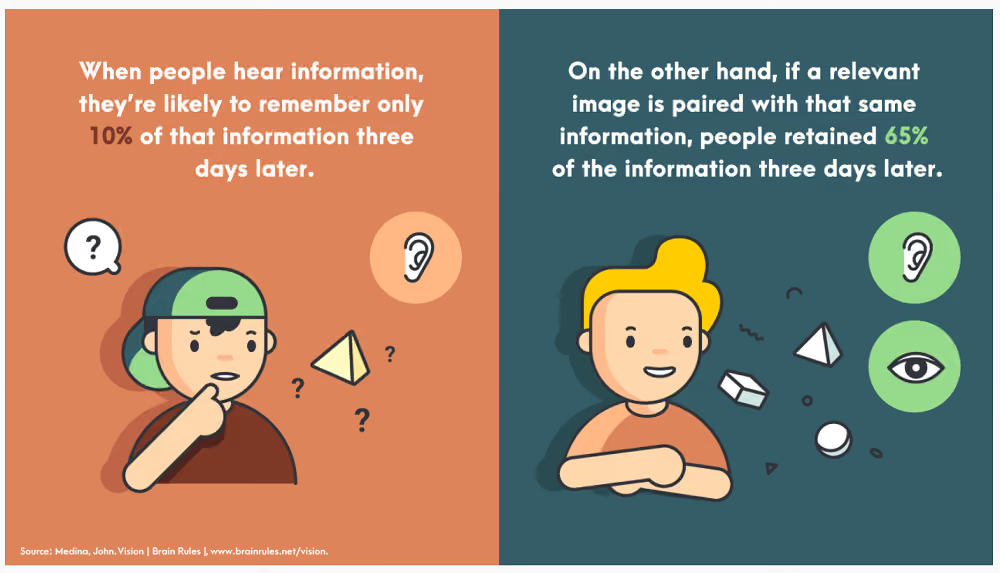
Visuals can help you communicate key data in a way that it’s easily digestible, comprehensible, and memorable.
Chances are your company is already using visualization in many areas. From the emoji that a coworker shares with you to the poster in the hall depicting Covid precautions, you probably come across a variety of visuals every day. So it’s only a matter of extending the same creativity to your change communications.
On top of that, tools like Canva, Piktochart, and Visme that have recently flooded the market allow even non-designers to create stunning visuals in no time.
Once you have created the visual content for communicating change, use a platform like Blink (which has a newsfeed and content hub) ensure smooth distribution and ready accessibility.
Bring in video communication
Videos are among the most engaging communication formats. Viewers retain 95% of a message when the message is conveyed with a video, as compared to just 10% from plain text.
If the thought of creating a video is conjuring images of complex video editing software in your head, worry not.
Just like with graphics, you don’t need to be a video-mixing pro to create engaging clips. What matters is that your videos are genuine and authentic – they don’t need to be slick and polished.
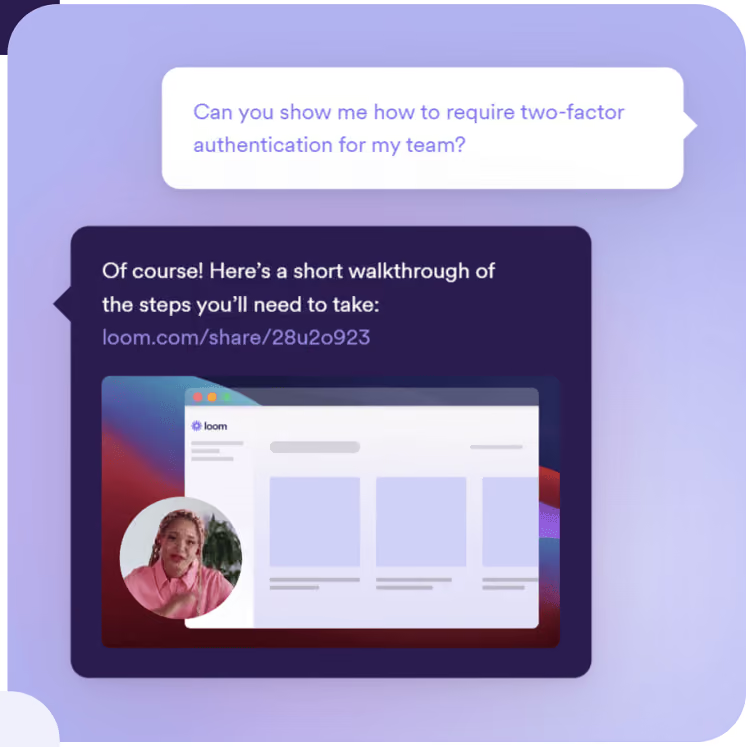
Tools such as Snagit, Piktostory, and Loom make it really easy to record, edit and share videos with employees in your organization.
Communicating change in the workplace: 6 best practices 1
Don’t forget face-to-face channels
It’s no secret that people are increasingly working remotely and relying on digital communication platforms to meet and keep in touch. In many ways, that’s a good thing.
But change, no matter how small, is a sensitive topic. When communicating change, it’s not just about what you’re saying, but also about how you’re saying it – the non-verbal signals you, and your employees, send out contain important information.
Take the example of a global manufacturer who held a meeting of about 200 workers right after a reorganization. There was an unease in the crowd, and when the VP got up to deliver his speech, he spotted this and took it into account: instead of embarking on his presentation, he started by addressing the elephant in the room.
He told the workers that he understood how they were feeling. Uncertain. Sad. Scared. He expressed honest, heartfelt sorrow over the senior management’s distress about letting good people go. He validated what the employees were feeling.
Had this been a virtual meeting, the VP probably wouldn’t have caught the non-verbal signals of workers’ mental and emotional condition.
Communicating change in the workplace: 6 best practices 2
So whenever possible, include in-person communication in your change management communication process. Tune in to what preoccupies your employees so you can respond genuinely. This is especially important if they are frontline workers; make sure they feel seen, heard and taken into account.
Incorporate the principles of storytelling
In the early 1980s, the airline industry went through a tough time. Scandinavian Airlines was hit particularly hard: it was facing a loss of $20 million.
To turn itself around, the business decided to make a big change in its strategy, the core of which was to focus more on business travelers. But changing the mindset of its 20,000 workers was not going to be easy.
So what did they do? The management sent a short handbook to all the employees with a visual story communicating the change. The booklet covered what the company was going through, its future goal, and how workers could help the organization get through its struggles.
Along with other change communication efforts, this approach helped the company increase its earnings by $25 million in the first year, and $80 million overall.
Stories can go a long way in reducing the fear and uncertainty associated with your change initiative, and rally your workers around shared objectives.
Change is stressful. 73% of employees affected by change report experiencing moderate to high stress levels.
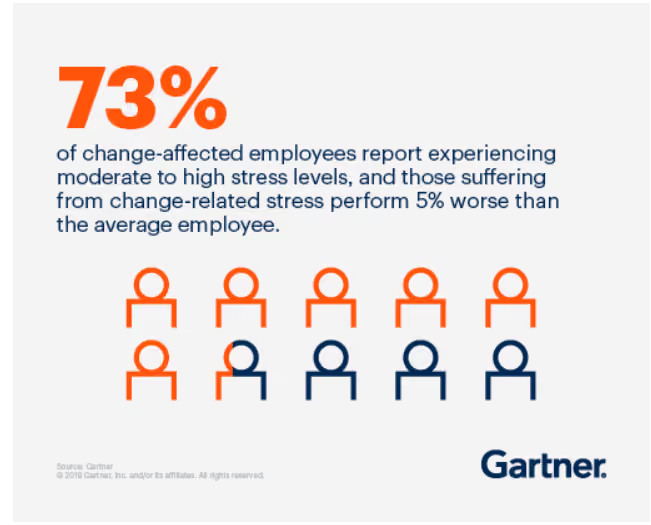
When going through a transition, employees want to feel heard and validated. They should be able to share their concerns, feelings, and experiences, and raise questions.
In-person chats go a long way in giving workers a sense of being included. If that’s not possible, or in larger companies, two-way digital communication channels can make a big difference. Either way, the unspoken message you want to convey is that the management and the employees are in this together.
Create a change communication strategy
Your employees will feel reassured and get on board much faster if they have a clear view of exactly what’s happening when, and if they feel that they have a voice.
The best way to embark on a change process is to start with a change communication strategy that helps workers see what lies ahead. Not knowing generates anxiety; being in the loop alleviates it.
A proper change communication strategy will help you distribute timely, consistent, and relevant information, along with mechanisms for workers to share feedback and raise questions.
Communicating change in the workplace: final thoughts
Communicating change takes time and effort but it is often worth it. When communicated skilfully, a change effort can shift gears and successfully move your company into a desired future state.
Many organizations fail at change management because they treat it as a set-and-forget process. Don’t make that mistake. When communicating change, make sure to hammer home your key messages not just once, but again and again. Keep communicating until the change becomes second nature.
If you make your workers the protagonists in the story of your change, you’ll see a real willingness on their part to adapt and contribute.
If you are looking to implement effective change communication, schedule a demo to learn about how Blink can help you drive successful organizational change with efficient internal communications.

A telltale sign of whether an organization will survive and thrive into the future is its adaptability.
That’s because sooner or later, every organization will go through a big change that impacts its employees.
It may be a merger, a growth slump, an acquisition, a leadership replacement, or a company-wide policy update. To make it work – to adapt and thrive – employees need to be aligned with a company’s change efforts. This is especially true for frontline organisations.
Sadly, when it comes to communicating change, many organizational change initiatives fail miserably. A recent study by Gartner shows that only 34% of all change efforts are successful.
We’re not big on fancy jargon. So let’s keep it simple. Change communication is the process of keeping your workers updated on your change initiatives throughout a period of change.
How you go about communicating change can help employees and other stakeholders understand:
What is being changed
Why the change is necessary at this time
What’s the scope of your change efforts
How the change will affect them
What steps are required from their side
Whether you’re adopting new technology, updating a part of a business operation, or shuffling leadership, communicating change helps workers shift from where they are to where they need to be in the future.
Understanding the change communication model
If you want your change initiative to bear fruit, your workers should go through the following phases.
Awareness: informing employees about the coming change. This should be done through clear and relevant messages distributed through internal communication channels.
Understanding: helping employees what, why, and how of the change.
Acceptance: supporting employees in accepting the upcoming change effort and act in accordance with it. This will almost certainly require two-way communication.
Commitment: making sure that communication keeps flowing until the new activities become the norm, to reach full commitment.
Each of these phases is important for a smooth transition. If you rush the process and skip a phase you will encounter resistance. There are no shortcuts.
So the big question is: how can you best meet the needs of workers during each phase? We’re glad you asked. Here are some tips to help you streamline your change initiatives.
Communicating change in the workplace: how to do it right
Use visual communication
Visual communication relies on visual aids to convey information – graphs, maps, charts, infographics…
Images and videos are visual forms of content too. TechSmith’s research shows that using them saves time and leads to faster understanding than text on its own.
Visuals can help you communicate key data in a way that it’s easily digestible, comprehensible, and memorable.
Chances are your company is already using visualization in many areas. From the emoji that a coworker shares with you to the poster in the hall depicting Covid precautions, you probably come across a variety of visuals every day. So it’s only a matter of extending the same creativity to your change communications.
On top of that, tools like Canva, Piktochart, and Visme that have recently flooded the market allow even non-designers to create stunning visuals in no time.
Once you have created the visual content for communicating change, use a platform like Blink (which has a newsfeed and content hub) ensure smooth distribution and ready accessibility.
Bring in video communication
Videos are among the most engaging communication formats. Viewers retain 95% of a message when the message is conveyed with a video, as compared to just 10% from plain text.
If the thought of creating a video is conjuring images of complex video editing software in your head, worry not.
Just like with graphics, you don’t need to be a video-mixing pro to create engaging clips. What matters is that your videos are genuine and authentic – they don’t need to be slick and polished.
Tools such as Snagit, Piktostory, and Loom make it really easy to record, edit and share videos with employees in your organization.
Communicating change in the workplace: 6 best practices 1
Don’t forget face-to-face channels
It’s no secret that people are increasingly working remotely and relying on digital communication platforms to meet and keep in touch. In many ways, that’s a good thing.
But change, no matter how small, is a sensitive topic. When communicating change, it’s not just about what you’re saying, but also about how you’re saying it – the non-verbal signals you, and your employees, send out contain important information.
Take the example of a global manufacturer who held a meeting of about 200 workers right after a reorganization. There was an unease in the crowd, and when the VP got up to deliver his speech, he spotted this and took it into account: instead of embarking on his presentation, he started by addressing the elephant in the room.
He told the workers that he understood how they were feeling. Uncertain. Sad. Scared. He expressed honest, heartfelt sorrow over the senior management’s distress about letting good people go. He validated what the employees were feeling.
Had this been a virtual meeting, the VP probably wouldn’t have caught the non-verbal signals of workers’ mental and emotional condition.
Communicating change in the workplace: 6 best practices 2
So whenever possible, include in-person communication in your change management communication process. Tune in to what preoccupies your employees so you can respond genuinely. This is especially important if they are frontline workers; make sure they feel seen, heard and taken into account.
Incorporate the principles of storytelling
In the early 1980s, the airline industry went through a tough time. Scandinavian Airlines was hit particularly hard: it was facing a loss of $20 million.
To turn itself around, the business decided to make a big change in its strategy, the core of which was to focus more on business travelers. But changing the mindset of its 20,000 workers was not going to be easy.
So what did they do? The management sent a short handbook to all the employees with a visual story communicating the change. The booklet covered what the company was going through, its future goal, and how workers could help the organization get through its struggles.
Along with other change communication efforts, this approach helped the company increase its earnings by $25 million in the first year, and $80 million overall.
Stories can go a long way in reducing the fear and uncertainty associated with your change initiative, and rally your workers around shared objectives.
Change is stressful. 73% of employees affected by change report experiencing moderate to high stress levels.
When going through a transition, employees want to feel heard and validated. They should be able to share their concerns, feelings, and experiences, and raise questions.
In-person chats go a long way in giving workers a sense of being included. If that’s not possible, or in larger companies, two-way digital communication channels can make a big difference. Either way, the unspoken message you want to convey is that the management and the employees are in this together.
Create a change communication strategy
Your employees will feel reassured and get on board much faster if they have a clear view of exactly what’s happening when, and if they feel that they have a voice.
The best way to embark on a change process is to start with a change communication strategy that helps workers see what lies ahead. Not knowing generates anxiety; being in the loop alleviates it.
A proper change communication strategy will help you distribute timely, consistent, and relevant information, along with mechanisms for workers to share feedback and raise questions.
Communicating change in the workplace: final thoughts
Communicating change takes time and effort but it is often worth it. When communicated skilfully, a change effort can shift gears and successfully move your company into a desired future state.
Many organizations fail at change management because they treat it as a set-and-forget process. Don’t make that mistake. When communicating change, make sure to hammer home your key messages not just once, but again and again. Keep communicating until the change becomes second nature.
If you make your workers the protagonists in the story of your change, you’ll see a real willingness on their part to adapt and contribute.
If you are looking to implement effective change communication, schedule a demo to learn about how Blink can help you drive successful organizational change with efficient internal communications.
What we'll cover
Start your free trial today
See how Blink helps frontline teams stay connected, informed, and engaged.
Growth is exciting — until your communication stack starts showing cracks.
What worked when you had 500 employees rarely survives the jump to 2,000. Messages get missed. Tools and communication channels multiply. Frontline teams fall out of the loop. Managers spend more time clarifying updates than leading their teams. Collaboration suffers.
And the cost adds up fast.
Internal communication isn’t just about “sending messages.” It’s the connective tissue that keeps people aligned, productive, and confident through change — especially during rapid growth, acquisitions, and reorganization.
In 2026, the best internal communication platforms are mobile-first, integrated, and built to scale. They bring updates, messaging, recognition, feedback, and knowledge into one clear place — reducing noise while increasing clarity.
But choosing the right platform is where many growing organizations stumble.
In this guide, we break down exactly how to compare internal communication tools for growth — so you can avoid tool sprawl, protect employee trust, and scale communication without slowing your business down.
Let’s get into it.
How to choose and compare internal communication tools for growth
Step #1: Audit your current communication tools and challenges
Start by mapping your current comms tech stack. List every communication tool your company uses — email, intranet, chat apps, recognition tools, employee apps — everything.
Categorize these tools by function and adoption level. Then, identify pain points. Are employees frustrated by fragmented communication? Duplicate workflows? Low engagement? Or maybe frontline teams can’t access key updates at all?
Creating a simple audit table with key criteria can make this research easier to digest:
Tool
Purpose
Coverage
Integration status
Mobile experience
Overall user experience
Analytics
Adoption rate
Unique features
Problems we have with this tool
This gives you a baseline. So you can see what’s working and what’s holding you back.
Step #2: Define business outcomes and KPIs
The best employee communication tools don’t just support better comms. They support your overarching business goals and KPIs.
So, when comparing internal communication tools for business growth, start by asking: What do we want to achieve?
Example goals include:
Increase productivity by ensuring employees have the information the need, when they need it
Improve retention by fostering engagement and a sense of belonging
Boost customer satisfaction through better-informed frontline teams
Strengthen collaboration across departments, locations, and roles with joined-up comms software
Next, define KPIs that make these outcomes measurable. For example, missed deadline rates, employee satisfaction scores, time-to-information, and cross-functional interaction rates.
During M&A or large-scale change, communication KPIs matter even more. Leaders should track not just engagement, but clarity — for example, repeat questions in manager channels, policy page revisit rates, or sentiment dips following major announcements. These indicators reveal where uncertainty is slowing integration and decision-making.
Step #3: Prioritize essential features for growth and engagement
In 2026, mobile-first communication solutions are essential. If your tool isn’t designed to work seamlessly on a smartphone, you exclude frontline workers and make life harder than it needs to be for everyone else.
When you compare internal communication tools for growth, look for platforms that deliver an exceptional mobile experience and the following functionality to drive adoption, impact, and scalability:
Step #4: Test integrations and compatibility with your ecosystem
Your internal communication platform can’t live in isolation. Integration matters. It eliminates workflow fiction, maximizes comms ROI, and supports seamless adoption of your tech tools.
Start by auditing your software ecosystem: HRIS, CRM, payroll, identity providers, operational tools. Then, look for internal communication platforms that offer strong integrations with your current tech stack.
Things to look for?:
Single sign-on. So employees can access all workplace software via one unified dashboard and a single set of login details.
HRIS sync. From benefits to policy docs to schedules to payroll, you make life easy for employees and your HR team when internal comms and HR systems talk to each other.
Calendar/file system connectivity. To create a joined-up system, the same calendar and files should be accessible across all workplace software.
Security compliance. Easy access is important. But you need to balance this with security and privacy standards. Look for platforms that balance usability with data protection.
You may like to run sample integration tests, documenting any issues or workarounds needed, to find the best match.
Use case: Supporting internal communications during M&A and organizational change
Business growth doesn’t always follow a straight line. For many organizations, growth comes through mergers and acquisitions (M&A) or major restructuring — moments when communication becomes both more critical and more fragile.
While legal close and system access often run smoothly, the employee experience that follows is far messier. What we consistently see during M&A-driven growth includes:
Conflicting messages across teams
Duplicated tools and knowledge bases
Managers fielding questions they don’t yet have answers to
Employees unsure where to go for “what’s actually changed”
This is where internal communication platforms are truly tested.
Communication at scale — without losing local context
Successful M&A communication balances two competing needs:
A shared narrative from the parent organization
Local relevance for acquired teams
The best internal communication tools support this by clearly separating global updates from location-, role-, or entity-specific information — so employees understand what applies to everyone and what applies to them.
Systems change needs a human layer
During M&A, system consolidation is inevitable. What shouldn’t be inevitable is confusion.
Employees don’t want another announcement about a new platform. They want:
One clear place to start their day
Simple guidance on what changed (and what didn’t)
Confidence they’re using the right tools
Mobile-first platforms that unify communication, knowledge, and workflows help organizations turn change management from a one-time event into a guided experience.
Modern intranets under pressure
Legacy intranets often collapse under M&A strain:
Duplicate pages and policies
No clear ownership
Inconsistent branding and structure
Modern internal communication platforms act as flexible, living knowledge hubs — supporting shared content while allowing phased integration and local nuance.
Supporting managers is risk mitigation
Managers become the front line of communication during M&A — often before decisions are fully finalized.
Platforms that provide:
Manager-ready messaging
Clear distinction between what’s decided and what’s evolving
A single source of truth managers can point teams to
…reduce mixed signals, rumor cycles, and burnout. Supporting managers isn’t just enablement — it’s how organizations protect trust during change.
Why measurement matters more during M&A
The most successful M&A integrations share one thing: visibility.
Strong internal communication tools allow leaders to see:
Who’s engaging with updates
Where confusion persists
Which teams need additional support
Without this data, organizations guess. And during M&A, guessing is expensive.
Bottom line:
If an internal communication platform can support employees through M&A — preserving clarity, confidence, and culture — it’s built to support business growth at any scale.
{{mobile-desktop-main="/image"}}
Execution mistakes to avoid after choosing an internal communication tool for business growth
Choosing the right internal communication platform is a big milestone. But growth-ready comms don’t come from software alone — they come from how well the platform is implemented, adopted, and embedded into daily work.
Here are the most common execution mistakes growing organizations make and how to avoid them.
Mistake #1: Rolling out to everyone at once
A full-scale rollout might feel efficient, but it often hides problems until they’re expensive to fix.
Different groups experience communication very differently — especially during growth or post-acquisition integration. Frontline teams, managers, and HQ staff don’t have the same needs, habits, or access.
What to do instead:
Run targeted pilots with representative user groups. Track adoption, ease of use, and qualitative feedback. Use what you learn to refine onboarding, governance, notifications, and content formats before scaling.
A phased rollout surfaces friction early — when it’s still easy to fix.
Mistake #2: Measuring usage, but not impact
Login rates alone don’t tell you whether communication is working. High activity can still mask confusion, misalignment, or low trust.
What to do instead:
Measure adoption and engagement alongside business outcomes. Segment data by role, location, and department to identify where communication is supporting productivity — and where it’s falling short.
Look for correlations between communication patterns and KPIs like retention, customer sentiment, safety incidents, or time-to-information. That’s where ROI becomes visible.
Mistake #3: Letting tool sprawl creep back in
One of the fastest ways to undermine a new platform is by continuing to introduce side tools “just in case.”
This recreates the very fragmentation the platform was meant to fix.
What to do instead:
Commit to consolidation. Use your internal communication platform as the default starting point for updates, resources, and workflows — and only introduce additional tools when there’s a clear, documented gap.
Clear ownership and governance keep the platform focused, trusted, and scalable.
Mistake #4: Treating communication as a broadcast channel
Posting more messages doesn’t automatically improve alignment — especially during periods of change.
When everything looks urgent, employees stop paying attention.
What to do instead:
Design intentional communication flows. Use push notifications sparingly for critical updates. Reserve feeds for cultural and organizational alignment. Enable group or team channels for local coordination.
Structure reduces noise — and increases trust.
Mistake #5: Leaving managers unsupported
During growth or M&A, managers become the de facto interpreters of change — often before decisions are fully finalized.
Without support, this leads to mixed messages, burnout, and rumor cycles.
What to do instead:
Equip managers with clear, shareable messaging and a single source of truth they can confidently point teams to. Be explicit about what’s confirmed, what’s evolving, and where employees should go with questions.
Supporting managers isn’t just enablement — it’s risk management.
Mistake #6: Treating implementation as “done”
Employee expectations, business priorities, and communication needs don’t stand still — especially in growing organizations.
What to do instead:
Regularly audit performance using analytics and feedback. Adapt content, workflows, and governance as teams and structures evolve. Continuous improvement turns your communication platform into a long-term growth asset — not a one-time rollout.
{{mobile-chat="/image"}}
Bottom line
The right internal communication tool creates the foundation for growth. But disciplined execution is what protects clarity, trust, and momentum as your organization scales.
Avoid these common mistakes, and your platform won’t just support growth — it will actively enable it.
Good internal communication is the glue that holds organizations together. It keeps everyone informed, aligned, and connected — helping employees understand company priorities and feel part of a shared purpose.
In 2026, internal communication involves more than noticeboards and scattered email threads. Organizations with hybrid or frontline teams need modern internal communication platforms like Blink to connect employees, simplify updates, and enable easy collaboration.
A successful internal communication strategy includes all communication types: top-down, bottom-up, and peer-to-peer. These channels work together to connect employees and ensure information flows throughout your organization.
For larger or dispersed teams, achieving this can feel like a tall order. But with the right internal communication software, even global workforces can stay connected and engaged.
Luckily, many new tools and platforms can help your company improve communication.
Types of internal communication tools and platforms
Before diving into specific providers, it helps to understand the main types of internal communication software shaping the modern workplace in 2026.
The most effective organizations use a combination of these tools — or a single employee experience platform like Blink, which combines many of these functions into a single mobile-first solution.
Instant messaging tools
Internal communication isn’t just top-down. Co-worker collaboration tools keep conversations flowing across teams and locations by enabling quick information sharing, file exchange, and informal social connections.
{{mobile-chat="/image"}}
Advantages:
A communication tool that allows employees to chat and share information (along with emojis and GIFs)
Most instant messaging tools are available on both desktop and mobile
Messaging tools can be used for communication between co-workers, but also for information-sharing between leadership and employees
Best tools: Blink, Slack, Jive, Workvivo
Emails and newsletters
Digital newsletters have always been great for sharing essential company updates. Modern tools enhance this channel with templates, analytics, and branded content delivery.
Best tools: ContactMonkey, Axero, Poppulo, Staffbase
Audio and video conferencing tools
Rewind a decade and video conferencing probably wouldn’t be one of the top staff communication tools on your list. Today, however, in a world of remote and hybrid teams, video conferencing tools are a workplace essential. They allow employees to talk face-to-face, even when they’re not based in the same office.Now a workplace essential, these tools make remote and hybrid meetings seamless — from one-to-one calls to company-wide events.
Best tools: Zoom, Google Meet, Microsoft Teams
Employee recognition center
Recognition platforms reward effort and build engagement by blending social recognition with tangible rewards to boost morale and employee retention.
Best tools: Blink, Bonusly, Unily
{{mobile-kudos="/image"}}
Employee engagement and surveys
Engage your employees and you experience countless benefits, including improved productivity, customer loyalty, and profitability. But if you really want to improve employee engagement, you need to measure it.
Employee surveys and feedback forms are an essential part of any internal communication toolkit. They support bottom-up communication and give you valuable insight into how employees really feel about working for your firm.
{{mobile-survey="/image"}}
Best tools: Blink, SurveyMonkey, Bonusly, Qualtrics
Company news feed
A private, social-style feed alerts employees to company updates and important cultural moments.
Best tools: Blink, Workvivo, Staffbase, Happeo
{{mobile-main="/image"}}
Project management
Project management platforms keep work visible, accountable, and collaborative.
Best tools: Asana, monday.com
Intranet
Evolving beyond traditional intranets, these tools now enable engagement, two-way communication, and document collaboration.
Mobile-first employee communication apps centralize updates, messaging, and engagement features — ideal for hybrid and frontline teams.
Best tools: Blink, Workvivo
Employee experience platform
These top-tier employee experience platforms offer a user-friendly way to access messaging, news, surveys, recognition programs, and HR functions.
These platforms go beyond communication — supporting onboarding, engagement, and culture-building.
Best tools: Blink, Workvivo, Staffbase
The takeaway:
Modern internal communication relies on an integrated ecosystem or a unified platform like Blink, which simplifies your tech stack and enhances workforce connection.
Blink serves as a mobile-first communication app, a modern intranet, a recognition tool, and a complete employee experience platform.That agility makes it ideal for companies looking to streamline their technology and boost employee engagement.
20 best internal communication tools
Ready to find the right comms solution for your organization? Take a look at our round-up of the best internal communication tools for 2025.
Blink is a modern internal communication tool and employee experience platform that brings together messaging, news, surveys, recognition, and analytics into a single mobile-first solution. It’s designed for organizations that want to improve communication, engagement, and access to information across both desk-based and frontline teams.
{{mobile-hub="/image"}}
As a mobile-first internal communication platform, Blink’s unified interface lets teams share updates, message peers, and access essential workplace applications in real time, without a corporate email address — no matter their location.
Unlike single-purpose messaging apps, Blink functions as an all-in-one internal communication software, combining collaboration and employee engagement tools in one place.
Features like pulse surveys, recognition, and content personalization enable two-way communication and make company-wide updates more meaningful.
Blink also includes social-style communication features — such as Stories, Communities, and a personalized news feed — that make information sharing intuitive and engaging. Built-in analytics help leaders understand message reach, engagement trends, and content effectiveness.
Pros
Unified internal communication toolset: Blink combines chat, news, surveys, recognition, and analytics.
Mobile-first accessibility: It works on smartphones and desktops, and doesn`t require a company email.
Seamless integrations: Connects with Microsoft 365, Google Workspace, HRIS, and scheduling tools.
Data-driven insights: The analytics dashboards measure communication performance and engagement.
Cons
The search functionality could benefit from more advanced filtering and refinement options.
Pricing
Pricing is available on request
Use Cases
Strengthening culture and alignment through data-informed communication strategies
Connecting hybrid and frontline teams with one internal communication platform
Centralizing all company messages, tools, and resources in a single hub
Improving engagement through interactive multimedia content
2. Asana
Asana is a well-known project management tool and, if you use it, you’re in good company. Around 85% of Fortune 100 companies say they use Asana.
With this workplace communication platform, you can create, prioritize, and allocate tasks. You can view tasks in timeline, board, and list formats — and track your progress toward milestones.
The visual format makes it easy to see which tasks your team needs to complete first. And the process of identifying and remedying project bottlenecks becomes much easier too.
Pros
A free version that supports 10 members and comes with unlimited storage, tasks, and messages
A clean, intuitive interface and a comprehensive selection of project and task management tools
Comes with a mobile app so employees can keep of track of projects on the go
Good integration with third-party tools
Cons
A high volume of email notifications can be frustrating for users
One of the more expensive project management solutions available
The mobile experience pales in comparison to the desktop experience
Collaboration tools aren’t as extensive and effective as those of other project management tools on the market
Pricing
Monthly pricing for Asana starts at a basic free plan. A business plan costs $24.99 per user per month when billed annually.
Use cases
Giving remote teams the tools they need to manage projects effectively
Cross-team collaboration
Status updates and reporting — leaders can view dashboards and reports to stay informed of project progress.
3. Jive
Jive is a community-building communication tool that you can use for top-down, bottom-up, and peer-to-peer connection. Team members can share photos, videos, documents, status updates, and blog posts. They can also decide whether their post gets seen by one team member, a specific group, or the whole organization.
Another great feature of Jive is its People Directory. Here, employees can search for co-workers they want to connect with, based on their skills, endorsements, and favorite activities.
Pros
Jive is an all-purpose business communication tool
Supports personalized news updates
Provides a single inbox so employees can manage all company communications and conversations in one place
Cons
Jive has a complicated interface and a cluttered layout that can be difficult for users to understand and navigate
Limited integrations with the other workplace tools you use
Some users say the Jive mobile app is slow and clunky with lackluster features
Pricing
Pricing is available on request.
Use cases
Creating a centralized hub for updates and document sharing
Personalizing company updates to make them more relevant and engaging
Giving employees the tools they need to interact with leadership, managers, and coworkers
4. Zoom
Zoom is often listed as one of the most reliable video conferencing platforms. It offers excellent audio and visual quality, even when internet connection is patchy, and it’s really easy to use.
You can record meetings, direct meeting participants to breakout rooms, and make use of a meeting annotation function. Zoom offers a range of other useful features too, including an online whiteboard and virtual working spaces (known as Zoom Huddles).
Pros
User-friendly interface
Can run small one-to-one meetings, large conferences, and anything in between
Advanced features include breakout rooms and webinar hosting
Cons
Zoom can be expensive for larger teams, with add-ons needed for meetings of more than 500 participants
Pricing
A Pro plan, for up to 99 users, costs $15.99 per user per month. A Business Plan, for up to 250 users and with a greater range of features, costs $21.99 per user per month.
Use cases
Running live meetings and webinars
Supporting video and audio communication for hybrid and remote teams
5. Bonusly
Bonusly gives you all the tools you need to run a successful recognition program. Via an intuitive platform, employees can tag peers and congratulate them on their accomplishments. Congratulated employees earn points, which they can then use to claim their preferred reward — a gift card, cash, or a charitable donation.
Reporting tools give leaders insight into team dynamics and patterns of recognition. It helps you to discover top performers and identify people who haven’t had any recognition in a while.
Pros
A user-friendly interface and next to no learning curve
The option to tailor recognition programs to fit your culture and values
Out-of-the-box integrations with other workplace tools including Workday, Asana, and Slack
Cons
Limited analytics — so it can be hard for companies to understand employee engagement and recognition patterns
Pricing
Monthly pricing options for Bonusly starts at $2 per user.
Use cases
Strengthening company culture and employee morale with regular recognition, even when employees are working remotely
Creating a culture of peer-to-peer recognition — employees can award points and praise to their co-workers
6. Axero
Axero is an internal comms platform designed to unify teams, increase productivity, and improve workplace culture. It features mass email tools, an activity stream, a blogging platform, and instant messaging.
Using Axero, you can create a central hub for files, communications, and company updates. Collaboration features also come in handy, with space for team discussions and the option to co-edit documents.
Pros
Axero’s customer service is responsive and helpful
Good customization and integration options
A comprehensive employee directory that makes it easy for staff to find and connect with co-workers
Cons
A steep learning curve — users say that Axero can be overwhelming for beginners
Some users say that Axero functionality lags behind that of other intranet competitors
Limited features on the mobile version
Pricing
Pricing is available on request.
Use cases
Creating a single hub for news, updates, and resources
Supporting collaboration across your company, with file sharing and team discussions
Building a personalized employee experience, with custom dashboards tailored to the roles and departments of employees
7. ContactMonkey
ContactMonkey is one of the best newsletter platforms available. Unlike some of its competitors, ContactMonkey integrates with both Outlook and Gmail so you can send emails from and receive replies to your usual inbox.
The platform provides an easy-to-use, drag-and-drop email builder. Multiple team members can collaborate on the same email. And analytics tools help you judge which newsletter content is best engaging your workforce, so you can create more of the same.
Pros
Employee survey tools so you can email your surveys to the workforce with ease
Integration with Outlook and Gmail
SMS integration that allows you to reach employees with urgent updates
Real-time tracking and analytics — so you get insight into email open rates and click-throughs
Cons
You can only use ContactMonkey for internal emails, not external marketing emails
Only supports communication over email, which may not be particularly engaging or appropriate for all organizations
Unlikely to fulfill all your internal communication needs
Pricing
Prices start from $600 per month for 500 employees. Prices for more extensive plans are available on request.
Use cases
Engaging email and newsletter communication for employees
Launching employee surveys to help you acquire useful feedback
8. Slack
Slack is an instant messaging tool that supports asynchronous communication. Slack works well for desk-based employees who have access to other platforms, like Google Drive. Slack doesn’t work as well for on-the-go, field-based employees, who don’t have such easy access to separate cloud storage.
People within your organization can launch chat threads, including as many or as few team members as they like. They can create threads for different projects, departments, and topics. Teams also get access to little extras, like file sharing, message search, and a task reminder function.
Pros
User-friendly interface
Integration with a wide range of other workplace software
Customizable notifications
Cons
Doesn’t work well for teams who are on the go — Slack is most suited to desk-based teams
Can be hard to find what you’re looking for across multiple chats and channels
Pricing
Slack offers a limited free plan. Paid plans start from $8.75 per user per month.
Use cases
Ensuring real-time communication between dispersed team members
Providing a variety of internal communication channels — including direct messages, group chats, and channels
SurveyMonkey has made it to our employee survey top spot for its ease of use. This employee communications platform has lots of survey templates to choose from and, if speed is your priority, lots of features that help you get employee feedback fast.
You can choose from hundreds of expert-written questions or write your own. And with the help of custom templates, you can find or create surveys for any situation, whether you want to conduct 360 reviews, find out your Net Promoter score, or seek feedback on your employee engagement efforts.
Pros
Ease of use — SurveyMonkey has a clean, uncluttered interface that employees will enjoy using
Using the Genius Assistant and the “build it for me” feature, you can create surveys quickly
Excellent analytics that help you make sense of employee responses
Cons
Limited free features
Limited customization options, so you may struggle to create complex or specialized surveys
Pricing
Prices start from $30 per user per month.
Use cases
Boosting employee satisfaction and engagement with the help of employee feedback
Making it easy for your teams to launch and respond to employee surveys
10. Microsoft SharePoint
Microsoft SharePoint is a file-sharing software that integrates seamlessly with the other Microsoft tools you may already use. You can create branded document libraries called sites, customizing them for document collaboration or top-down comms.
Teams get to share news, documents, and data. They can also edit documents collaboratively — setting notifications so they know when a co-worker makes changes.
Pros
Easy integration with other Microsoft products
Allows you to segment employees by division, giving each division its own calendar and visual timeline
Customization options so you can build forms, workflows, and custom applications for your teams
Cons
Not particularly user-friendly, especially on mobile
Cost of implementation is high and adoption rates tend to be low
Pricing
A basic SharePoint plan costs $5 per user per month.
Use cases
Project collaboration — teams can co-edit documents and manage workflows
An easy way for desk-based teams to access company documents and resources
Using internal announcements and newsletters to communicate with all employees
11. Monday.com
Monday.com is a project management tool that supports comms and employee engagement. You can use this internal communications software to create and assign tasks, track project progress, and create performance-tracking templates for employees.
Team members receive notifications when action is required. And an easy-to-use visual interface makes it easy to see where each project is up to at a glance.
Pros
A comprehensive set of project management tools
Customizable project templates to get you started
A weekly overview so you can see tasks and project milestones you need to tackle over the next few days
Cons
The backend of this business communication software is complicated and involves a steep learning curve
Limited comms tools so Monday.com isn’t useful as a standalone business communication platform
Pricing
Prices start from $8 per user per month.
Use cases
Improving project management and work collaboration
Task and workflow automation to streamline repetitive processes
12. Workvivo
Workvivo is an intranet software company owned by Zoom. You can use this internal communication tool to improve comms, employee engagement, and recognition, too. You can also make use of multiple communication channels and employee feedback tools.
Standout features include live broadcasting tools, so you can launch live streams and podcasts. You can also create microsites, where teams and special interest groups can create their own, tailored communities.
Pros
Strong translation abilities for multilingual organizations
An engaging, social-media-style interface that will feel familiar to employees
Rich communication tools including a news feed and instant messaging (available through integrations with tools like Slack, MS Teams, and Zoom meetings)
Cons
Chat functionality on the mobile app falls behind the desktop experience
Advanced features — including chat, Workvivo TV, and advanced analytics — are add-ons that come at an additional cost
Admins say they want better customization options and improved third-party integrations
Staffbase is an internal communication platform designed to connect and engage employees. It brings company news, messaging, and resources into one place, making it easier for you to reach your workforce — whether they’re remote, hybrid, deskless, or office-based.
With Staffbase, you can communicate over the company intranet and send emails and SMS, all from one centralized dashboard. You can also create tailored content paths so employees receive the right information at the right time.
Pros
A great user experience across desktop and mobile versions
Brings a range of communication and workplace functions into one location, supporting top-down, bottom-up, and peer-to-peer conversations
Built-in reporting so you can see how employees are using the platform and interacting with your content
You can customize the platform so it matches the look and feel of your branding
Cons
Some add-ons and integrations come at an additional cost
There are few out-of-the-box features on the employee app
Search functionality and integrations aren’t as good as they could be
Pricing
Pricing is available on request.
Use cases
Launching employee surveys with in-built tools
Creating a single source of truth within your organization thanks to communication channels that all workers can access
Making comms more personal, with the option to segment your audience and deliver relevant content to different employee groups
14. Poppulo
Poppulo is an email and mobile communications software. It also provides digital signage functionality and digital tools for desk and meeting room management.
You can target messages based on location, role, or interests to cut through the noise. You can also access tools for planning and promoting internal events, like town halls and team meetings.
Pros
Omni-channel communications, across email, SMS, intranet, and digital signage
Drag and drop email design tools plus advanced personalization
Strong analytics — Poppulo gives comms teams clear visibility into message performance
Cons
Poppulo is more complex than some of the other tools on this list, so there can be quite a learning curve
While it brings multiple communication channels together, Poppulo isn’t comprehensive enough to work as a standalone company communication system
Pricing
Pricing is available on request.
Use cases
Enterprise email communication and analytics
Improving the quality of email messaging with employee segmentation tools
Managing office workspace among hybrid teams
15. Qualtrics
Qualtrics is an employee survey and feedback tool. You can use it to capture employee data via surveys and passive listening — and discover how your business is doing across metrics like intent to stay, engagement, inclusion, and wellbeing.
Surveys are easy to customize, with advanced question types and logic, while analytics and reporting tools help you turn insights into actionable strategies.
Pros
Flexible survey design options
Powerful analytics and reporting capabilities
AI tools that guide you to take action based on your employee feedback findings
Cons
Using advanced features effectively may require training
Qualtrics can be overly expensive for smaller businesses
Pricing
Pricing is available on request.
Use cases
Improving employee satisfaction and engagement with the help of regular surveys
Creating a culture of 360 feedback to improve the effectiveness of management and leadership
16. Happeo
Happeo is a Google-based intranet that provides a centralized location for all internal communications. It provides a hub for company news, documents, and collaboration tools.

Key features include a social intranet, an employee directory, and an intuitive search function. You can also use AI tools to find and fix gaps in your knowledge base.
Pros
Easy integration with Google Workspace tools
Excellent search functions so it’s easy to find the people, posts, and integrated third-party apps you’re looking for
The option to create hubs and communities based on departments, roles, and shared interests
Cons
Limited integrations beyond the Google suite
A web-first platform, best suited to desk-based teams
Pricing
Pricing is available on request.
Use cases
Creating a centralized hub for updates and document sharing
Unily is an employee experience and internal communications tool. It provides features that support its “four cornerstones” of digital employee experience: Alignment, Engagement, Enablement, and Simplicity.
Key features include email, employee feedback, and recognition tools. You can design, sequence, and automate employee journeys so staff receive relevant information at the right time. You can also use gamification features to improve intranet engagement.
Pros
An excellent desktop version, with an engaging and intuitive user experience
Fine-grained controls for admins
A good range of notifications
Cons
Mixed opinions on Unily’s customer service and ability to support its partners
Translating Unily’s comprehensive desktop features to mobile is a challenge for admins
Pricing
Pricing is available on request.
Use cases
Creating channels for company-wide communications
Boosting employee engagement with dynamic content and gamification
A comprehensive intranet platform, Simpplr supports internal communication and employee engagement. It provides a user-friendly, social-media-style interface and provides AI-driven content recommendations.
Standout features include employee listening tools, surveys, and a recognition program. There are also lots of communication channels you can use across email, SMS, a mobile app, and desktop software.
Pros
An intuitive, uncluttered interface
Strong analytics that make it easy to track engagement metrics and content performance
Great search functions
Cons
Difficult login process, with multiple links provided
Some users say the struggle to integrate Simpplr with their preferred third-party apps
Advanced features can be expensive
Pricing
Pricing is available on request.
Use cases
Making employee feedback and listening a key part of company culture
Creating a centralized hub for communications, resources, and community
Bringing large organizations and distributed teams together
Google Meet is a video conferencing and virtual meeting tool. It’s integrated into Google Workspace, so it connects easily to Gmail, Calendar, and any other Google tools your team happens to use.
It’s incredibly easy to use via an internet browser so users don’t even have to download the software. This makes it one of the most accessible virtual meeting tools currently available.
Pros
Easy to set up and use
The ability to hold meetings with up to 1,000 participants
Chat, emoji, and screen share functions available during meetings
Cons
You need additional tools to fulfil all internal communication needs
Fewer advanced features compared to Zoom and Microsoft Teams
Pricing
Prices start from $6 per user per month.
Use cases
Virtual team meetings, webinars, and company-wide announcements
One-on-one video meetings
Virtual training and employee onboarding
20. Microsoft Teams
Microsoft Teams combines instant messaging, video conferencing, and file-sharing tools. As you’d expect, it offers the best possible integration with other Microsoft Office tech. You can use a selection of tools to create an all-round internal communication solution.
You can use Teams to run video meetings and team chats when your employees are working remotely or across different locations.
Pros
Strong integration with other Microsoft products
Secure communication and file sharing
Cons
Interface isn’t particularly engaging and there are few social-media-style features
Teams is designed for desktop use so mobile users don’t get the same user experience
Pricing
Prices start from $4 per user per month.
Use cases
Creating digital channels for internal communication and project management
Launching video and audio calls and sharing company-wide updates
Bringing remote and hybrid teams together, even when they’re working in different locations
Choosing an internal communication tool for your frontline organization (2026)
The right choice depends on your organization’s structure, workforce, and goals — particularly if you operate with hybrid or frontline teams.
For frontline organizations, the most significant communication challenge is dispersion. To resolve this, every employee should receive critical updates and feel part of the same company culture, even if they rarely visit headquarters.
To build a sense of belonging, choose a mobile-first internal communication platform that’s user-friendly and equally accessible for all.
To identify the best fit, ask yourself these four questions when evaluating internal communication software:
#1. Is your organization office-based, or do you have deskless workers to consider?
Some internal communication tools suit desk-based teams, such as intranets designed for desktop access. However, these are often unsuitable for reaching frontline workers who rely on smartphones.
To prevent information gaps, look for mobile-first internal communication solutions that offer the same functionality across devices. A dedicated mobile app ensures equal access and engagement across every team member — no matter where they work.
#2. Do your employees have regular opportunities to connect during the workday?
Connection drives performance, and employees who feel they belong are much more engaged and productive.
The problem for frontline teams is that they often lack organic “water cooler” moments. Using internal communication tools that enable social-style interaction — such as chat, feeds, and communities — fosters real-time collaboration between field and office teams.
#3. How much time can your employees spend on internal comms each day?
As frontline employees are busy serving customers, maintaining operations, or working off-site, they need a simple and reliable communication platform.
When evaluating tools, prioritize their ease of use, onboarding speeds, and precise message delivery.
Also check adoption rates and engagement levels as they’re powerful indicators of how smoothly a tool integrates into your daily workflow.
#4. How many internal communication goals do you want to cover?
Some platforms specialize in single functions, such as surveys, document sharing, or project management. Others, like all-in-one employee communication platforms, combine these capabilities.
To streamline your tech stack while enhancing connection and engagement, choose an internal communication tool that supports multiple channels — chat, news, surveys, recognition, and analytics — within one system.
The importance of internal communications in an organization
Every organization — frontline or otherwise — needs an effective internal communication strategy thatunites employees behind the company culture and values, improves collaboration, and enhances retention.
Strong internal communication also supports:
Company connection: When employees feel aligned with organizational goals, engagement and satisfaction rise
Change management: Transparent communication ensures buy-in during transitions
Problem-solving: Clear, direct messaging limits misinformation and strengthens trust
Productivity: Employees perform best when information is easy to find and act upon
Many internal communication tools support these goals — from instant messaging and surveys to intranets and recognition platforms. For frontline teams, the right solution must be mobile-first and easy to access on the go.
The right internal communication software can transform a disconnected team into a cohesive, informed community.
Blink shows how this works by helping companies like Go North West connect all their employees through a single digital hub.
Blink. And transform company communication with an all-in-one internal communication platform built for every worker.
2025 will be a transformative year for internal comms
As we look to 2025, internal communications is no longer just about keeping employees in the loop. Today’s workplace demands thoughtful, empathetic, and tech-savvy approaches to connect and engage a diverse, often dispersed workforce.
While this coming year will bring a host of unknown changes and unexpected challenges, it will also underscore universal principles — like empathy, community, and respect — that help create workplaces people genuinely want to be part of.
{{future-of-internal-comms-2025="/callouts"}}
For internal comms leaders, staying on top of these trends is about more than checking the latest buzzwords off your comms resolution list. It’s about creating a work culture that feels meaningful, supportive, and inclusive.
Let’s dive into the top internal comms trends shaping the future of work in 2025.
With worldwide conflicts and societal strife stirring up strong opinions, internal communication can’t afford to be tone-deaf or dismissive. People want a workplace that doesn’t just pay lip service to empathy and respect — they want to feel it.
86% of employees say workplace empathy is crucial, yet only 50% believe their organizations deliver on it — underscoring a gap that leaders are aiming to bridge in 2025
Employees bring their whole selves to work, especially during tense times. Internal comms should acknowledge that people may feel vulnerable or uncertain. This doesn’t mean comms teams need to — or even should! — take a stance on every issue, but it does mean that they should prioritize creating a culture where all voices feel respected and valued.
Help your executive leaders create communication guidelines that promote respect and open dialogue without crossing into sensitive or divisive territories. And consider how your content can be more inclusive not only with what it says, but how it says it: Informal videos from leaders, for example, can be more impactful and human than a lengthy written email.
#2. Hyper-personalization will redefine comms
The right balance of communications can be hard to find. Too much, and you risk overwhelming employees; too little, and employees may not feel as informed.
A key way to hit the right stride is by creating a more personalized approach to comms — something that 55% of communication professionals believe will be the most impactful trend in the next 5 years. Real-time data and AI can help internal comms teams segment communications to targeted groups:
By role: If you’re a manufacturer, the messages your boots-on-the-ground plant workers care about will likely differ from your employees at headquarters. Be sure to take your core employee groups into consideration as you develop your content.
By location: Similarly to role-based content, consider personalizing comms by location — from corporate updates (such as new benefits in the US vs. Europe) to proximate situations (like a nearby flood warning or power outage).
By channel: Use back-end analytics to identify the channels where employees receive their information — as well as those that, for whatever reason, tend to fall flat — so you can ensure optimal engagement.
Taking a hyper-personalized approach creates a more relevant experience that cuts through the noise and resonates with employees on an individual level.
3. Mobile-first strategies will take center stage
For frontline and mobile workers, desktop-first communication doesn’t cut it anymore. Only 23% of frontline employees feel they have access to adequate technology; this lack of access can be detrimental to the employee experience.
Streamlining workplace tech isn’t just better for the frontline — it’s better for everyone: The average desk worker juggles 11 applications to complete their tasks, leaving a lot of room for digital burnout, irrelevant content, and missed messages. Plus, mobile phones are the primary way people interact with their favorite apps and services outside of work — so mobile-friendly employee technology feels naturally intuitive and familiar.
Internal comms teams need to see mobile as the primary channel for reaching all employees. By using mobile-first employee platforms to share urgent updates and in-the-moment communication, internal comms teams can better reach people where they are.
Bonus: Create concise and visual content that’s easy to see on a smartphone — think short videos, bite-sized news updates, and mobile-friendly graphics — to make important information instantly accessible and boost engagement.
{{mobile-main="/image"}}
#4. Asynchronous tools will bring harmony to hybrid teams
As hybrid and dispersed workforces become more the norm, it’s on internal comms teams to cater to employees scattered across time zones, locations, and schedules.
With asynchronous (async) communication, people don’t have to be online at the same time to receive and respond to updates — making it easier for everyone to stay informed and connected. Plus, many employees feel that async communication is beneficial because it increases productivity (42%) and fosters a sense of inclusion (34%).
Rather than sharing important information only via live town halls or in-person meetings, consider creating digital assets — like recorded video updates, in-depth FAQs, or detailed content hubs — that employees can access on their own time. This approach ensures everyone can stay on the same page without endless meetings or overlapping schedules.
Make sure your content is accessible to everyone, from employees with disabilities to those working odd hours. Use clear language, avoid jargon, and leverage diverse formats to accommodate different preferences and needs.
#5. Digital tools will look more and more like Instagram and TikTok
Social media influences everything we do, and the workplace is no exception. More internal comms platforms are adding social media-style features to make work communication more engaging.
Employees enjoy posting, sharing, and reacting outside of work — the new year is a perfect moment in time to start bringing that energy into the workplace. Now more than ever, your employee experience tech should offer a user experience as good as, or better than, everyday consumer apps like Instagram and TikTok.
Here are some ways organizations are encouraging user-generated content that creates a sense of community and makes people feel seen:
Stories for the workplace: Enable employees to share daily updates, work wins, and personal highlights from their workday.
Communities that connect: Create digital spaces where employees can connect and chat about shared interests, hobbies, and personal passions.
News Feed for everyone: Curate your comms homepage as an internal news feed, showcasing an employee’s unique view of relevant content
{{mobile-stories="/image"}}
Social-style features can be a great way to inspire interactivity, but it’s crucial to maintain professional boundaries. Use moderation tools, set clear guidelines, and ensure all content aligns with company values and respects the workplace environment.
#6. AI will become your content sidekick
From writing support to content recommendations, AI is becoming a game-changer to help internal comms teams boost efficiency and personalize content. And they’re already excited about the innovation: 75% of users are looking to automate tasks at work and use generative AI for work communications.
Generative AI has emerged as a powerful co-creator for internal comms, allowing teams to craft messages from scratch, refine drafts, or adjust tones with ease. Need to send a CEO message with a warm, motivational tone or an urgent update that’s clear and concise? Either way, generative AI’s got your back.
AI tools can also analyze how employees engage with content, helping internal comms teams understand what resonates and adjust messaging accordingly. For instance, if engagement spikes with video updates, teams can double down on that format.
As AI continues to evolve, comms teams will gain a deeper understanding of tone, timing, and content effectiveness, ultimately leading to internal messages that feel both high quality and highly personalized.
{{mobile-blink-assist="/image"}}
#7. Employee influencers will shape internal culture
We know firsthand from social media that people connect with people more than they do with brands or businesses. After all, 7 in 10 people are more likely to trust an influencer recommendation over information straight from a brand.
By tapping internal influencers, internal comms teams can champion messages and initiatives authentically, much like influencers do externally.
Start by identifying well-regarded and highly engaged employees across departments who can act as ambassadors for key company initiatives. These ambassadors can create and share their own updates, tips, or personal stories — like on social media — giving an authentic perspective that feels relatable and trustworthy.
Whether it’s a behind-the-scenes look at a big project, a day in their work life, or a personal win, internal influencers help humanize communication and give employees a sense of ownership over company culture.
#8. Gamification will transform engagement
Gamification is huge in consumer apps, and it’s making its way into internal comms to make engagement fun and rewarding. This trend goes beyond simple points or badges — it’s about fostering healthy competition and building team spirit. In fact, 9 in 10 employees say gamification makes them feel more productive and happier at work.
Create leaderboards around metrics like onboarding activities participated in, peer recognition received, or training modules completed. This can spark a friendly sense of competition, especially when teams work toward a collective goal.
Employees can unlock digital achievements for reaching milestones like work anniversaries, completing major projects, or receiving continuous positive feedback. These achievements can be showcased in their profiles or even appear as badges in chat interfaces.
Stay ahead of the comms curve in the new year and beyond
As 2025 unfolds, internal comms teams have an exciting opportunity to lead the charge in creating thoughtful, human-centered communication.
From AI personalization to empathetic messaging, these trends can help build stronger, more connected workplaces that employees feel proud to belong to.
By incorporating these trends into your 2025 plan, internal comms leaders can set up their team for success with a strategy that hears every voice, embraces every employee, and unites teams across their organization.
In 2020, digital transformation in the manufacturing industry was valued at $263.9 billion USD. This figure is anticipated to reach $767.8 billion USD by 2026. As business leaders in manufacturing, you probably already know all about how DX on your production line can improve your machinery, drive your production rates and refine your overall output.
But what about your day-to-day, run-the-biz systems? How can digital transformation in manufacturing also benefit your wider company operations and employee performance? How can you utilize DX in manufacturing to craft a more meaningful and engaging employee experience, and what other bonuses may you discover along the way?
At Blink, we know a thing or two about transforming the employee experience through the right digital tools and technologies. So with this guide, we are providing you with a comprehensive introduction to the key benefits of digital transformation in manufacturing and why it's essential for your organization right now, with a core focus on the digital employee experience and how you can transform it in your business.
What is digital transformation (DX) in manufacturing?
Digital transformation (DX) in manufacturing is the process of implementing new digital technologies to improve and refine processes in a manufacturing organization. This typically involves a range of procedures, from improving communication and collaboration to adopting new manufacturing methods, or automating tasks.
A digital transformation strategy works to improve the overall efficiency, productivity and profitability of a manufacturing organization by integrating new digital technologies – such as employee engagement tools, Industry 4.0, big data analytics, cloud computing, Internet of Things (IoT), artificial intelligence (AI) and augmented reality (AR) – into company processes.
And while we all know that production machinery and tech makes up a huge part of your company processes, it’s important to see the wider picture, too. DX can actually have a significant impact on the behind the scenes operations of your business, including how you communicate and engage with employees, distribute knowledge and connect teams, recruit new talent, and even support the wider community.
By undergoing DX in all areas of your business and integrating stronger digital employee experience strategies for your workforce, you can in fact unlock a range of surprising benefits for your organization.
Main goals of manufacturing digital transformation
"It's not possible to pick just a short list of technologies and declare them to be the next big thing. Any innovation project is always a combination of different technologies and thoroughly designed processes aiming to achieve business goals."
Max Ivannikov
But what are some of the main goals that manufacturers are focusing on for their digital transformation initiatives? As this industry whitepaper discusses, the main goals of manufacturing digital transformation can be segregated into four broader areas:
Cost reduction: Leveraging digital technologies to reduce costs in areas such as supply chain management, employee performance, production planning and inventory control.
Competitive advantage: Utilizing digital technologies to gain a competitive edge in the market, such as through improved customer/employee experience, product customization and data-driven decision making.
Agility: Increasing flexibility and adaptability in the face of changing market demands, such as through improved supply chain visibility, predictive maintenance and agile business processes.
New business models: This could include refreshing manufacturing processes, investing in digital technology to improve processes company-wide, and otherwise finding new revenue streams through digital transformation initiatives.
Common roadblocks to DX in manufacturing
Some common challenges organizations see when undertaking DX in manufacturing include:
Competitive market: In a highly competitive market, your current digital capabilities and processes may not be enough to stay ahead. And with the swift upturn in DX investments in the market, it can be difficult to keep up with competitors who are already rapidly integrating new digital technologies. While you might feel on the back foot, it's important to remember that digital transformation is a long-term investment, and there are always opportunities for growth and sustainable improvement.
Distributed workforce: It can be difficult to know where to begin with digital transformation, especially for manufacturers who have a distributed workforce and may not have a clear understanding of the specific needs and pain points of their frontline employees. This can make implementing new processes, rolling out communications and combating employee attrition particularly challenging. We'll dive deeper into how to enable DX by empowering your frontline workers later in this post.
Costs and fees: Adopting new digital technologies and processes can be a costly investment, and there may also be additional fees for training and implementing these changes company-wide. It's important to conduct thorough ROI analysis and carefully weigh the potential long-term benefits against the initial costs.
Resistance to change: Change can be difficult, especially for employees who have been working in a certain way for many years. This is why it's important to have clear communication and a strong employee engagement system in place to help employees transition and adapt to the new digital technologies and processes.
Enabling DX by empowering the frontline
As we mentioned, a distributed workforce and lack of visibility into the specific pain points and needs on the frontline can make DX a challenge for manufacturing organizations. But by focusing on empowering your frontline workers, you can not only improve their experience and enable better communication, but also gather valuable insights to inform your digital transformation efforts.
One way to do this is through a mobile-first approach, providing frontline employees with devices and applications that allow them to easily access the information and communication they need, wherever they are on the factory floor. This not only improves productivity, but also allows for better data collection and analysis to inform DX initiatives.
Another key aspect is giving your frontline employees a voice in the digital transformation process, through tactics like regular check-ins and surveys, as well as dedicated onboarding and training programs. By actively seeking their input and understanding their specific needs, they will feel more engaged and empowered in the DX journey.
Frontline specific tech like Blink's employee app allows for better communication, feedback and overall engagement with your frontline workers. This helps to address common DX challenges such as unclear frontline needs and resistance to change, while also improving productivity and efficiency on the manufacturing floor.
With real-time employee engagement analytics, manufacturers can also track the impact, employee satisfaction and ROI of their digital transformation initiatives, supporting cost reduction efforts and decision making.
One great example to illustrate this is our work with JFE. When Canadian manufacturing company JFE approached us, their frontline workforce was disconnected due to outdated technology and communications, and they were facing large shortages in the labor market.
We overhauled their current technology and communications processes with a real-time communication solution by offering channels to funnel information, the ability to communicate with their operating teams through chats and a central hub to give employees access to company information in one place.
As a result, JFE was able to improve their recruitment processes, employee engagement, satisfaction and, crucially, its workers’ safety. With our help, they took the company from 300 to over 450 employees, and were able to promote initiatives in both recruiting and retaining staff to make them a more attractive employer to staff and new recruits.
https://www.youtube.com/embed/z0kAQOx9Ik8"
Interested in seeing how Blink's employee app can support your manufacturing digital transformation efforts? Schedule a free demo today.
6 unforeseen benefits of DX in manufacturing
So, you already know the production benefits of implementing DX in your business, but what about the benefits of DX solutions for the back of house? Here are 6 key benefits of DX in manufacturing that you just might have overlooked in the past.
1. Reduce staff turnover & recruit the right talent
More than 90% of manufacturing leaders believe that DX is important for their success, IDC states. They go on to predict that global DX spend among companies in discrete or process manufacturing industries will total more than $816 billion in 2025.
Hiring and retaining the right people in a competitive market can be a challenge for manufacturers, but DX can help. And with the IDC statistics above, it's more important than ever for manufacturers to keep up with digital transformation efforts in order to stay competitive in the recruitment market and attract top talent.
Adopting new technologies can make a company more attractive to potential employees and improve employee satisfaction and retention. It allows you to modernize, stay competitive and attract the right employees even when competitors are vying for the same pool of skilled workers with high DX spend.
In addition, frontline-specific tech can boost your employer value proposition as a manufacturer. You listen to how the frontline thinks and feels, allowing you to build trust with the entire workforce and reduce churn.
2. Improve worker health & safety
According to the Workplace Safety Index 2020, workplace injuries are a key driver of loss for U.S. businesses, costing more than $1 billion per week and $59 billion annually.
As we mentioned before, the rise of Industry 4.0 in the manufacturing industry has seen various manufacturers investing in new digital technologies to automate, modernize and enhance the entire process.
And with losses like these reported in the WSI, the key aspect of this modernization in the manufacturing industry is safety. By improving traditional manufacturing processes, boosting direct communication and implementing predictive maintenance, manufacturers can improve worker health and safety at the workplace.
With a frontline app like Blink, manufacturers can also gather direct employee feedback on safety concerns and act on them quickly, as well as offer training materials, policies, procedures and updates to ensure a safe work environment.
Additionally, with research showing that engaged workers are more aware of their surroundings and best practices around safety and are more likely to take steps to protect their co-workers, by investing in and driving employee engagement throughout your company, you can improve worker health and safety as a whole.
By promoting a culture where employees feel comfortable to speak up about concerns or risks, actively participate in risk management and adhere to policies and procedures, manufacturers can see a decrease in injury rates and overall improvement in the health and safety of their workforce.
3. Increase your bottom line
The latest data suggests that digital transformation investment for manufacturing companies increases business value. Gartner reports that 36% of manufacturing enterprises realize above-average business value from IT spending in digitalization at a reasonable cost when compared with peers.
Opportunities for driving profit and increasing your bottom line don’t only come from your production line. Keeping the wider picture of DX in mind, you can utilize digital tools to drive business value through improving your run-the-business functions (like finance or human resources)
DX in an organization’s HR function, in particular, have shown increased employee engagement and statistics show that highly engaged organizations benefit from:
18% higher sales
23% difference in profitability
43% difference in turnover.
With employee engagement tools that provide streamlined workflows, real-time frontline communication and intelligence, seamless scheduling and product updates in addition to new production tech like IoT and augmented reality, manufacturers can cut down on extra expenses and improve the overall efficiency of all their operations.
This ultimately drives up profits and revenue and increases business value, with your teams performing at their best by using the latest and greatest technology solutions.
4. Boost Employee Engagement
The digital transformation process can also boost employee engagement. Adopting new, modern technologies can make employees feel more valued and appreciated, improving job satisfaction and retention rates.
Currently, Gallup data notes that industrial manufacturers haven't quite caught up to other industries in terms of adopting digital tools to improve employee engagement, with only 25% of manufacturing employees stating they felt engaged at work.
DX offers new ways for frontline employees to communicate with each other and leadership, improving transparency and overall communication in the workplace – a key component of employee engagement.
With frontline-specific tech designed to engage employees like manufacturers, you can gather key employee feedback and act on it to improve processes and enhance overall employee engagement.
Further, according to the Chron, employee satisfaction is a reliable predictor of employee retention, meaning you can reduce churn and cut recruitment costs at the same time by improving the engagement your employees have with their digital tools.
Simplified, improved communications and streamlined, intuitive workflows means DX can enhance employee satisfaction levels for frontline workers, in turn, boosting their levels of engagement with their new tech and your employee retention rates.
And with the distinct improvement in profitability, sales and turnover that engaged teams provide as we highlighted above, it’s clear that investing in employee engagement initiatives is worth it from an ROI perspective.
5. Improve employee productivity
It’s obvious how traditional digital transformation solutions help improve quality on the production line. But did you know that implementing DX to improve your employees’ engagement can also lead to huge productivity boosts?
In the manufacturing sector, DX is not only about staying competitive or cutting costs – it's also about supporting your current employees; finding innovative ways to drive their motivation and productivity for a better overall business performance.
TechNative tells us that businesses must embrace innovative digital tools to make the employee experience seamless and personalized, creating a stronger emotional connection to the day-to-day experience of work.
Adopting new digital solutions, like frontline intelligence, predictive analytics and real-time communication solutions, allows you to foster connection with your frontline employees and act on their feedback to streamline day-to-day tasks. As such, your employees will feel better supported to be productive and efficient in their roles, and can produce their best work.
These employee technologies also offer product updates that keep everyone aligned with company goals, as well as streamlined workflows and schedules, reducing miscommunications and errors and allowing for maximum productivity.
So, not only does investing in digital transformation for your frontline workforce improve their overall job satisfaction, it also leads to a significant increase in motivation, productivity and output. It’s a win-win!
6. Build a positive brand reputation
In today’s day and age, it’s no secret that a company’s reputation is everything. In fact, the World Economic Forum has stated that a company's reputation can account for a quarter of its market value. Additionally, 87% of executives believe that reputational risks are more pressing than any other strategic risks.
As the digital transformation movement continues to evolve, your reputation as a manufacturing leader hinges on how well you adopt and use technology for success. Investing in new digital solutions for your frontline workforce is not only beneficial for your employees and your bottom line, but also for building a positive brand reputation.
By boosting employee engagement, satisfaction and productivity with technology, you’re not only improving the experience for those within your company, but also for your potential new hires and even your customers. With employees better equipped to provide top-notch service and meet customer demands efficiently, you can create a more positive customer experience and, ultimately, attract new business.
On top of that, adopting digital solutions for your frontline workforce also demonstrates your commitment to innovation and staying ahead of the competition in the manufacturing industry. It shows potential employees, investors, partners and customers that you’re dedicated to improving processes and creating a successful future for your company.
"Business leaders must move away from industry stereotypes, understand technologies, and help firms ride this wave with a competitive advantage by developing a successful transformation roadmap."
A DX roadmap, or digital transformation roadmap, is a plan that outlines the specific steps and timeframes for the adoption of new technologies to achieve your DX goals. This roadmap may be long and contain a number of different steps, but this allows you to stagger your digital transformation initiatives over time, prioritizing the areas that align with your current goals and business requirements.
To create your DX roadmap, you first need to understand the current state of your business. Your KPIs from above will come in handy here. Without knowing your starting point, it is impossible to map out a clear path to your goals. Therefore, knowing where you currently are is essential.
Your DX roadmap should outline key objectives, success metrics, technology investments, roles and responsibilities, and timelines. Begin implementing new technologies, methods, and processes one step at a time, starting with those that will have the biggest impact on your desired goals. And don’t forget to measure and evaluate your progress regularly to ensure you stay on track.
Remember the bigger picture
Remember, digital transformation is a long-term investment, with long-term value. Digital transformation is changing the way people do business.
Great digital leaders sift through the latest technologies to identify which ones will have the biggest impact on their business, and then prioritize those implementations. Keep in mind that digital transformation is not just about adopting new technology, but also about changing processes and culture for maximum efficiency and success.
And even with the relevant new technologies and industry trends to guide your digital transformation, you want to be uniquely positioned from your competitors. So, it's vital that you consider the wider market picture and how your DX transformation fits into it.
Consider your USPs. Can you provide a swift turnaround time based on your unique manufacturing technologies or streamlined business processes? Do you provide a second-to-none customer service journey because your customer-facing employees are always in direct contact with your frontline? You want these to be considered when mapping out your DX journey.
Set, monitor and measure your core transformation goals
To undergo digital transformation in any industry, you need to know your transformation goals. According to Asana, the best way to understand if your digital transformation strategy worked is by monitoring your business success metrics.
For the manufacturing industry, these success metrics might include employee engagement rates, retention of clients or employees, a reduction in accidents and errors, increased efficiency in production, and sustainable business growth.
Make sure to align these goals with your business key performance indicators (KPIs), as this will ensure that the entire company is on the same page about what constitutes success for the digital transformation. Plus, it's important to regularly track and measure your progress towards these goals, adjusting as needed.
To do this, look for DX solutions that allow you to access Frontline Intelligence, providing you with key metrics, analytics and insights into your employee engagement, satisfaction and even retention rates. With handy tools like this included in your DX roadmap, you are set up for success in achieving your core transformation goals.
Communicate well and often
As Mckinsey recommends for those undergoing digital transformation in the manufacturing industry:
“Communicate well and often. Establish an effective engagement plan and regular communication with critical senior stakeholders, site leaders, and a cross-functional core team.”
In short, communication is crucial for the success of your digital transformation. Keep all stakeholders, from top executives to frontline employees, in the loop about your DX roadmap and progress towards goals. This will ensure that everyone knows their role in the transformation and can work together towards success.
And don't forget to communicate with your employees! Driving employee engagement and buy-in for the digital transformation is crucial. They will be the ones driving and implementing these changes, so it's important that they understand the benefits and their role in making them happen.
Effective communication can also help with any potential resistance to change from employees. By keeping them informed and involved with easy-to-use, two-way conversations, you can work towards getting them on board with the transformation.
Accelerate your digital transformation today…
It's clear that leaders in the sector must prioritize DX efforts to ensure they're keeping up with competitors and improving overall satisfaction among their workforce.
From minimizing the time spent switching between apps and logins, to sending real-time communications and vital updates, DX allows manufacturers to improve the employee experience in a modern, digital way, and boost their bottom line in the process.
Designed specifically for industries like the manufacturing industry where workforces don’t have 24/7 access to a computer, or even a company email account, our platform is here to transform how you do business. Our app rethinks outdated frontline tech and offers a modern, digital solution for your frontline employee engagement.
Project Hydra was initially a short-term project commencing early September 2023. It was expected to last initially for 8 weeks (on Saturdays) — however, it has continued until June 2024. The necessary upgrades to water pipes at the VHK affected access to the renal unit, impacting on patients attending their scheduled dialysis. The Project Hydra Volunteering Team supported patients to access the alternative route to the unit to ensure patients were supported, and their stress minimized.
The Volunteers assisted patients on arrival in a meet-and-greet / escort role. This involved welcoming patients in the designated reception area and escorting them to the clinic area. Our volunteers were more than happy to help, and worked a rota system over the Saturdays on a shift basis, starting at 6:45am and finishing at 6:00pm. During September 2023–June 2024, eight volunteers assisted with Project Hydra, supporting — on some days — 30+ patients.
How has Blink helped in their role?
Communications updated Blink with relevant information about the ongoing works and its impact. This allowed the Volunteer service to communicate effectively with the Project Hydra Volunteer Team to inform them how long they were still needed to provide this service for.
What do they want to do next?
Our volunteers continue to support the hospital, both staff and patients, and maintain their drive and passion to give back and provide support to the NHS and the people who use it.
Nominated by: Elizabeth Fallas, Volunteer Service Support Officer
In our recent webinar, Marcy Paterson (VP of Solutions Consulting) and Simon White (Chief People Officer) discussed how Blink can help solve People team’s goals and shared best practice tips for using the app.
They covered a lot of ground, including:
Closing the connection gap between employees and management
Ways to adjust the noise level and moderate app content
HR team priorities: internal comms and employee engagement
Chief People Officer, Simon White, started by giving his take on current HR priorities. It’s all about internal communication and employee engagement, he says.
Employees have higher expectations year on year. Employees want to know what’s happening within their organization. And they want to feel connected to something bigger than themselves.
To enable that feeling of connection, companies need to embrace transparency.
An increasingly dispersed workforce also means meeting employees where they are. In terms of their location, shift patterns, and the tech they can access.
In the modern workplace, HR leaders don’t just need to decide what to say. They also need to consider how they get people to hear and absorb internal communications. And how they make that content equally accessible to every employee in the organization, regardless of their role or schedule.

With these priorities in mind, let’s find out how a People's team can get the most from Blink, a super-app designed for the frontline.
How HR teams can get the most from a frontline app
Closing the connection gap
There’s often a connection gap between frontline workers and office-based teams.
Frontline workers don’t always have access to devices or even a company email address. The resources and information that is often readily available to office-based teams, can easily get lost when getting to the frontline. The information they receive is sometimes piecemeal or non-existent.
This can lead to engagement problems. Employees may not see how they contribute to the bigger picture, so they’re unlikely to go above and beyond in their role.
That’s where Blink comes in - an app available via a personal smartphone device, not requiring a work email to access. It supports employee communication and employee recognition. The sharing of company updates and company culture.
Crucially, an app gives employees a voice - and gives visibility to that voice. Employees can tag their CEO in a question and everyone sees the CEO’s public response.
That’s meaningful two-way conversation and connection. And this is something that helps move the dial on employee engagement. Closing this frontline connection gap is one of the best ways HR teams can use a frontline app.
You help people to see – hey, you may be one person in a 10-person company, you may be one person in a 10,000-person company. But actually, you really contribute something. And that’s really important. – Simon White, Chief People Officer
Some HR leaders are concerned about the unnecessary noise an employee app might create. But with Blink, you decide who can post what, and where.
Employees may be limited to posting within particular groups. A team leader can then decide to boost the most relevant content to a wider audience.
But both Marcy and Simon were keen to point out the importance of informal content to the employee experience. They recommend allowing informal posts alongside formal, top-down content. The reason? It encourages employees to spend more time on the app, and drives a sense of community across your employees.
Posts wishing someone a happy birthday or about finding your work bestie may seem irrelevant to business success - but they’re often some of the most engaging and meaningful for employees.
They encourage workers to spend time in the app environment. So it’s easier to make the larger top-down messages heard, too.
Streamlining self-service
You could give your employees 50 different apps and say this is all the software we use. But you’re not actually driving a good experience for them. You’re not providing something that makes their lives easier. – Simon White, Chief People Officer
Blink is far more than just a communication tool - it integrates with other tools you use, allowing for employees to access other tools easily and without friction.
Via the Blink interface, employees can navigate to pay stubs, time off, or learning and development. A quick click on an icon and employees are taken straight to the relevant place within the relevant software.
This benefits everyone. Fewer support tickets are submitted from employees who can’t remember what the pay stub app is called or what their various passwords are, and employees get a streamlined, intuitive experience.
And on top of that, the dollars and time your teams have spent on other important tools for your employees will be easily accessed, driving the adoption you need on those technologies. Employee technology is only as valuable as the employees actually using it, and often employees don’t even know what is available to them and how to get there. Blink gives them one place to access everything they need in their day - driving ROI across your existing tools, too.
The work you’ve done to select a vendor, to pay for a vendor, to get approval - the ability to then drive adoption and drive the change management through a product like this is imperative. – Simon White, Chief People Officer
Getting HR messages heard
Important HR messages don’t have to become dead documents in a deeply buried shared file. With an employee app, you put HR messages right in front of the right people.
Here are a couple more benefits of this approach:
Employees can read HR messages at a time and place to suit them
You can pin messages or request confirmation to ensure that essential information is read
You can add useful links to a post so employees can access additional information easily
Automatic translations allow all employees to read messages in their preferred language
A user-friendly search function also allows employees to revisit HR messages, posts, and resources whenever they need to.
For HR teams, this makes messaging more effective - it also saves a lot of time. Your HR staff do less chasing and make fewer phone calls. They can be confident that their message is getting through via the app.
Embracing transparency
Some organizations worry about opening up a newsfeed to employees. They’re unsure about allowing employees to comment, like, and post. But this is often less of an issue that organizations expect.
From his own experience of using Blink, Simon says that the benefits far outweigh the risks. And actually, an app can help bring small issues into the light, allowing leaders to address them before they become big ones.
Marcy also highlights the crawl, walk, run approach that Blink customers can take. Thanks to Blink customizations, you can dip your toe in water. You can find out how a transparent culture fits your organization. Then scale up or down accordingly.
This fear that people have of “oh, you know, an employee communication platform – people will use it to unionize”[…] People aren’t unionizing because you’ve given them a platform. They’re probably unionizing because you haven’t given them a voice. – Simon White, Chief People Officer
Encouraging adoption
Employees already spend time in their personal lives swiping, scrolling, and liking posts on different social media apps. Blink has a very similar interface to those types of apps we all use. This makes it easy for employees to pick the app up and use it – even if they don’t feel confident with tech in general. It’s a familiar, adaptive tool that doesn’t have the same learning curve that some advanced tech tools do.
But some employees inevitably take more persuading than others. When encouraging employees to adopt an employee app, Simon and Marcy recommend leading with the benefits to employee experience.
By explaining to employees what they stand to gain from using the app, you get better uptake. Here are a few ideas:
It’s a way for them to stay in touch with co-workers
It’s an easy way for them to see L&D opportunities
Once you have a decent level of adoption, you can rely on organic growth. Employees promote the app and its features to one another, driving an even higher proportion of the workforce to choose to download and use it.
Measuring engagement
Moving onto a platform with surveys and analytics is a really effective way for HR and people teams to measure engagement. And find ways to increase employee engagement too.
Blink engagement is a useful metric. If a team or an individual isn’t answering posts and asking questions, this may be a sign that they’re feeling disengaged. You can also access real-time data on how many people are using Blink – and your other software tools.
Engagement surveys are another great feature. Employees don’t have to log on to the communal computer at lunchtime, or log on to another platform. They can respond to survey questions quickly and easily within the Blink app they already use.
This makes it easy for HR leaders to gather statistically significant data. And to share anonymized survey results with employees.
You can then sit this data alongside other HR metrics – relating to retention, attrition, and promotion – to uncover trends and areas for improvement.
Going beyond HR and people teams
Marcy and Simon discuss a lot about how HR and people teams can get the most out of Blink. But they emphasized the fact that, to truly transform internal communication and employee engagement, you need a company-wide effort.
Blink supports cross-functional usage. And when different teams – HR, operations, comms, leadership – all harness its potential, you get the best results.
Blink is an employee app focused on connecting everyone in your organization - regardless of their role, location, or seniority. When leadership can show the way and engage, employees will naturally follow and adopt the app. They will have all of the resources they need to do their job efficiently - no longer wasting time finding important announcements, passwords for other tools, or even trying to find their payslips.
Ultimately, improving your two-way communication will enhance employee engagement, and you’ll create a more loyal, productive, and satisfied workforce.
Want to take a closer look at Blink – and find out how these features would work for your HR and people team? Schedule a personalized demo today.