Conducting an annual employee engagement survey may be a standard practice, but it’s not your only option. Here’s how to measure how engaged your workers are.
Jess DeVore
Published:
September 6, 2023
Last updated:
October 8, 2024
IM Flash Technologies, a semiconductor factory with a large frontline workforce, was struggling with its worst turnover in decades.
As a last resort, they turned to employee engagement surveys.
Senior leaders spent the next year collecting insights and making the changes their employees asked for.
By the next year, they'd reduced turnover by 50%.
Clear, actionable data is the key to making informed decisions about your workplace culture and internal communications: the good, the bad – and the ugly.
And what’s your best bet to get this data? Extract it straight from the source: your people.
Senior managers have been using the trusty annual employee engagement survey for the past 30+ to ask workers how they really feel.
And fair enough. When done right, an annual employee survey can get you some solid insights. But it’s not going to cut it in today’s world. At least not on its own.
In this post, we’ll walk you through the ins and outs of conducting an employee engagement survey, why it may or may not work for your company, and the employee survey alternatives you can start using right away.
What is an employee engagement survey?
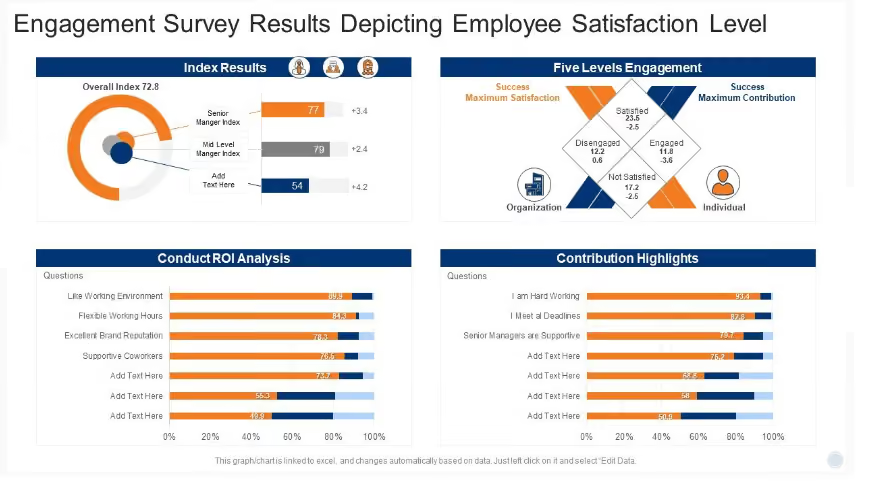
An annual employee engagement survey is a set of questions shared with workers once a year. The answers help gauge employee sentiment, identify issues, and contribute to (possible) solutions.
mployee engagement is crucial for any organization’s growth. Teams with highly engaged members sell over 20% more than groups with low engagement, according to a PeopleMetrics study. Engaged workers have the potential to get your company more customers, while disengaged workers increase expenses and reduce profits.
So an annual employee engagement survey measures the extent to which workers feel valued at your organization.
With that in mind, here’s a rundown of how you’d typically go about conducting a yearly employee engagement survey in an organization.
How to run an employee engagement survey
Figure out your goal
Before creating and distributing a survey to your workers, you need a crystal clear idea of what you want to measure and why. This will help you generate the right questions and get data you can actually use.
For example, your purpose for conducting an annual employee engagement survey could be:
Help find ways to transform a toxic workplace culture
Identify how to increase employee engagement throughout the company
Come up with ways to improve employee retention
Develop two-way communication between managers and workers
Plan your survey questions
Asking great questions is the key to getting to the heart of workplace issues. The right questions will get better answers from workers. And the better responses you get, the easier for your company to identify areas of improvement.
Here are the best questions for an annual employee engagement survey. These are a baseline – but a solid one!
What is your favorite thing about working at our company?
What is your least favorite thing about working at our company?
What’s the most important thing we should do to make things better at our company?
Do you feel like a valued member of our company or just a number? Why?
What can we do to foster better internal communication at our company?
Do you get constructive feedback from your seniors on a regular basis?
Do you see your career growing in this company?
Is the number of tasks assigned to you reasonable?
Are you satisfied with our rewards and recognition policies?
Don’t overwhelm your readers
If you conduct an employee engagement survey only once a year, it’s tempting to combine multiple surveys or ask a wide range of questions.
Give in to this temptation, and you’ll likely end up with a survey that confuses workers and doesn’t generate actionable feedback.
That’s not what you want, right? So keep it simple. Only include the most important and specific topics to keep your survey from turning into an SAT exam. And make sure to use plain language that all the employees can easily understand.
Ideally, your survey should include around 30 questions. Go more than 40 and it’s overkill. 30-40 questions are just enough to cover all the key aspects as per your objective without putting too much burden on the workers.
Build and distribute your survey
The next step is execution. How will you create the survey and share it with the employees? The good news is there are many intuitive tools at your disposal. Take Blink for example.
Our employee experience platform helps you share anonymous polls and surveys with your employees. These surveys get high completion rates and honest feedback.
Now comes the fun part — getting workers to fill the survey. Just like charity begins at home, survey advocacy begins with senior management. Here are the key steps that will help maximize the reach of your annual employee engagement survey.
Get the senior leaders and managers to complete the survey first. This way, you can get feedback on the overall experience of filling the survey. So you can make any amends, if needed, before sharing the survey with the whole workforce.
Use an employee app to provide resources that may come in handy when a worker sits down to complete a survey.
Promote the survey at every opportunity. Boost participation by mentioning the survey in employee newsletters, posting flyers, announcing prizes, and reminding workers about the survey in meetings and conferences.
Are annual employee engagement surveys dead?
Now you know how to conduct surveys. But you should also know that an annual employee engagement survey has certain shortcomings.
An annual employee engagement survey can help gauge your work culture only to some extent. So when used on its own, it’s not the best way to learn more about your employees. Often, it may not reveal any solid insights into your organization’s core issues.
Before you decide on planning a survey, also consider the drawbacks below.
It’s impersonal
An annual employee engagement survey, by its nature, is a cold way to get feedback. When you send a set of questions once a year to be answered by your workers, the unspoken message they may hear is:
"We want your inputs, but only in a certain format and confined to the questions we have developed. We're not attempting to build or nurture a relationship or anything! Don’t think too much and just check a few boxes. No big deal!"
An annual employee engagement survey can make workers feel that their employer doesn’t take feedback seriously. So neither should they.
It doesn’t provide valuable data
An annual employee engagement survey doesn’t encourage honest feedback. Many of the workers may not trust the system. They might think that being too honest in an annual employee engagement survey - like slamming their manager - can get them in trouble.
It relies on fluffy metrics
HBR once reported in a case study that United Parcel Service faced a huge loss because its annual employee survey didn’t uncover problems associated with a surge in part-time jobs. So when workers went on strike, it cost the company hundreds of millions of dollars.
Most commonly-used questionnaires make use of “percent favourable” metrics. So the data you get consists of inflated scores and blind spots, giving you the illusion of high engagement when it’s the opposite in reality.
It’s not regular enough
For anything that matters, measuring your progress just once a year is not enough. Whether it’s your personal health, financial investments, or employee engagement, you’ll be wise to keep tabs regularly.
An annual employee engagement survey is a snapshot in time. And the feedback you get from employees in a singular moment can’t accurately reflect their feelings for the whole year.
Since organizations using annual surveys don’t get the data they need to act, they don’t. They finish conducting the survey like it was just a formality and move on, further tarnishing whatever trust workers had in the employer.
For these reasons, many HR leaders believe that annual employee engagement surveys are dead. While we won’t go as far, it’s evident that once-a-year surveys alone aren’t enough to get accurate and comprehensive insights, which brings us to the next part.
Employee engagement survey alternatives
Gone are the days when workers were happy just to have a job. And before you counter — Yes, even if it provides standard benefits like health insurance and retirement savings. The ingredients that make your employees engaged, satisfied, and happy are now more nuanced and sophisticated.
To find out how successful your recipe is, you need comprehensive techniques that can capture worker sentiment in a timely and relevant manner. Let’s see what those are.
1. Tracking company-wide metrics
The tools and technologies that you use for employee management and collaboration can give you a ton of real-time and continuous feedback from the workforce.
Most modern systems these days come with built-in analytics to drill down into worker behavior and identify areas of improvement. For example, you can view:
Performance appraisal and evaluation ratings
Number of discrimination complaints and legal claims
Number of workers on a leave of absence
Employees who have filed compensation claims
Number of workers who resigned in the last 12 months
Number of training hours workers attended voluntarily
Average employee commute time (the shorter, the better)
Number of workers on zero-hour contracts
By understanding such people trends, you can get an accurate sense of engagement across the organization. And you can do all this without directly involving your employees.
2. Pulse surveys
Research shows that 77% of employees want to provide feedback more than once per year. And that most employees prefer to provide feedback four times a year.
That’s where Pulse surveys come in. Pulse surveys get employee feedback using short, frequent check-ins that are not confined to specific content or topics. When you ask quick questions at short intervals, the feedback you get will be more authentic and practical.
3. Town-hall meetings
Townhalls are another viable alternative to annual surveys. If you manage a team that’s too large for a conference table, organize a Town Hall meeting to spark discussions and learn about team members’ concerns.

Don’t want to put yourself on the spot? Easy. Ask employees to submit questions in advance so you can be better prepared to answer them.
4. An open-door policy
Why wait for a formal process or tool to get feedback? You can create an environment in which spontaneous feedback is encouraged.
Make your employees feel safe and comfortable with two-way communication mechanisms. When they can talk openly about their concerns, you’ll always have a string of things you can improve in your repository. So you won’t have to go hunt for good ideas once every year.
Final thoughts
If you really want to have a lasting impact on your culture, you must consult your employees regularly and consider alternatives to a once-a-year survey. By pairing surveys with alternative ways to get employee feedback, you’ll be on your way to shaping a work environment where workers feel more productive and content.

What we'll cover
Start your free trial today
See how Blink helps frontline teams stay connected, informed, and engaged.
We get it — work communication has never been louder. Too many channels. Too many tools. Too little signal.
That’s why this Fall, Blink’s release focuses on nuance: Smarter alerts, sharper analytics, and cleaner connections that give your teams more signal, less noise.
From notifications that know when to pause to chat that feels more human, these updates help you cut through the clutter without adding complexity.
Because the best employee experiences don’t shout louder — they just make more sense.
#1. Notifications that know when (and how) to talk
Upgrade unlocked. Blink’s new Notifications framework reimagines how messages reach — and respect — your workforce.
This feature puts power and precision back in everyone’s hands. Whether you’re sending critical safety alerts or scheduling downtime for a global team, Blink now balances reach, relevance, and respect — at scale.
People want more control of their communications — and this upgrade delivers it. With a smarter engine that blends personalization, targeting, and flexibility, organizations can now cut through the noise, boost engagement, and rebuild trust between leaders and teams.
It’s not just a new notification system. It’s a new communication philosophy — one that turns alerts into alignment, and messages into moments that matter.
What’s new:
User autonomy: Employees can now set preferences (All / Important / Mute) and schedule quiet hours by day
Precision reach: Admins can define who sends notifications and safeguard critical groups from muting
Instant context: Notifications now include group names and content previews so people instantly know what matters
Governance by design: Org-level defaults and group-level overrides make communication clean, consistent, and compliant
Featured flags & quiet days: Highlight key announcements, or give everyone a digital breather, directly from group settings
{{mobile-notification="/image"}}
#2. Chat that feels more human
Communication shouldn’t feel like a chore. With this release, Blink Chat gets a subtle yet powerful glow-up.
New visual tweaks — from chat bubbles to color updates — make conversations clearer, warmer, and easier to follow. It’s small design detail meets big usability payoff, especially for mobile teams on the move.
What’s new:
Refreshed bubble and color design for cleaner conversation flow
Sleeker layout optimizedfor readability and accessibility
{{mobile-shift-chat="/image"}}
#3. Surveys that spark smarter action
Data is only as good as what you do with it. This update gives your Surveys a sharper edge — faster setup, better targeting, and smoother participation across teams.
What’s new:
Improved creation flow and formatting in the Admin Portal
Trackable surveys that allow you to narrow in on responses from the profile fields you care about most
Cleaner user experience for participants on every platform — especially on mobile
Detailed analytic exports on engagement and completion rates to boost decision-making
Question descriptions that enable you to share more question-specific detail with participants
#4. Informational Workday nudges
Workday is great for processes — but people often need reminders to actually complete them. Enter Informational Workday Nudges.
This new feature helps surface important Workday updates — like upcoming reviews or expiring training — directly inside Blink, where employees already spend their time.
Your HR system just got a human touch.
What’s new:
Automated, context-aware nudges triggered by Workday events
Fully integrated with Blink’s mobile-first experience
Informational-only for now — with Actionable Nudges on the horizon
#5. Smart Search with ServiceNow: One query, all answers
Tired of hunting across tools? Blink’s new ServiceNow federated search brings everything into one place.
Employees can now find ServiceNow tickets, knowledge base articles, and internal content without ever leaving Blink. It’s one search bar to rule them all — and a big win for IT and employee self-service alike.
What’s new:
Unified search results from Blink and ServiceNow
Instant access to help articles and ticket info
Reduced system hopping for employees and IT teams
#6. Live stream analytics: Because reach matters
You’ve mastered live streaming — now it’s time to measure it.
With new live stream analytics, you can finally see who tuned in, how long they stayed, and what content resonated most. Use these insights to refine your next event and make every broadcast count.
The result? A full picture of engagement, not just attendance.
What’s new:
Viewer metrics: Total attendees, average watch time, drop-off points
Ensuring workplace policy compliance is crucial but traditionally time-consuming — especially for frontline workforces.
Our new agreement center lets administrators control and distribute policy agreements and record employee acceptance with ease and precision, right from Blink’s desktop interface.
What’s new:
Recurring employee prompts with custom CTAs and a selection of set cadences
Single-click functionality so employees can accept on mobile or desktop just once
Policy or workplace document links right in the prompt
#8. Coming soon
Because innovation never clocks out. Here’s what’s next on the horizon:
Union conversations have a habit of making people nervous. Leaders worry about saying the wrong thing. Employees worry about being monitored. Union reps worry about losing influence or control.
And technology? It often gets blamed for all of the above.
But here’s the reality we see time and time again: unionization itself isn’t the problem. Poor communication is. And when communication breaks down, mistrust fills the gap.
This is where a modern, frontline‑first employee experience platform can either inflame tensions — or quietly make everything work better.
Let’s talk about how.
Why union engagement makes or breaks change
Rolling out any new workplace technology without union engagement is risky. Rolling it out to a unionized workforce without involving union reps early? That’s how good initiatives get derailed.
Union concerns are rarely about the tool itself. They’re usually about how the tool shows up:
Is it being forced on people?
Will it blur the line between work and personal time?
Can data be used against members?
Is this really about safety and communication — or “efficiencies” and headcount reduction?
If these questions go unanswered, assumptions fill the gap — and those stories spread fast.
The fix isn’t better messaging at the end. It’s earlier, more transparent engagement from day one.
{{mobile-desktop-main="/image"}}
The most common union concerns — and what’s actually behind them
Union concerns tend to cluster around a few themes. None of them are unreasonable.
1. Personal devices and work creep
No one wants a workplace app that turns evenings, weekends, and lunch breaks into unpaid work time.
The fear isn’t the app — it’s the expectation that comes with it.
2. Surveillance and disciplinary misuse
“Are managers reading chats?”
“Is location tracking involved?”
“Can this data be used against members?”
If workers feel monitored, trust evaporates.
3. Data security and privacy
Unions are rightly skeptical of where employee data lives, who owns it, and whether it’s being shared or sold.
4. Digital exclusion
Not everyone is equally comfortable with technology. Digitizing forms and processes can unintentionally disadvantage certain groups if it’s done carelessly.
5. Loss of union voice
In some organizations, unions have historically been the primary communication channel. New platforms can feel like a threat to that role — unless they’re positioned differently.
None of these concerns disappear if you ignore them. They just get louder.
{{mobile-chat="/image"}}
Reframing technology as a worker benefit — not a management tool
When unions are brought into the conversation early, something interesting happens: the narrative shifts.
Instead of “this is being done to us,” the conversation becomes “how can this work for our members?”
When critical information reaches everyone instantly — not just the people with email access — it reduces risk for the entire workforce.
Clearer boundaries between work and personal life
Replacing informal tools like WhatsApp with a dedicated work app actually protects personal time.
Features like Do Not Disturb and notification controls make expectations explicit instead of implied.
A stronger union communication channel
A modern employee app doesn’t replace union communication. It strengthens it.
Union reps can:
Share updates directly with members
Run group chats and discussions
Post sign‑up forms and resources
Communicate clearly during industrial action or negotiations
Instead of losing visibility, unions often gain it.
Less friction, fewer workarounds
Paper forms, scattered systems, and shared logins aren’t just inefficient — they’re inequitable.
Centralizing access to tools and information creates a more level playing field between desk‑based and frontline workers.
A more equitable employee experience
When everyone gets the same access to updates, policies, and conversations — regardless of role or location — trust grows.
That sense of fairness matters more than most organizations realize.
[Product image - Reporting / digital forms (if we have it?)]
{{mobile-hub-report="/image"}}
What successful union engagement actually looks like
The organizations that navigate union alignment well don’t rely on clever slogans or last‑minute reassurance. They follow a few consistent principles.
Engage early (earlier than you think)
Unions should hear about new platforms before launch plans are finalized — not after.
Early conversations surface concerns while there’s still time to address them.
Make participation voluntary — and mean it
Choice matters. When people feel coerced, adoption drops and resistance hardens.
Ironically, voluntary rollouts often see higher uptake because the value is clear.
Involve union reps as champions
Union reps shouldn’t be observers. They should be part of the champion group helping shape how the platform is used.
Ownership beats endorsement every time.
Explain the “why,” not just the “what”
Link the rollout back to real issues unions already care about — safety, inclusion, access, and communication gaps raised by members.
When the problem is familiar, the solution makes more sense.
Keep the dialogue going after launch
Union engagement doesn’t end on go‑live day.
Post‑launch check‑ins, feedback sessions, and open forums build credibility — especially when concerns are acknowledged and acted on.
{{mobile-priority-post="/image"}}
What we see in the real world
Across transport, logistics, healthcare, and other unionized environments, the pattern is consistent:
Unions that are resistant at first often become the strongest advocates once they’re genuinely involved
Union‑led communication through the platform increases trust and reach
During negotiations or industrial action, having a clear, controlled communication channel reduces confusion and misinformation
The common thread isn’t the industry. It’s respect.
Technology doesn’t replace relationships — it exposes them
No platform can fix a broken relationship between leadership and unions. But the right technology does amplify intent.
If the intent is control, workers will feel it. If the intent is safety, clarity, and fairness, that shows up too.
Unionized workforces don’t need fewer tools. They need better ones — introduced with transparency, choice, and trust. Blink was built for environments exactly like this — complex, frontline‑heavy, and relationship‑driven.
Because when communication works, everything else gets easier.
Digital tools are transforming the way organizations build and sustain employee engagement. Platforms like Blink, Workvivo, Staffbase, and Reward Gateway are helping teams stay connected, improve communication, and bring company culture to life — wherever employees work.
But with so many employee engagement tools on the market, choosing the right one can be tricky. The wrong platform can waste time, hurt adoption, and even reduce engagement.
Getting it right matters. Companies with highly engaged teams are more productive and see up to 23% higher profitability. The best employee engagement software goes beyond simple communication — it connects people, recognizes great work, and supports a shared sense of purpose.
Every organization is different. The tools that work for a remote or office-based workforce may not suit a frontline team. That’s why it’s important to align your engagement goals with the right platform.
You’ll find software built for:
Frontline employees — mobile-first apps like Blink that keep workers connected on the go
Remote teams — tools such as Asana and Slack that combine communication and project management
Office-based teams — platforms like Culture Amp and OfficeVibe that measure engagement and feedback
And others that specialize in areas such as:
Communication and collaboration
Feedback and performance
Wellbeing and productivity
Rewards and recognition
Choosing the right solution depends on your people and your priorities — because engagement software only works when it works for everyone.
For frontline organizations, this is especially true. Most engagement platforms are still built with desk-based employees in mind. Only 1 in 10 frontline workers says they have access to the tools and technology they need to connect and advance at work — even though they make up 82% of the global workforce.
Without easy access to company updates, communication, and recognition, frontline employees can quickly feel disconnected and undervalued.
That’s why your employee engagement solution needs to work for all employees — wherever and however they work.
In the next section, we’ll look at the best employee engagement software for 2026 — from all-in-one employee apps like Blink to specialized tools for communication, wellbeing, and recognition.
Let’s take a closer look.
Best employee engagement app for frontline organizations
Frontline employees are the backbone of many industries — from transportation and retail to healthcare and hospitality. But engaging this workforce comes with unique challenges. Many frontline employees don’t have regular access to company systems, email, or desktop devices, making it harder for them to stay informed and connected.
That’s why mobile-first employee engagement software has become essential. The best platforms for frontline teams combine communication, recognition, and real-time updates in one easy-to-use app.
These tools close the gap between head office and the field, helping every employee — regardless of location — feel included in company culture.
Below are some of the best employee engagement tools for frontline workers in 2026, starting with Blink, a leading all-in-one platform designed specifically for deskless and distributed teams.
Best employee engagement software for frontline workers
Blink
When it comes to engaging a dispersed, frontline workforce, few tools match what Blink delivers.
Blink is a mobile-first employee engagement platform built to help organizations connect with every worker — whether they’re in the field, on the factory floor, or on the move. Used by teams across industries such as transport, healthcare, logistics, and construction, Blink turns everyday communication into connection.
Employees can easily chat with colleagues, access company updates, view schedules, and complete essential tasks all in one place. The result: better communication, stronger engagement, and a more unified culture.
Managers benefit, too. Blink’s analytics dashboard helps leaders track engagement and performance trends, identify communication gaps, and celebrate wins through built-in recognition tools.
Key features include:
All-in-one communication: Peer-to-peer chat, team groups, and company-wide updates keep everyone aligned.
Employee recognition: Built-in recognition features highlight great work and reinforce culture.
Engagement surveys: Pulse surveys provide quick, actionable insights into morale and satisfaction.
Analytics and insights: Track usage, engagement, and content performance to inform strategy.
Seamless integrations: Connect scheduling, HR, and project management tools for a single digital workspace.
Mobile-first design: Works on any smartphone — no corporate email required.
With Blink, your entire workforce can access the same tools and information, creating a seamless digital experience that keeps everyone connected, informed, and motivated.
Request a demo today to see how Blink can transform engagement across your frontline teams.
Best employee engagement software for desk-based remote workers
If you're looking for employee engagement software platforms suited to desk-based remote workers, here are some excellent options.
Google Chat
Source: Google Chat Capterra Reviews
Google Chat is a communication platform that includes features like video and voice calls, and group chat. It's a great option for workplace communication and it's free to use.
As you’d expect, this tool integrates with the rest of the Google suite, including Google Calendar, Drive, Groups, and Gmail. But it lacks some of the advanced features you tend to get with paid tools.
Reviews from Capterra note that Google Chat is easy to use. It also provides good collaboration tools. However, the interface can be frustrating, message delivery can be an issue, and notifications can be challenging to navigate.
Pricing: Monthly pricing for Google Chat for business starts at $6 per user.
Discord
Discord is a chat app designed for gamers. But it’s recently been used for workplace communication, too. It includes features like voice and video chat, so you can easily connect and communicate with colleagues.
You can use Discord for free, making it a basic but cost-effective tool for internal communications, especially in a remote working environment.
Pricing: Many of Discord’s features are free to use. For businesses that want to invest in extra perks, Discord’s premium tier, “Nitro,” is available for $99 per year.
Asana
Asana is a popular project management tool that can also be used for employee engagement. With Asana, you can easily create and assign tasks, track task progress, and set team priorities. You can also use Asana to create custom projects for easy employee collaboration.
Source: Asana Capterra reviews
Asana makes a great option for remote teams, in part because it offers a mobile app for easy access to tasks and progress data. This helps to ensure that employees are working cohesively and effectively wherever they’re based.
Reviews from Capterra note that while Asana offers a clean, intuitive, and integrated interface, notifications are often missed, automatic opt-in to email notifications can be annoying, and the different projects and access features can be confusing.
Pricing: Monthly pricing for Asana starts at a basic free plan. A business plan costs $24.99 per user per month when billed annually.
ClickUp
ClickUp is a cloud-based collaboration and project management tool and it’s a good option for those looking to improve remote employee engagement.
Key features include task assignments and statuses, alerts, and a task toolbar. But while ClickUp does well in terms of task management, it doesn’t offer a full range of employee engagement tools.
This platform lacks features relating to real-time communication, employee recognition, and social interaction. So you’re likely to need additional software.
Pricing: ClickUp offers a free version. Monthly pricing for a Business plan costs $12 per user per month.
WorkTango
WorkTango is an employee experience platform with a number of solutions for employee engagement. It provides tools like employee surveys, real-time analytics, rewards, and recognition.
You can also see how your engagement scores rank against other WorkTango customers to get a better sense of how you’re doing.
On Capterra, users say that anonymous feedback and anonymous employee chat allow for truly honest conversations. Clients also praise recognition features. However, some users would like better reporting tools and easier platform navigation.
Leapsome is a good employee engagement tool for goal setting and employee development.
It’s designed to support organizations to create high-performing teams. You can use Leapsome to track and collaborate on goals, run 360-degree reviews, and create personalized learning pathways.
With lots of tools for remote teams, Leapsome helps maintain employee progress even when employees aren’t in the office. The software also offers video conferencing tools, which make it easy to collaborate on agendas and align action plans.
Pricing: Pricing starts at $8 per user per month, with the option to add on the extra features you need.
Slack
Source: Slack Capterra Reviews
Slack is a great productivity tool for remote office workers. It helps you to organize teams and their work, with the help of channels, huddles, and a workflow builder.
However, it's worth noting that Slack doesn't provide much in the way of scheduling, performance tracking, or survey features. If these tools are essential to your organization, you’ll need to use Slack plus another employee engagement platform.
Reviews from Capterra note that Slack’s user interface is easy to use. They like channel and plugin features. They also appreciate having all work conversations in one place.
However, reviews also note that it can be a confusing platform to use, with lots of channels across different teams. Adoption can also be difficult if people are not familiar with the software.
Pricing: For multiple employees, monthly pricing for Slack starts at $6.67 per user.
Best employee engagement software for desk-based office workers
Now, let’s take a look at the tech tools best suited to office worker engagement.
OfficeVibe
Source: OfficeVibe Capterra Reviews
OfficeVibe is a “people-first” employee experience platform, with a number of employee engagement features designed for the office.
It helps employers to assess and improve employee engagement levels with robust measurement tools. It also provides an app so you can track progress on the go if needed.
Reviews from Capterra note that OfficeVibe is an innovative tool that helps organizations better understand employee happiness. The company also provides strong customer service.
However, managers complain that survey questions can’t be customized and that insights don’t go deep enough. They also say that the Slack integration doesn’t work too well and that setup can be confusing.
Pricing: Monthly pricing for OfficeVibe ranges from a free version to a $5 per user Pro Plan.
SurveyMonkey
By using employee satisfaction survey tools like SurveyMonkey, you can collect regular feedback from employees on their engagement levels. This real-time feedback can help you to identify problem areas and take steps to improve employee engagement in your organization.
As well as survey templates, SurveyMonkey offers reporting and analytics features that help you spot data trends and insights. It also uses AI to reveal employee sentiment.
Pricing: For over three users, monthly pricing for SurveyMonkey starts at $31.83 per user.
Doodle
Employee polls are a quick and easy way to collect anonymous feedback from employees on a range of topics. You can use employee poll tools from Doodle to gather feedback on everything from engagement levels to job satisfaction.
But Doodle does more than polls. It also provides meeting, video conferencing, and scheduling tools. You can even poll meeting attendees to find a time that works for everyone and improve attendance.
Pricing: Monthly pricing for Doodle Professional starts at $6.95 per user.
Monday.com
Monday.com is a project management tool that can also be used for employee engagement.
With Monday.com, you can create and assign tasks, track progress, and more. You can also use it to create performance tracking templates for employees. This can help you to identify areas where employees need improvement and take steps to address them.
On Capterra, Monday.com users say that the platform’s project management tools are excellent. But others complain that the backend of the platform is complicated and involves a steep learning curve.
Pricing: For more than two employees, monthly pricing for Monday.com starts at $8 per user per month.
Culture Amp
Culture Amp’s employee engagement platform provides over 40 science-backed survey templates. You can use these surveys to find out how employees feel about engagement, belonging, inclusion, and more.
The platform also uses AI-powered insights to summarize employee engagement findings, supporting your business to make data-backed decisions.
Reviews from Capterra say that Culture Amp has a user-friendly user interface. They also praise the platform’s ready-to-go survey templates.
But users don’t like having to rely on the Culture Amp support team to update some parts of the platform. They also say that — while survey features are strong — features like the objective and key results (OKR) module aren’t as well-developed.
The following tools specialize in one area of employee engagement. As such, they make a great add-on to your chosen staff engagement tool.
At Blink, our App Marketplace integrates all the tools you need to manage your employee engagement in one place. If we don't already integrate with your app, just ask!
Kudos
Kudos is an add-on app that allows employees to give and receive recognition in real time. With Kudos, you can create a culture of recognition where employees feel appreciated for their hard work.
Pricing: Monthly pricing for Kudos starts at $3.25 per user.
Friday
Friday is an app that makes it easy to give employees recognition for a job well done. With Friday, you can give employees badges, points, and rewards to show your appreciation.
Pricing: Friday has a free version. Monthly pricing goes up to $100+ for company plans.
Bonusly
Bonusly is another dedicated employee recognition tool. Bonusly supports peer recognition, allowing employees to give each other bonuses in the form of points that can be redeemed for rewards. By using Bonusly, you can create a culture of appreciation and recognition throughout your workforce.
Pricing: Monthly pricing options for Bonusly starts at $2.70 per user.
Limeade Wellbeing
Employee wellbeing programs, like those on offer from Limeade, go hand in hand with employee engagement programs. Because when employees feel healthier, happier, and less stressed, they have the headspace they need to engage with their work.
Limeade provides customized employee wellness programs. These programs encourage participation and deliver essential wellbeing resources via one handy tool.
With this tool, you can also listen and respond to your workforce in real time through anonymous surveys, polls, and quizzes. All that’s really missing from this system is strong employee communication tools.
WeThrive is an employee engagement tool designed to support the mental health of desk-based workers. With this platform, you can create surveys to assess employee wellbeing and then take action to improve it.
WeThrive analytics allow you to segment survey results by team, tenure, location, department, and manager. This makes it easy to identify the root causes of poor wellbeing and identify areas for improvement.
Reward Gateway is an employee engagement solution that offers employee discounts, employee rewards and recognition, and tools for employee communications.
This combined platform is a great tool for office-based employers looking to boost employee recognition, with features such as discounts and rewards accessible in one place.
Reviews from Capterra note that Reward Gateway is flexible and easy to use. But it can be glitchy, with reporting features sometimes not running properly and some features failing to run as smoothly as others.
Pricing: Monthly pricing for Reward Gateway starts at $10.19 per user.
Weekdone
For structured goal setting, Weekdone is an excellent choice. It’s a top-rated OKR platform that allows you to track weekly plans and progress, provide feedback, and get everyone pulling in the same direction.
OKR software can also be used to ensure that remote employees have clear objectives, with performance reviews and goal tracking.
Pricing: For more than three employees, monthly pricing for Weekdone is $8 per user.
Awardco
Awardco is another bonus tool that makes recognizing and rewarding people easier and more effective.
With Awardco, employers can set up reward and recognition programs that their employees can access from any device. You can tailor incentives to your teams, ensuring the prizes on offer act as real motivation.
This tool is a good option for office-based companies of all sizes looking to increase employee satisfaction and engage with their workforce to boost productivity.
Pricing: Pricing for Awardco ranges from $2,500 to $4,000 per year.
QuizBreaker
QuizBreaker is a virtual team-building tool. It works well for both office-based and dispersed teams, bringing a bit of gamification to the work day.
Key features of QuizBreaker include:
a scheduled icebreaker quiz that helps employees get to know each other better
escape games and 1,000+ trivia quizzes for fun team-building events
employee profiles that reveal work style, unique strengths, and fun facts
pulse surveys to help you get regular feedback from employees
QuizBreaker isn’t an all-in-one employee engagement tool. But this platform helps teams to bond and brings a little fun to your workplace culture.
Capterra score: Not found in Capterra database. Pricing: Monthly pricing for QuizBreaker starts at $3 per user.
Motivosity
Motivosity is employee recognition software that makes it easy for managers to give recognition and rewards.
Motivosity’s “Thanks Matters” card is an innovative way of rewarding employees. Like Bonusly, you assign points for great performance. These points directly translate into cash, which employees can access via a special Visa debit card.
They can choose from hundreds of reward options. You can even add your own gifts such as branded swag or lunch with the CEO. Employees can also choose to forgo cash rewards in order to make charitable donations.
Key employee engagement software features to prioritize in 2026
When choosing the right employee engagement software for your organization, focus on the features that will help you overcome your biggest engagement challenges. The right combination of tools can improve communication, morale, and productivity across every level of your workforce.
Channels and chats
Communication is the foundation of engagement. Real-time chat features — including group channels, private messages, and announcements — ensure employees stay in the loop and can collaborate quickly, wherever they work.
Surveys, polls, and content analytics
Platforms with built-in surveys, polls, and analytics help you measure engagement levels, gather employee sentiment, and identify emerging issues before they become major problems. This data ensures every employee has a voice and helps leaders take action with confidence.
Employee recognition
Recognition tools — such as kudos, badges, or points systems — make it easy to celebrate achievements and highlight great work. This simple feature goes a long way toward strengthening motivation, morale, and a sense of belonging.
Analytics and dashboards
For organizations managing distributed or frontline teams, analytics functions are essential. They allow you to measure engagement, retention, and satisfaction while uncovering insights into how employees interact with leadership and one another. These insights drive continuous improvement in your employee experience strategy.
A main feed or hub
A centralized hub — or main company feed — brings all updates, videos, documents, and announcements together in one place. This consolidation creates a single source of truth, keeping employees informed and aligned with your company’s goals.
At Blink, our frontline employee app brings all of these features together. With tools for chat, recognition, surveys, analytics, and communication, Blink helps you overcome common engagement challenges and connect every employee — from the frontline to the office.
The business benefits of digital employee engagement tools
Digital engagement tools require an upfront investment — both financially and in time. But the return on that investment is substantial. The right software encourages participation, builds connection, and creates a culture employees want to be part of.
Below are the five key business benefits of using digital employee engagement software.
#1. Reduce employee turnover and save on recruitment costs
Engaged employees are more likely to stay with your organization, reducing the cost of recruitment and training. According to SHRM, hiring a new employee can cost three to four times the position’s salary, making engagement one of the most effective retention strategies available.
Digital tools strengthen this connection by amplifying company culture and ensuring all employees can participate fully — leading to a happier, more loyal workforce.
#2. Strengthen company culture through digital engagement platforms
In today’s competitive labor market, salary alone isn’t enough to retain top talent. Engaged employees are motivated by purpose, belonging, and appreciation.
Digital engagement tools help reinforce these pillars by improving communication, supporting growth, and enabling public recognition. The right platform makes culture tangible — connecting leadership, values, and everyday work.
#3. Improve internal communication with employee engagement software
Two-way communication is critical for engagement. Modern tools help you deliver the right message to the right people — whether through audience segmentation, targeted updates, or role-based notifications.
These platforms also make it easier to track the effectiveness of communication. With built-in analytics, you can see how employees interact with content and refine your messaging to increase engagement and clarity across the organization.
#4. Use analytics to understand and improve employee engagement
Feedback is the backbone of a strong employee engagement strategy. Without it, leaders can’t identify what’s working or where improvements are needed.
Employee engagement software with advanced reporting provides actionable insights. You can see how satisfied employees are, how frequently they engage with company updates, and where there are communication or experience gaps.
With Blink, for example, you can access detailed data on engagement, satisfaction, and retention — helping you identify frontline challenges early and respond faster.
#5. Boost productivity with connected employee engagement platforms
Disconnected tools slow teams down. Employees lose valuable time switching between apps, searching for information, and handling repetitive admin tasks.
A unified engagement platform streamlines these processes. By digitizing workflows, automating basic tasks, and connecting every workplace app in one place, you free up employees to focus on meaningful, high-impact work.
Blink’s connected platform helps teams stay organized and productive — from digitized HR processes to mobile-friendly task management — improving both individual and organizational performance.
Amelia has spent the last two years bringing energy, creativity, and a spark of marketing magic to Blink’s Boston office. As a Senior Marketing Associate, she’s helped shape our presence at events across the US, from high-profile conferences to intimate dinners — and even found time to turn our beloved mascot, Blinkie, into plush toys and Legos.
We sat down with Amelia to talk about what brought her to Blink, the milestones she’s proud of, and what makes the culture in Boston so special.
1. What is your role at Blink?
I am the Senior Marketing Associate at Blink and am based out of the Boston office. I have been here a little over two years.
2. What initially attracted you to join Blink?
I’ve always been drawn to the fast-paced, creative energy of tech startups, and when my former colleague Courtney Hayes joined Blink, she couldn’t stop talking about the mission, the buzz around the product, and how great the team was. That instantly piqued my interest.
At the time, I was still early in my career and looking for a place where I could grow — and Blink offered that in a really exciting way. It felt like a no-brainer. Once I learned more about the technology and how it was solving real problems for frontline teams, I knew I wanted to be part of it.
3. What's a project you are proud of during your time at Blink?
Because I run our events in the US, no two days ever look the same. Every event — whether it’s a major conference, a global webinar, or an intimate dinner — comes with its own unique set of challenges and rewards, so it’s hard to pick just one project. But I’m incredibly proud of how we’ve grown our event presence over the last couple of years. People now expect to see Blink at major industry shows, and they expect us to bring a level of excitement and creativity — and we’ve been delivering on that. From how we look to the quality of conversations we’re having, it’s been a huge leap forward.
On another note, I also somehow became a toy manufacturer on the side! Over the past year, I’ve worked with third-party partners to bring our mascot Blinkie to life as both plush toys and Legos. It’s been a long but fun process, from design to production, and now that they’re in our hands, it’s incredibly rewarding. They’re playful and memorable, and they bring so much joy to our customers, prospects, and the whole Blink team.
4. How would you describe the company culture at Blink in three words?
Supportive, upbeat, and collaborative.
The Boston office has such a special vibe. Everyone genuinely supports one another, no matter their title or role. We help each other grow, hold one another to high standards, and always find ways to bring energy and fun into the day. That kind of culture makes it easy to stay motivated and feel confident in the work you’re doing.
5. What's one thing you're excited about for the future of Blink?
Definitely our global growth. It’s exciting to see new customers coming on board — whether they’re small teams or massive enterprises. Even in just the few years we’ve been in the US market, we’ve seen incredible momentum. Every new logo is a reminder that there’s a real need for what we’re building.
I’m especially excited to see where we go in industries like EMS and retail. We’ve already made an impact, and I think there’s still so much opportunity. Some of the brands we’ve signed recently weren’t even on my radar when I first joined — and now they’re some of our biggest wins. It makes the next few years feel full of possibility.
6. Can you tell us about a recent initiative or program launched at Blink that you found particularly exciting?
I’m really excited about the new voice and video feature we launched. I’m someone who sends voice notes all the time and prefers face-to-face conversations, so this update felt like it was made for people like me. It’s not just convenient, it adds a whole new dimension to how people communicate on Blink. Sometimes a message just doesn’t capture tone or emotion the right way, and this makes interactions feel more human and real. I think it’s going to be a game-changer for our customers.
7. Why do you work for Blink?
The product, the mission, and the people. Blink is solving a real need connecting frontline workers who have been left out of digital transformation. That in itself is meaningful work. But what makes it special is the people behind it. Everyone here is passionate about the mission and genuinely wants to make a difference.
There was actually a moment early on in my first year, during an all-hands meeting. Sean gave a really inspiring update about our progress, and I remember looking around the Boston office and seeing how proud people were. That was when it really hit me that I was part of something important.
Hannah’s hard work and dedication to quality don’t go unnoticed, and she is a key contributor to making the department successful. She is an amazing self-starter, reliable, and always team-oriented.
In her role, she is responsible for everything relating to customer quality response at the facility, which helps us increase customer satisfaction and efficiency and adhere to regulations that are critical to the manufacturing process. Her role includes but is not limited to: Customer complaint investigations (TICS), Return Material Authorizations (RMAs), NCMR generation and completion via software (C-Pro), participation in CAPA processes for addressing internal and external requests, supplier (SCARS), supervising returned material, tracking, inventory adjustments and corrections, analysis, and reporting.
She also supervises the calibration of laboratory equipment and weigh scales, and conducts preventive maintenance of testing instruments, important for preventing defects and maintaining consistency.
Throughout all of this, she manages to deliver clear, concise communication across all levels of the organization.
What does she want to do next?
She’ll be supported to do whatever she wants to do!
ClearBox validates Blink’s leadership in the future of the intranet market
For the fourth year running, Blink has been recognized as a standout platform in the annual ClearBox intranet market report — and this year’s results come with an even stronger signal.
The ClearBox Consulting Intranet and Employee Experience Platforms Report 2026 confirms what Blink customers already know: the intranet market may be mature, but it hasn’t converged. And Blink continues to lead where it matters most.
In fact, Blink is the only vendor in the entire report to achieve a perfect 5/5 score in any category, earning top marks for Mobile & Frontline Support.
Here’s how ClearBox summed it up:
“Blink is an engaging, social and truly mobile-first platform, ideal for organizations with a high percentage of frontline and deskless employees.”
Let’s break down what the report assessed — and what this year’s findings mean for buyers.
About ClearBox
ClearBox Consulting is an independent intranet and digital workplace consultancy that helps organizations select, design, and evolve the right intranet and employee experience platforms.
Trusted by global brands including Unilever, PlayStation, GlaxoSmithKline, and Bayer, ClearBox is known for its rigorous, vendor-agnostic evaluations and practical buyer guidance.
Each year, ClearBox reviews 20 leading intranet and employee experience platforms, scoring them across eight core criteria and sharing detailed insights into where each vendor truly excels.
What does the ClearBox report assess?
ClearBox evaluates platforms against eight key criteria, including:
User experience and visual appeal
Community and engagement
Publishing and communications management
Mobile and frontline support
Governance, administration, and vendor maturity
The research also incorporates customer feedback, pricing considerations, and product roadmaps — giving buyers a clear picture of both current capability and future direction.
Mobile and frontline support — perfect score, category leadership
Once again, Blink leads the market in mobile and frontline delivery — but this year, the result is definitive.
Blink is the only platform to receive a perfect 5/5 score for Mobile & Frontline Support across the entire vendor landscape.
This isn’t incremental improvement. It’s category leadership in the fastest-growing, most underserved segment of the workforce.
Blink was built mobile-first from day one — not retrofitted for frontline teams later. Employees can access everything they need through a single, secure app, without a company email address or desktop login. Offline access, frontline-native UX, and intuitive navigation ensure that critical information reaches everyone, everywhere.
ClearBox highlights Blink’s structural advantage here, noting that desktop-led intranets consistently under-serve frontline workers — a gap Blink was designed specifically to solve.
{{mobile-main="/image"}}
User experience built for adoption — not training
Blink continues to earn top marks for user experience and visual appeal, thanks to its clean, social-style interface that mirrors the consumer apps employees already use.
ClearBox notes:
“Blink delivers an engaging, social experience and practical tools for communication, collaboration and productivity, without overwhelming users with complexity.”
From a feed-first experience and Stories to rich multimedia content and communities, Blink makes communication feel familiar, fast, and engaging — driving adoption without heavy change management.
{{mobile-stories="/image"}}
What ClearBox is really telling the market in 2026
Beyond individual scores, this year’s report delivers a clear message to buyers: the intranet market is mature, fragmented, and outcome-led.
There is no longer a single “do everything” platform that wins across every category. Instead, vendors lead by solving specific problems for specific audiences.
For Blink, that market context matters.
ClearBox’s findings validate Blink’s long-standing strategy of not chasing feature sprawl, and instead focusing relentlessly on communications effectiveness, frontline reach, and measurable engagement.
Key signals from the report include:
Internal communications teams are increasingly the primary buyers — not IT
Mobile and frontline delivery is no longer optional
Governance, moderation, and trust are critical as platforms become more social
Buyers want practical AI embedded into real workflows, not hype
Blink aligns with each of these shifts — by design.
Enterprise governance, without killing engagement
As platforms become more social, ClearBox notes that governance and risk management are back in focus — especially for large, complex organizations.
Blink balances engagement with control through:
Community permissions and moderation tools
Timed log-outs for frontline safety and compliance
A relevancy-based, algorithmic feed that balances reach with oversight
The result is social communication that scales inside the enterprise — not in spite of it.
What this means for buyers
If your priorities include:
Communications effectiveness
Frontline reach
Mobile-first delivery
Governed, measurable engagement
The ClearBox 2026 report shows that Blink consistently outperforms broader, heavier platforms where it counts most.
Blink isn’t trying to be everything to everyone. It’s focused on helping organizations reach 100% of their workforce — and prove the impact of doing so.
{{mobile-mandatory-reads-task="/image"}}
Some more highlights from the ClearBox report
Here’s what else ClearBox had to say about Blink:
“Today, Blink continues to stand out for its mobile-first design and intuitive user experience, making it a strong choice for organizations with frontline workers.”
“The platform’s personalised feed and simple navigation give employees quick access to relevant content.”
“Blink also excels in onboarding and adoption support, offering practical features like QR code access and in-person onboarding events.”
“Overall, Blink is a strong choice for organizations prioritising mobile engagement, particularly those with large frontline populations.”
And here’s what customers interviewed by ClearBox said about their experience with Blink:
“Our users find it easy to use and intuitive, boosting activation and engagement rates.”
“It’s easy to download, the UI is simple and familiar, and it’s been a gamechanger for our company since launch.”
“Blink has completely transformed how we communicate. Our frontline teams finally feel connected and included.”
“Blink makes work feel more connected. It’s like a social hub where everyone — whether in the office, on the frontline, or remote — can share updates, celebrate wins, and find what they need fast.”
“We’ve leaned hard on them to make some changes specifically for us and they have been extremely accommodating to our timelines to make it happen.”
“While they have lots of big clients, they always make you feel like you are their only customer. They are a fantastic bunch!”
“The Blink team has been a true partner from day one. They’re proactive, responsive, and invested in our success.”
{{mobile-community="/image"}}
Looking ahead
ClearBox doesn’t just validate Blink’s performance this year — it validates Blink’s direction.
Blink wins when:
Communications is a strategic function, not a broadcast channel
Frontline workers are first-class citizens, not an afterthought
Mobile is the primary experience, not a companion app
Outcomes matter more than feature checklists
Bottom line: The ClearBox 2026 report confirms that Blink isn’t chasing the past of the intranet market — it’s aligned with its future.