Chandi has been instrumental in representing the company and its bus drivers in cases related to traffic penalties. By thoroughly reviewing and addressing these cases, she has substantially reduced costs for both the business and individual drivers.
It is very common for bus drivers to face fines and prosecutions while doing their essential job for the communities of London. Chandi appears in Courts and Tribunals to represent the business and has successfully challenged almost 50% of the cases that come in. In years gone by the business was facing charges of up to £10k per month which have now been reduced by 70%. This is a massive saving both financially and reputationally to the business.
Most importantly, Chandi’s work provides crucial support to drivers, alleviating their stress and ensuring they feel valued. She is a quiet and meticulous professional who has created so much good in the department since her arrival in April 2024.
How has Blink helped in her role?
Blink has been used to advertise “money boxes” YBJ where fines are received. Chandi has also used the platform to share guidance and resources about observing traffic regulations, as well as demonstrating the team’s support for drivers.
What does she want to do next?
Continuing to reduce penalties, with the ultimate goal of eliminating them, would be a massive achievement, maybe seen as impossible — but what Chandi has achieved would have been seen as impossible six months ago. Chandi is keen to communicate with drivers using Blink as well as garage roadshows to raise awareness and help bus drivers avoid fines and better serve the communities of London.
Nominated by: Phil Thornton, General Manager Central Operations
What we'll cover
Start your free trial today
See how Blink helps frontline teams stay connected, informed, and engaged.
Twenty years ago, I was advising the government on transport. Our North Star was this: how do we get people out of cars, and onto public transport? We worked hard and made several huge breakthroughs. Public transport in the UK thrived and up until recently, was the mode of choice for many.
But over the past few months, things have changed – drastically so. Two decades of progress has been effectively undone in a matter of months. The government has actively discouraged people from using public transport. That’s never happened before, although I understand that it was necessary.
So: where do we go from here?
Covid-19 has had a devastating impact on the transport industry and its frontline workers. And it’s not over. We have a long road ahead, with many challenges looming.
Even so, I’m optimistic. Here's why.
The arguments for public transport are as strong as ever
Let me own up to my biggest fear first: an increase in car ownership. At the moment, many people are apprehensive about, or scared of, using public transport. That may make them rely more on their cars.
When you’ve got a car, you’ve got an enclosed space. You don't have to sit next to anyone. It's one of the reasons car shares hasn’t taken off. People don't like letting others into their personal space. Covid-19 has exacerbated all this. It might lead families without cars to buy one, or go from one to two-car households.
That might not sound like a big deal. But there's a direct correlation: as car ownership rises, bus passenger numbers fall. Or, put that in perspective: for every new car on Britain’s roads, there’s 365 fewer bus journeys per year.
My goal has always been to achieve a modal shift towards public transport. I've been working with governments for many years to make this happen. That momentum has now ground to a halt. Will that change be permanent?
I don’t think so. The argument for public transport – economic and environmental – remain strong. They will only get stronger. One pivotal reason is climate change. At the beginning of 2020, that conversation was at the heart of public consciousness. Once again, circumstances have sidelined that conversation, but it's more urgent than ever.
The facts remain: the car is an inefficient user of roads, it's wasteful, it's polluting.
But here's what gives me hope. During lockdown, many people have experienced good quality, clean air. Many of them for the first time ever. That's huge. That's compelling.
We caught a glimpse of what a life with less pollution could be like. A live demonstration of a world with less traffic and fewer planes. That’s something most of us want to hang on to; without losing the thrill and energy of vibrant, busy cities.
What's holding us back is public perception. Many people see buses as a main polluter, causing congestion and reducing air quality.
That's not true. One new bus produces less pollution than one new car. That's despite the fact that they can carry 50 times as many passengers, by the way. In fact, buses are a key part of the solution for clean air and sustainability.
What we need to do is shift ingrained mindsets and change misperceptions.
Even after disaster, people adjust
Covid-19 poses an extreme threat. But we have dealt with – and recovered from – extreme threats before.
Take the London bombings in 2005. We lost 35 people; it was all over the television. It was terrifying. People's lack of confidence in public transport was lower then than it is now. Even so, Transport for London got their systems running again the very next day.
Or take 9/11. One of the worst horrors of anyone's lifetime. Remember how nervous were people about flying? But the next day, thousands of planes still took off. Today, aviation has a fantastic track record of keeping people safe.
We've mitigated the risks associated with terror attacks as much as possible. But you'd need to be a fool to say that that terrorist threat has gone away completely.
We don’t know when, or if, Covid-19 will completely go away. We can never eliminate risk. But we can learn to live with new danger.
We adjusted to airport security measures. And we will adjust to facemasks and social distancing.
Human beings are born to adapt.
It will take time, of course. Some people will be nervous for the foreseeable future. But long-term, people’s behaviour will normalize again. Patterns of patronage will return. All the evidence shows this is what happens after a crisis.
We need a marketing exercise. To gradually build up public trust, to reassure passengers it's safe. A way of reassuring people about risk, hygiene, temperature checks and general safety.
Our key workers are resilient
Being a bus driver is one of the toughest jobs in the UK, especially in a busy city.As a driver in London, you have to navigate the busy streets, the traffic; and at the same time, you have to keep people safe, give directions, take their fares.
It's a demanding job at the best of times. Along came COVID-19, and bus drivers were even more exposed than healthcare professionals. Thirty-three of them died in the UK. And all the while they were delivering NHS staff and other key workers to their jobs. The role they play is enormous.
We should be clapping for our bus drivers.
We don't know what their job will look like when all this is over. But I have trust in the resilience of our key workers, and in their capacity to adapt.
One of the economic fears in this respect is about a potential increase in autonomous vehicles. I do expect those to play a big role in the future of transport. In the past year, the number of autonomous car trips was no more than a few thousand.
But there have been hundreds of millions of autonomous train journeys every day. Half of all trains in Asia are autonomous, and we're starting to see autonomous buses come to the fore. There are five different tests in European cities later this year. This looks like it will be an area of big growth.
But won’t that mean job losses for frontline workers?
I don’t think so. In my view, we can approach the issue of driverless vehicles in two ways.
We can say that we're not going to change people's jobs despite the fact that we've got new technologies. Then we will lose bus drivers in the long-term. That would be the wrong way.
Or, we can use technology to enhance people’s jobs. Frontline workers’ roles could shift to become more customer service-orientated. Our workers could be there as ambassadors, communicating with passengers. In the case of an emergency, they could mingle with customers, make sure they're okay. This could herald a new era for public transport, an 'excellent customer service phase'.
We've already seen the potential firsthand. If you've got a lively happy bus driver, the whole experience changes. But at the moment, it's difficult to achieve that. If we move towards an autonomous world, we could recruit more of the right people.
There could be a different mindset, a different approach, a different energy to it. We could reproduce the customer care that people expect in restaurants and shops.
So the role of frontline workers will change, but the prevalence of jobs won’t. Our frontline workers will be as relevant ever.
We can build strong collaborations
To produce a much better product, we need the help of our customers. When it comes to the bus system in particular, we tend not to know what our customers think or want. We don't communicate with them, or not enough.
We want to get to know our customers better. Learn about what matters to them, communicate better with the people who rely on us. Drop them text messages. “Sorry, I'm hacked off, we couldn't produce reliable journeys because of these roadblocks.” Reward them, thank them for their loyalty. That would mean learning about best practice in customer care.
We also want to form closer partnerships with the unions, local authorities and the highways authority. We need to get to know the local politician who's in charge of road space allocation well. To deliver, you need strong relationships like that.
We need to broaden our vision and build robust connections. With our customers, with relevant authorities.Look at best practice in other industries, think bigger, and focus on core competencies. Nail the areas that matter most, no matter the line of work.
That’s my vision for the frontline of the future, and that’s why I’m optimistic.
With a focus on communication, marketing and customer service, we can make the changes we need. Not just to recover – to thrive. It won't happen by itself; we need to set the right priorities and make the right decisions.
A telltale sign of whether an organization will survive and thrive into the future is its adaptability.
That’s because sooner or later, every organization will go through a big change that impacts its employees.
It may be a merger, a growth slump, an acquisition, a leadership replacement, or a company-wide policy update. To make it work – to adapt and thrive – employees need to be aligned with a company’s change efforts. This is especially true for frontline organisations.
Sadly, when it comes to communicating change, many organizational change initiatives fail miserably. A recent study by Gartner shows that only 34% of all change efforts are successful.
We’re not big on fancy jargon. So let’s keep it simple. Change communication is the process of keeping your workers updated on your change initiatives throughout a period of change.
How you go about communicating change can help employees and other stakeholders understand:
What is being changed
Why the change is necessary at this time
What’s the scope of your change efforts
How the change will affect them
What steps are required from their side
Whether you’re adopting new technology, updating a part of a business operation, or shuffling leadership, communicating change helps workers shift from where they are to where they need to be in the future.
Understanding the change communication model
If you want your change initiative to bear fruit, your workers should go through the following phases.
Awareness: informing employees about the coming change. This should be done through clear and relevant messages distributed through internal communication channels.
Understanding: helping employees what, why, and how of the change.
Acceptance: supporting employees in accepting the upcoming change effort and act in accordance with it. This will almost certainly require two-way communication.
Commitment: making sure that communication keeps flowing until the new activities become the norm, to reach full commitment.
Each of these phases is important for a smooth transition. If you rush the process and skip a phase you will encounter resistance. There are no shortcuts.
So the big question is: how can you best meet the needs of workers during each phase? We’re glad you asked. Here are some tips to help you streamline your change initiatives.
Communicating change in the workplace: how to do it right
Use visual communication
Visual communication relies on visual aids to convey information – graphs, maps, charts, infographics…
Images and videos are visual forms of content too. TechSmith’s research shows that using them saves time and leads to faster understanding than text on its own.
Visuals can help you communicate key data in a way that it’s easily digestible, comprehensible, and memorable.
Chances are your company is already using visualization in many areas. From the emoji that a coworker shares with you to the poster in the hall depicting Covid precautions, you probably come across a variety of visuals every day. So it’s only a matter of extending the same creativity to your change communications.
On top of that, tools like Canva, Piktochart, and Visme that have recently flooded the market allow even non-designers to create stunning visuals in no time.
Once you have created the visual content for communicating change, use a platform like Blink (which has a newsfeed and content hub) ensure smooth distribution and ready accessibility.
Bring in video communication
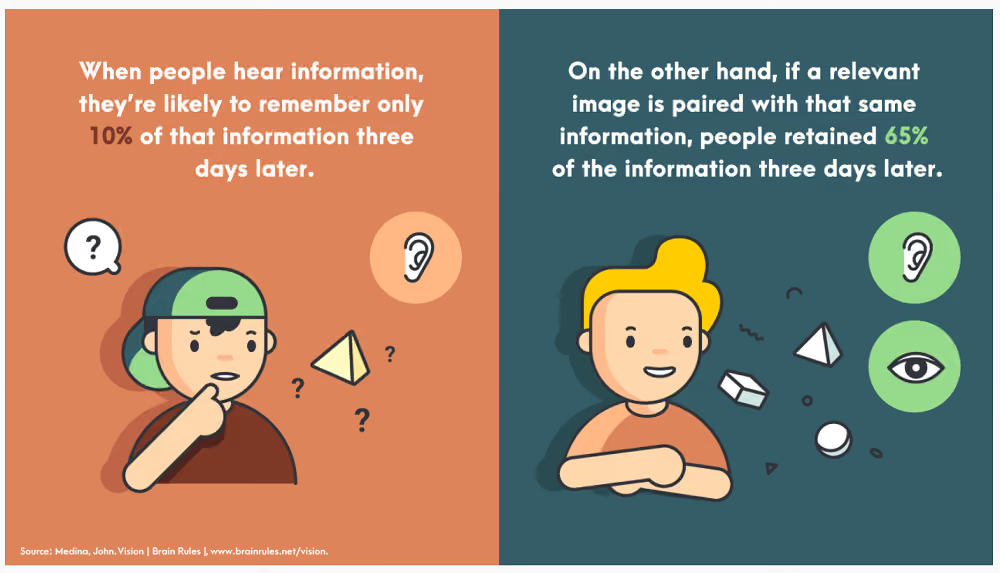
Videos are among the most engaging communication formats. Viewers retain 95% of a message when the message is conveyed with a video, as compared to just 10% from plain text.
If the thought of creating a video is conjuring images of complex video editing software in your head, worry not.
Just like with graphics, you don’t need to be a video-mixing pro to create engaging clips. What matters is that your videos are genuine and authentic – they don’t need to be slick and polished.
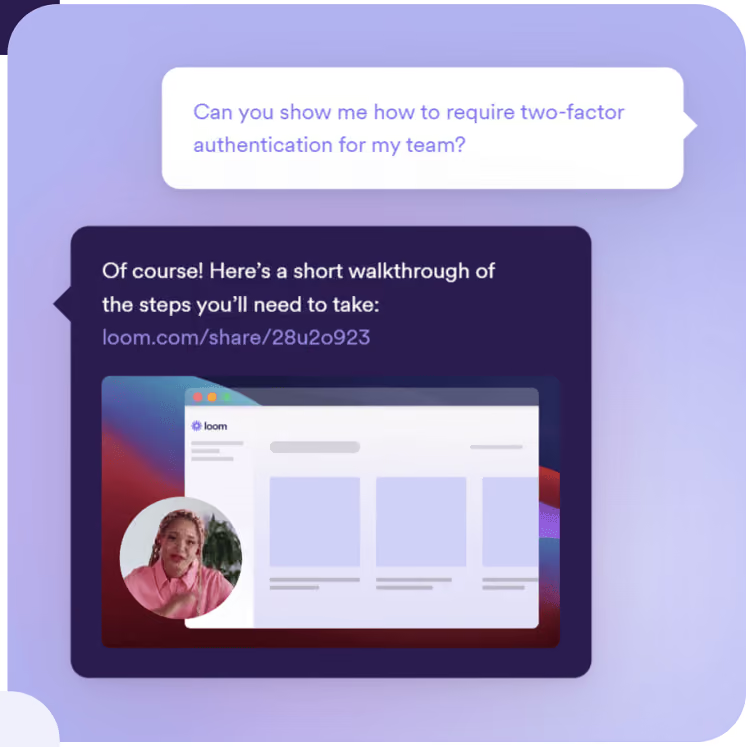
Tools such as Snagit, Piktostory, and Loom make it really easy to record, edit and share videos with employees in your organization.
Communicating change in the workplace: 6 best practices 1
Don’t forget face-to-face channels
It’s no secret that people are increasingly working remotely and relying on digital communication platforms to meet and keep in touch. In many ways, that’s a good thing.
But change, no matter how small, is a sensitive topic. When communicating change, it’s not just about what you’re saying, but also about how you’re saying it – the non-verbal signals you, and your employees, send out contain important information.
Take the example of a global manufacturer who held a meeting of about 200 workers right after a reorganization. There was an unease in the crowd, and when the VP got up to deliver his speech, he spotted this and took it into account: instead of embarking on his presentation, he started by addressing the elephant in the room.
He told the workers that he understood how they were feeling. Uncertain. Sad. Scared. He expressed honest, heartfelt sorrow over the senior management’s distress about letting good people go. He validated what the employees were feeling.
Had this been a virtual meeting, the VP probably wouldn’t have caught the non-verbal signals of workers’ mental and emotional condition.
Communicating change in the workplace: 6 best practices 2
So whenever possible, include in-person communication in your change management communication process. Tune in to what preoccupies your employees so you can respond genuinely. This is especially important if they are frontline workers; make sure they feel seen, heard and taken into account.
Incorporate the principles of storytelling
In the early 1980s, the airline industry went through a tough time. Scandinavian Airlines was hit particularly hard: it was facing a loss of $20 million.
To turn itself around, the business decided to make a big change in its strategy, the core of which was to focus more on business travelers. But changing the mindset of its 20,000 workers was not going to be easy.
So what did they do? The management sent a short handbook to all the employees with a visual story communicating the change. The booklet covered what the company was going through, its future goal, and how workers could help the organization get through its struggles.
Along with other change communication efforts, this approach helped the company increase its earnings by $25 million in the first year, and $80 million overall.
Stories can go a long way in reducing the fear and uncertainty associated with your change initiative, and rally your workers around shared objectives.
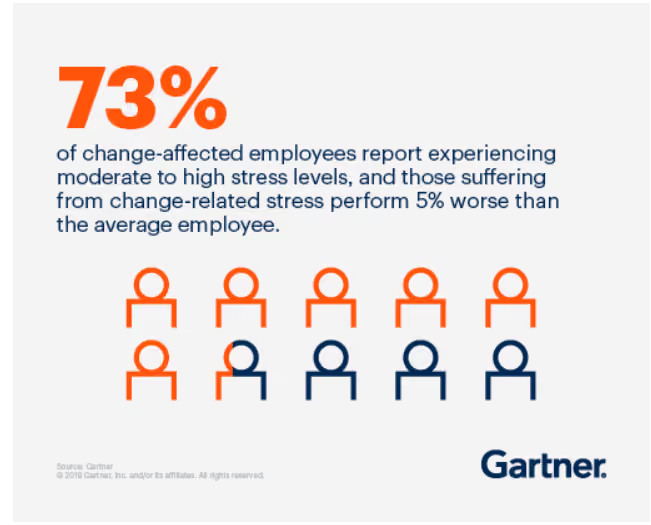
Change is stressful. 73% of employees affected by change report experiencing moderate to high stress levels.
When going through a transition, employees want to feel heard and validated. They should be able to share their concerns, feelings, and experiences, and raise questions.
In-person chats go a long way in giving workers a sense of being included. If that’s not possible, or in larger companies, two-way digital communication channels can make a big difference. Either way, the unspoken message you want to convey is that the management and the employees are in this together.
Create a change communication strategy
Your employees will feel reassured and get on board much faster if they have a clear view of exactly what’s happening when, and if they feel that they have a voice.
The best way to embark on a change process is to start with a change communication strategy that helps workers see what lies ahead. Not knowing generates anxiety; being in the loop alleviates it.
A proper change communication strategy will help you distribute timely, consistent, and relevant information, along with mechanisms for workers to share feedback and raise questions.
Communicating change in the workplace: final thoughts
Communicating change takes time and effort but it is often worth it. When communicated skilfully, a change effort can shift gears and successfully move your company into a desired future state.
Many organizations fail at change management because they treat it as a set-and-forget process. Don’t make that mistake. When communicating change, make sure to hammer home your key messages not just once, but again and again. Keep communicating until the change becomes second nature.
If you make your workers the protagonists in the story of your change, you’ll see a real willingness on their part to adapt and contribute.
If you are looking to implement effective change communication, schedule a demo to learn about how Blink can help you drive successful organizational change with efficient internal communications.
Employees power your business, but many are often left behind when it comes to workplace tools and technology.
That’s where Blink and Workday come in.
With the industry’s most comprehensive integration between Workday and any employee experience platform, Blink extends Workday’s powerful capabilities to all employees — whether they’re desk-based, remote, or on the frontline. This unmatched integration ensures every employee can access what they need, when they need it — driving engagement, boosting productivity, and helping organizations unlock the full potential of their Workday investment.
Together, Blink and Workday bridge the employee experience gap, offering the entire workforce seamless, one-click access via their smartphones to the tools and information they need.
Let’s take a closer look at how Blink and Workday work hand in hand to revolutionize the employee experience, creating a more connected and engaged workforce.
Blink and Workday: How it works
Blink is a mobile-first employee experience platform that serves as a digital front door for your organization, giving employees access to all the software you use in just a few clicks.
If you’re already a Workday customer, you benefit from our pre-built, out-of-the-box integration. This means we can take Workday user data into Blink and automatically create user accounts.
Employees can download the Blink app from Android or Apple app stores and use their email or phone number to access.
Through single sign-on (SSO), employees can access third-party apps — like Workday — by simply clicking on the relevant icon. Users can also click on deep links that take them straight to specific Workday functions, like payslips or an address update form.
When you partner with Blink and Workday, you make Workday accessible to all of your employees.
Blink and Workday: The benefits
Here’s what you can expect when you use Blink and Workday together.
#1. Improving adoption of Workday (and other third-party tools)
Persuading employees to download multiple workplace apps is a challenge. But with Blink, there’s just one app to download.
The Blink app acts as a centralized hub. With SSO, employees can access all workplace software — including tools like Workday, SharePoint, and ServiceNow — from Blink. Employees don’t have multiple passwords to remember or reset.
{{mobile-hub="/image"}}
This explains why Blink customers enjoy a 5x improvement on adoption of third-party tools. Pair Blink with Workday and you’ll get much more value from your Workday subscription.
#2. Easy identity management
Frontline workers don’t tend to have a corporate email address or device. So these employees are often left behind when it comes to workplace tech tools like Workday.
But with Blink, it’s easy to get hard-to-reach deskless employees onto your systems. That’s because Blink serves as your identity provider.
Deep integration between Workday and Blink allows the transfer of rich employee data to Blink systems. Then, Blink verifies user identities, making it simpler than ever to activate employees.
#3. Streamlining the frontline workforce experience
Together, Blink and Workday makes it easy for frontline workers to access all the tools and resources they need, at a time and place that suits them. This makes workers more efficient and effective.
Via Blink, employees can access Workday Skills Cloud, view pay and benefits, pick up shifts, complete employee surveys, submit paperwork, and report safety concerns.
Putting these tools in the hands of frontline workers means you squeeze all possible value from them. You also make life easier for your frontline workforce — so much easier that Blink users give the app a 9/10 ease rating.
{{mobile-workday-feed="/image"}}
#4. Improving employee communication
Blink takes internal comms beyond the office noticeboard and word-of-mouth messaging. An intuitive news feed gives every employee instant access to up-to-date internal communications, tailored to them.
Admins can use the news feed to highlight Workday-related tasks. You might like to communicate available shifts, signpost training resources, or prompt staff to book their vacation time. You can add links to your posts, directing users to the appropriate place on the Workday app.
Blink’s wide range of employee communication tools supports your workforce in other ways, too. They find it easy to chat with supervisors, coworkers, and leadership. So they feel more connected to your organization and the people within it.
#5. Accessing comprehensive data
When you use Blink and Workday together, you get access to rich analytics and survey data relating to your employees, all via a user-friendly dashboard.
This data reveals how employees are using your workplace tools. It gives you a deeper understanding of employee engagement and staff turnover. It can even help with workforce planning.
Drill down into this data to identify strategic areas for improvement — identifying operational weaknesses and issues with employee experience.
#6. Closing the digital divide
A majority of workers feel disconnected from their organization — and many feel they lack the tools they need to do their jobs effectively.
By improving the digital employee experience, with a combination of Blink and Workday, you close the digital divide. You give all employees equal access to workplace tools and bring them into the company conversation.
This helps to improve employee engagement and satisfaction. It also leads to better staff retention. Blink customers experience a 26% reduction in employee turnover.
Make Workday work harder for your full organization with Blink
Blink helps leading organizations bring Workday to deskless employees. We provide the most comprehensive and effective Workday integration in the industry, which makes for easy setup and a seamless user experience.
In many organizations, the work WhatsApp group is thego-to place for company news.
The app provides a vital link between coworkers and managers. And it’s easy to see why. WhatsApp has a user-friendly interface, streamlined functionality, and a range of useful communication tools. It’s also sitting in the pocket of over 3 billion monthly active users.
The stats say it all. 1 in 3 UK workers relies on apps like WhatsApp and Telegram for workplace communication. And a huge 69% of frontline workers rely on personal text messaging apps to get their work done.
So what’s the problem? Why shouldn’t employees use WhatsApp — or other consumer messaging apps like it?
The truth is, while these apps may be the height of convenience, they come with major risks for your organization. Risks that include data leaks, regulatory fines, legal liability, and cyber-attacks. And that’s before we even look at the dangers they pose to company culture.
In short, WhatsApp doesn’t work for work.
Here, we dive into the issues associated with consumer messaging apps and explore a safer alternative for team messaging.
The WhatsApp trap
Imagine you’re a frontline delivery driver. You spend limited time at the depot. You receive company news in a piecemeal fashion — from the depot bulletin board, from coworkers in the break room, and over phone calls with your manager.
Your company has an employee intranet. But the mobile experience is clunky and hard to access without a corporate email address. You feel out of the loop, disconnected from your coworkers and from company culture.
So what do you do?
Option one. Do nothing. In which case, your workforce engagement is likely to take a dip and you may be tempted to hit the job boards.
Option two. Turn to the messaging tools you already use day to day. Use WhatsApp to ask about changes to today's employee scheduling, share route tips with fellow drivers, and request paid time off.
When your company experiences an internal communication tech gap, employees seek out other solutions. The most logical is always the consumer apps they use away from work.
Setup is frictionless — you can set up a group with coworkers in seconds. The app is instantly familiar. And (for employees at least) these apps do the job perfectly.
But, look under the hood, and this unofficial tech poses all sorts of problems for your organization.
{{no-email-no-problem="/callouts"}}
Why “shadow messaging” isn’t something you should overlook
Unofficial tech tools, unapproved by your IT team, are known as “shadow IT.” And while WhatsApp may provide a path of least resistance for employees, shadow messaging has no place within a security-conscious organization.
Beneath the convenience and (let’s be honest) that exceptional user experience, there’s no company oversight, no easy way to offboard users, and no data control. Here’s why shadow messaging tools like WhatsApp pose such a risk to your business.
Security and compliance risks
WhatsApp gives the perception of technical security. End-to-end encryption sounds pretty good, right? But that’s not the whole story.
Message backups stored in the cloud may not be encrypted. Phones can be lost or stolen. Ex-employees can continue to access conversations. And mistakes happen: Someone could send sensitive information to the wrong group, or add someone who doesn’t have the right security clearance.
If your company is subject to GDPR, HIPAA, or other data privacy regulations, consumer apps are a ticking time bomb. Sensitive customer data or internal information shared via WhatsApp can lead to data breaches and hefty compliance fines.
Reputational risks
Shadow messaging doesn’t just create compliance issues — it can threaten your company’s reputation, too.
Private chats are private…until they aren’t. A screenshot from a WhatsApp group can quickly circulate beyond the intended audience. Informal remarks may be misinterpreted when broadcast beyond a small team. Even small errors — like sharing internal updates before they’re ready for public consumption — can undermine credibility with stakeholders.
Consumer messaging apps make it nearly impossible to monitor and manage these risks. Administrative features like disappearing messages and the ability to make edits mean there’s no consistent audit trail. Organizations can’t easily verify what was said, who saw it, or when it was deleted.
These gaps raise critical questions. How long should employees retain work-related messages? What happens if group messages are deleted before they can be reviewed? How do you investigate disputes when evidence is scattered across personal devices?
Without centralized control, organizations are left exposed and at increased risk of PR headaches.
The cost to company culture
There’s a quieter risk at play here, too — the one posed to company culture. When you use WhatsApp or another consumer app for internal communication, instead of your own dedicated team chat app, there’s a cost in terms of the following:
Oversight. No messaging analytics. No content hub. No unified inbox. No team-level access. Limited integration with other workplace tools. WhatsApp operates in a silo. So creating a connected culture is tough. What’s more, comms teams can’t track employee engagement or measure sentiment, so your organization struggles to make meaningful changes to the employee experience.
Exclusivity. Without oversight, some employees inevitably get left out. Maybe a new starter never got added to the group, or some workers avoid using personal messaging apps for work-related chat. When some people are in the loop and others aren’t, information gaps form, resentment builds, and engagement suffers.
Missed messages. Important and urgent updates get lost in the noise.
Burnout. WhatsApp blurs the line between personal and professional. Managers may feel it’s fine to ping employees at any hour. Without clear boundaries, employees may struggle to fully switch off. The result? No downtime and an increased risk of stress and burnout.
Informality. Here at Blink, we talk a lot about the value of authentic, human communication. But authentic and unprofessional are two very different things. When employees chat over a personal messaging tool, there’s a chance they drop their professional filter. The work chat becomes a place to vent frustrations or spread gossip, damaging the cultural values you’re trying to uphold.
{{mobile-chat="/image"}}
What safe employee messaging looks like
So if WhatsApp is too risky, what does good team messaging look like?
Safe, compliant messaging tools go beyond WhatsApp’s end-to-end encryption. They give organizations the control and visibility they need, in one digital source of truth without sacrificing the speed or familiarity that employees crave.
Here’s what to look for.
Centralized mobile access and identity management.Single sign-on (SSO) gives employees secure, frictionless access to group messaging and other workplace software, without juggling multiple passwords.
Automated user management. With the help of SCIM (system for cross-domain identity management), you can automate the user lifecycle, creating accounts for new employees and automatically ending access when someone leaves your company.
Moderation and governance tools. Admins can flag, review, and remove inappropriate content, protecting both employees and the business.
Secure file sharing. Instead of forwarding PDFs and customer data over WhatsApp, files stay encrypted and traceable within your organization’s approved environment.
Customizable notifications, read receipts,and acknowledgements so you know who got the message and can manage compliance and critical comms.
Integrations. The best messaging tools connect seamlessly with workplace software — like Workday, ServiceNow, and Microsoft 365 — offering secure access to all the tools your teams need in real time.
Security features like these are paramount. But your tools need to go even further:
Remember all those reasons employees like using WhatsApp?
Mobile-first and simple. It’s instantly accessible.
A second-to-none user experience that feels as intuitive and familiar as Instagram or TikTok. This is key for adoption.
The best team messaging solutions replicate this kind of consumer-grade user experience. They give employees a streamlined, user-friendly way to chat with managers and coworkers. And they give them all the cutting-edge team communication tools they’re used to.
The bigger picture: Using team messaging to build meaning
When you move beyond WhatsApp, you’re not just switching to a more secure tool. You’re opening up a world of employee communication possibilities. Because team messaging was never just about chat. It’s about connection, trust, and belonging.
With a customizable, company-branded app, you can create a messaging experience that feels distinctly yours — one that supports your business goals and reflects your values.
By offering a mobile-first solution, you show frontline teams that they’re a valued part of company culture. You show everyone that easy, open communication is a foundation of your employee experience. And you create a space where respectful, inclusive, and collaborative communication is the norm.
Every message — from a company update to a simple “thanks for your hard work” — acts to reinforce what you want your organization to stand for.
{{mobile-kudos="/image"}}
Transitioning from WhatsApp to a team messaging tool that’s built for work
Moving your teams away from WhatsApp is easier than you might think — particularly when you choose a secure, mobile-first platform like Blink.
Blink was built to replace risky, fragmented comms. It’s a mobile modern intranet platform, with all the channels you need for an effective internal communication strategy and beyond.
Our consumer-grade team messaging tool comes with notification controls, GIFs, emojis, the option to favorite your most frequently used chats, and the ability to highlight messages you want to return to at a later date.
Most importantly, Blink uniquely combines consumer-grade UI and intuitive, flexible features with enterprise-grade automation and data security, ensuring compliance without compromising on adoption and engagement.
Our app was built for everyone, particularly those who do not sit at a desk. And with a customer experience team on hand to provide support every step of the way, you can hit the ground running from the first day your app goes live.
Meet Lewis Tran, London-based Senior Front-End Engineer and one of the creative forces bringing Blink’s user experience to life.
Just over two years ago, Lewis joined the team with a passion for building intuitive, impactful products. Since then, he’s been at the forefront of developing features that land directly in the hands of our users — shaping the way thousands of frontline employees connect, communicate, and get work done.
We sat down with Lewis to talk about innovation, problem-solving, and what it’s like to craft products that make a real difference every day. Let’s dive in.
#1. What is your Blink background?
I am a Senior Front-end Engineer working out of the London office. I have been at Blink just about over 2 years.
#2. What initially attracted you to join Blink?
Initially, I didn’t know much about Blink. But I’d worked at a startup before and knew I wanted to be in a fast-paced environment again. It wasn’t until I started interviewing that I got to learn more about what Blink does and get a taste of the product. It was easy to see the potential of Blink platform, and as a front-end engineer who loves building product, I was excited to explore those opportunities.
#3. What’s a project you are proud of from your time at Blink?
One project I’m especially proud of isn’t the biggest or flashiest, but it means a lot to me — an AI feature we built that started from an internal hackathon. About a year ago, we held an AI hackathon where people pitched ideas for using AI internally or in the product. I designed a prototype for a feed post summary tool, where you could select multiple posts and quickly generate summaries with links back to the originals. The idea was to make it easier to highlight key content in busy feeds.
The day after I presented it, Lauren reached out to ask if we could actually build it into the product. At that point, it was just a prototype, but we developed it further, integrated it into the app, and eventually launched it as part of our Blink Assist AI feature. Going from idea to a released product in just a few weeks was a great experience.
#4. How would you describe the company culture at Blink in three words?
Passionate, dynamic, and supportive.
Everyone here is excited about building a great product and solving real problems. There’s never a dull day, and while challenges come up, people are always ready to help each other out. That level of support makes Blink a really great place to work.
#5. What’s one thing you’re excited about for the future of Blink?
There’s still so much untapped potential in the employee communications space. Our customers face real challenges, and we have the opportunity to solve them in ways that make a genuine difference to employees’ lives. As an engineer, that’s incredibly exciting — designing solutions, speaking with customers, and creating tools that have a tangible impact on companies and their people.
#6. Can you tell us about a recent initiative or program launched at Blink that you found particularly exciting?
We have an internal initiative called Adopt a Customer, which has been running since the beginning of the year. Once a week, someone at Blink presents one of the companies using our platform. It’s a great way to see the variety of organizations we work with — from large logistics companies to small gyms — and to understand the broad impact Blink has.
I might be biased, but I’m especially excited to present my adopted customer. They’re a fantastic company, and I think everyone at Blink should hear about them and learn how they’re using the product.
#7. Why do you work for Blink?
For me, it’s about solving interesting problems every day — problems that have a real impact on people’s lives. That’s a unique and privileged position to be in. As an engineer, you don’t always get to work on something you believe in or feel passionate about, but at Blink, the mission and the product are perfectly aligned for me.
That combination makes me want to keep building the best product possible and finding solutions to the challenges our customers face. It’s exciting, meaningful work — and Blink is the perfect place for that.
Find and fix pain points to build an employee intranet that everyone wants to use.
Let’s be real here. The word “intranet” doesn’t exactly spark joy in employees.
For many, it’s synonymous with clunky logins, endless scrolling, and outdated information. It’s the digital equivalent of a dusty bulletin board. It’s just there — not doing anything to help the employee experience.
In fact, just 13% of employees say they use their intranet daily — and 31% said they never do.
Here for the work? Let’s unpack what employees hate about your intranet experience and what you can do to fix it.
Employee intranet pain points — and what you can do to address them
#1. “It’s too hard to find anything”
Your intranet is packed with employee handbooks, policies, HR forms, org charts, benefits info, and company news. But can anyone actually find what they’re looking for?
If your intranet software is the digital black hole where documents go to die, employees will soon realize that searching through files in search of the resource they need simply isn’t worth their time.
The fix: Tidy things up
Make your company intranet easy to navigate. You can do this by:
Improving search functionality. Allow for misspellings and synonyms, ensure results are relevant, and support employees with autocomplete and filter functions.
Grouping content logically. Think like a user — or run focus groups — asking where you would expect to find each piece of content.
Cleaning up your navigation. Simplify dashboards and use clear, intuitive labels that make sense to everyone.
{{mobile-hub="/image"}}
#2. “It’s only updated once a quarter”
If your intranet is only updated once in a blue moon, it’s no wonder employees aren’t logging in. There’s nothing new to see — and no reason to trust that the internal communications and resources they do find are up-to-date.
The result? Your intranet becomes a ghost town, with fewer and fewer employees bothering to pay a visit.
The fix: Keep it fresh
When your intranet is relevant and up-to-date, employee engagement follows. Your intranet becomes a place worth visiting, which means employees are more likely to see critical messages.
Don’t wait for “big news.” Celebrate small wins. Share behind-the-scenes moments. Post real-time updates. And take a look at these intranet content ideas if you need a little inspiration.
Internal communications team already stretched too thin? Then add employee-generated content (EGC) into the mix. Allow your entire workforce to interact with intranet content — and post content of their own — and there’s always something new and exciting for your audience to engage with.
#3. “It wasn’t built for people like me”
This is a common problem for frontline employees and more remote teams. Just 10% of frontline workers say they have high access to the tools, tech, and opportunities they need to connect and advance in their workplace.
Imagine a retail assistant who spends their days in a store serving and supporting customers. Unlike the team at HQ, they only have access to a desktop computer in the breakroom at lunchtime. And they don’t have a company email address.
It’s then difficult — if not impossible — for them to access vital workplace documents and updates via the intranet. They feel disconnected from the company and frontline employee engagement suffers.
Use frontline-friendly login methods that don’t require a corporate email address
Design for mobile devices — don’t just squeeze the desktop experience onto a smaller screen
Make your employee intranet accessible to frontline workers and you ditch the two-tier experience, where office staff feel connected to company culture and each other — and where frontline workers are left behind. You create an enjoyable intranet experience that works for everyone.
{{mobile-chat="/image"}}
#4.“It’s all corporate fluff”
Does your content feel like it’s gone through five rounds of legal, then taken a trip via the buzzword bus stop before finally landing on the employee intranet? Then your audience is likely to scroll right past it.
Formal, corporate language is unengaging. It’s also difficult to read. Long words, long sentences, long paragraphs. They don’t reflect the way people speak to one another in the real world. And they get in the way of meaningful employee communication and connection.
Likewise, if you only use your intranet to talk about high-level corporate happenings, employees will struggle to relate. If they can’t see themselves in the story, they’ll tune out.
The fix: Make it human
Yes, company news matters. But it doesn’t need to sound robotic and overly formal.
Write like a human. Use plain language, short sentences, and a conversational tone — just like you would talking to someone face-to-face.
And don’t forget to share stuff that your people really care about. Use your employee intranet to celebrate employee stories and customer stories. Put people at the center of each piece of content.
One final tip for ditching the corporate speak? Play around with content formats. Swap dry text-based documents for dynamic images, videos, polls, GIFs, and infographics. You’ll make the intranet feel less like a bulletin board and more like a digital community.
{{mobile-stories="/image"}}
#5. “It’s ugly and feels like 2009”
Still working with your parent’s intranet? Today’s employees get super-slick experiences on the tech tools they use at home. So they have increasingly high expectations for the tech they use at work.
They want minimal friction. Intuitive dashboards. Easy navigation. And then there’s personalization.
A one-size-fits-all approach to the intranet is outdated. Because most of today’s software experiences are tailored to the preferences and behaviors of each individual user.
Up against consumer-grade digital tools, a traditional intranet feels like a lumbering dinosaur. It’s hard to use and fails to delight employees.
The fix: Upgrade intranet UX
A modern intranet should look and feel like the tools employees already love using. We’re talking:
Clean, mobile-responsive design, available via desktop and smartphone app
Intuitive navigation and integrations, so everything employees need is just a couple of clicks away
Personalized dashboards, based on role, location, team, and tenure
Social features, like chats, forums, emojis, and news feeds — and lots of engaging visuals
Modern intranet features like these are no longer nice-to-haves. They’re essential if you want to meet employee expectations and keep them coming back to your social intranet for more.
#6. “No one ever showed me how to use it”
For some employees, it’s not resistance. It’s simply a lack of intranet know-how.
They don’t know how to log into the intranet or download it to their device. They’re unaware of how the intranet can support their work and don’t know how to use specific features.
Without clear training or support, they never give your intranet a try — and never discover all the amazing things it can do for them.
The fix: Support employees to get started
A good intranet should feel intuitive from the get-go. There’s a minimal learning curve and better employee adoption because the platform has a familiar and user-friendly interface.
But, beyond choosing the right intranet platform, there are a few other things you can do to support employees to use it:
Create intranet ambassadors. Offer intranet training to a select band of employees who can share their knowledge with teammates.
Offer how-to tips within the intranet. Add pop-ups and quick tips on relevant pages so employees get support when and where they need it.
Bake it into onboarding. As new hires start work at your company, make an intranet walk-through an integral part of the employee onboarding process.
#7. “It doesn’t help me do my job”
Too many corporate intranets are built around what the organization wants to share — not what employees actually need. So what happens?
People work around it. They ping their manager for shift information, share documents by email, and complete HR forms by hand. They don’t see the value in your employee intranet so they don’t choose to hang out there.
The fix: Build it around employee needs
Start by asking employees what they want the intranet to do. Ask which tools they’d find useful. Then shape the user experience around that.
Some essential features that tend to be popular?
Integrations. Link your intranet to the other workplace software you use, so employees can access the tools they need from their intranet dashboard.
HR self-service. Support employees to request PTO, swap shifts, leave feedback, access benefits, and submit expenses — right within your intranet platform.
Employee directory. Make it easy for employees to find and connect with colleagues across locations, teams, and shifts — even without a corporate email.
Interactivity. Turn your intranet into a digital water cooler by providing channels for peer-to-peer connection, team collaboration, and the sharing of company culture.
From ignored to adored — your intranet makeover starts here
Let’s recap.
Most employees don’t hate the idea of the employee intranet — they just hate the version they’ve been stuck with. Outdated, clunky, hard to use, irrelevant…
But that doesn’t mean you have to scrap it and start over.
You can build a better digital employee experience by listening to your people, modernizing the experience, and meeting them where they are. On mobile — with real stories, useful tools, and relevant content that actually reflects their day-to-day work.
Build a modern intranet and your platform can become a digital home for internal communications, community, and culture — and an app that employees across your entire company enjoy opening every day.















%20(800%20x%20450%20px).avif)


