Respiratory Care Coordinator for Children’s of Alabama
Jess DeVore
Published:
December 2, 2024
Last updated:
December 6, 2024
What makes her awesome?
Alisha McGuire has been working in Respiratory Care at Children’s of Alabama since graduating from the UAB Respiratory Therapy Program in January of 2006.
Alisha’s leadership abilities and her commitment to our patients were evident from the beginning. She eagerly and consistently assumed the role of leading her night shift colleagues. She rapidly gained a reputation as a go-to resource person for respiratory therapists, nurses, and physicians. While Alisha initially worked primarily in acute care, she took the initiative to orient in multiple areas, including critical care units. Her skills are diverse and she is able to function competently in any unit in the hospital.
When the Lead Respiratory Therapist role was created in 2016, it was obvious that Alisha would be one of the first ones selected. Her job performance was always rock solid and I was never concerned about anything on night shift when Alisha was on duty. Her leadership was a contributing factor to the early success of both our Asthma Care Pathway and our Bronchiolitis Care Pathway. Her commitment to excellence has helped to ensure the ongoing success of both of these pathways which have so positively impacted the lives of patients with these respiratory diseases.
Alisha was promoted to Respiratory Care Coordinator in 2018. She has excelled as a leader in this role. One of her first projects was working with Dr. Alishlash to help develop the Acute Chest Syndrome (ACS) protocol. Dr. Alishlash recognized Alisha, in an email to her managers, for her hard work in helping the protocol become a success. Overall length of stay has decreased for patients admitted with ACS.
We have faced many challenges over the years, none so great as the COVID-19 pandemic. Alisha’s leadership throughout the pandemic served to help her colleagues remain informed and steer a steady course amid the ever-evolving guidelines. Alisha addressed the staffing challenges created by the pandemic by willingly working extra shifts on days, nights, weekends, and holidays. She has always simply taken the bull by the horns to get the job done and her can-do attitude is consistently inspiring. Alisha has been impacting the lives of those we serve for over 18 years now. She deserves to be recognized for her consistently stellar performance.
How has Blink helped in her role?
Blink has helped with communicating news about special events to the team.
What does she want to do next?
Alisha wants to continue her career at Children’s of Alabama and to utilize her clinical and leadership skills to provide high quality, compassionate care and to be an advocate for those we serve.
Nominated by: Robert W. Park, Director, Respiratory Care
What we'll cover
Start your free trial today
See how Blink helps frontline teams stay connected, informed, and engaged.
Searching high and low for the perfect employee to fill a complicated role can be difficult. It stresses you out if you’re already short-staffed and in a rush to get more hands as quickly as possible.
Of course, it would be preferable not to worry about hiring at all. Retaining employees you already have can be a lot simpler than constantly hiring. And it can benefit your business too.
While you’re probably familiar with some of the benefits of employee retention, there are several hidden advantages of employee retention that you may not have considered.
If you’re ready to get motivated to kick your retention efforts into high gear and retain your top talent, keep reading and learn some of the lesser-known benefits of staff retention.
Why employee retention is important
Employee retention is important because it can improve the productivity of an organization.
Organizations with high employee retention profit from increased employee engagement, higher employee morale, more experienced employees, and lower employee turnover costs.
That’s why 91% of Human Resources leaders are concerned about employee turnover in the near future.
Besides the revenue, companies with a lower turnover rate can spend time on their employees, build a cohesive company culture, and achieve innovations that outperform their high-churn counterparts.
Employee retention’s effect extends beyond your annual revenue or quarterly performance reports — it improves each day for your workers, managers, and customers.
In short, it’s hard to overstate the importance of effective employee retention strategies as they can impact just about every aspect of your business, including revenue, service, and company culture.
1. More quality hires
Hiring typically increases when employees leave your company. So it should decrease as your retention goes up.
The hidden benefit of high retention is that you can allocate more resources to the time-consuming job of sourcing new hires. You can be more selective in finding candidates with relevant experience and perfect cultural fit instead of rushing to fill a vacancy.
The candidates you hire this way are more likely to stick around and better fit your organization, which further improves your retention rate.
Ultimately, more employees staying means more business growth and more new positions. You can focus your hiring efforts on adding to the team rather than replacing previous talent.
2. Better employee training
Hiring new employees takes up a significant portion of your company’s HR budget and time. It’s estimated that replacing an employee costs anywhere from 50% to 200% of their annual salary.
Retaining just one extra employee means thousands of dollars saved you can use in other areas.
One often-neglected management area is training, with 78% of workers saying they want more training. By saving on hiring, you can spend on training.
With more time for training, your employees will be happier, more skilled, and even more likely to stay with your organization.
3. Improved customer relationships
Most of your return customers and clients don’t think of your business as a logo or physical store. They think of the person with whom they interacted. Your employees are the face of your business, from frontline workers up to account managers.
Your customers rely on your employee’s knowledge of their needs and history with the company to deliver the highest level of service. So when an employee leaves, the relationships they built with your customer base leave with them.
A PWC report found that 80% of Americans think a knowledgeable staff is the most important element to customer satisfaction, along with speed and convenience. They also pay more for things when they experience a positive customer experience.
The benefits of employee retention reach beyond your current staff and bottom line and impact the customer experience. A high employee retention rate ultimately improves your clients’ and customers’ perception of your business.
4. Faster progress
While onboarding and formal training programs are essential for satisfied, efficient employees, these resources are hardly the only way employees learn on the job.
One of the most valuable sources of guidance and information is your current employees. Studies show that 91% of employees with a workplace mentor are happy with their jobs.
By retaining most of your employees, you get:
Strong relationships between your employees that impact their performance
Employees who possess in-depth knowledge in their fields
Great mentors who have the technical skills and know little-known tricks in the field to help the newcomers
You benefit from the perks of high employee retention: Employees have a wealth of team members to turn to when they have a question or need advice. This turns your newest employees into your best employees.
Also, when turnover is low, you keep the work environment of cultural cohesion and the know-how of experienced employees. This results in less stress and high productivity.
Final thoughts: 4 hidden benefits of employee retention you should know
Why retain employees? The answer is clear.
The benefits of employee retention are wide-reaching for your entire organization. Employees, management, and customers all reap the benefits of employee retention.
Employees benefit from greater satisfaction, higher productivity, and better support on the job. Employers can enjoy greater profit and less uncertainty. And your customers can rely on consistently high-quality and personalized customer service.
These benefits are well worth the expense of managing incentives like healthcare, training, and work-life balance.
If you’re ready to improve your employee retention, an all-in-one employee communication tool like Blink can maximize your organization’s initiatives.
Unfortunately for C-suite execs at frontline organizations, unless decisive action is taken quickly, things will only get worse.
While the problem of frontline turnover has many contributing factors, from salary competition to changing workforce demographics, one important part of the solution remains constant: employee engagement.
And here lies the problem: most of the time, it doesn’t work.
“If you build it...they won’t actually come”
Frontline businesses have invested in engagement solutions and projects before, but regardless of the type of organization, these are generally met with tepid responses.
The list of fallen soldiers here is considerable: town halls, employee surveys, intranets, ERGs. And often, the response sounds something like this:
“Great, another thing to remember”
“It’s not a natural part of my day”
“It’s a one-off thing”
“It’s too hard to use”
Hours of time from leadership, People teams, Internal Comms functions and supervisors go into projects that rarely succeed in their mission. This is like the birthday party where the decorations are up, the cake is ready and the music’s on – but nobody’s showed up.
The result? Frontline workers aren’t sustainably engaged, the cycle of attrition continues and there’s little meaningful data in order to understand exactly what to do to fix it.
The solution: chips and dips
Turning this around warrants changing the way we think about employee engagement. For most businesses, employee engagement is a thing that we ‘do’ - it’s a project, an initiative, even a tool or an app. But this is where we’re going wrong.
The solution lies in approaching frontline engagement as something that we ‘earn’ - it’s an outcome, not an output.
To illustrate this, let’s return to our party. Anyone who’s ever been to a house party will be able to tell you exactly where most people end up: the kitchen. And why are they in the kitchen? Because that’s where the drinks, the mixers, the snacks and the ice is. There’s useful stuff there, and so they gravitate there, and the good times start rolling.
So to return to frontline engagement: put out the ‘chips and dips’. In other words, focus on providing frontline workers with services and tools that not only fit into their busy days, but make them better – and use that space to invite engagement.
How it works: chips, dips and paystubs
Blink is a new type of frontline engagement app that the average worker opens ten times per day! Blink brings the processes that frontline workers and their managers need all into one place – from payslips to scheduling and critical documents, all with one login. This is our ‘chips and dip’.
For leaders and managers looking for engagement, this is the time to swoop. The whole of the frontline’s eyeballs are on the app, which means that surveys get seen, important messages from the CEO and HQ are read, and the work being done to improve the working day gets cut-through.
If a once-yearly employee engagement survey is the equivalent of putting out samples at Costco in the hope that a nameless stranger will take a drive-by snack, this is the equivalent of the work cafeteria – the place where the whole companies gathers, day after day.
How to be a good frontline host: Elara Caring’s story
Elara Caring – one of the largest US-based providers of personal care, home health and hospice care – had a frontline engagement problem when we first met them last year. With a 62% turnover rate of their more than 32,000 personal care attendants (PCAs), the leadership team needed sustainable engagement badly.
In adopting Blink, Elara looked to empower its PCAs and make their lives easier – and get engagement and loyalty in return.
They used Blink to remove the burden of paper-based admin: Elara’s PCAs had to constantly fill out expenses and other forms on paper. Blink’s solution was to integrate these manual processes and systems into a single app. Payslips, expenses and mileage reporting, key information from Sharepoint, schedules and rotas were all suddenly available to Elara’s PCAs at their fingertips.
The benefits for Elara’s PCAs? Time savings, with more attention devoted to their “real jobs” than ever before.
The benefits for Elara Caring? Sustainable engagement, with 95% of employees saying that they now feel more connected to the company. PCAs have begun to use Blink to create a community – and sub-communities – within the organization, creating the connection and cohesion that makes them stay.
https://www.youtube.com/watch?v=dINw_Y7CjWQ
In conclusion: good parties don’t skimp on the guac
In a war for a diminishing talent pool, the need to directly address frontline engagement has never been more acute. But it’s also shown where there are failings in trying to get engagement from the activities and programs that work for desk-based, white-collar workers. The key to success for the frontline is to not only fit into frontline life, but to make frontline life better and easier – and use that digital space you’ve created to finally connect your people.
Migration can mean more than just maintaining the status quo
If you’re one of the many organizations preparing to transition from Workplace from Meta, you may be looking for platform alternatives that help you keep business as usual.
But what if you could achieve business as better?
This worldwide shift away from Workplace is a rare opportunity to reimagine how your internal communications operate altogether. Rather than focusing solely on like-for-like functionality, you can use this transition to raise the bar.
A great alternative doesn’t just ensure business continuity with the Workplace features you know and love — it also empowers your teams, streamlines communication, and can help take your internal communications strategy from good to great.
Before you pick a platform and migrate from Workplace, consider not just what you need in your new platform — but which new features you want.
Here are the three of the biggest ways to raise your internal comms game.
3 ways to upgrade your post-Workplace internal communications
#1. Calm potential comms chaos with chat controls
Two-way communication brings employees into the company conversation. As opposed to top-down comms, two-way engagement turns your employees from recipients into participants, giving them a voice in your digital workspace.
But two-way communication isn’t always easy to get right. Too much of a good thing can still be too much. Without the right guardrails in place, excess communications can lead to content overload and a noisy news feed. It’s harder to ensure critical messages cut through. And comms leaders can struggle to bring order to the wild west of workplace messaging.
When choosing a new internal communications platform, look for solutions that support two-way communication with the balance you need.
The best Workplace from Meta alternatives allow you to manage the types of content employees can post — and the audience they’re able to post it to — with the help of controls and segmentation.
For example, perhaps senior leaders have free rein to publish company-wide posts, but team manager posts are visible to only their team members. Maybe employees have the freedom to comment on posts or contribute to their group chats, or maybe it suits your organization more to have a pre-approval process with posts from specific titles or levels.
By selecting a tool that includes easy controls and audience segmentation, you can encourage interaction and engagement while preventing comms overload. This doesn’t just keep your platform useful and relevant — it creates a better employee experience.
{{mobile-main="/image"}}
#2. Take your intranet from outdated to outstanding
An effective intranet is an important pillar of your internal communications. It’s a place to share company policies, support staff training, and ensure compliance.
But intranets often feel like a relic of the past — and, sometimes, entirely irrelevant.
With complicated storage systems and poor search functions, it can be hard for employees to find the information they’re looking for. And even when they do find it, they can’t be sure they have access to the latest version of that particular resource.
A curated and interactive content hub makes a welcome alternative. If your intranet is a sore spot you’re looking to improve, this is a great chance to prioritize it. A modern resource library supports a variety of engaging content types, including documents, videos, images, and interactive media. It should also be able to house forms, making it easy for employees to report incidents, request time off, and more.
For comms teams, a modern content hub doesn’t just make it easy to publish and update content — it shows how this content performs. Powerful analytics provide you the insight you need to achieve long-term intranet success and improvement.
Personalization can go a long way here, too: Employees can easily hyper-relevant content to them in a user-friendly, highly personalized interface.
#3. Include frontline workers from the get go
If you’ve struggled to get frontline workers onto your employee communications platform, this transition is the perfect moment in time to right that wrong.
Many workplace comms tools overlook deskless, hourly, and temporary workers, with a one-platform-fits-all approach that leaves behind those without a company email address.
In an attempt to reach their frontline, most organizations either 1) use paper memos or shadow IT to try to fill the gaps or 2) spend extra time and money on a third-party vendor to add frontline-friendly functionality onto their primary intranet tool.
Neither solution is ideal. And with more than half of frontline workers feeling overlooked and undervalued, it’s an issue that any organization with a deskless workforce should be keen to rectify.
As you search for the right Workplace alternative, keep the frontline in mind. For starters, look at solutions that offer a mobile-first user experience, use single sign-on technology, and don’t require an employee email address.
Frontline workers may have been notoriously difficult to reach with Workplace. But with your new platform, you can show these employees that they’re just as important to your organization as your desk-based staff.
{{mobile-mandatory-reads-task="/image"}}
Winning your Workplace migration
We know that finding an alternative to Workplace from Meta is a hassle. But with migration comes a pivotal opportunity for your employee communications.
Finding like-for-like functionalities is important — but this is a chance for you to think bigger. How can you go from like-to-love with your internal comms platform?
Look for a solution that improves on what you’ve already got, including:
Appropriate controls for posting rights and audience segmentation
A curated content hub with a personalized dashboard
Equal engagement and access for both desk-based and deskless workers
If your new platform can tick these boxes, your employees will still have access to the resources, tools, and colleagues they need — plus a more compelling employee experience.
An intranet is a private internal network a company uses to share information, tools, and documents with its own employees. It looks and feels like the public internet, except only people inside the organization can see it.
Here's the catch. Gallup's State of the Global Workplace 2025 puts employee engagement at 20% worldwide, the lowest since 2020, and most workers, especially the 80% who don't sit at a desk, still can't reach the information they need when they actually need it. A modern intranet is how you close that gap.
Whether you are entirely new to internal communications or you are actively looking to upgrade your legacy systems, understanding the basics is critical. Before you start comparing the best intranet platforms on the market today, it is important to clearly define what a modern digital workspace is actually designed to do.
This guide walks through what an intranet is in 2026, how it differs from the version your IT team built a decade ago, the features that actually matter, and why most intranets still quietly fail the people who need them most.
What is an intranet?
An intranet is a private digital workspace for employees. It holds company news, policies, HR documents, team directories, knowledge bases, and internal chat in one place, behind a login only employees can reach. Think of it as the company's internal version of the internet: the same browsing and search experience, restricted to your organization.
A modern intranet runs in the cloud, works on mobile, and plugs into the tools employees already use, from payroll and scheduling to Microsoft 365 and Google Workspace. It gives people a single place to find what they need, sign off on policies, and stay in the loop on company news.
Gallup's 2025 research ties engagement directly to whether employees feel informed and connected, and 31% of US employees are engaged, the lowest in a decade. An intranet that actually gets used is one of the fastest ways to move that number.
Types of intranet: Which one fits your company?
Most intranets fall into one of four categories. The right choice depends on who needs to use it and how they work.
The last category is the newest and the fastest-growing, mostly because the others were built for people at desks. If your company is mostly frontline, deskless, or multi-site, anything other than a mobile-first intranet will underperform on day one.
How does an intranet actually work?
Under the hood, an intranet is a secure web application. It lives on a server, either on-premises or in the cloud, and is accessible only to authenticated users inside the organization. Employees log in through a browser or mobile app using single sign-on, a company password, or, for frontline workers, a phone number-based identity that doesn't require a corporate email address.
Content is organized into spaces: company-wide feeds, team channels, knowledge bases, policy libraries, and directories. Admins control who sees what by role, location, shift, or department. Search pulls results across everything, and integrations surface data from HR systems, payroll, rota tools, and document stores.
The main thing that separates a 2026 intranet from a 2006 one is identity. Older intranets assumed every employee had a work email. Modern ones don't, because most frontline workers don't. That one architectural shift is why mobile-first intranets reach adoption rates the older generation never could.
What are the key features of a modern intranet?
Features matter less than the question they answer: Would every employee, even the ones without a desk, actually use this? Strip it back to essentials.
A personalized news feed. Company announcements, team updates, and peer recognition, filtered by role and location.
A searchable knowledge base. Policies, how-tos, benefits, and training in one place, findable in two taps.
Team chat and group channels. Direct messages, team chats, site-specific groups.
Policy sign-off with audit trail. Read receipts, confirmations, timestamps.
Integrations with HR and payroll. Pay slips, shift rotas, holiday requests.
When executives at Nokia Bell Labs brought engineers and scientists together from separate teams, their experiments led to the invention that we know as the vacuum tube.
Since then, the product has transformed hundreds of industries and solidified Nokia’s place in the telecommunications technology space.
The global revenue of their network infrastructure has been increasing by 22% year after year, and for the quarter ending March 31, 2021, it was €1.7B.
That’s the power of cross-functional collaboration. Many of the problems organizations face today need not one, but multiple teams or departments to work with one another. And in a survey of more than 2000 professionals, LinkedIn has identified cross-functional collaboration as a key leadership skill.
That’s why in this post, we’ll take a look at the meaning of cross-functional collaboration, its advantages, and best practices to facilitate cross-functional collaboration at work.
What is cross-functional collaboration?
Cross-functional collaboration refers to the concept of employees from different operational areas of a company working together as a team to complete a project or solve a problem. For example:
Ecommerce website designers, developers, and copywriters may join forces to deliver a cohesive user experience.
Sales, customer support, and marketing teams may engage in cross-team collaboration to create a uniform customer journey.
Manufacturing floor staff and procurement managers may collaborate to reduce excess inventory and ensure stock availability.
And this is just the tip of the iceberg. Cross-functional collaboration has endless applications and possibilities depending on the business requirements.
Importance of cross-functional collaboration
So why would you want different departments to collaborate? The future belongs to cross-team collaboration. According to Deloitte, “We’re seeing a shift from hierarchies to cross-functional teams. Adopting team structures can improve organizational performance, while not doing so puts you at the risk of falling behind.”
We’ve covered some use cases above but the benefits of cross-functional collaboration go beyond that. These include:
Increased innovation
When you involve people from different parts of the business, you get different points of view. The combination of these unique perspectives can lead to creative ideas for solving problems and lifting production.
Better efficiency
Cross-functional collaboration can make your business operations more efficient. The more different departments collaborate, the more their workflows will evolve and improve.
For example, if a manufacturing company suddenly loses its regular supplier, sales representatives, the ordering department, and the warehouse manager can unite to find a new vendor.
With this cross-team collaboration, they have a high chance of quickly finding a new supplier that satisfies the criteria established by all three of them.
Faster acceptance and implementation of change
When you involve people from different spheres in a change initiative from the beginning, you also get their empathy, buy-in, and trust. And they spread this acceptance to other people in their respective teams.
The result? Everyone’s on the same page, and there are fewer delays in execution. For example, some companies have orientation programs where a new employee is required to spend some time in each department.
This leads to a better understanding of the challenges and decision-making processes in different parts of the business. So whatever team the employee ends up with, he’d still be able to welcome changes introduced by other teams.
Enhanced organizational knowledge
This one’s a pretty obvious benefit of cross-team collaboration. When you collaborate with other departments, you also get to know the tools, processes, and best practices they are using.
The inner workings of a different department help you learn lessons that you can implement in your own team. For example, they might be using a better tool for data visualization which is also cheaper than yours.
Plus, you get a better sense of how your work and the other team’s work fits into the bigger picture.
Ways to streamline cross-functional collaboration
As you can see, solving problems that affect multiple teams or departments goes a long way in giving you an edge against the competition.
You may think that bringing people together from different teams would be easy, since they’re all part of the same company. But that’s often not the case, especially in medium and large-sized businesses.
Different departments may have conflicting agendas, values, goals, and priorities. And these differences prevent them from progressing on cross-functional projects.
So let’s see the core steps you can take to improve cross-functional collaboration in your business.
Have a clear vision
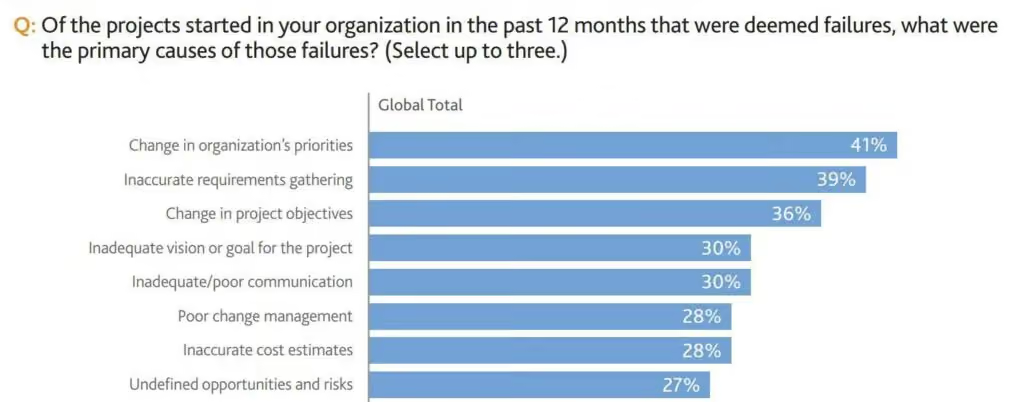
30% of employees worldwide cite inadequate vision as the reason for the failure of projects in their companies.
If that’s the case for regular projects, you can imagine how high it would be for cross-functional projects.
When you don’t share a concrete reason for the existence of a cross-functional project, why would anyone prioritize it over the tasks within their own team?
Be transparent with the teams involved about why you started the project. Tell them why they were chosen for it. And clarify what’s the end goal.
For example, if you are launching an onboarding program with a mentor from each department, the vision could be to quickly transform new hires into long-term assets.
The more open your communication, the more invested different departments will be in the project’s success.
Gather the right team members
How you build your cross-functional team plays a big role in your project’s success.
For example, having a finance expert in the team will be crucial for a cross-functional project that involves cutting energy costs and becoming a more eco-friendly company. Plus, you’ll also need PR experts that can spread the story in news outlets and give the whole thing a positive spin.
When putting together a cross-functional team, also consider the diversity and influence exerted by every member within the organization. People who are well-liked and respected even outside their immediate departments make perfect candidates for cross-functional initiatives.
Clarify roles and responsibilities
Do any of these ring a bell?
“I thought he/she was going to do it.”
“I keep butting heads with someone in the other team doing my job.”
“I am reporting to two managers from different teams with different ideas on what my job is.”
If you don’t clear up the expectations from each cross-functional team member, your team will remain confused about what exactly they should do, and who will carry out each task.
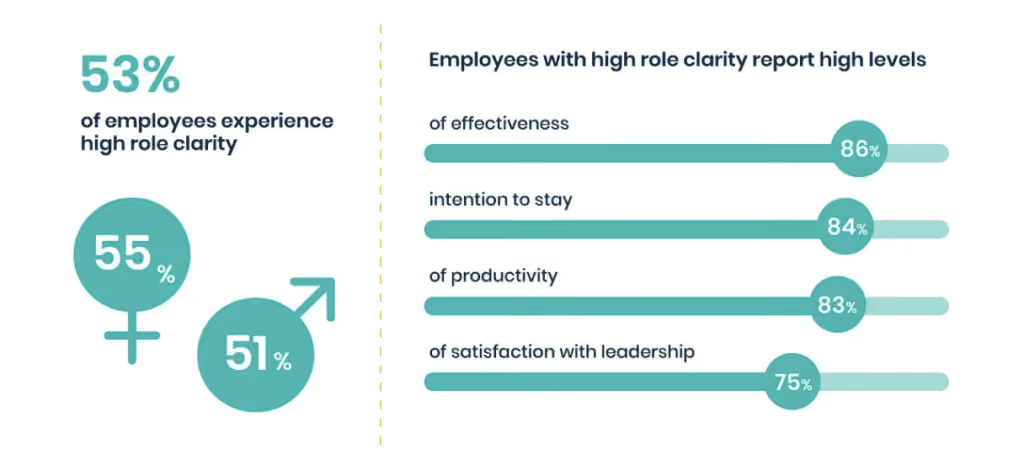
Remember, employees with clarity on their roles report a high level of satisfaction (75%), effectiveness (86%), and productivity (83%).
So when engaging in cross-team collaboration, make sure to clearly organize both individual and collective tasks for your workers. Every employee should know what tasks they are supposed to do on their own, and what is to be done in collaboration with other team members.
Put up roles for everyone else to see
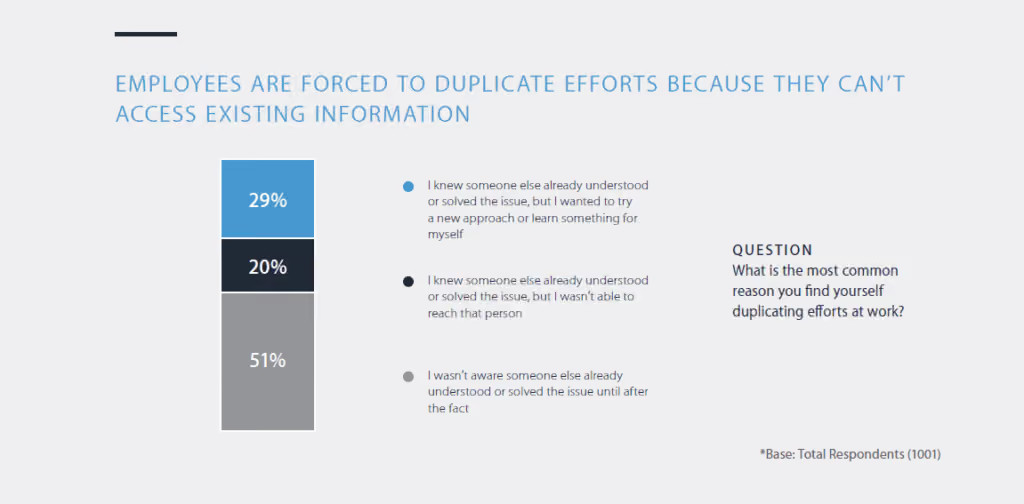
A study of American workers across many industries found that 20% end up duplicating the work of others. The reason? Not being able to reach the concerned coworker.
So while it’s good to clarify roles and responsibilities for each team member, they must also know what everyone else is doing and responsible for. This will help you in two ways:
There will be no repeat or duplicate work. If someone is already handling a task, another person will not take it up.
When a team member runs into a problem or needs some information, they’ll know who to reach out to.
The basic information you should openly display for each team member includes:
Full name
Department name and job title
Role within the cross-functional project
Contact information
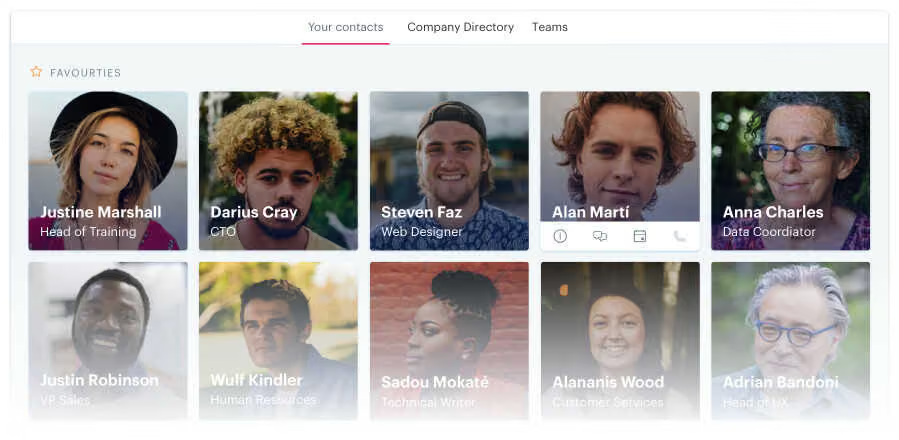
A great way to streamline this process is to use an employee directory. Blink, for example, is an internal communication app that offers this feature.
It lets you create a directory where information about each worker can be displayed. Plus, employees can search or reach anyone in the directory via instant messaging.
Ensure clear and regular communication
The ability to communicate the goals, status, and outcome of your team's work is crucial for cross-functional collaboration. When cross-functional teams don’t discuss project updates and requirements with one another, they cannot realize their full potential.
But cross-functional communication can be tricky. People are occupied with projects within their immediate teams, and no one may be willing to go the extra mile to communicate with other departments.
A great way to make communication easy for everyone is by implementing simple communication channels. Even better if you can provide a designated space for employees to share updates, exchange messages, and share documents.
That way, you make it easy for different departments to share information without switching between multiple apps.
Another thing you should do is to create a concrete communication strategy for your cross-functional project. The communication strategy will clarify how and when to send updates, and set communication expectations for the teams involved.
Create comprehensive documentation
Cross-functional projects are usually big, and big projects are scary. There are many moving parts that can overwhelm the teams involved. They may not know where to begin, how to carry out a task, or whom to ask.
In such a situation, documenting every aspect of the project can be a huge help. It clarifies processes and boosts productivity in both the short and long term.
Documenting involves writing down details about the project goals, baseline measurements, ongoing tasks, expected results, and more. Then making all this information available to the departments that have a stake in the cross-functional project.
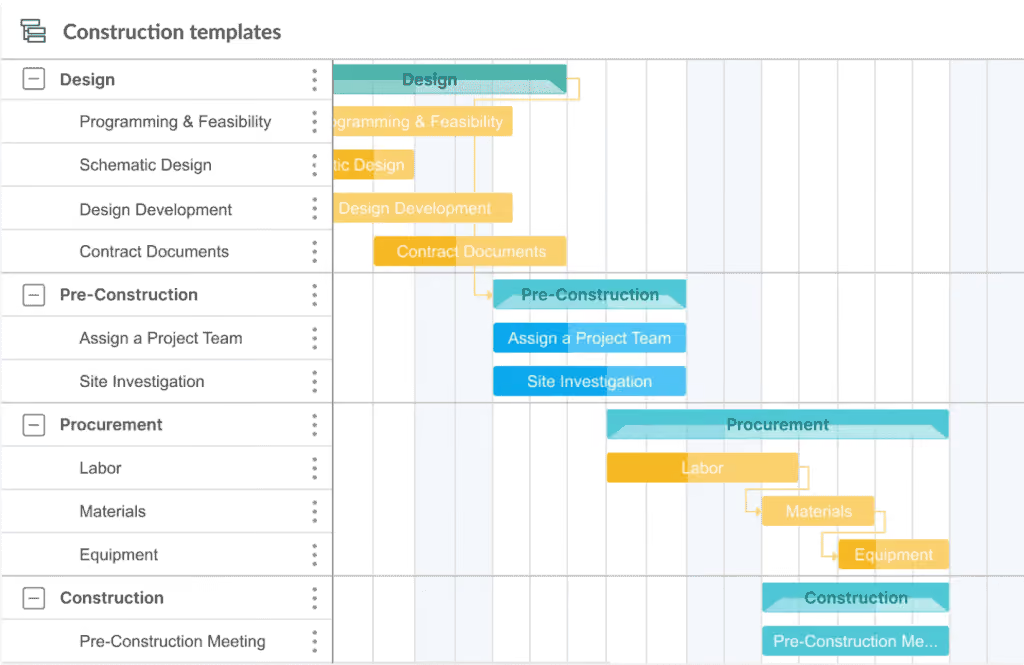
You can begin by creating a project timeline to set and communicate the main tasks and a schedule based on when they should be completed as well as establish a project baseline.
Take construction projects, for example. These are typically complex cross-functional ventures because they require the design, procurement, and construction teams to collaborate deeply with one another.
And they have many tasks and subtasks to be managed on a strict timeline, as delays can lead to increased costs. Here’s what a project timeline might look like for such a project.
This level of detail in your documentation goes a long way in showing both the big-picture view and small tasks associated with the project, making the project vision easy to digest for all the team members.
Conclusion: how to streamline cross-functional collaboration
Cross-functional collaboration can be daunting, but its potential for your business can’t be ignored. It’s an opportunity to leverage the leadership, communication, and problem-solving skills from all corners of your company and use them to drive powerful results.
So use these strategies to set a solid foundation for cross-functional success. As your teams start collaborating, encourage them to keep adjusting and learning from the experience. Because these lessons will help you improve your organization’s ability to facilitate cross-functional collaboration even further.
And if you’re looking for a tool that can help enhance cross-functional collaboration at work, look no further than Blink. Request a free demo today.
Blink, the leading mobile-first employee experience platform, today announced a new partnership with Ennismore, one of the world’s largest and fastest-growing lifestyle hospitality brands, to launch an internal app, powered by Blink. With Blink’s white-labeled app, Ennismore’s 25,000+ employees across hundreds of properties and locations will have seamless access to real-time communication, collaboration tools, and critical company information in one intuitive mobile app.
Blink’s all-in-one platform, which Ennismore has chosen to replace its instance of Workplace by Meta, will continue to elevate its employee experience and empower Ennismore’s workforce with:
Chats and voice memos that streamline and accelerate day-to-day operations
Instant voice and video calls for effortless collaboration across teams and locations
Knowledge Hub where employees can easily find company policies and procedures
Platform extensibility to provide frictionless access to other HR systems
“At Ennismore, exceptional guest experiences start with an engaged team,” said Marcos Eleftheriou, vice president of culture and corporate communications at Ennismore. “Our team members need instant access to information, seamless collaboration, and a strong sense of community. That’s where our partnership with Blink comes in. We’re excited to introduce our new internal app, powered by Blink, to our team and give them the same great experience they create for our guests every day.”
By offering a social media-inspired and mobile-first experience by Blink, Ennismore will continue to provide a vibrant, inclusive workplace culture where every team member feels connected and part of their global community, regardless of location or position.
“Our mission is to help every company deliver digital experiences that elevate their business and their culture, so they win in the market,” said Sean Nolan, CEO and co-founder of Blink. “Hospitality runs on great people, and we’re thrilled to partner with Ennismore to make work simpler, smarter, and more rewarding for their teams — no matter where they work or what their role is.”
By bringing Blink to its global workforce, Ennismore is enhancing communication and collaboration as it continues to invest in the future of hospitality by ensuring its teams have the tools they need to thrive.