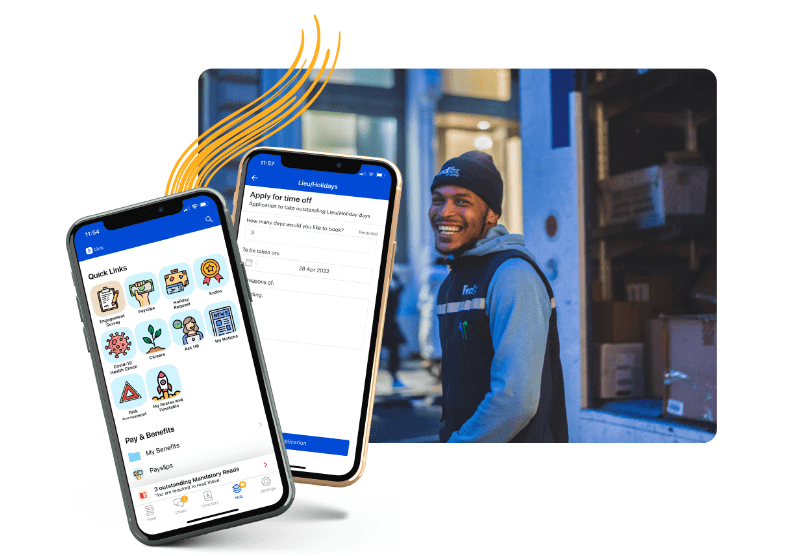
Carla has been with Elara Caring since 2022 as an Attendant Coordinator at the Mount Vernon branch in Texas.
Carla is a wonderful frontline champion at Elara Caring. She is the first to step up to help or train others. Her ability to teach and lead is amazing — CTs and all PCs reach out to her due to her kindness and understanding and compassion. She is a wonderful person and has taken the time to help me and lead me when there was none other.
Carla sacrifices what she wants for others and it's a blessing. People call her from other offices and states for help because they know how valuable she is to this company. Her determination and leadership is what this world needs more of. She doesn’t just do a great job — she touches lives in every way and work and in the client's home.
I have watched her over 6 months of being at this company and thought, “Wow, we have a jewel!” She deserves to be recognized for her greatness and champion spirit. Elara Caring is better each day due to the fact we have a champion on staff — Carla Brewer is a great person, a great employee, and a treasure to this world.
How has Blink helped in her role?
Carla is a master at Blink and often helps with training. She uses it to talk with the attendants and takes the time to go slow so all learn how to use it.
What does she want to do next?
I believe that Carla wants an environment where all feel valuable and like they have a place. She uses her life to bring light to stressful places and I believe she will only soar in this next level in her life and this company.
Nominated by: Sissi Watts, Attendant Coordinator
What makes her awesome?
Carla has been with Elara Caring since 2022 as an Attendant Coordinator at the Mount Vernon branch in Texas.
Carla is a wonderful frontline champion at Elara Caring. She is the first to step up to help or train others. Her ability to teach and lead is amazing — CTs and all PCs reach out to her due to her kindness and understanding and compassion. She is a wonderful person and has taken the time to help me and lead me when there was none other.
Carla sacrifices what she wants for others and it's a blessing. People call her from other offices and states for help because they know how valuable she is to this company. Her determination and leadership is what this world needs more of. She doesn’t just do a great job — she touches lives in every way and work and in the client's home.
I have watched her over 6 months of being at this company and thought, “Wow, we have a jewel!” She deserves to be recognized for her greatness and champion spirit. Elara Caring is better each day due to the fact we have a champion on staff — Carla Brewer is a great person, a great employee, and a treasure to this world.
How has Blink helped in her role?
Carla is a master at Blink and often helps with training. She uses it to talk with the attendants and takes the time to go slow so all learn how to use it.
What does she want to do next?
I believe that Carla wants an environment where all feel valuable and like they have a place. She uses her life to bring light to stressful places and I believe she will only soar in this next level in her life and this company.
Nominated by: Sissi Watts, Attendant Coordinator
What we'll cover
Start your free trial today
See how Blink helps frontline teams stay connected, informed, and engaged.
Ren has been making her mark at Blink for over a year, helping to power our Revenue Operations function with a sharp analytical eye and a strong command of tools like SQL and Python. Based in our London office, she’s been a driving force behind smarter systems, cleaner data, and smoother cross-team collaboration.
We caught up with Ren to hear more about what drew her to Blink, the projects she’s proud of, and how being part of a fast-moving, mission-driven team keeps her inspired every day.
Which Blink office do you work out of?
I'm based in the London office.
What is your position at Blink?
I work as a Revenue Operations Analyst.
How long have you been at Blink?
I’ve been at Blink for just over a year now!
What initially attracted you to join Blink?
Honestly, it was the product that really stood out to me. I really connected with Blink’s mission of helping frontline employees stay connected. I had previously spent some time working in education as a teacher, so I saw first-hand how valuable something like Blink could be. I remember thinking, “If I had this as a teacher, I would’ve loved it.” That real-world application really sold it for me.
What confirmed I’d made the right choice was during the interview process. I got to meet my future team and was thrown straight into a collaborative SQL task. That experience representedthe collaborative nature of the environment at Blink and it immediately felt like a team I wanted to be part of.
What's a project you are proud of from your time at Blink?
Rather than one specific project, I’d say I’m proud of how much I’ve grown my technical skills. I’ve had the chance to work on projects that pushed me to master tools like SQL and Python. It’s been amazing to not only learn those languages but to use them daily and feel confident doing so.
One of the biggest challenges early on was finding the time and headspace to fully focus on that kind of technical development. But as a team, we tackled that by introducing dedicated Hackathon days, which gave us uninterrupted time to solve complex problems and upskill together.
The impact of this has been really rewarding. A lot of the work I’ve done in Rev Ops has helped bring critical data into the hands of our go-to-market teams, enabling them to better connect with customers and prospects. Most recently, I’ve been using SQL and Python to help build out parts of our very own internal “Blink ChatGPT” tool!
How would you describe the company culture at Blink in three words?
I would describe the Blink culture as fun, motivating, and challenging.
Fun because the social side of Blink is genuinely brilliant. We’ve had some amazing team events — from the Crystal Maze experience to crazy boules, an F1 simulator, and even a speedboat ride along the Thames. These moments really help bring people together and build strong bonds across teams.
Motivating because you’re constantly surrounded by incredibly smart, driven people who are all deeply invested in the success of the company. Being around colleagues who genuinely care pushes you to bring your best every day.
Challenging because the pace is fast, and the problems we’re solving are complex. Those challenges have also been the most rewarding and have accelerated my growth more than I expected.
What's one thing you're excited about for the future of Blink?
I’m really excited to keep seeing us sign big, well-known customers. Every time we bring a large name on board, it’s a huge morale boost across the company. It really shows how strong our product is. A standout for me was when we signed McDonald’s — such an iconic brand choosing us felt like a major moment. I’d like to see us continue to expand into the retail market. Another big fashion brand would be really exciting. It’s a sector where our impact could be huge, and there is a lot of potential there.
Can you tell us about a recent initiative or program launched at Blink that you found particularly exciting?
The first thing that comes to mind is all of the work that has gone into the upcoming summer party. I think it’s going to be an amazing event — not just for us internally, but for our customers too. It’s a brilliant opportunity to bring everyone together, share best practices, and show off what makes Blink such a great platform. Events like this really spotlight our culture and our community.
Since joining Blink, I’ve also had the chance to be part of three customer launches. It’s been incredibly rewarding to meet users in person and see the real impact our platform has on their day-to-day work. This definitely motivates me in the work that I do at Blink.
Why do you work for Blink?
I work for Blink because, as I’ve said before, I believe in the product. I think it’s an incredibly impactful software that helps a huge number of people. Another thing I appreciate is the variety in my role — it keeps the work dynamic and engaging. I get to work across lots of different teams at Blink, from operations to technical projects. That mix keeps things exciting. Plus, the atmosphere here is genuinely great. If I had to pick a favorite team to collaborate with, I’d say the sales team. They’re always full of energy, very motivated and really fun to work with. I’m grateful that I get the opportunity to collaborate with them.
There are more employee communication tools available than ever. Modern intranets. Employee apps. And a ton of software add-ons. But — as we’re sure you now know — there’s soon to be one big player missing from the market.
Whether you’re affected by the closure of Workplace or simply feel that your employee communication tools need a rethink, choosing a new internal communication tool requires careful consideration.
You need a platform that promises to improve internal communications and employee engagement for your workforce. Something that facilitates easy communication between people at all levels of your organization.
Depending on your company and workforce, you may also need a tool that supports teamwork, company-wide updates, co-worker connection, recognition, feedback, and more.
The variety of software options available is an opportunity — and a challenge. It’s likely that there’s a perfect-fit platform out there. But the process of finding it can be tricky.
With that in mind, we’ve put together a list of questions you should ask when choosing a new employee communication tool. These questions will help you find software that performs as well as Workplace from Meta and meets the needs of your workplace.
But first, let’s take a quick look at the current employee communication landscape.
The employee communication landscape in 2024
In today’s digital workplace, effective employee communication relies on the right tech solutions. But if you’re looking for a new employee communication tool for your organization, chances are you’re feeling a little overwhelmed by the number of options on offer.
There are tools suited to certain segments of the workforce — for example, desk-based workers or frontline workers.
There are internal communication tools that focus on a very specific area of employee communications, like surveys or video conferencing.
And there are tools that go beyond employee communication to support organizations with tasks like employee engagement and project management, either through integrations or as an all-in-one solution.
Some tools are also exiting the marketplace.
Earlier this year, Meta announced that it would be discontinuing its Workplace tool. The platform will continue to operate until September 2025 and will remain read-only until May 2026. But many companies using Workplace from Meta are already looking to make a switch.
Deciding which tool — from this huge selection — is right for your organization can feel challenging. But it’s a priority for many business leaders in 2024, with 84% saying they plan to invest in more modern communication strategies.
You only have to look at some recent research to understand why.
According to the Axios report for 2023 into the State of Workplace Communications, the cost of poor internal communications amounts to $15,000 per employee per year. And while 77% of leaders think the communications they share support employees to do their jobs well, only 46% of employees agree.
31% of employees experience strained workplace relationships
26% of employees have missed deadlines
On the flip side, good internal communications lead to increased employee confidence, productivity, and work satisfaction. Ultimately, a much better employee experience and better business results, too.
Questions to ask when choosing a new employee communication tool
Ask the right questions and you’ll find it easier to create a shortlist of employee communication tools. Here are the things you should be asking yourself — and your teams — as you undergo your software search.
How do we rate our current communication channels?
Before you start looking for a new workplace tool, assess your current one. Whatever platform you’ve used until now — Workplace from Meta or an alternative — you need to clarify what you like and dislike about it. You’ll then have a clearer idea of what you need in a new solution.
So consider how effective your current communication tools are and whether they have any limitations. Establish whether there are any significant integration gaps. Launch an employee survey to gather the thoughts of your workforce.
Also, bear in mind what Grammarly said in its recent report: over the past 12 months, 73% of professionals say they’ve seen an increase in the variety of communication channels used in their workplace. But this isn’t leading to more effective internal communications.
Different workplace tools come with their own notifications, interfaces, and rules of engagement. Employees may feel confused about which channel is appropriate for which message. And conversations become disjointed and hard to track because they take place in multiple locations.
The best solutions are streamlined and easy to use. So consider how many different communication channels you’re currently using. And whether these tools are successfully communicating key messages and encouraging employee engagement.
You can look at adoption and platform engagement rates to better understand how employees interact with your current tech selection.
What do we want from this communication tool and partnership?
Onto challenges, goals, and platform features. When choosing a workplace tool, think about:
Your primary communication challenges. Perhaps messages are being missed. Or employees are failing to engage with the platform. Maybe there’s a disconnect between HQ and frontline workers.
What you’re trying to achieve with this tool. Do you want it to enhance workplace collaboration, improve employee engagement, or amplify company culture? Maybe you want it to do all these things.
Must-have features. What functionality do you need? This might include real-time messaging, video conferencing, document sharing, surveys, or social feed features.
Also, think beyond the platform itself. Sure, you need a communication tool that supports your organization’s style of communication. But it’s also useful to have a partner who understands employee communications — and your workplace challenges — inside out.
Here at Blink, we’re experts in employee communication and engagement. Unlike some of our competitors, this is our sole focus. Our clients can rely on us as a strategic partner, benefitting from our comms insights and ongoing support.
We work with our clients so they get the best from the Blink app. We offer extensive support through the launch phase, helping you to encourage adoption. We also pride ourselves on our responsiveness to client feature requests, feedback, and suggestions.
Will this communication platform work for all employees?
A good employee communication tool acts as a hub for your organization. It’s a place where co-workers connect, where they access collective knowledge, and where leadership shares important messages.
All pretty vital stuff. So it’s not fair to leave any employees out of the conversation. It’s not good for business either.
Unless everyone enjoys easy access to your platform, you fail to achieve the levels of workplace communication and employee engagement that you’re striving for.
Bear in mind that only 10% of frontline workers say they have high access to the tools, tech, and opportunities they need to connect and advance in their workplace. So when choosing a new employee communication tool, consider where and when your employees will be using it.
If your employees are fully desk-based, a desktop platform is likely to fit the bill. For hybrid teams, you need desktop systems with real-time communication and collaboration tools.
For frontline employees who don’t work at a desk — and don’t necessarily even have a company email address — you need a different type of workplace tool. A mobile-first employee app, available on employee smartphones, is your best option.
Of course, if you have a mix of frontline and desk-based staff, you need a solution that works for everyone. It should have the same extensive features on both mobile and desktop so no one misses out. And it should successfully bridge the gap between your company’s frontlines and head office.
What level of personalization and customization do we want?
The best employee communication tools offer personalization features. They allow you to adapt a platform to the branding and requirements of your organization. This is good for the employee experience and it helps improve employee engagement with your tool.
Don’t need a particular module? Then it probably shouldn’t take up space on the employee dashboard. Want the software to align with your company branding? This service should come as standard.
If you’re a large, global company, it may also make sense to create mini-sites within your platform. Each of these sites can be branded and personalized for a different segment of your workforce to ensure they’re relevant and engaging.
So clarify what you expect in terms of platform personalization, then ask platform providers what they’re able to deliver.
What integrations do we need?
As we’ve already touched upon, in today’s digital workplace, software overwhelm is a real problem. Throw too many tech tools at employees and you make them less productive and engaged.
That’s why a good employee communication tool is an all-in-one solution. It also integrates seamlessly with any other workplace software you like to use.
This makes life easier for employees because they access all tools from one unified dashboard. It can also improve software adoption rate. When employees don’t have to worry about separate logins and passwords, they find it easier to use the tools at their disposal.
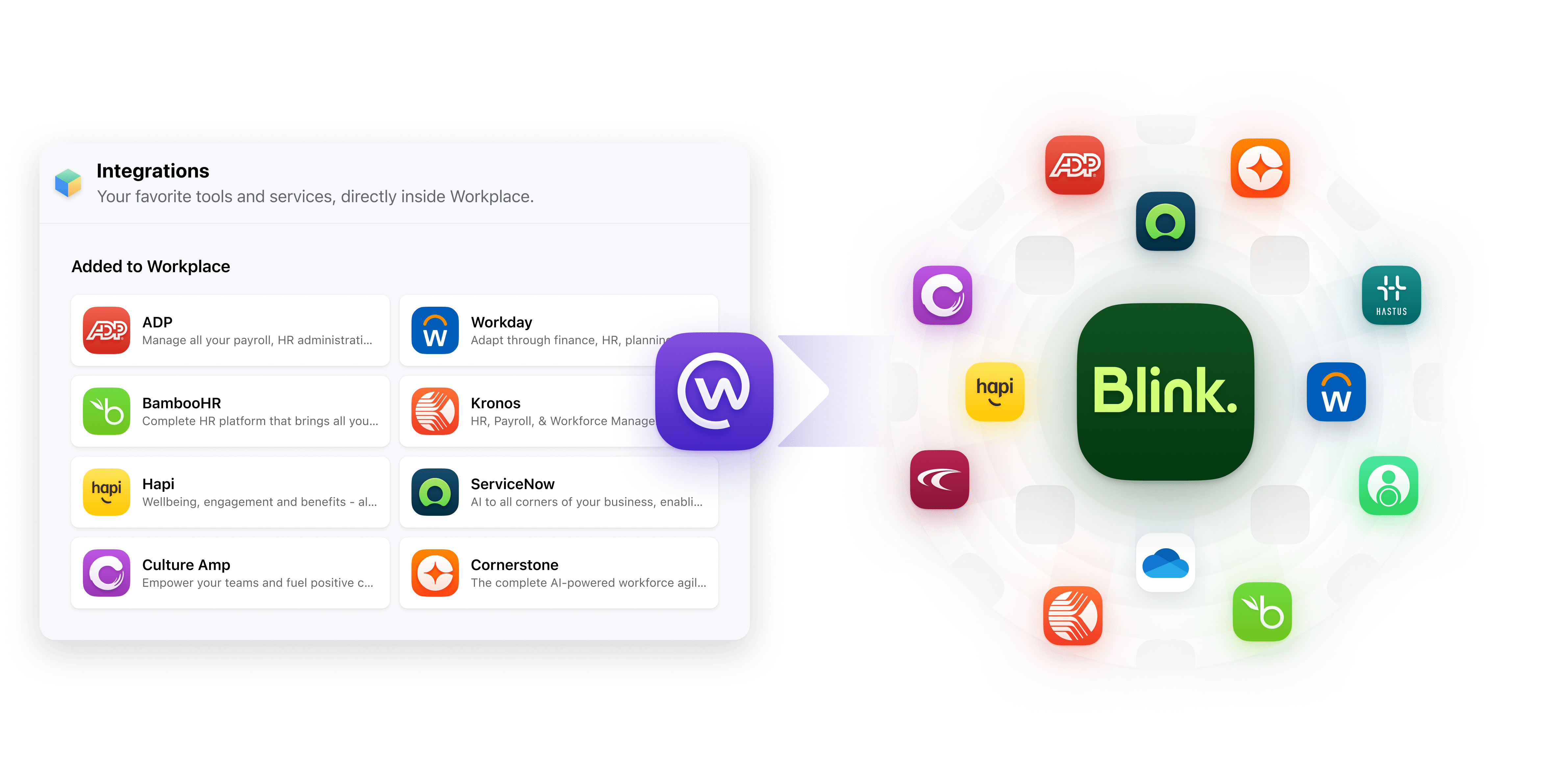
Thanks to Blink’s digital hub, organizations enjoy 5x better adoption of existing tools. With single sign-on (SSO), users don’t have to waste time logging into different apps. This creates a streamlined and user-friendly experience — and it makes employees more productive, too.
What’s the user experience like?
Usability is another important consideration when choosing a new employee comms tool. There’s little point investing time in new tech if a large proportion of employees don’t actually end up using it.
The best employee apps require minimal employee training. They’re intuitive to use and navigate. There are few points of friction. It’s easy for admins to manage content and comms from the back end of the platform.
Your chosen employee communication tool should also support you in boosting employee engagement. It’ll come with a social-media-style news feed. Employees will have the option to like, comment, and post. You’ll be able to launch pulse surveys and send out rich, multimedia content.
If you’re switching from an existing tool — like Workplace from Meta — it makes sense to choose an internal communications solution with a similar interface and features. When a platform feels familiar, employees will find it easier to make the switch.
So how do you judge a tool’s user experience? A product demo helps you get a sense of what a platform is like in action. You can also look at a tool’s adoption rates and platform engagement rates to see how it’s working for other organizations like yours.
Find out what customers think of Blink. Take a look at our case studies.
What are the practicalities of this platform?
As well as considering the effectiveness of an internal communication tool, you need to consider its practical impact. So work with other departments, like IT and finance, to establish your requirements in terms of:
Budget. How much are you prepared to spend? What’s the ongoing cost of a platform? Are there any hidden costs and does it represent good value for money?
Security. Does this platform keep your company and employee data safe? What security practices does it follow?
Scalability. Can the platform grow with your organization? How will it adapt to your changing needs?
Final thoughts on choosing an internal communication tool
There are lots of employee communication tools to choose from. And — as Meta discontinues Workplace — lots of organizations looking for a new solution to meet the needs of their workforce.
To find the right internal communication tool for your organization, you need to ask the right questions.
Think about what you like and dislike about your current solution. Clarify what you want from platform features and a software partner. Consider customizations, integrations, and the user experience. And be sure to think about all employees and their communication needs.
This should help you narrow down the list of options. You can then conduct research into your shortlisted platform providers, looking at their adoption and engagement rates — and taking them for a spin as part of a free trial or demo.
Find out if Blink is the right internal communication tool for your organization by scheduling a personalized demo. Book your demo today.
Say hello to Surveys from Blink: the quick and easy way to gain actionable feedback from your frontline workforce, helping you deliver your best employee experience.
Solving a uniquely frontline issue
The frontline connection gap — a failure to enable frontline workers to communicate with the same ease, scale, and speed as desk-based workers —is real, and so too are the risks it carries. But closing it is easier than you might think.
With Blink's new in-app survey tool, you can create a connected workplace culture by getting real-time data from your employees themselves.
What's so powerful about surveys through Blink?
Employee survey tools like Peakon and CultureAmp made it easy for leaders of desk-based teams to access employee engagement insights. But for frontline organizations, it's a very different story:
Paper problems: many frontline workers are still asked to complete paper surveys, which are easy to ignore and even easier to lose
Desktop friction: completing online surveys using a shared desktop terminal or tablet demands time from a frontline worker's busy shift — and there are only so devices to share around
One too many tools: even when frontline workers are given mobile access to survey tools, many still struggle with the complexity of bad user experience and a new set of log-in details to remember
All of this leads to incredibly low response rates, which make for datasets that aren't insightful or actionable. That's what Blink has set out to solve.
Introducing Surveys on Blink
Surveys are now available to use on Blink's frontline app, transforming your ability to capture crucial information from your frontline teams. It's incredibly simple to use:
Select your target audience
Choose a best-in-class survey format
Launch to your frontline in minutes (one-question surveys can be live in 30 seconds!)
Employee engagement surveys - engaged employees are more productive and loyal. Find out how engaged your teams are today and how you can improve their experience
Pulse survey - ask one burning question frequently to track changes and identify patterns
0-10 eNPS (employee Net Promoter Score) - get a 'North Star' metric for your employee engagement
Onboarding surveys - the first few months of a new starter's journey are critical, and these types of surveys reveal whether the process is running as it should.
Every single answer in a Blink survey is anonymous — and that anonymity is made clear to your frontline workers. This ensures they have the confidence to be candid and, in turn, means that you get a true read on current performance with clear opportunities for improvement.
How Blink triples your survey response rate
Our customers have seen their response rates increase by 300% by using Blink to deliver them. Here's why it works:
We're mobile-first. With Surveys on Blink, you can transition away from paper surveys and shared desktops to having surveys appear seamlessly in the palm of every frontline employee's hand
It's all-in-one. Decrease the friction caused by having to remember another password by embedding your in one frontline app
Surveys are co-located with the other tools your frontline needs. Unless you make life easier for the frontline you can’t expect them to engage. With Blink, you're delivering exactly what the frontline needs — from paystubs to scheduling and access to critical documents. This means your surveys are in an app that gets opened an average of seven times a day
Guaranteed anonymity. By offering anonymity, frontline workers feel safer giving genuine feedback, leading to better quality results
What's next?
If you're interested in getting started with Surveys on Blink, either talk to your Customer Success partner or request a Demo.
In the coming months, we'll be announcing even more data-focused features to help you better understand your frontline, empowering your 2023 strategies with insight. Stay tuned!
At Blink, we’re constantly evolving our employee experience platform to meet the dynamic needs of organizations and their employees.
As part of our commitment to empowering great employee experiences from the frontline to the front office, we’re excited to announce our latest suite of product features designed to improve the way employees engage with their organization and with each other.
From fostering deeper social connections and real-time interactions, to improving platform security and content protection, discover 6 new features designed to help you create an engaging, reliable, and thriving workplace.
#1. Stories: Share snapshots of your company culture
In today’s fast-paced world, the need for real-time connection and engagement has never been more important — and that includes at work. That’s why we’re excited to bring Stories, a first-of-its-kind feature, to Blink. With Stories, teams can easily share moments, celebrate wins, and keep the workplace experience fun and dynamic.
Much like Stories on the social media platforms we know and love, employees and team leaders can share temporary posts that live at the top of the Feed, keeping internal content relevant and up to date.
{{mobile-stories="/image"}}
Why you’ll love it:
Instant sharing: Whether it’s celebrating team achievements, giving updates on project milestones, or sharing everyday moments, Stories offer a personal touch that helps foster a connected culture.
Boost engagement: With the ability to share everyday moments and add a personal touch using image-editing tools, Stories make it easier for employees to connect and engage beyond formal communications.
Keep content fresh: With a 72-hour shelf life, Stories are a great way to share timely messages and encourage frequent, social snapshots of your day.
With Stories, organizations can bring a fresh yet familiar approach to their internal communications strategy, engaging employees not just in critical communications but throughout their everyday work lives.
#2. Communities: Modernize your employee resource groups
As part of the reimagined Connect section, which brings Groups, Teams, and Contacts into one cohesive view, we’re excited to introduce Communities. This new feature allows employees to connect and collaborate over shared interests and hobbies.
With Communities, which are open for anyone to explore and join, employees have an intuitive and interactive digital space to foster deeper connections that go beyond day-to-day work tasks.
{{mobile-community="/image"}}
Key benefits:
Personalized experience: Employees can join Communities based on their interests, passions, or hobbies, creating a more inclusive and engaging workplace.
A dedicated space: Each Community comes with its own unique Feed, Channels, and Resources, creating a dynamic virtual hub for content and communication.
Cross-company connection: Communities provide an opportunity to engage with colleagues across the organization, helping to bridge the gap between teams, departments, and geographies.
From Parents at Work and Home Chefs, to Dog Lovers and LGBTQ+ Crew, Communities open up new opportunities for social connection, workplace collaboration, and community-building.
#3. Moderation: Enhance control over your digital spaces
In order to ensure organizations can create and maintain a positive digital environment, we’ve enhanced our platform moderation tools. Administrators can now better manage and control content in Blink through new reporting and moderation functionalities.
New capabilities:
Report a comment: Users can now report individual comments, in addition to posts, making moderation more precise.
Report reasons: Users can provide specific reasons for reporting content, enabling admins to make more informed decisions and take quick action.
Streamlined admin workflow: Moderation tasks are now part of the admin task list, ensuring that no report goes unnoticed.
These improvements give admins more transparency and control, allowing them to better maintain a respectful and focused communication environment.
#4. Mobile version control: Improve security for frontline teams
We’ve added mobile version control as an additional security measure to help organizations protect sensitive content on Blink’s platform. With this new feature, admins now have the option to require that devices meet a minimum OS version requirement, across iOS and Android, to access specific content and resources.
Why it matters:
Improved data security: By controlling OS versions, companies can add an additional layer of security to any sensitive resources housed in the Content Hub.
Tailored policies: Admins can customize their security settings to include OS version requirements, helping to meet BYOD (bring your own device) policies and ensuring compliance.
Prompted updates: As part of this feature, Blink will alert employees in-app whose devices don’t meet the minimum OS requirements and prompt them to update their device. Blink will let me know I need to update my device’s operating system.
This update is crucial for companies prioritizing security, especially those with frontline, hybrid, or remote workers who often use their personal devices.
#5. Custom profile fields: Tailor your employee inputs
In addition to our 15 out-of-the-box user profile fields like “Name” and “Location,” we’re excited to roll out customizable profile fields.
Admins can now set up custom profile fields to gather the data they need and expand Blink’s usability, paving the way for admins to design a truly tailored Blink experience for their organizations and employees alike.
A closer look:
Customization: Admins can now create custom fields to collect and manage unique user data, offering more tailored experiences for employees.
Scalability: Whether you’re managing teams in retail, healthcare, or any other industry, custom fields make it easy to track data points that matter most to your organization.
Extensibility: This is just the first step! Soon, custom fields will be integrated across more Blink features, making it easier to manage employee information in a way that works for you.
With these customized fields, you can gain deeper insights, streamline processes, and capture workforce data that aligns with your organization’s unique operational needs.
#6. ServiceNow notification integration: Stay on top of IT updates
Lastly, but certainly not least, we’ve expanded our integration capabilities. Our seamless notification integration with ServiceNow enables employees to receive real-time updates on their IT tickets directly within Blink.
How it works:
Real-time notifications: Whenever an IT ticket is updated or resolved in ServiceNow, employees receive instant notifications via the Feed.
Improved efficiency: This integration reduces the need for employees to switch between platforms, keeping everything in one place and ensuring they stay informed about their requests.
Enhanced integrations like these ensure that Blink can continue to be the central hub for all of your employee communications and task management needs.
Bring your consumer-grade employee experience to life.
As workplaces continue to evolve, our goal remains the same: to provide the tools that foster connection, enhance productivity, and create a seamless and exceptional experience for every employee — no matter what they do and where they work.
These product enhancements are our next step in empowering organizations to meet — and exceed — the expectations of a modern and digitally savvy workforce.
So, you already know how digital transformation can improve your warehousing, docking and inventory processes, but are you paying enough attention to digitalization in your run-the-business systems? Here's why you need to.
Digital technology is making huge advancements in the logistics sector, yet the frontline are still left feeling unsatisfied. By improving not only supply chain capabilities, but also your day-to-day employee management systems, businesses can enjoy a number of unexpected benefits, which we've put together for you in this handy guide.
We'll share some of our frontline employee engagement expertise with you here, as well as the latest research on how digital transformation can help in areas such as recruitment, training and tracking performance. This should help HR leaders see just how valuable digital tech can be when it comes to making their logistics workforce operate better and more efficiently across the board.
What is digital transformation (DX) in logistics?
Digital transformation (DX) in logistics is the use of digital technologies to improve the efficiency, effectiveness and responsiveness of logistics systems in order to better meet the needs of customers and businesses.
While you may be familiar with the growing pressure to digitize your supply chain management and front-of-house systems, many logistics companies are just starting to realize the impact that digital transformation can have on their back-end operations as well.
In order to keep up with today's fast-paced and competitive business environment, HR leaders will need to look at how they leverage employee technology in order to better manage their workforce; recruit and retrain more effectively; and track employee performance and engagement over time.
By creating a more streamlined, digital and integrated approach to these HR functions, businesses can streamline their operations and better meet the needs of both customers and employees alike.
So for any HR leader looking to get ahead of the competition, it is essential to embrace digital transformation in logistics and use it as a tool to improve operational efficiency, employee engagement, and overall business performance.
Core goals of logistics digital transformation
As business leaders, it's crucial to have clear goals in mind when looking to invest in or implement new digital tools.
While common logistics and supply chain processes like docking, inventory, digital supply chains, and other front-of-house systems might not be your main focus, digital transformation in logistics can help you improve or manage your business in other important ways. Think project management, team communication, and business planning, just to name a few.
But what specific goals should you be looking to achieve with your run-the-biz logistics DX efforts? Core goals often include:
Cost Reduction: For HR professionals, this may mean looking for ways to automate processes, reduce employee errors and minimize overhead costs related to hiring, training, and onboarding new employees.
Improve Communication: One of the main goals of the digital transformation journey is improving communication both internally and externally, with an aim to drive increased employee satisfaction and, ultimately, retention.
Customer Satisfaction: Improving customer satisfaction is another important priority for many logistics leaders looking to leverage digital technologies. Whether it's through improvements in product quality and delivery times, or better tracking of customer feedback and requests, maintaining high levels of service can be a key goal of DX efforts in logistics.
Employee Engagement: One often forgotten goal of DX efforts in the transportation and logistics sector is to improve employee engagement and happiness, which can have a direct impact on your employee retention and productivity levels.
Increase Profits: While not always a top priority for HR leaders, increasing profits and driving ROI can be another overarching goal of DX efforts in the industry – and this can be a great hook to get buy-in from your IT leaders or CEO.
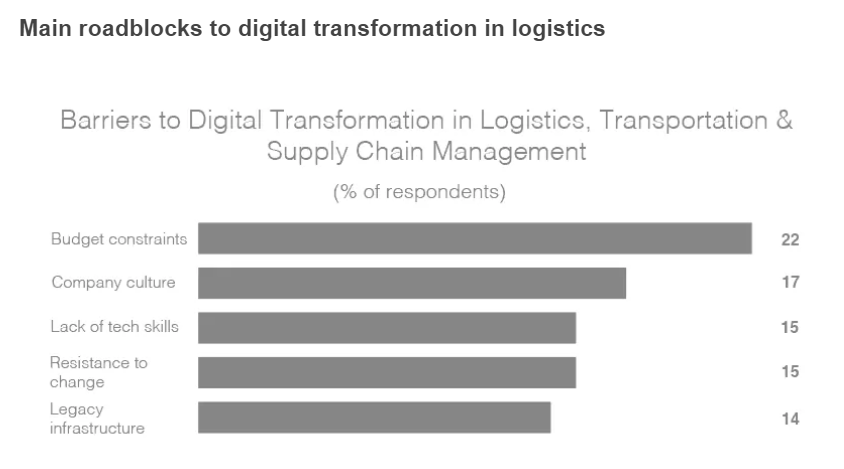
While there are many benefits to be had from digital transformation for logistics companies, there are also a number of potential barriers (see image above) and roadblocks that can impede success. For HR professionals, the main challenges will likely include:
Resistance to Change: One of the biggest challenges faced by any company looking to undergo digital transformation is the natural resistance to change that arises within any organization. This can be especially true in cases where employees feel they are being asked to do more work or change the way they've been doing things for years.
Company Culture: Another obstacle that can arise during DX efforts in logistics is company culture. If the company's culture is not supportive of change or new technologies, it can be very difficult for any type of transformation – digital or otherwise – to take hold and be successful.
Legacy Infrastructure: Finally, one of the biggest challenges faced by companies looking to digitize their operations is legacy infrastructure. Many companies have invested heavily in outdated systems and technologies that can be difficult – and expensive – to replace. As such, it often takes a lot of time and effort to upgrade these systems in order to enable a successful DX initiative.
By knowing what you're up against, you can better prepare yourself and your organization for the challenges of digital transformation in logistics. With a clear understanding of your goals and potential roadblocks, you can work to overcome resistance, build a supportive company culture, and upgrade or replace legacy systems as needed.
And with the right approach and mindset, you can leverage digital tools that will help you achieve improved business outcomes and drive higher levels of success for your organization.
Driving digital transformation with frontline workers
Digital business processes impact your frontline team directly, and they need to be included in the transformation journey. Frontline workers are often left feeling like an afterthought, particularly during digital transformation efforts, which can be a huge mistake.
These workers are the ones who interface directly with customers and clients on a daily basis, and they understand what improvements will make their jobs easier – and ultimately benefit the company as well. As such, it is important to invest in frontline workers when driving supply chain digital transformation initiatives.
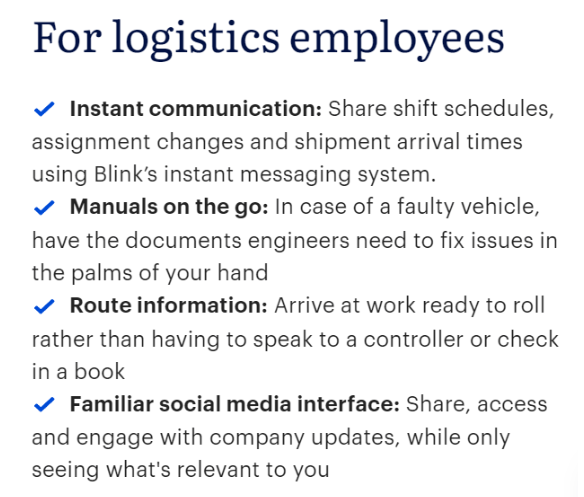
For logistics companies, this often means leveraging frontline workers as a source of insights, ideas, and feedback on what technologies will work best for them. For logistics employees, this could include instant communication, on-the-go manuals, direct route information or a familiar social media interface: all features of theBlink Frontline Engagement App.
5 unexpected HR benefits of DX in logistics
1. Reduction in staff turnover
With a real pressure on HR leaders to bring in high-quality candidates and retain their existing staff, one of the most surprising benefits of digital transformation in logistics is reduced staff turnover.
By leveraging new technologies in your business strategy to improve the work environment – such as intuitive systems that are easy to use or improved communication channels – you can help alleviate some of the stresses and challenges faced by your employees on a daily basis.
52% of frontline workers claim that they would leave their job over tech tools, according to Unleash.ai, highlighting the impact that the right workplace technology has on employee retention.
The right digital initiatives can make your workers feel more valued, appreciated, and supported – thereby helping to reduce turnover rates in the long-term.
2. Better employee engagement
Another unexpected benefit of digital transformation in logistics is improved employee engagement. This can be driven by a number of different factors, such as the use of gamification techniques or employee engagement apps that allow workers to connect with their colleagues and share ideas.
DX for your logistics workforce can also help foster a company culture of collaboration, innovation, and teamwork. By investing in your employees and encouraging them to work together towards common goals, you can cultivate a sense of shared purpose that will help drive greater success for the entire organization.
And with improved employee engagement and loyalty, HR leaders are better equipped to attract and retain top talent, manage performance, and achieve their business goals. Highly engaged employees also achieve 23% more profitability and 43% less employee turnover, Gallup reports, so the impact of upgrading your employee engagement initiatives runs deeper than you might think.
3. More productive staff
In addition to greater employee engagement and reduced turnover, digital transformation in logistics can also help boost staff productivity. In fact, McKinsey reports that well-connected teams see a productivity increase of 20–25%, so if you can target your DX initiatives towards connecting your employees, you could see another unexpected benefit.
With the right tools and technologies at their fingertips, your workers will be able to streamline processes, optimize performance, and improve output. This means better results for you and your organization – as well as increased job satisfaction for your logistics workers as it becomes easier to succeed in their frontline roles.
Whether you are implementing new systems, optimizing existing technology, or offering your employees training and support, digital transformation can help unlock the full potential of your workers and help drive greater success for your business.
4. Improved safety
In the logistics sector, one of the biggest concerns is often worker safety. This can be due to a number of factors, including long hours on the road, heavy lifting and handling of goods, or exposure to harsh weather conditions and other environmental hazards.
With digital transformation in logistics, however, you can help improve worker safety by leveraging new technologies and systems to protect your staff. This could include investing in smart wearables that track location and movement, implementing automated risk assessment tools, or an easy-to-access, Central Hub storing safety procedures and policies.
With this focus on safety, your workers will be more confident about their working conditions and better able to manage any risks that arise. And as a result, you can help reduce workplace injuries and help keep your employees safe, satisfied and healthy.
5. Increase your bottom line
And finally, perhaps one of the most valuable benefits of digital transformation in logistics is an improved bottom line. Whether you are looking to reduce costs, increase revenue, or improve overall efficiency for profitability, DX can help support these goals and drive greater success for your organization.
By leveraging new technologies and systems, you can streamline day-to-day processes, optimize performance and drive retention amongst your logistics workforce, saving on costs related to employee churn and recruitment and boosting your bottom line in the long-term.
Tips to help drive digital transformation in the logistics industry
Create a DX roadmap: A DX roadmap should include an evaluation of existing processes and systems, as well as a plan for implementing new technologies and improving existing ones.
Align digital transformation strategy with business objectives: To maximize the impact of your digital transformation efforts in logistics, it's important to align these efforts with business objectives and goals. This will help ensure that you are investing in solutions that can have the greatest impact on your operations.
Appoint digital transformation champions: To drive successful implementation and adoption of digital tools in logistics, it is important to identify key champions within your organization who can act as advocates for change.
Communicate clearly and often: To help ensure that all stakeholders are on the same page, it is important to communicate your digital transformation goals and strategies clearly and often, as well as work closely with IT or other key departments to troubleshoot any issues or problems along the way.
Keep track of your timeline: Maintaining a clear and realistic timeline for your digital transformation journey is essential to ensuring that you stay on track and meet your goals.
Use the right tools: Whether it's a digital tool for employee engagement, a new ERP system, or order tracking do your best to ensure it's right fit that will drive performance forward.
By keeping these best practices in mind, HR leaders can help drive digital transformation in logistics, maximizing the impact of these efforts on their organization as a whole.
Accelerate your digital transformation today…
The Blink Frontline Engagement App offers a powerful and easy-to-use platform for improving communication, collaboration, and task management between logistics managers and frontline employees. Whether you are looking to reduce costs or drive employee engagement in your logistics operations, the Blink app can help you achieve your goals quickly and easily.
Don't fall behind in the DX movement – get started with Blink today, and start accelerating your digital transformation in logistics!
With features like Secure Chats for real-time communications, Blink Feedfor product updates, and a Central Hub for document management, Blink can help drive increased innovation and productivity throughout your entire organization.
We slip words like these into conversations with ease. New technology has become part of our bread-and-butter vocabulary, without quotation (or question) marks.
Healthtech, on the other hand – that feels a bit more niche. Or it did, until Covid-19 made us sit up and pay attention.
24 months into the pandemic, nobody needs a lecture on the importance of healthtech; it’s staring us in the face. But health tech didn’t emerge on-the-fly in response to the Covid crisis. It’s been around for a long time.
And it’s big business. In 2017, Forbes valued the digital healthcare industry at an astounding $25 billion globally. They believe that number will skyrocket above $379 billion by 2024.
We all know that healthtech helps predict the spread of diseases, track pandemic outbreaks, and contain them. But there are other new developments in the future of healthcare that will change the way we live.
What is healthtech?
Right now, healthtech (also known as digital health) is the fastest-growing verticle in healthcare. It refers to any product or service that's enabled, or revolutionized by, technology. So far, so Sci-Fi. But healthtech is all around us already...
Wearables
Yep, you’ve already got this one. Fitness trackers (like FitBits) are health wearables. We like knowing we've put in my 10.000 steps. But other types of knowledge about what’s happening in our bodies can be more vital. For some people, it’s their heart rate; for others, their blood pressure, or their oxygen supply.
Continuously measuring these things makes a huge difference for people with chronic conditions. And these wearables don’t just make the invisible visible; they also act as a kind of coach. They empower wearers to become active participants in managing their health condition. Immediate feedback from a wearable can change habits; habits can change health; and health saves lives.
Wearables are particularly relevant in the time of Covid-19. But they will continue to be so well beyond it, as part of a bigger drive towards preventative or pro-active health care.
3D-printed prototypes
3D-printing technology still sounds far-fetched. But it’s here, and it’s a quiet revolution in healthcare. Technology like this can create everything from personalized prosthetics to bio-tissues and blood vessels, at a fraction of the past cost. It transforms organ transplants and tissue repair. It can even produce realistic skin grafts for burn victims.
In 2020, researchers at the Rensselaer Polytechnic Institute in Troy, New York, managed to develop a method for printing 3D-print living skin, along with blood vessels.
Blockchain for electronic healthcare records
Blockchain and the future of healthcare? Not obvious at first. But think of electronic health records, and how important it is to keep those accurate and safe.
Blockchain technology can play a key role in ensuring that medical records are 100% accurate. It also makes them significantly harder to hack. Conflicting information is automatically detected, thanks to a decentralised network of computers. And blockchain not only helps prevent data breaches; it also cuts costs.
So it’s no wonder that many health and pharmaceutical companies are investing in blockchain technology. A recent report put the blockchain health market at $890.5 million by 2023.
Artificial Intelligence
Artificial Intelligence (AI) is a key driver in health tech. We already see it in chatbots and virtual health assistants that act as diagnostic tools, and even as therapists.
But the real power of AI becomes clear in areas like precision medicine. In the past, many cancer patients received cookie-cutter treatments with high failure rates. Because of AI, we now have more personalised treatments, based on individual genetics and lifestyle factors, amongst other things.
And finally, two of the things AI is exceptionally good at is Pattern Recognition and optical character recognition. That means it can analyse large amounts of cancer images that help recognise and diagnose cancer. One famous example of this is Google’s DeepMind, which created an AI for breast cancer analysis. The algorithm outperformed human radiologists on pre-selected data sets to identify breast cancer, on average by 11.5%.
The market value of AI for future of healthcare worldwide? $34 billion by 2025.
VR/AR
Most of us are already familiar with this technology. Immersing yourself in a simulated environment is fun. But it can also be a therapeutic tool. For instance, VR environments help train people to deal with mental health triggers safely. Post-Traumatic Stress Disorder (PTSD), Bipolar Disorder. Covid-related Stress and Anxiety are now being treated this way.
The training potential of VR is – well, awesome. Take surgeons, for instance. A recent Harvard Business Review study showed that VR-trained surgeons had a 230% boost in their overall performance.
Compared to their traditionally-trained counterparts, they were both faster and more accurate. At Case Western Reserve University, students learn via a VR-based HoloAnatomy app. This offers detailed and precise experience without the need for real bodies.
Top 4 emerging healthtech trends for 2022
In light of the Covid pandemic and rapid growth in remote work, safeguarding your workers has become a mandatory part of doing business. This means you’re now also looked upon to bring in measures like:
By making these types of smart technologies accessible to your workforce, you can give way to improved safety standards and early alerts that reduce the risk of contagious threats. Keep track of these trends to keep your employees safe in 2022 and beyond.
identify opportunities to leverage them for your organization going forward.
Virtual care and remote medicine are on the rise
You drive to the doctor. You sit in a waiting area for ages until your name's called. When your appointment finally happens, it's a few questions, a prescription, and you're sent on your way. You wonder why you spent so long commuting for a matter of minutes.
Sound familiar?
That's why virtual care is replacing minor in-person appointments. The past two years have further accelerated this trend, leading to an increase in virtual visits or telephone consultations.
According to a recent McKinsey study, the number of people using telehealth rose from 11 to 46% during the pandemic. It further predicts that telehealth would account for $250 billion — 20% of the US healthcare spending in near future.
Virtual care not only reduces the risk of spreading contagious diseases but allows healthcare professionals to fit more consultations into their daily schedules. This is a vital factor for highly populated nations facing a shortage of medical professionals, such as India and China.
Genomics and gene editing lead to further breakthroughs
Before you get all excited — no, we haven’t figured out how a spider’s bite can turn a normal kid into spiderman.
But the good news is that there've been significant breakthroughs in gene editing, accelerating the development of different types of "precision medicine."
This means drugs can be tailored to the genetic profile of each patient, enhancing their effectiveness and minimizing side effects.
Precision medicine is already used in many ways, one of which is 'lab on a chip' — a technology that allows fast detection of Covid. It’s a hand-held device that can detect if someone is infected with better accuracy than conventional signals such as fever and coughing. So, it can go a long way in getting our lives back to normal.
Data and AI drives shift to fairer healthcare insurance and coverage
With all the strain that the coronavirus pandemic has put on our healthcare resources, you’d think it must have grown the bottom line too. Surprisingly, that’s not the case. In the US, healthcare revenues fell by 50% as patients avoided surgeries and hospitals.
But the silver lining in midst of all this is the revelation that people are willing to share their personal data when it’s a matter of their health. This is evident from how much people have engaged with track-and-trace systems.
The more data people share with health services, mobile apps, and online systems powered by AI, the more accurate picture healthcare providers will have of their well-being, along with a sense of when they should intervene. Not just that, it helps healthcare providers forecast the most efficient way to deliver their services.
This also matters from a financial perspective because other entities such as insurance companies can use advanced predictive technologies to measure risk and set premiums more accurately.
AI, IoT, and Smart Cities improve our ability to detect and respond to future outbreaks
If the pandemic has taught us anything, it’s that we were embarrassingly unprepared to deal with an outbreak. And we should have a collective, predetermined strategy if something similar happens in the future.
A key part of this strategy is the concept of “Smart Cities," powered by artificial intelligence (AI) and the internet of things (IoT). According to Statista, global revenue from smart city projects is estimated to reach $129 billion in 2021.
The idea of a smart city is based on incorporating digital connectivity and data-driven decision-making at our respective locations. And its applications extend to many areas such as:
Energy distribution
Public transportation networks
Refuse collection
Environmental health initiatives
It’s not just the organizations that are becoming health-care oriented, but also city planners and municipal authorities. These government bodies are now allocating resources to develop technologies that can help us predict, detect and prevent pandemics.
Another major focus is environmental health. Tech-driven initiatives are being put in place to reduce air pollution and build resilience to the effects of climate change, including the rise in sea level and temperature..
Conclusion
Even if most of your workers are remote, don’t think for a second that your health concerns are over. They now require even more attention because you don’t have the luxury of regular, face-to-face contact. It’ll be hard for you to tell when your employees are burning the candle at both ends. So you still need to support the mental health of employees as they perform their duties in the field, or from home.
That’s where the healthcare technology trends we outlined can help. There are several health apps available for professionals to monitor physical activity, practice meditation, set reminders for breaks, water and exercise, and so on.
The only way to avoid setbacks that can take you by surprise is to stay on top of the latest trends and innovations. The faster you can respond to relevant changes in your industry, the better for your organization.




%2520.avif)
%20(800%20x%20450%20px).avif)
-min.jpeg)