Every leader in an organization that has frontline workforce has likely experienced the 'frontline connection gap' - but what is it?
Jess DeVore
Published:
September 6, 2023
Last updated:
October 8, 2024
This article is part of Blink’s “frontline first” series: content created specifically for leaders of deskless or distributed teams. We know that the job of frontline leadership is entirely different from managing ‘desk-based’ teams, so this is for you and your unique set of challenges.
Every leader in an organization that has frontline workforce has likely experienced the 'Frontline Connection Gap' - it's the root cause of thousands of wasted hours and measurable negative impact on key business metrics like retention and productivity.
But what exactly is this 'gap', and how do you know if your organization is one of the ones experiencing it? And if it turns out that you are, how do you go about closing it (and is it even worth the effort)? In this article, we'll explore all of those questions and give you some simple answers.
What is the Frontline Connection Gap?
In a nutshell, the Frontline Connection Gap is the failure to enable frontline workers to communicate with the same ease, scale and speed as desk-based workers.
If it sounds simple, that's because it is. Think about how the average desk-based worker gets to communicate at work:
Easy access to their co-workers via email, work apps such as Slack and video conferencing tools such as Zoom or Microsoft Teams
Easy access to key information and updates via intranets and cloud-based drives
Easy access to key HR processes such as booking time off and downloading paystubs through tools such as Deel or Workday
Easy access to learning and development through dedicated Learning Management Systems
Easy access to other parts of the organization (including leadership) through shared directories
Easy access to feedback portals through tools such as CultureAmp or Peakon
There's more where this came from, but the key point is that desk-based workers have access to a wealth of people, processes and information within just a few clicks.
For deskless workers, the picture looks very different - let's look at those same areas again:
Limited access to co-workers beyond those in the same physical space, often leading to isolation
Limited access to key information, often still delivered through paper memos as many frontline workers don't have access to a company email address.
Limited access to key HR processes such as booking time off and arranging shifts, which often requires making phonecalls or messaging managers via text and WhatsApp. Processes such as claiming expenses often still involve using paper forms.
Limited access to learning and development, as access to computers is infrequent
Limited access to management and leadership, leading to disengagement
Limited ability to deliver feedback or whistleblow on critical problems
The stark difference in these two worlds all comes down to communications infrastructure (or lack thereof): without continuous access to computers and email addresses, frontline workers are in a world that desk-based workers haven't experienced in more than twenty years.
The impact of the Gap
The way to know if your organization has a Frontline Connection Gap is by seeing if anything 'disappears' into it.
For the best examples of this, look to what your Human Resources team are doing. Let's take Diversity, Equity and Inclusion (DEI) programs as a key case - these critical initiatives are often planned and tracked at board level, and in order for them to be effective they need to impact every single member of an organization. The roll-out of these will often work well for desk-based teams thanks to regular communications such as emails, chat groups, in-person Employee Resource Groups and video calls.
However, getting to the frontline is a different matter. Without reliable channels for communications, People leaders will often find that promoting DEI programs is restricted to a flyer on a noticeboard, curtailing awareness and participation from the very start. In other words, the DEI program has fallen into the Frontline Connection Gap.
So we see just how big a problem the Gap can be: company policies and programs might as well not exist, for all the frontline are able to engage with them. As a result, the impact of the Gap can be felt on almost any core business metric - for example:
Retention drops because frontline employee engagement is low
Recruitment faces challenges as the organization is unable to offer an ideal employee experience
Customer experience is impacted when employees are ill-informed and disengaged
Productivity drops through inefficiencies in processes such as filling empty shifts and inconsistent onboarding and training
Safety is put at risk through failures to communicate critical information at scale
Employee wellbeing suffers as a result of isolation and inability to access support
The list could go on - and it does. If any one of these key metrics looks different in the frontline part of your organization in comparison to the desk-based part, then the likelihood is that you have a Frontline Connection Gap to bridge.
How to close the Frontline Connection Gap
It's important at this point to remember that the Frontline Connection Gap is rarely caused through neglect or intention - in fact, many organizations have tried (and are still trying) to close it. The problem is that the strategies that they employ usually fail, and it's for one important reason: the kind of communications infrastructure that works for the desk-based will not work for the frontline.
A key example of this is using intranets. Many organizations find intranets to be a useful means of sharing information with their desk-based workers, and so attempt to roll these out to their frontline workers through a mobile-based approach. In theory, this should work: most frontline workers have access to a smartphone and are confident enough in using them to download an intranet app.
However, this strategy comes across a number of roadblocks:
Firstly, it requires frontline workers to remember a new login and password (IT teams often find themselves facing high volumes of password reset requests as a result).
Secondly, engagement with intranet apps will usually be disappointingly low - but the reason for this poor uptake will help you unlock the secret of successfully crossing the Frontline Connection Gap (keep reading to find out).
To close the Frontline Connection Gap, there are three simple principles to follow:
Go mobile. With smartphone adoption having reached a critical tipping point, this is a no-brainer.
Consolidate where you can. The more systems and apps you ask a frontline worker to instal, the more you dilute your success. If you're asking your frontline to download and login to separate systems for accessing paystubs, receiving communications, giving feedback and arranging shifts, you're adding friction with every step. Create a single point of access wherever you can.
Put daily value at the centre of your solution. This is the crucial secret behind adoption, and the last mile of closing the Frontline Connection Gap. Busy frontline workers need a reason to engage with HQ, and that's the problem with simply rolling out an intranet on mobile: there's little in it for a frontline worker, so even if they have an app in the palm of their hand, they'll rarely take time out to log in. Success lies in inverting this, by making sure that at the heart of your communications infrastructure are processes that the frontline always need - for example, access to shifts and paystubs. By placing value at the heart of your system, you get the consistent engagement you need to close the Gap (we call this 'Chips and Dip theory'.
Despite the seriousness of its impact, the Frontline Connection Gap is actually a relatively simple problem - which thankfully means relatively simple solutions. If you're ready to get started, check out some of the best solutions on the market over here.
What we'll cover
Start your free trial today
See how Blink helps frontline teams stay connected, informed, and engaged.
AI is already a familiar part of many desk-based jobs. Now, its potential is reaching much further - into classrooms, clinics, retail stores, manufacturing facilities, and other frontline workplaces.
For frontline workers, that shift could be especially valuable. The right tools can make everyday work simpler, reduce time spent on admin, and give employees more space to focus on the people, decisions, and hands-on tasks that need them most.
Where people work can also influence how quickly that change happens. Cities with a strong base of AI expertise, growing job opportunities, and high local interest can create the conditions for new tools and skills to spread across a wider range of workplaces.
To find the workforces leading the way, Blink analyzed 100 frontline occupations across expected AI use, AI task exposure, projected job growth, and search interest. We also ranked 100 mid-sized U.S. cities based on AI job opportunities, their concentration of tech and AI employment, local search interest, and recent employment growth.
Together, the results reveal which frontline occupations are most prepared to embrace AI, and which emerging U.S. cities provide the strongest environment for workplace adoption.
The most AI-optimistic workforces in the U.S.
AI is beginning to play a role across a wide range of frontline occupations, from classrooms and clinics to stores and manufacturing facilities. We analyzed 100 occupations based on expected AI use in their primary industry, current AI task exposure, projected job growth, and search interest to find those best positioned to embrace the technology.
1. Counter and rental clerks
Counter and rental clerks rank as the most AI-optimistic frontline occupation in the U.S., with an overall score of 61.8. The role recorded 33,460 searches related to using AI, the highest search interest in the study, alongside an AI task exposure rate of 20.5%. With 26.6% of businesses in the occupation’s primary industry expected to use AI, the findings suggest workers are already exploring how the technology could support customer service and make everyday admin more efficient. For example, AI could help with routine customer queries, booking administration, and checking product or vehicle availability.
2. K-12 teachers
K–12 teachers rank second with a score of 55.7. Educational services have the highest expected AI-use rate among the leading occupations, at 35.3%, while teachers recorded an AI task exposure rate of 20.7%. Despite employment being projected to fall by 1.8% between 2024 and 2034, the results suggest teachers are already exploring how AI could support their work in the classroom. Potential uses include supporting lesson planning, creating classroom materials, and reducing time spent on routine administrative tasks.
3. Occupational therapy assistants
Occupational therapy assistants rank third with a score of 53.5. Employment in the profession is projected to grow by 19.2% between 2024 and 2034 - the strongest growth of any occupation in the study. Searches related to using AI also reached 12,460. Although no AI task exposure was observed in the source data, the profession’s rapid growth and high search interest suggest there is strong curiosity about how AI could support the role in the future. For example, AI could help with clinical documentation and suggest personalized activities based on a patient's needs and progress, while leaving care decisions to trained professionals.
4. Retail salespersons
Retail salespersons rank fourth with a score of 48.8. The role recorded an AI task exposure rate of 32.2%, the highest among all 100 occupations analyzed. While projected job growth and search interest were more modest, the results show that AI is already finding practical uses in customer-facing retail work. For example, AI could help employees answer product questions, check stock availability, and find the information customers need. As technology continues to shape the sector, giving retail employees easy access to the right tools will help ensure frontline workers benefit from it, too.
5. Home health aides
Home health aides complete the top five with a score of 47.7. Employment is projected to grow by 17% over the next decade, while 24.9% of businesses in health care and social assistance expect to use AI. No direct AI task exposure was observed, but the combination of strong job growth and wider adoption across the healthcare sector puts home health aides among the occupations best positioned for future AI use. In practice, AI could help aides manage schedules, complete care notes, and flag changes in a patient’s routine or condition for review by a healthcare professional.
6. Medical assistants
Medical assistants rank sixth with a score of 47.0. The role combines projected job growth of 12.5% with an AI task exposure rate of 4.8%. With almost a quarter of businesses across health care and social assistance expected to use AI, medical assistants could increasingly encounter the technology as part of their everyday work. In practice, AI could support administrative tasks such as appointment scheduling, patient intake, and clinical documentation.
7. Physical therapists
Physical therapists are in seventh place with a score of 42.0. Employment is projected to grow by 10.9% between 2024 and 2034, while the role recorded an AI task exposure rate of 1.7%. Its position reflects a fast-growing profession within a healthcare sector where AI adoption is expected to increase. AI could support physical therapists by analyzing movement, tracking rehabilitation progress, and helping tailor exercise plans, while treatment decisions remain with trained professionals.
8. Respiratory therapists
Respiratory therapists rank eighth, also scoring 42.0. The occupation is projected to grow by 12.1% over the next decade and recorded 1,650 searches related to using AI. Although no direct AI task exposure was observed, strong employment prospects and wider expected AI use across health care help lift the role into the top 10. In practice, AI could support clinical documentation, scheduling, and the review of patient data, while leaving care decisions firmly in the hands of trained professionals.
9. Industrial machinery mechanics
Industrial machinery mechanics rank ninth with a score of 41.4. Employment is projected to grow by 16.1% between 2024 and 2034, making it one of the fastest-growing occupations in the top 10. Its position shows how AI optimism is reaching hands-on technical roles. In practice, mechanics could use AI to identify potential equipment faults, anticipate maintenance needs, and reduce unplanned downtime. The result shows that manufacturing employees are also exploring how AI could improve productivity and support workers on the floor.
10. First-line supervisors of retail sales workers
First-line supervisors of retail sales workers complete the top 10 with a score of 41.2. The role recorded an AI task exposure rate of 26.3% and 11,350 searches related to using AI - both among the highest results in the ranking. Despite employment being projected to decline, the findings suggest retail supervisors are already considering how AI could support the teams and day-to-day operations they manage. Potential uses include shift planning, routine reporting, and sharing operational updates across stores.
The most AI-optimistic cities in the U.S.
While the occupation ranking explores AI readiness across frontline roles, the city ranking looks at the wider environment supporting workplace adoption. It considers local AI expertise and job opportunities alongside search interest and employment growth. This means established technology centers can rank alongside emerging cities, even though the occupations using AI may look very different in each place.
1. Sunnyvale, California
Sunnyvale ranks as the most AI-optimistic city in the U.S., with an overall score of 82.3. The city has an exceptionally high concentration of tech and AI employment, recording a location quotient of 3.91 — the highest among the top 10. It also has one of the largest shares of AI-related job postings in the ranking, at 0.71%.
While its position in Silicon Valley is central to the result, the ranking captures the wider environment for workplace AI rather than frontline adoption alone. Sunnyvale’s combination of specialist expertise, job opportunities, and an established technology ecosystem creates strong conditions for AI adoption across different industries.
2. Tacoma, Washington
Tacoma ranks second with a score of 61.9. Its position is supported by a tech and AI employment concentration 2.76 times the national average, alongside a 0.39% share of job postings related to AI. Local interest is growing, too, with 1,270 searches for AI workplace topics. Together, these results show that AI momentum extends beyond the country’s best-known tech centers.
3. Fremont, California
Fremont ranks third with a score of 60.9. The city has a 0.71% AI job-posting share, tying with Sunnyvale and Hayward for the highest among the top 10. It also benefits from the wider San Francisco Bay Area’s strong concentration of tech and AI employment. With 1,450 searches for AI workplace topics, Fremont’s workforce isn’t just surrounded by AI opportunities; people are actively exploring how the technology could shape their work.
4. Bellevue, Washington
Bellevue ranks fourth with a score of 60.3. Like nearby Tacoma, it records a tech and AI employment concentration 2.76 times the national average, along with an AI job-posting share of 0.39%. These figures help Bellevue strengthen Washington state’s presence near the top of the ranking and highlight the broader Seattle area as an important center for AI skills and employment.
5. Hayward, California
Hayward completes the top five with a score of 59.0. Its 0.71% AI job-posting share is among the highest in the study, while the wider San Francisco-Oakland area has a tech and AI employment concentration nearly twice the national average. Combined with 1,150 searches for AI workplace topics, the city’s access to both opportunity and expertise makes it another Bay Area workforce well positioned to embrace workplace AI.
6. Spokane, Washington
Spokane ranks sixth with a score of 57.0. Its AI job-posting share is lower than the cities above it, but a strong concentration of tech and AI employment helps it stand out. Employment also grew by 0.84% between May 2025 and May 2026, the strongest growth among the three Washington cities in the top 10. Spokane is further evidence that an AI-ready workforce doesn’t have to sit within a traditional coastal tech hub.
7. Salt Lake City, Utah
Salt Lake City ranks seventh with a score of 53.0. It recorded 2,050 searches for AI workplace topics, the second-highest level of search interest among the top 10. The city also combines an above-average concentration of tech and AI employment with modest recent employment growth, pointing to a workforce that is both curious about AI and increasingly equipped to use it.
8. Arlington, Virginia
Arlington ranks eighth with a score of 53.0. No other top-10 city recorded more searches for AI workplace topics, with local search interest reaching 2,390. Its tech and AI employment concentration is also more than twice the national average. Although employment fell by 2.6% between May 2025 and May 2026, the city’s established expertise and strong search interest still help it place among the most AI-optimistic workforces in the U.S.
9. Cary, North Carolina
Cary ranks ninth with a score of 52.3. The city combines a 0.34% AI job-posting share with a tech and AI employment concentration 1.74 times the national average. Employment also grew by 0.49% between May 2025 and May 2026. This balance of job opportunities, specialist skills, and continued growth helps make Cary one of the strongest emerging AI workforces outside the West Coast.
10. Columbia, South Carolina
Columbia completes the top 10 with a score of 50.7. The city recorded employment growth of 3.13%, the highest of any city in the top 10, alongside 1,550 searches for AI workplace topics. While its concentration of tech and AI employment is more modest, its pace of growth suggests the city could play a bigger role in America’s AI-powered working future.
What America’s most AI-optimistic workforces have in common
There’s no single route to becoming an AI-optimistic workforce. Established tech hubs like Sunnyvale and Bellevue rank alongside growing cities such as Cary and Columbia, showing that the conditions supporting workplace AI aren’t limited to the places traditionally associated with technology.
The same is true of the occupation ranking. Customer-facing, healthcare, education, retail, and manufacturing roles all appear near the top, suggesting that workplace AI has potential far beyond desk-based jobs. Some occupations stand out because AI is already becoming part of their everyday tasks, while others are supported by strong job growth or growing interest in how the technology could be used.
Commenting on the findings, Jack Westerman, Applied AI Lead at Blink, said:
“The findings show that AI readiness isn’t confined to one type of role or one part of the country. What matters now is turning that momentum into tools that solve real problems for frontline workers, whether that’s finding information faster, reducing admin, or making everyday tasks simpler. For employers, successful adoption will depend on introducing AI in a way that fits how their people actually work”.
Turning that potential into something useful means meeting frontline workers where they are, including people working across retail stores, manufacturing sites, and hospitality shifts. Blink AI brings AI directly into the frontline experience, helping teams spend less time searching for information and completing routine tasks, and more time on the work that needs a human touch.
Methodology:
To identify the most AI-optimistic workforce in the U.S., Blink analyzed 100 frontline occupations across four factors: expected AI use in their primary industry (25%), AI task exposure (30%), projected job growth from 2024 to 2034 (35%), and search interest for “[occupation] using AI” (10%).
We also ranked 100 mid-sized U.S. cities with populations of 250,000 or fewer based on the share of AI-related job postings (20%), the concentration of tech and AI employment (35%), AI workplace search interest (15%), and employment growth between May 2025 and May 2026 (30%).
Each factor was normalized to a score between 0 and 100 before the weighted scores were combined to produce separate occupation and city rankings.
Occupation data was sourced from the U.S. Census Bureau’s Business Trends and Outlook Survey AI Supplement, the Anthropic Economic Index, the U.S. Bureau of Labor Statistics, and Keywordtool.io. City data was sourced from the University of Maryland–LinkUp AI Maps Project, the U.S. Bureau of Labor Statistics, Keywordtool.io, and World Population Review.
Expected AI use was measured at the industry level, with each occupation assigned to its largest-employing industry. Most city metrics were measured at the metropolitan level, meaning cities within the same metro share certain values. AI job-posting data covers July 1–31, 2026.
The occupation and city rankings were calculated separately. Data is accurate as of August 14, 2026.
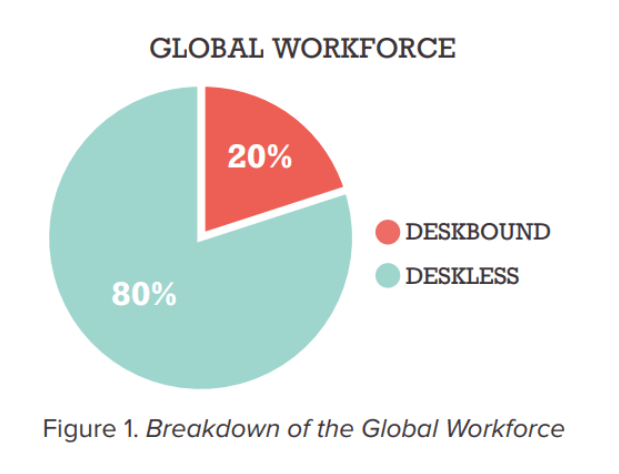
More than 80% of the global workforce is deskless. That's more than 2.7 billion people working outside of a traditional office setting, making it more important than ever to have effective communication tools in place.
This guide is designed to help business leaders keep their deskless employees connected and communicating, no matter where they are. We'll cover a variety of topics, from why communication is so important (and often challenging!) for deskless workers, to how to choose and evaluate digital communication tools to engage your deskless workforce with ease.
Why communication is important for deskless workers
With such a strong majority of the global workforce that is deskless, purposeful corporate communication solutions are crucial. This means ensuring all employees feel connected, in-the-loop and heard - even as a deskless team. As such, there are a number of reasons effective employee communication is important for frontline workers and their wider teams.
1. Reduces turnover
With the Great Resignation still in full swing, all business leaders need to be focusing on employee retention. This becomes even more prominent for the deskless workforce, with52% of frontline workers claiming they would leave their job over tech tools in 2022.
Additionally, according to a survey of 8,000+ global frontline workers and C-suite executives, 45% of frontline workers were planning on leaving the frontline altogether this year.
With most corporate communications tools not designed for them and frontline engagement projects lacking in substance, deskless workers are showing high turnover rates and low job satisfaction, creating an unstable workforce for your business.
Effective communication can improve job satisfaction by creating a sense of community and increasing transparency from leadership. This also helps to reduce misunderstandings and conflicts among employees, leading to better employee retention rates.
2. Increases profits
Better communication means better engagement. Indeed tells us that improved communication works to connect and keep open lines of communication between employees and other members of the organization, which ultimately works to create better engagement between employees. But did you know that this can have a further positive impact on your company profitability?
Engaged employees, who feel heard, valued and involved in communications, are more productive, and this increased productivity can often result in a more profitable business.
As we highlighted in our recentEmployee Engagement Statistics Guide, highly engaged organizations achieve a 23% difference in profitability, alongside a 43% difference in turnover. By driving home your employee engagement with impactful, intuitive communication, you’re investing in the success of your deskless workforce, and the long-term success and overall profitability of your business.
3. Drives employee experience & empowerment
Deskless workers often have limited access to traditional channels of communication, such as email or company intranet. Providing alternative means of communication, such as mobile apps designed for the frontline, can help improve the employee experience by giving them a voice and empowering them in their work environment.
This also allows for agile, on-the-go, two-way communication that deskless employees need in their fast-paced work environments, which is where communications for deskless workers often fall short.
Better employee experience can also boost your bottom line. HBR research shows that a shift in employee experience would result in a 45% increase in profits per person-hour, adding significantly to both individual, team and overall company success.
4. Increases productivity & organization
Effective organizational communication can increase productivity by reducing miscommunications and streamlining processes. It also allows for better frontline organization, as employees have access to important information and updates in real time.
This helps deskless workers stay on top of their tasks and responsibilities, leading to more productive employees and a more organized frontline.
Without efficient two-way communication solutions, it can be difficult for business leaders to understand, or even acknowledge, the issues their frontline workers are facing. For example, did you know that70% of frontline workers have either suffered from burnout or felt at risk of burning out?
With great team communication, your leaders can hear and respond directly to workers needs, implementing them into their organizational practices.
Whether that means giving employees an intuitive two-way communication solution such as a mobile employee app, an accessible scheduling tool to prevent miscommunications or an easier way to organize shift swaps, effective communication can improve the productivity and organization of your workforce.
5. Boosts trust, engagement & morale
A lack of communication can lead to a disengaged and distrusting workforce, as employees feel isolated and disconnected from the larger company culture.
Research shows that nearly all (99%) of C-suite executives believe their frontline workers trust them, while only a quarter (26%) of workers entirely trust their organization to communicate company updates and news transparently.
Clearly, as part of the C-Suite it's important to understand how purposeful internal communications help to build a sense of community among deskless workers. By increasing transparency from leadership, you can drive employee engagement long-term. In turn, this can improve overall job satisfaction, minimize churn and build trust with your workers.
6. Improves worker safety
Proper communication can also improve safety in the workplace. Problems with communication leading to major accidents/incidents are well known, according to HSE.
Proper frontline communication includes informing deskless employees of important safety updates, as well as providing a platform for reporting concerns or hazards. In turn, this can lead to a better quality of work and decrease the likelihood of accidents or injuries on the job.
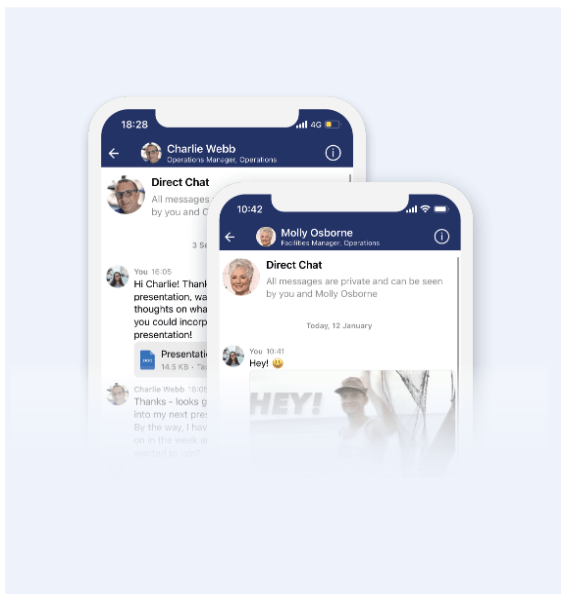
The Blink frontline engagement app offers a central Hub for storing core company policies, procedures and training documents, ensuring all teams have access to important information and updates in real time. It also includes Secure Chats, giving frontline employees the ability to report concerns or hazards directly to management for swift resolution.
The challenges of communicating with deskless workers
While the benefits are great, it can be a huge challenge to communicate with deskless workers in the modern work environment. Some key challenges of communicating with deskless workers include:
Budget: When you're under-budgeted and under pressure, finding the right communication channels and tools for your deskless workers can be a complex and costly process for business leaders that don't know where to invest.
Old software or no access to tech: Deskless workers may not have access to the same technology or software that office-based employees do, leading to communication disconnects, especially when using tech not designed for them.
Implementing new software: Introducing new communication software can also be a challenge, requiring dedicated training and support to ensure adoption and success for your deskless teams.
Easy access to the right information: Deskless workers often require easy access to essential information, such as company updates, product knowledge or HR policies. Without proper communication channels in place, there can be a breakdown in sharing important information with these teams.
Disconnected, disengaged & distributed: With teams spread across various locations, it can be difficult for deskless workers to feel connected and engaged with the company and their coworkers. Effective communication helps bridge this disconnect.
No sense of community or belonging: Deskless workers may not have the same office community or team spirit as traditional office-based employees, making it crucial for businesses to find ways to build a sense of belonging and connection within their remote or distributed teams.
So – how can leaders overcome these challenges and drive stronger communication between their employees? Let’s take a look.
How to improve communication with deskless workers
Build a digital culture
The pressure’s on for leaders in the frontline sector to digitize their communication efforts with deskless employees. As such, many companies are now developing digitalization strategies that enhance employee experience and drive performance.
One key to business success in a post-Covid world is to embrace a digital culture.
For digital culture to be successful, it must be driven from the ground up.
Clearly, it's important for business leaders to embrace a digital culture, with communication tools and processes that accommodate deskless workers. This means investing in the right technology solutions, as well as training and support for adoption of more complex tools.
For leaders of a deskless organization, digital communication can reduce the complexity of managing a dispersed team, as well as improve transparency and accessibility for employees in remote locations, making everyone's lives easier.
Digital transformation and digital adoption are now key concepts for the deskless workforce, and a focus on digital culture can ensure deskless workers feel connected and included in company processes. With your workers able to access important information and comms from the palm of their hand, you'll have no shortage of engaged, on-the-ball and informed employees.
And remember, this digital transformation must be built from the ground up, with impactful input from deskless workers themselves on their communication needs and challenges.
Listen to and act on feedback
As important as it is to have the right communication tools in place, it's also essential for business leaders to implement processes that gather and listen to feedback from their deskless teams. Ask for input on what channels and tools they prefer, as well as how communication processes can be improved, and implement it in your communication strategy.
Direct communication with features such as surveys, polls or secure chats can make it easier for deskless workers to provide their input. And listening to and implementing this feedback can lead to more successful communication strategies with your deskless teams.
When workers know that their feedback is being listened to, and acted upon, they will be more receptive to future engagement strategies and communications.
With the right processes in place, deskless workers can feel just as heard, connected, included as their office-based colleagues, leading to a more natural, intuitive communication flow within the entire organization.
Provide easy access to key information
By providing an easy-to-access, intuitively designed central Hub for information and communication, deskless workers have easy access to the essential information they need for their roles. This includes company updates, product knowledge, HR policies and more - all in one place, accessible on any device.
A central Hub can also promote a sense of community by allowing deskless workers to connect with their colleagues and share ideas or important information.
This not only saves valuable time for you and your employees, but can also boost your productivity and improve communication initiatives in the long run.
Focus on building a sense of belonging and connection
Though they may not have the same office community as traditional office-based employees, there are still ways to build a sense of belonging and connection for deskless workers.
This includes regularly scheduled check-ins with managers or team members, virtual (and meaningful) team building activities, and offering opportunities for professional development.
These efforts can help deskless workers feel included, valued, and connected with their colleagues and the company as a whole, which can improve employee engagement in a way that feels natural and earned.
Keep two-way communication channels open
As we touched on, it’s important for deskless workers to not only receive information, but also have the opportunity to share their ideas and feedback.
Communication should not be a one way street from the top down. Employees should be engaging in two-way conversations with both each other and management in order to keep communication open and transparent.
This can be done through regular check-ins or meetings, as well as utilizing communication tools that allow for a two-way flow of information - such as Secure Chats or collaboration platforms.
Encourage real employee recognition
Recognition and appreciation are important for all employees, but can be even more impactful for deskless workers who may not have the same opportunities for team praise or company events.
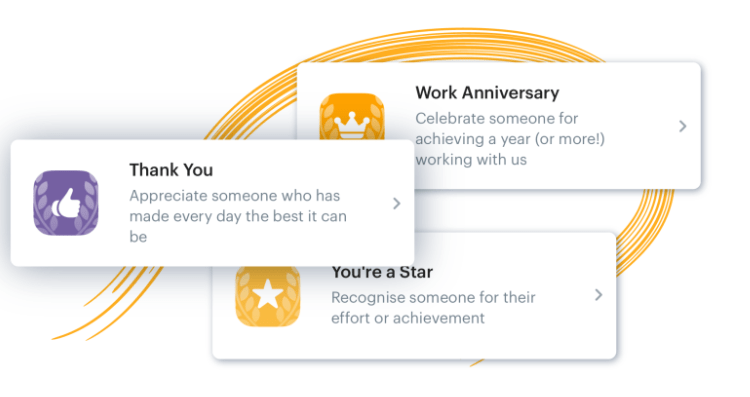
Implementing a recognition program, with features such as virtual badges or “shout-outs”, can help deskless workers feel seen and valued. And don’t underestimate the power of a personalized thank you note or Feed shoutout from leadership - deskless employees can feel just as appreciated through these small gestures.
The role of technology in deskless communication & employee engagement
The right employee technology is vital for your team communication. And as the deskless workforce continues to grow, so does the need for communication technology and tools specifically designed for them.
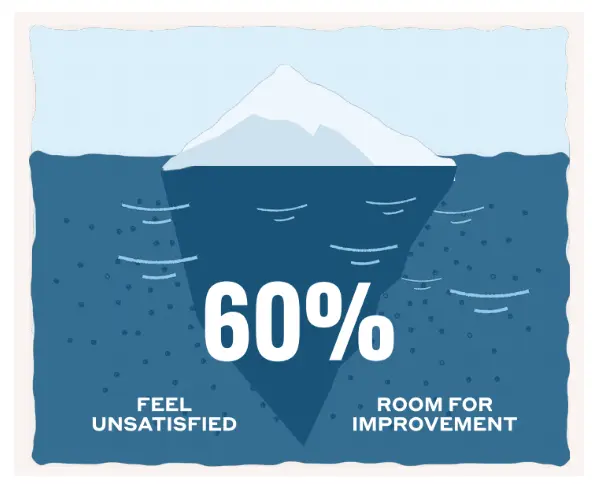
Reports show that 75% of deskless workers spend most of their work time using some form of technology, yet 60% reported being unsatisfied with the tech they use.
This is where better employee communication and engagement apps come in. By investing in technology that truly supports and engages your deskless team, you’re able to better connect with them, reaping all of the benefits of great communication we explored above.
But what is the exact role of technology in team comms and employee engagement? Here are a few key roles great technology solutions can play:
Easy communication & real-time responses
The right tech should connect your deskless employees with ease, ensuring they have the same access to communication as their desk-based colleagues. With mobile and desktop apps, they can easily communicate no matter where they are or what device they’re using, making one key role of employee tech easy and intuitive communication.
Successful communication also relies on timely responses, and the right employee communication app should support this with real-time messaging and notifications. This helps to keep your deskless team in-the-loop, ensuring they have access to important information as it happens.
Easy access to important information
Employee engagement technology reduces complexity and overhead for your teams by simplifying password management with single sign on to your tools. By centralizing important information, documents and updates on one platform, employees can easily access what they need without having to navigate multiple systems or chase down colleagues, resulting in a better overall employee experience.
Easy implementation & adoption
A key role of the right technology in team communication and engagement is simple implementation and adoption. Look for a solution that’s easy to set up and navigate, with support available when you need it. This helps make the transition smoother, leading to faster adoption and better results from your tech investment.
It can also be useful to choose a technology that feels familiar to employees in order to drive adoption of your chosen tool. By providing a user-friendly, familiar experience, such as a mobile app, deskless workers are more likely to engage and adopt the technology in their day-to-day work.
One core role of employee communication tech is to help your business leaders focus on driving real change and value, rather than being bogged down by day-to-day IT management. Look for a solution that is scalable and customizable, allowing you to easily adapt your communication strategy as your business grows and changes.
By developing business value away from business-as-usual (BAU) IT and into an employee communication and engagement platform fit for your frontline, you’re investing in your deskless workforce, and ultimately, your organization.
How to measure the impact of communication technology on your workforce
C-suite leaders are starting to catch on to the potential benefits employee communications technologies, tools and apps can have on their workforce. In fact, leadership trends show increased HR support of supervisors and managers with innovative processes and technology. But how can those leaders measure the success of these digital initiatives?
As part of the C-Suite, the CIO will want to see ROI on any investment made in employee communication technology. In fact, data from CIO found that 81 percent of IT leaders agree that CIOs are under extreme pressure to defend their technology investments and prove ROI.
This can be done through surveys, pulse check-ins, or feedback from leaders and managers on team performance. Additionally, you should consider investing in a technology that provides real-time employee engagement analytics, like ourFrontline Intelligence feature, to get live insights into how your deskless teams are utilizing the tool.
This key data can help inform and improve your internal communication strategy, ultimately leading to better, and more tangible, ROI.
It’s also important to consider other measures of success, such as improved team profitability, communication and collaboration, boosted employee engagement and satisfaction rates, increased productivity, and higher retention rates for deskless employees. These all contribute to the overall impact of employee communication technology on your workforce.
Final thoughts
At Blink, ouremployee communication and engagement software offers a mobile-first, intuitive solution for your deskless workforce. We support real-time communication, easy access to important information, and simple implementation and adoption – all key roles of technology in team communication and employee engagement.
Our employee app is made for the frontline, to support the needs of your deskless team and drive business value in the process.
Interested in learning more? Request a demo today to see how Blink can drive value for your deskless organization.
The Shift went live on Thursday April 20th, hosting an 'Ask Me Anything' session on the topic of frontline stress and wellbeing. Ahead of the event, we asked our audience to send in their questions about burnout on the frontline. The response we got was phenomenal.
Here, we list — and answer — the questions that weren't covered in the live discussion (now available to watch on-demand). These questions are all in search of practical insights: how to help employees who are struggling with burnout, what strategies other managers have had success with, why managers sometimes don't feel confident handling burnout conversations and how to build that muscle.
A big thank you to our 'Ask Me Anything' panel who helped put these answers together:
Chris Stewart, Managing Director of Minding Minds, a Mental Health First Aid training company
Ian Gordon, former President of Administrative Operations at Elara Caring
Burnout can show itself in several ways and, because we're dealing with people, everyone is individual in their responses. That said, the 'warning signs' are usually:
Exhaustion/tiredness — You see this when employees still look tired on a Monday morning; the weekends don't feel long enough and just aren't touching the sides in relieving the fatigue. When tiredness becomes extreme, people will not only feel physically drained, but they'll also lose interest in the tasks they used to find enjoyable. This is also a warning sign for depression.
Difficulty concentrating — Coupled with the above, employees may experience a 'butterfly mind', flitting from one thought to another. They may chase issues or tasks, but never stay on them long enough to make progress.
Preoccupation with work and being overly driven — It might sound counterintuitive, but some people approaching burnout will throw themselves into their work and lose themselves within it...
Presenteeism/drop in productivity — ...And yet, being 'at work' doesn't mean you're getting work done. It takes a person longer to complete their tasks when they start to burn out. 10 hours of work may only reap 2 hours of results; they're working more hours, with less output, and lower quality. Of course, the opposite can be a warning sign too. Some people will do less, attend work less, or leave work early due to a lack of interest or bandwidth.
Loss of motivation or outlook — This can be a very corrosive warning sign, and we should always be looking for changes to someone's regular demeanor. Are they displaying more negativity than usual? Are they becoming more cynical? It's unlikely that the individual will notice this change in outlook as they are already in that belief system. It's a manager's role to notice this change. It's an important 'tell' that something is seriously wrong.
Physical signs — Stress shows itself physically as well. Difficulty sleeping, gastrointestinal issues, aches and pains, low immunity and so higher levels of sickness; if someone is falling ill more often than they used to, burnout may be the root cause.
Q: How can we have an immediate impact on someone who is struggling with mental health?
As mentioned above, everyone's symptoms will be different — and their needs will be too. One thing we can all do is develop the skills to spot the warning signs, approach the person for a conversation, uncover the issues, and respond to their individual needs. There has to be a conversation. That's the most immediate action we can take to help.
Q: Is there a point of no return with frontline burnout or can it be reversed with early identification?
We can think of burnout like an elastic band. You can really stretch it, and though it's under stress, it's still holding. Hold it at a stress point for too long, though, and you'll alter the shape and elasticity of the band forever, even when it's released.
And what happens to an elastic band when we pull it too tight without relieving it? It breaks. You can tie the band back up and it will still serve its function, but it will never regain its original capacity for stretch or stress.
People's capacity for stress never seems to return to their pre-burnout point. Their stress container has shrunk with the experience. But there's a positive within this: when people do return to work post-burnout, they have little choice but to take stress management seriously. People may focus in different ways and manage stress much more effectively.
So, the answer is yes, burnout can be reversed. But given that the warning signs include a preoccupation with work and a drop in productivity or change in emotional outlook, it's up to the organization to have systems and support in place to pick up on these signs and stop them from developing. The individual may not even know they are going through these early or mid stages of burnout.
We have tachographs for lorry drivers and pilots because we know the risks associated with a lack of relief or downtime. The same applies to our people. The company tachograph must look at more than just hours logged, though. Clear and communicated support, with honest feedback sought, and ongoing risk assessment are all essential.
Q: What is the top question you're getting from managers who are on-site and helping lead the frontline?
The biggest question frontline leaders usually have is: "Even if I think there's an issue, how do I broach talking about mental health? I'm not qualified to deal with this. I have enough to deal with already. I am under-supported and under-skilled".
Q: How can you fight and mitigate stress in a mostly remote or deskless work environment? As someone in the corporate office and not close to the frontline, what can I do to help?
Start with communication. This is one of the most powerful ways of fighting and mitigating stress: you have to understand how your frontline is doing and they have to know that you care.
Next, there's advocacy. As a leader, you're either in or close to the seat of power, and you can get buy-in at the top for frontline wellbeing support.
Third, you need to make life easier for the frontline where you can. Reduce the stress that comes from unnecessary cognitive load. Help make them more efficient at work with proper tooling that makes a meaningful difference to their day-to-day.
Q: What can an individual do to support their own mental health?
Check for the warning signs in yourself, where possible, and start to learn what the beginning of stress feels like for you. It's important to take responsibility for your own stress and wellbeing, and to communicate with others when you're feeling the symptoms.
Wellbeing solutions and strategies for frontline teams
Q: Do you have any unique or innovative ways of improving engagement with key wellbeing initiatives? How do you increase morale?
One great example comes from Salutem, a leading care provider in the UK. Like many businesses, Salutem's staff were left feeling stressed and with low morale following the pandemic. The organization was disconnected and disengaged, and Salutem's leaders wanted a new, inspiring way to give employees a voice.
Salutem launched S.E.L.F (the Salutem Employee Listening Forum), with managers using Blink to nominate S.E.L.F Reps using the Feed. These Reps were responsible for moderating Blink Channels for their regions and following up with their teams. Co-workers were encouraged to share their thoughts and have candid conversations regarding their concerns and ideas for improvement.
Given how essential conversation and communication is for promoting wellbeing and mitigating burnout, creating these connections can deliver a lot of impact, fast.
Social and peer proof can also be powerful. There will always be workers who appreciate the importance of taking care of themselves more readily than others. Enlist these people to advocate for your wellbeing initiatives — as fellow frontline workers, they might just be more influential than management.
Q: What are your tips for making stress management accessible and relevant for frontline workers to use in real time? What delivers immediately?
The first truth we need to remember is that what works for desk-based employees typically won't work for the frontline. A frontline worker's 'real time' situations look vastly different compared to someone sitting in head office; they are out in the 'field', on the go, with little access to desktop files. This means that any stress management support we provide has to be easy to access from anywhere, at any time.
Not only that, it has to be easy to access from a usability standpoint too. Adding another platform or tool to the frontline's already unintuitive tool stack will do more harm than good. Don't labor them with another set of log-in details to remember in order to access wellbeing resources.
This is where an 'all through one' employee app like Blink has value.
Q: In healthcare specifically, how do you get people to take care of themselves when they've cared for others all day?
This is the classic 'Caregiver's Dilemma'. Caregivers are amazing people and, by choice, they place their health and wellbeing second to that of the people they care for. And, to be clear, that's not just how they are at work — it's how they are in every aspect of their lives.
We can encourage better self-care in caregivers by helping them realize that poor self-care will only render them unable to care for others. More than that, they may become the one thing they all fear: a burden on the people around them.
You can also run on-site check-up days for caregivers, where other healthcare professionals come in to perform mental health assessments — like a physical health check, but for stress and wellbeing. Doing so not only makes stress awareness more convenient for the caregiver, but you create a dedicated time slot in their otherwise fully-booked days.
Q: How can managers become more confident and comfortable in leading wellbeing conversations with their frontline workforce?
This question was answered during the live event. But given that managers often feel under-qualified, under-skilled, and under-supported when it comes to approaching these topics, it's worth recapping the answer again.
Confidence and comfort come from two-way conversations around stress and wellbeing. Ian referred to this as 'inverting the hierarchy' — managers making themselves vulnerable to open dialogue up, being present, and acting as a 'servant leader'. Chris explained that managers don't have to stand back and pretend they are all well; empathizing with an employee's experience makes everyone feel more at ease.
These conversations are a core part of your job, says Ian. Once you start breaking down those barriers you remove the fear factor for everyone. You're just another person; someone they trust to have their back and whose job it is to support them. Once you've shown that you value your employees, they will feel much more able to open up to you with personal and professional truths, and you will feel more able to start these conversations too.
This wellbeing resource is available whenever you need it
You can watch The Shift LIVE: 'Ask Me Anything' on frontline stress and wellbeing here at any time.
And make sure you're subscribed to The Shift — Blink's fortnightly newsletter for frontline leaders. That way you'll be the first to know about our next 'Ask Me Anything' event, coming soon.
Unfortunately for C-suite execs at frontline organizations, unless decisive action is taken quickly, things will only get worse.
While the problem of frontline turnover has many contributing factors, from salary competition to changing workforce demographics, one important part of the solution remains constant: employee engagement.
And here lies the problem: most of the time, it doesn’t work.
“If you build it...they won’t actually come”
Frontline businesses have invested in engagement solutions and projects before, but regardless of the type of organization, these are generally met with tepid responses.
The list of fallen soldiers here is considerable: town halls, employee surveys, intranets, ERGs. And often, the response sounds something like this:
“Great, another thing to remember”
“It’s not a natural part of my day”
“It’s a one-off thing”
“It’s too hard to use”
Hours of time from leadership, People teams, Internal Comms functions and supervisors go into projects that rarely succeed in their mission. This is like the birthday party where the decorations are up, the cake is ready and the music’s on – but nobody’s showed up.
The result? Frontline workers aren’t sustainably engaged, the cycle of attrition continues and there’s little meaningful data in order to understand exactly what to do to fix it.
The solution: chips and dips
Turning this around warrants changing the way we think about employee engagement. For most businesses, employee engagement is a thing that we ‘do’ - it’s a project, an initiative, even a tool or an app. But this is where we’re going wrong.
The solution lies in approaching frontline engagement as something that we ‘earn’ - it’s an outcome, not an output.
To illustrate this, let’s return to our party. Anyone who’s ever been to a house party will be able to tell you exactly where most people end up: the kitchen. And why are they in the kitchen? Because that’s where the drinks, the mixers, the snacks and the ice is. There’s useful stuff there, and so they gravitate there, and the good times start rolling.
So to return to frontline engagement: put out the ‘chips and dips’. In other words, focus on providing frontline workers with services and tools that not only fit into their busy days, but make them better – and use that space to invite engagement.
How it works: chips, dips and paystubs
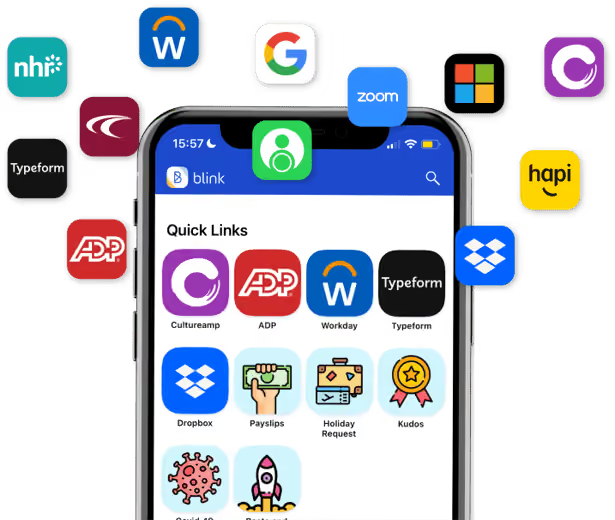
Blink is a new type of frontline engagement app that the average worker opens ten times per day! Blink brings the processes that frontline workers and their managers need all into one place – from payslips to scheduling and critical documents, all with one login. This is our ‘chips and dip’.
For leaders and managers looking for engagement, this is the time to swoop. The whole of the frontline’s eyeballs are on the app, which means that surveys get seen, important messages from the CEO and HQ are read, and the work being done to improve the working day gets cut-through.
If a once-yearly employee engagement survey is the equivalent of putting out samples at Costco in the hope that a nameless stranger will take a drive-by snack, this is the equivalent of the work cafeteria – the place where the whole companies gathers, day after day.
How to be a good frontline host: Elara Caring’s story
Elara Caring – one of the largest US-based providers of personal care, home health and hospice care – had a frontline engagement problem when we first met them last year. With a 62% turnover rate of their more than 32,000 personal care attendants (PCAs), the leadership team needed sustainable engagement badly.
In adopting Blink, Elara looked to empower its PCAs and make their lives easier – and get engagement and loyalty in return.
They used Blink to remove the burden of paper-based admin: Elara’s PCAs had to constantly fill out expenses and other forms on paper. Blink’s solution was to integrate these manual processes and systems into a single app. Payslips, expenses and mileage reporting, key information from Sharepoint, schedules and rotas were all suddenly available to Elara’s PCAs at their fingertips.
The benefits for Elara’s PCAs? Time savings, with more attention devoted to their “real jobs” than ever before.
The benefits for Elara Caring? Sustainable engagement, with 95% of employees saying that they now feel more connected to the company. PCAs have begun to use Blink to create a community – and sub-communities – within the organization, creating the connection and cohesion that makes them stay.
https://www.youtube.com/watch?v=dINw_Y7CjWQ
In conclusion: good parties don’t skimp on the guac
In a war for a diminishing talent pool, the need to directly address frontline engagement has never been more acute. But it’s also shown where there are failings in trying to get engagement from the activities and programs that work for desk-based, white-collar workers. The key to success for the frontline is to not only fit into frontline life, but to make frontline life better and easier – and use that digital space you’ve created to finally connect your people.
Out of all the terms we’ve added to our lexicon over the course of 2020, ‘frontline workers’ is our favorite.
At Blink, we build software that improves the experience of thousands of frontline workers all over the world. We know how hard they work. The hours they put in. The pride they take in keeping their communities healthy, fed and well looked-after.
There’s a lot about this year we’d all like to move on from. The word 'unprecedented' being one of them. But there’s one thing that we need to take forward, and that's our appreciation of brave frontline teams.
We're forever indebted to you. Thank you for looking after us during the most unprecedented (sorry) of times.
We can’t possibly mention you all, and we’re sorry. But we hope you know how much we appreciate everything you do for us.
Long live society’s newfound appreciation; long may it continue!
The frontline workers we need to thank
NHS medical teams
This Christmas, many will be raising glasses to the medical staff who threw themselves behind global efforts to contain the pandemic and minimize its impact.
We’ll certainly be joining them.
So, here’s to the doctors, nurses, paramedics, healthcare assistants, physios, occupational therapists and pharmacists.
Whether directly or indirectly involved in treating Coronavirus patients, the world owes you one.
While we extend our gratitude to healthcare workers globally, we can’t help but be extremely grateful for our native NHS. Providing stellar, free-at-the-point-of-access care during a global pandemic isn’t easy - but somehow you’ve managed, and managed spectacularly.
It’s stories like that of Dr Sarbjit Clare, Sandwell and West Birmingham Hospital NHS Trust's deputy medical director, that demonstrate what a gargantuan effort healthcare workers put in.
Central to operational and clinical decision-making surrounding COVID-19 treatment, Dr Clare cared for over 700 patients. Oh, and she single-handedly kept her department open when all her colleagues were sick or self-isolating.
If treating and caring for patients wasn’t enough, some healthcare workers took on even more responsibility in their spare time. Ashleigh Linsdell founded and coordinated a national effort to make scrubs during the UK shortage.
Alison Williams raised funds for COVID-19 patient essentials, including iPads to help them contact their families during isolation.
NHS support teams
We need to thank the often-overlooked support teams that keep wheels turning behind the scenes.
Without them, it would be practically impossible for healthcare workers to do what they do. They’re the backbone keeping the NHS - and healthcare organisations the world over - together and functional.
Caterers for keeping staff and patients fed.
Laundry and housekeeping staff for keeping hospitals clean, whilst navigating intense and often-changing safety regulations.
Hospital porters, for providing an ever friendly, welcoming service. Veteran porter Terry Allen worked tirelessly for patients, transferring them between departments, facilitating their treatment and helping them feel comfortable.
The NHS’s medical teams provide first-class care, but they couldn’t do it without Terry and thousands of others like him.
Care home workers
Residential care home staff - working with elderly people or those with disabilities - look after those most vulnerable to COVID-19.
It’s a tough, underappreciated (and often underpaid) job. So, it's all the more remarkable that care workers have gone above and beyond for their patients and their families.
Care staff have made it an absolute priority to keep their residents safe. Sometimes, they have done so at great personal sacrifice to them and their own families.
Countless others moved away temporarily, when the support of loved ones has never been more important.
We haven’t even mentioned all the work they put in keeping spirits up amongst those who couldn’t go outside.
From fiddling about with FaceTime to organizing activities, care home residents would have struggled without them.
Supermarket workers
A huge shoutout to supermarket and food supply chain workers for putting food on our tables.
Whether you’ve been working on the supermarket floor or manning the warehouse, we wouldn't have survived the pandemic without you. We mean that literally –– access to food is generally important for long-term survival, after all.
Here are a few of the ways food supermarket and food supply chain workers made a difference:
Eased shortages by introducing limits on certain items (toilet roll, anyone?) and enforcing them effectively at checkouts
Remapped warehouses and supermarkets and implemented queueing systems so they could operate with social distancing
Kept up with frequently changing regulations with regard to masks and PPE
Stepped up to a massive increase in demand for online orders/home delivery
Julie Cook, who works at Asda in Aberdare, South Wales, spent her time off shopping for care homes to ensure they received key supplies.
It’s thanks to supermarket workers like Julie that we’ve all been able to eat and shop safely this year. So, wherever you shop, make sure to thank their in-store team for their efforts when you pop in next.
Teachers
As schools shut and lessons launched online, anyone with a child found themselves more appreciative of how hard teachers work.
If you thought homeschooling your school-aged child was hard, imagine trying to teach a class of 30. Then imagine trying to teach a class of 30 online, with the myriad distractions and potential for disruption that offers.
Teachers have kept classrooms open for children of key workers. Dealt with whole year groups being sent home for isolation. And increased their risk of exposure to the virus to minimise disruption to education.
Headteacher Jane Davenport and the staff at Reynalds Cross School kept classrooms open for children of key workers. They also made sure the school’s most vulnerable children - with complex educational, healthcare and behavioural needs - could attend classes safely. Jane put so much work that she was recognised with an OBE for services to young people with special educational needs and disabilities.
They’ve certainly earned those Christmas chocolate boxes, bottles of wine and ‘best teacher ever’ mugs. If you can’t offer these, a nice note thanking them will be equally as treasured!
Logistics personnel
In a pandemic, it’s vital to keep key supply lines open. That’s exactly what lorry drivers do, alongside the logistics teams that support them.
The logistics sector made sure food, essential medicines, PPE and medical equipment were delivered to organizations in need, whilst working under significant pressure and increased demand.
To all the frontline workers across the logistics and supply chain sector, whether working for an in-house operation or a third-party logistics specialist –– thank you.
You can’t eat food that doesn’t arrive on supermarket shelves before expiring. Pharmacists can’t fill prescriptions if they don’t have the right medication on hand. Doctors and nurses can’t protect themselves with PPE if it doesn’t arrive on time.
Logistics teams make this all happen.
Public transport workers
Car ownership is by no means a given amongst many groups of frontline workers. Without the efforts of public transport personnel worldwide, lots of urgently-needed staff would have been stranded.
Drivers, ticket sellers, platform guards and many others in every transport system across the globe need to be thanked here.
We were in awe of how professionally our own transit clients’ workforces carried out their duties under lockdown regulations.
Drivers from Go Ahead, Metroline and Stagecoach provide essential services whilst operating in uncertain and unfamiliar circumstances. Not to mention dealing with significantly reduced capacity to ensure social distancing. Kudos to you.
Police, fire and social workers
While it’s great we recognize the contribution ambulance drivers and paramedics made, it’s easy to forget other essential services.
For police and fire crews, this involved keeping essential services running, whilst adding new responsibilities to their workloads.
For example, UK police have been tasked with enforcing both national and local lockdown laws. These have often changed quickly, and guidance for policing them has been somewhat vague at times.
Enforcing them whilst strengthening links to local communities has been a difficult, often thankless task. We’d like to thank them for their part in containing the spread of the virus.
Meanwhile social services workers have continued to do an emotionally demanding job in extremely difficult conditions.
The Queen’s Birthday Honours List reflected this, with both senior and on-the-ground practitioners recognised for the work they do.
Social workers Manvir Hothi (Hammersmith and Fulham), Danny Levine (North Yorkshire) and Louise Peart (Vale of Glamorgan) were all recognised for supporting service users throughout the pandemic - but that’s only the tip of the iceberg.
Thousands more helped vulnerable people and families navigate a particularly confusing time, provided community-based support and eased the loneliness of those self-isolating.
Postal workers and parcel couriers
There’s a lot to be said for delivering ‘everyday’ post as well.
Ask yourself: how much more difficult would those initial stages of lockdown have been without that new hobby you took up?
How much more lonely would elderly relatives or those living alone have felt without cards, letters and gifts delivered?
Postal workers kept it together in tough working conditions. In doing so, they kept countless others together by keeping them connected and keeping them occupied.
Lockdown would have been a lonelier, more boring place without them.
Honorable mentions
Containing and treating the Coronavirus pandemic has required a Herculean effort from so many key workers across different industries.
Not everyone involved in the COVID effort needed to work directly on the frontline. So much organization has gone on behind the scenes, from so many people – many of whom weren't involved as professionals.
We’d like to give an honourable mention to the groups below for stepping up!
Operations who repurposed their facilities
The most impressive thing about society’s collective response to the Coronavirus was how everyone came together.
Companies repurposing their manufacturing operations to provide essential items and supplies was just one example of this phenomenon.
It takes entrepreneurship, ingenuity and a lot of hard work to turn around a new, unfamiliar product at short notice. We think it’s important to recognise just how much effort this took, for both strategic decision-makers and on-the-ground workforces.
There are countless examples across the globe here. Close to home, we saw international craft beer brewery BrewDog produce batches of hand sanitizer to help meet skyrocketing demand.
Luxury fashion brand Barbour’s manufacturing workforce turn their sewing machines away from wax jackets to making seriously high-quality medical gowns.
Further north, design teachers from James Calvert Spence College and Duchess’s Community High School in Northumberland teamed up to make PPE.
James Calvert Spence science teacher Dan Davison, who previously worked in an NHS lab, helped develop a test protocol whilst still teaching online classes. Miss Scrimgeour, Mr Donnison and Ms Whitelock from the two schools’ DT departments laser cut visors for use across local hospitals and care homes.
This ‘all hands on deck’ attitude helped significantly in easing shortages - particularly at a local level.
Last but not least... let's hear it for the volunteers
Alongside frontline workers and key workers paid to do their jobs, an army of volunteers rose to the challenge.
They transformed old bedsheets into useful medical scrubs, started essential goods collections for struggling families, dedicated their time to befriending isolated people over the phone and so much more.
We can’t list everyone who helped out, so to finish off, we’ll share Cambridgeshire resident Geoff Norris’ story.
Already a frontline worker, Geoff worried elderly and vulnerable residents would struggle to get their groceries amidst food shortages. Noticing that all the delivery slots were booked up too, he set up a weekly food delivery service.
On the days he wasn’t working at Asda in Wisbech, he picked up orders, put them through the tills and delivered them at his expense, using his own vehicle. Soon, he had recruited colleagues to help, and was taking orders via phone and email.
We all know a Geoff - or several - who has selflessly given up their time to help others during the pandemic. In our eyes, they’re just as much key workers as anyone else.
So we’ll end by saying “thank you, volunteers, for donating time when you didn’t have to, and making a real difference to so many.”
Your contribution has been absolutely unprecedented (oh no!), and we appreciate it.
While 2020 was a rotten year for many, many reasons, the sense of togetherness fostered is inspiring and moving.
If you’re new to mobile workforce management, you’re not alone.
Before the pandemic, just 6% of the employed workforce worked from home. Now, 74% of US companies are either operating on a hybrid working model or plan to do so in the future. Businesses that previously did not need mobile workforce management strategies are now rapidly trying to figure out what works when your team is scattered across multiple locations.
If that’s you, don’t panic. With the right tools and approach, it’s possible to run an effective mobile workplace, without compromising on productivity. Here’s how.
What is mobile workforce management?
IBM defines a mobile workforce as “a group of employees that isn’t bound by a central physical location. Instead, the employees are connected by various types of mobile technology: computers, smartphones and other mobile devices.”
This includes – but isn’t limited to – remote desk-based teams who might have worked in a centralized office pre-pandemic. It could also include:
Community healthcare teams who visit outpatients during working hours
Drivers – whether for public transport, taxi or private logistics fleets
Traveling sales teams, who spend part of their time visiting clients, conferences and trade shows
Teams of engineers, tradespeople or contractors who attend different clients each day
Mobile workforce management is simply the process of managing these teams so that they’re as effective, efficient and engaged as possible. The three ‘e’s, if you like.
The differences between the mobile and the standard workforce
Traditionally, a ‘standard workforce’ is based on physical location. You might have an office HQ that your employees commute to each day or a manufacturing plant that needs to be manned 24/7, for example.
Thanks to the wave of remote and mobile working brought on by COVID-19, things aren’t as clean-cut as they once were. Mobile workforce management is now a major consideration for desk-based teams as well as more traditionally mobile workforces.
In terms of how you approach managing your teams, this means:
You’ll need to use mobile workforce management software to run your team effectively
You’ll need to be mindful of differences across time zones when scheduling calls or arranging deadlines
The principles of good management still hold. A transparent and fair approach to managing your team is still a great foundation to work from – you just might have to incorporate a couple of extra tools for maximum effect!
The benefits of mobile workforce management
The benefits of a strong management strategy remain the same across both mobile and traditional workforces:
Increased productivity: teams get more done in the same amount of time
Improved visibility: managers provide insights into how your business works day to day
Improved customer experience: good managerial support allows your employees to offer a great customer experience through building skills and retaining talent
Improved employee engagement: employees feel supported by management and engage more with the business as a result
Mobile workforce management specifically – when done right – offers two key benefits besides.
Firstly, you’re no longer bound by geographic location when hiring. This opens up a vastly wider talent pool that you can draw from – especially useful at a time when competition for new employees is at an all-time high.
Secondly, flexible working is a hugely attractive benefit to offer new and existing employees. Nearly all (97%) respondents in Buffer’s 2022 State of Remote Work survey said they wanted to work remotely at least part of the time for the rest of their career.
Trends and challenges shaping mobile workforce management
Some of your employees are onsite. Some of them are remote or on the move. How do you collaborate in such a seemingly fragmented team?
This has been one of the major issues about mobile workforce management in the post-COVID era. Whilst the majority of businesses want to implement some sort of hybrid working arrangement, 63% of employees say that their company has not made any major changes to make this easier.
If your working model has changed, your processes need to change too.
One trend that’s becoming increasingly popular is a remote-first approach to work. This means that you run your entire team as if fully remote, by having all meetings via video conferencing software, for example.
The result is that everyone feels included and can interact on the same level – you remove the awkward atmosphere created by having some people meeting in person with others phoning in via a conferencing system.
Manage your mobile workforce
Getting started on mobile workforce management? Here are some tips.
Use the right software
Mobile workforce management is 100% reliant on using technology to communicate and collaborate, so having the right tools can make all the difference! An employee app to help you get messages across is essential, and you should also invest in a strong project management tool (e.g. Trello, Asana, Basecamp) at a minimum.
There are many different types of mobile workforce management software that you can use to make managing your teams easier. We’ve included a guide at the end of this article to help you get started.
Check in…but don’t micromanage
Daily check-ins are a must when your team is on the move or scattered across different locations. It’s all too easy for these to slip into micromanagement if you frame them wrong.
By all means ask for updates, but avoid listing ‘must-do’ tasks or demanding constant micro-updates on progress. Instead, ask if there’s anything you could be doing to support your employee, or if there’s anything they need assistance with. Check-ins are as much about offering support as they are about task updates.
Constant communication, not necessarily on topic
How much of your traditional office chat was work based? Inane office chatter – pets, the kids, weather, vacation plans – actually serves a valuable purpose in team bonding and making social connections across the company.
Use channels on your messaging app to provide a virtual space for this. You’ll find your team works better together as a result. Your remote and mobile workers start to feel more like a part of the wider organization, and engage more as a result.
Mobile workforce management software
Employee apps and mobile intranet (e.g. Blink)
Mobile-first employee experience apps are vital for day-to-day communication between team members as well as employee recognition, networking and engagement. ‘Mobile first’ is a must here – if your employees don’t have 24/7 access to a desktop, you need to be able to spread key messages via smartphone.
Provide a single point of reference for tasks and deadlines with an online project management tool. Choose from a variety of project views to suit your team, with automated notifications and reminders when a deadline is approaching.
Remote collaboration tools (e.g. Google Docs, Miro, Microsoft Teams)
Unlock your team’s creativity with a range of collaboration tools. Video conferencing is an absolute must-have, as is some form of collaborative document tool – Google Docs is by far the most intuitive here. For visual projects, virtual whiteboard tools are a particularly handy tool for online collaboration.
Mobile scheduling tool (e.g. Deputy, RotaCloud, Blink)
If your teams work in shifts, rota management is a must. Mobile rota management and scheduling apps save you hours by automating this process, and your employees will get instant updates if the rota changes. Eliminate misunderstandings and never be accidentally short staffed again!
Performance management is as important in a mobile setting as it is in a traditional work environment. Give your managers the tools to give feedback, run appraisals, manage employee goals and more with an extensive performance management solution.
A few final thoughts on mobile workforce management
Mobile workforce management doesn’t have to be a huge departure from your existing management strategy. Open communication, respect and approachability will get you some of the way there on their own.
It does, however, mean that you need to support employees across more than one different location though. And this means that finding the tech that works for you is essential in keeping everything running smoothly.
Spend time thinking about your requirements here, and don’t rush into any purchases, no matter how urgent they may seem. Being locked into an unsuitable contract will cause a lot more damage in the long term than waiting to find the right software for you.